Schemity supports Snowflake for design, not as a live connection. You draw a Snowflake diagram or import the script GET_DDL returns, edit it with Snowflake’s own types, and export a full CREATE script to run in a worksheet. Schemity never signs in to a Snowflake account, so it needs no credentials and no warehouse, and nothing about your account leaves your machine.
Snowflake diagrams are a licensed feature of the desktop app, available during the trial. They are not offered in Schemity Lite or after a trial expires.
How do I create a Snowflake diagram?
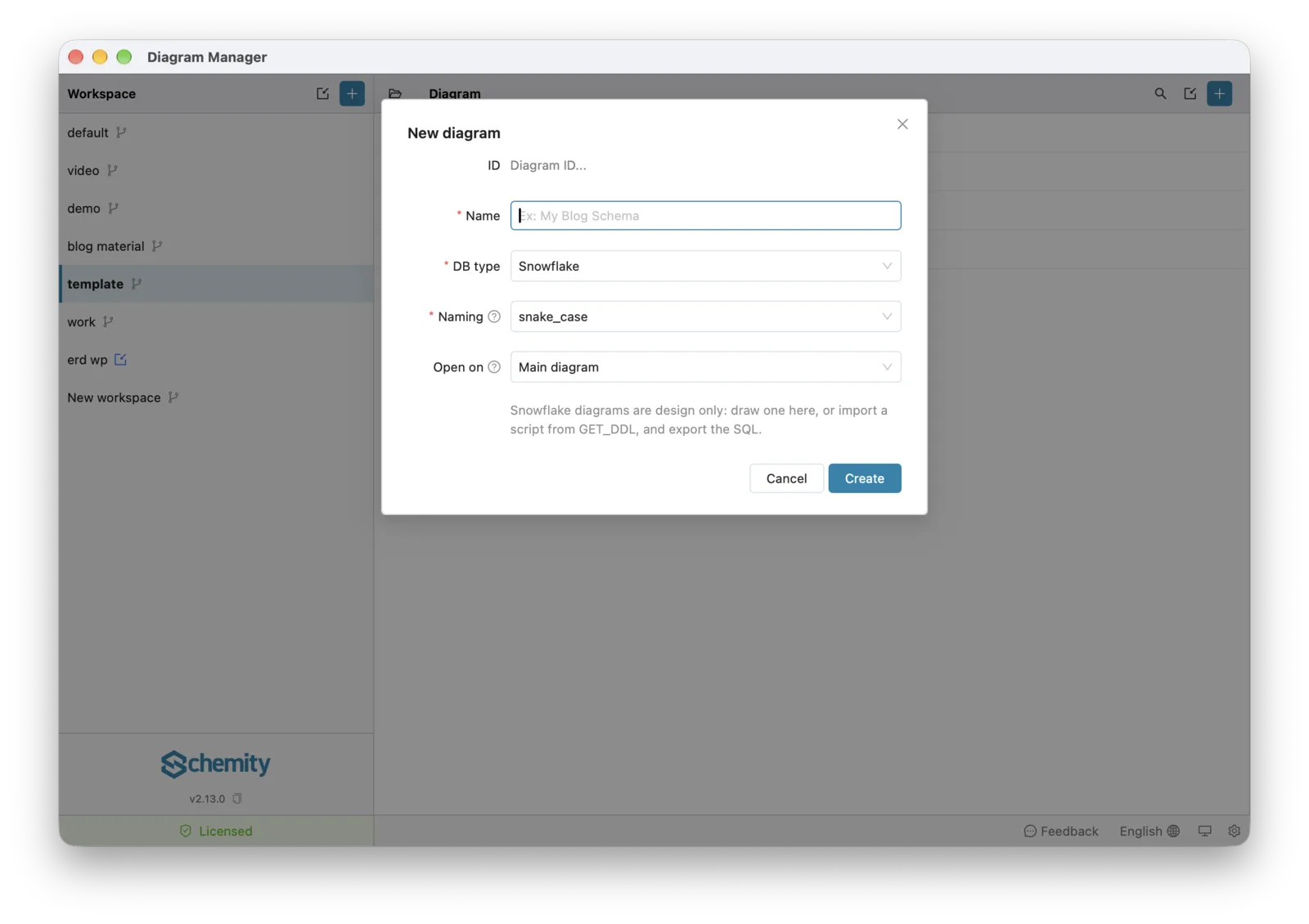
Click + above the diagram list, set DB type to Snowflake, give the diagram a name, and click Create. There is no Connect to a database button for Snowflake: the form says the diagram is design only, and that you can draw one or import a script from GET_DDL.
How do I import an existing Snowflake schema?
Run GET_DDL in a Snowflake worksheet and import its output:
- Run
SELECT GET_DDL('SCHEMA', 'MY_DB.MY_SCHEMA', TRUE);and copy the result. - In the Snowflake diagram, open Import SQL, paste the script or click Open file… for a saved
.sqlfile, and click Preview import. - Check the tables listed, then import.
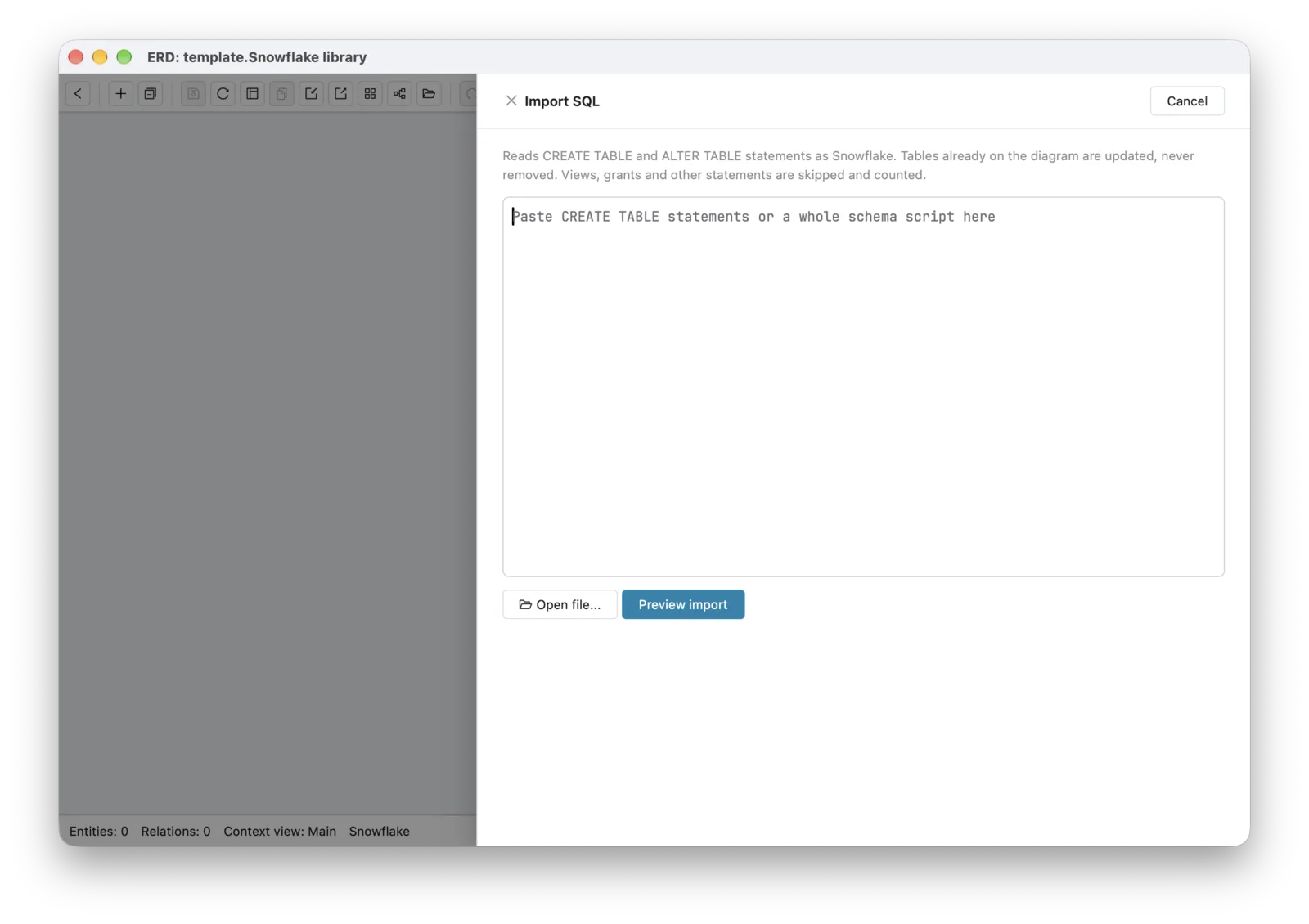
The script mixes tables with views, sequences, file formats, procedures, and tasks. Import SQL reads the tables and counts the rest as skipped. A dynamic table is not read as a table, and it is listed by name instead of disappearing without a word. Table and column COMMENTs become descriptions, and primary keys, unique constraints, foreign keys, and CHECK constraints come in with their tables.
A diagram holds one schema, so GET_DDL('DATABASE', ...) on a database with several schemas makes Import SQL ask which one to import. To keep a diagram current after the warehouse changes, run GET_DDL again and import the new script: tables are matched and listed as New, Updated, or Unchanged, and nothing the script leaves out is removed. See reverse engineering a database for how Import SQL matches tables.
How does Schemity read Snowflake’s types?
Snowflake keeps one name per type family and reports only that one, and the diagram does the same, so a design matches what GET_DDL prints and importing it again shows no false changes:
| You write | Snowflake stores, and the diagram shows |
|---|---|
INT, INTEGER, BIGINT, SMALLINT | NUMBER(38,0) |
DECIMAL(10,2), NUMERIC(10,2) | NUMBER(10,2) |
TEXT, STRING, VARCHAR(16777216) | VARCHAR |
CHAR(2) | VARCHAR(2) |
DOUBLE, REAL | FLOAT |
GET_DDL prints every text column at the maximum length, VARCHAR(16777216). That is Snowflake’s default, not a length anyone chose, so the diagram shows plain VARCHAR. Snowflake also stores a DEFAULT SYSDATE() expanded into a long CONVERT_TIMEZONE expression, and it reads back as SYSDATE().
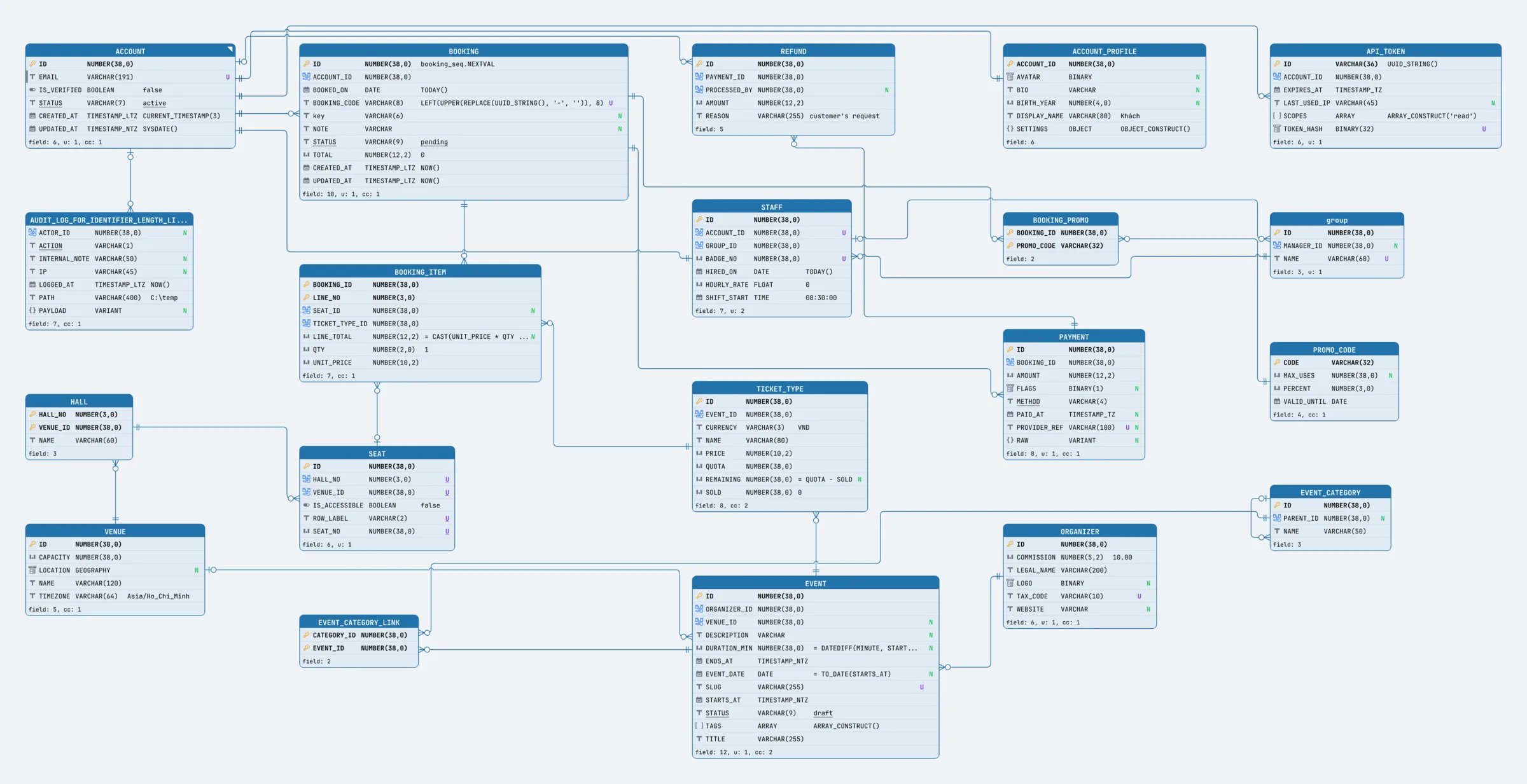
The field editor offers Snowflake’s types: NUMBER, FLOAT, VARCHAR, BOOLEAN, DATE, TIME, TIMESTAMP_NTZ, TIMESTAMP_LTZ, TIMESTAMP_TZ, VARIANT, OBJECT, ARRAY, BINARY, GEOGRAPHY, and GEOMETRY. Unquoted names are upper case, as Snowflake stores them, so orders in a script becomes ORDERS in the diagram. A quoted name keeps its case, like the group table in the diagram above.
What does the exported Snowflake SQL contain?
Choose Export > SQL file for the whole diagram, or Get SQL on a selection. The script creates every table with its columns, defaults, NOT NULL, primary keys, unique constraints, foreign keys, and CHECK constraints. It follows what Snowflake does with each of them:
- Keys are written but not enforced. Snowflake records primary, unique, and foreign keys on standard tables without enforcing them, as its constraints overview says. They are still worth declaring: they are how the diagram documents its relationships, and how BI and catalog tools reading the warehouse find them.
ON DELETEandON UPDATEare left out. Snowflake accepts the syntax but never runs the action, so aCASCADEin the script would promise something that never happens.NOT NULLandCHECKare enforced, and both are written.- No indexes. Standard Snowflake tables have none, so the editor hides indexes on a Snowflake diagram and the script writes none.
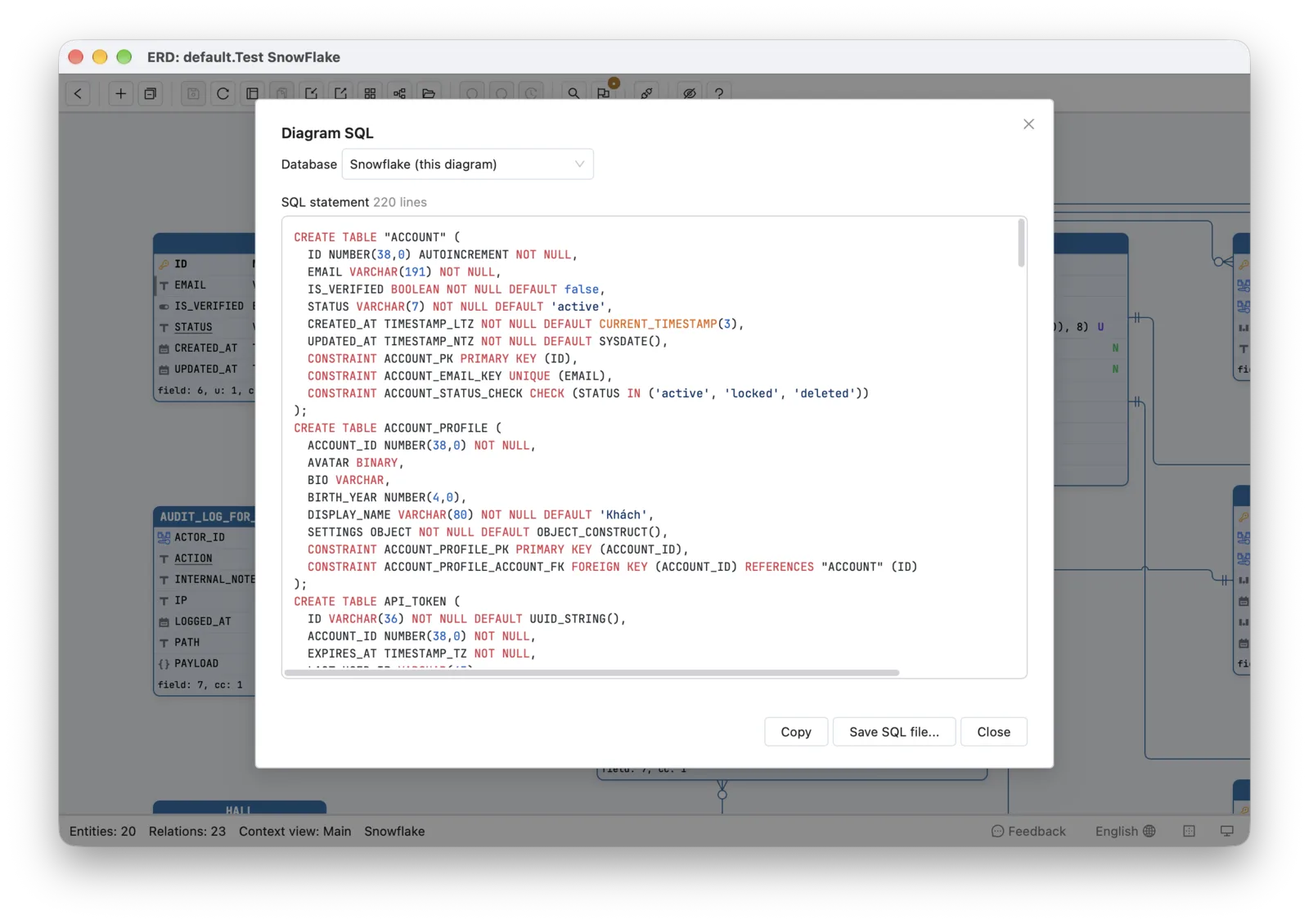
- Names are left bare when Snowflake reads them as written, so the tables are created in upper case and every later query finds them with or without quotes. A name with spaces or other characters, or a reserved word, is quoted: the
ACCOUNTtable is written as"ACCOUNT", sinceACCOUNTis reserved in Snowflake.
Mermaid, PlantUML, D2, OpenAPI, the data dictionary, and image exports work on a Snowflake diagram as on any other. See Export SQL & DDL.
Can I convert a Snowflake schema to PostgreSQL, or PostgreSQL to Snowflake?
Yes, both ways. In the SQL dialog, pick another database in Database and the script is rewritten for it, with a report of every type it changed. From Snowflake, NUMBER(38,0) becomes a 64-bit integer, VARIANT, OBJECT, and ARRAY become JSON, and TIMESTAMP_LTZ becomes a timestamp with time zone. Into Snowflake, a UUID becomes VARCHAR(36) and an array becomes ARRAY, which does not declare an element type. The diagram itself stays Snowflake, so you can hand a PostgreSQL version of a warehouse schema to an application team without forking the design.
What does Schemity not do on Snowflake?
With no live connection, nothing that compares against a database or writes to one applies: there is no re-sync from the warehouse, no impact analysis, no row counts, and no Migrate. To change a warehouse, export the script or the converted SQL and run it yourself.
Schema lint skips its rules about enforced foreign keys and referential actions, since Snowflake enforces neither, and checks names against Snowflake’s 255-character limit.
Next
Start from tables you already have with reverse engineering a database, or see the other database types in the connections overview.