Visual Paradigm is a modeling suite in which the ERD is one diagram type among dozens, and the Visual Paradigm alternative worth considering depends on whether you use the rest. If your team models UML, SysML and BPMN in the same project, keep it. If the ERD is the only diagram you open, you are paying for a suite and still need the US$349 Standard edition before it will read your database. Schemity is database design software that reads your live database, shows the impact of every schema change before it runs, and keeps the diagram as a file in Git.
This page compares the two as of 3 November 2026, from Visual Paradigm’s own shop, edition comparison and user guide: what each edition can do with a real database, what it costs over three years, where the diagrams live, how AI fits in, and where Visual Paradigm is the better choice.
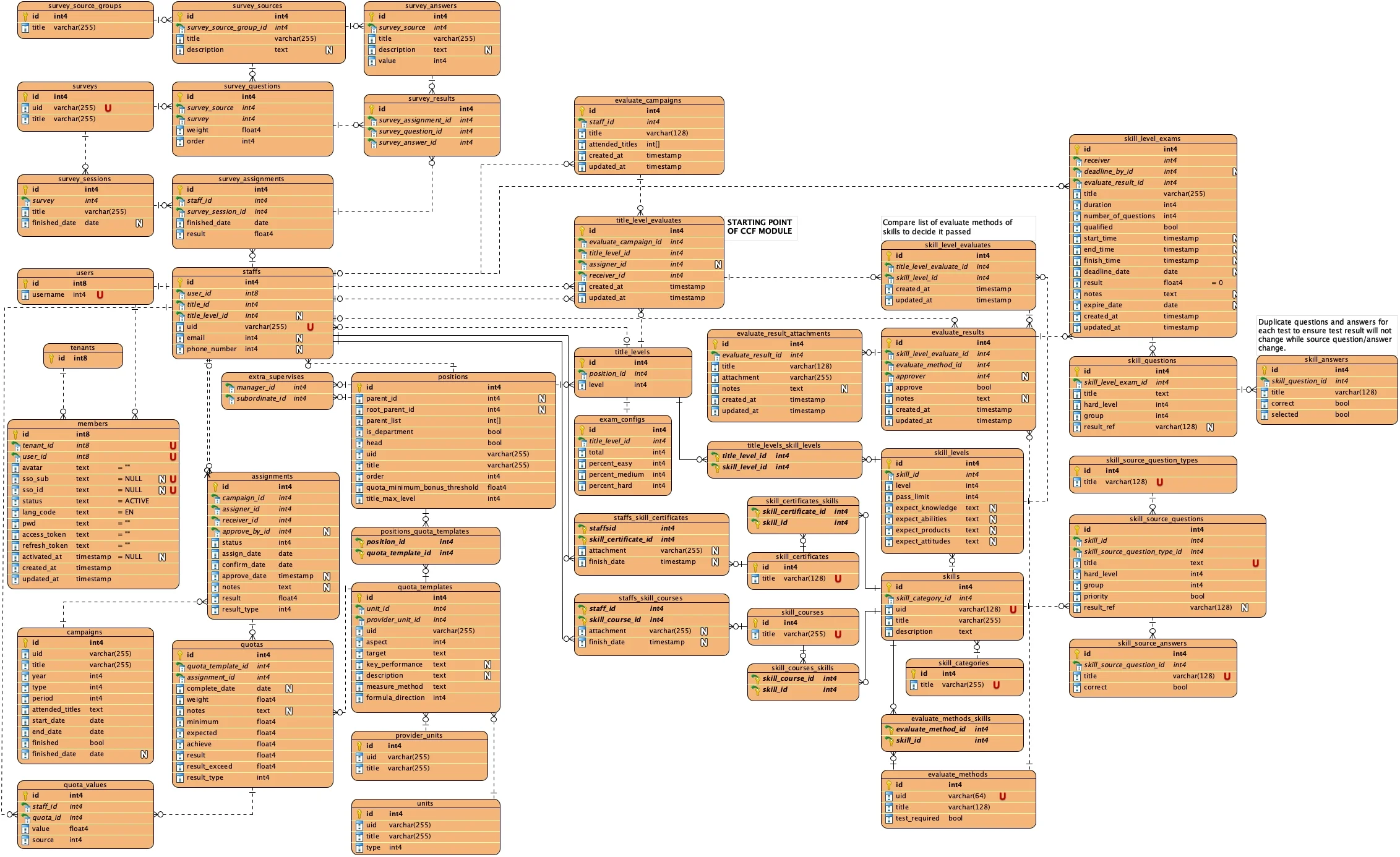
This is a Visual Paradigm ERD of a real schema, a staff skills and evaluation system of nearly 50 tables that we designed in Visual Paradigm for a project that has since been retired:
And this is the same project in Schemity, read from the database it ended up with: about 60 tables, Django’s own auth tables and a notification module included, grouped by module into eight colored legends:
The two do not match table for table, and that is the point. The Visual Paradigm diagram is the design as it was last updated by hand; the database kept changing after that, and the diagram fell behind it. It often felt built for a different kind of modeling than ours, which, as a UML suite, it is. That gap, and the smaller frustrations further down, are what years of Visual Paradigm taught us, and why we built Schemity.
Both tools draw a schema well. The questions below are about everything around the drawing: getting a real database into it, keeping it current, and what it costs to do either.
Which Visual Paradigm Edition Can Reverse Engineer a Database?
Only Standard, Professional and Enterprise: Modeler and the free Community edition draw ERDs but cannot read a database or patch one; Modeler can only write create and drop scripts for the entities you select.
Visual Paradigm’s edition comparison splits database work into two groups. The Database Design Toolset, which every edition has, covers drawing: entity relationship diagrams in crow’s foot and Chen notation, conceptual, logical and physical models, stored procedure and trigger shapes, sample records, and ERwin import. The Database Engineering group is where a diagram meets a real database, and every row in it is marked for Enterprise, Professional and Standard only:
| Database Engineering row | Enterprise | Professional | Standard | Modeler | Community |
|---|---|---|---|---|---|
| Reverse engineer ERD from database | Yes | Yes | Yes | No | No |
| Reverse engineer ERD from DDL | Yes | Yes | Yes | No | No |
| Generate DDL from ERD | Yes | Yes | Yes | No | No |
| Generate database from ERD | Yes | Yes | Yes | No | No |
| Patch database from ERD | Yes | Yes | Yes | No | No |
So the US$99 Modeler edition is a drawing tool for databases: you can model a schema in it, but you cannot point it at the database you already have, and the matrix marks the generation wizard Standard and up.
We checked in Visual Paradigm Modeler 17.2 (build 20260424) on 3 November 2026. Its Tools > DB menu does list Generate Database, Reverse Database and Reverse DDL, and each one opens the same dialog instead of running:
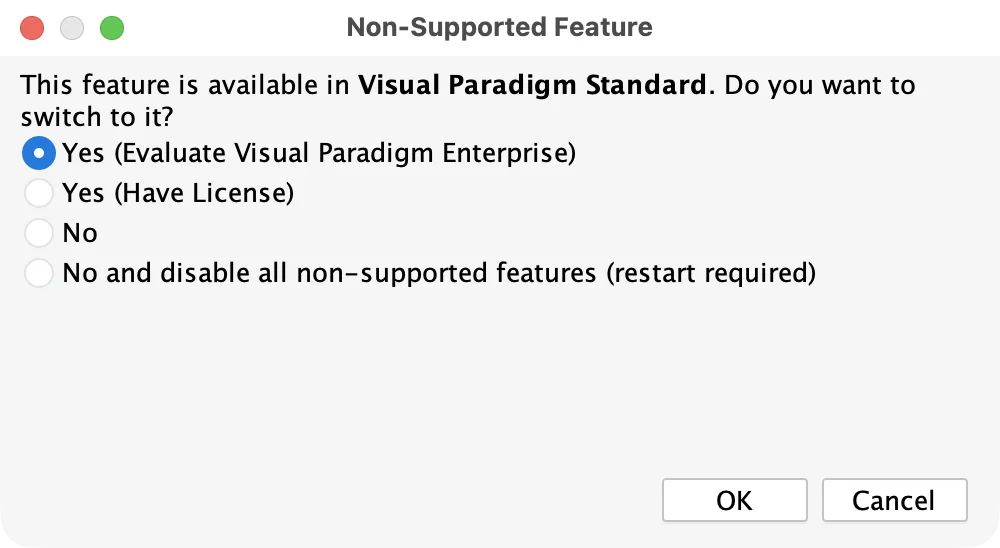
Only Database Configuration opens, so you can set up a connection to PostgreSQL or Snowflake in Modeler, but not use it to read or write a schema.
Modeler does write SQL for the entities you select. Select one or several and Generate SQL… from the right-click menu opens Visual Paradigm’s Ad-Hoc SQL generator, with a CREATE TABLE for each, the foreign keys between them as ALTER TABLE ... ADD CONSTRAINT, and the matching DROP statements:
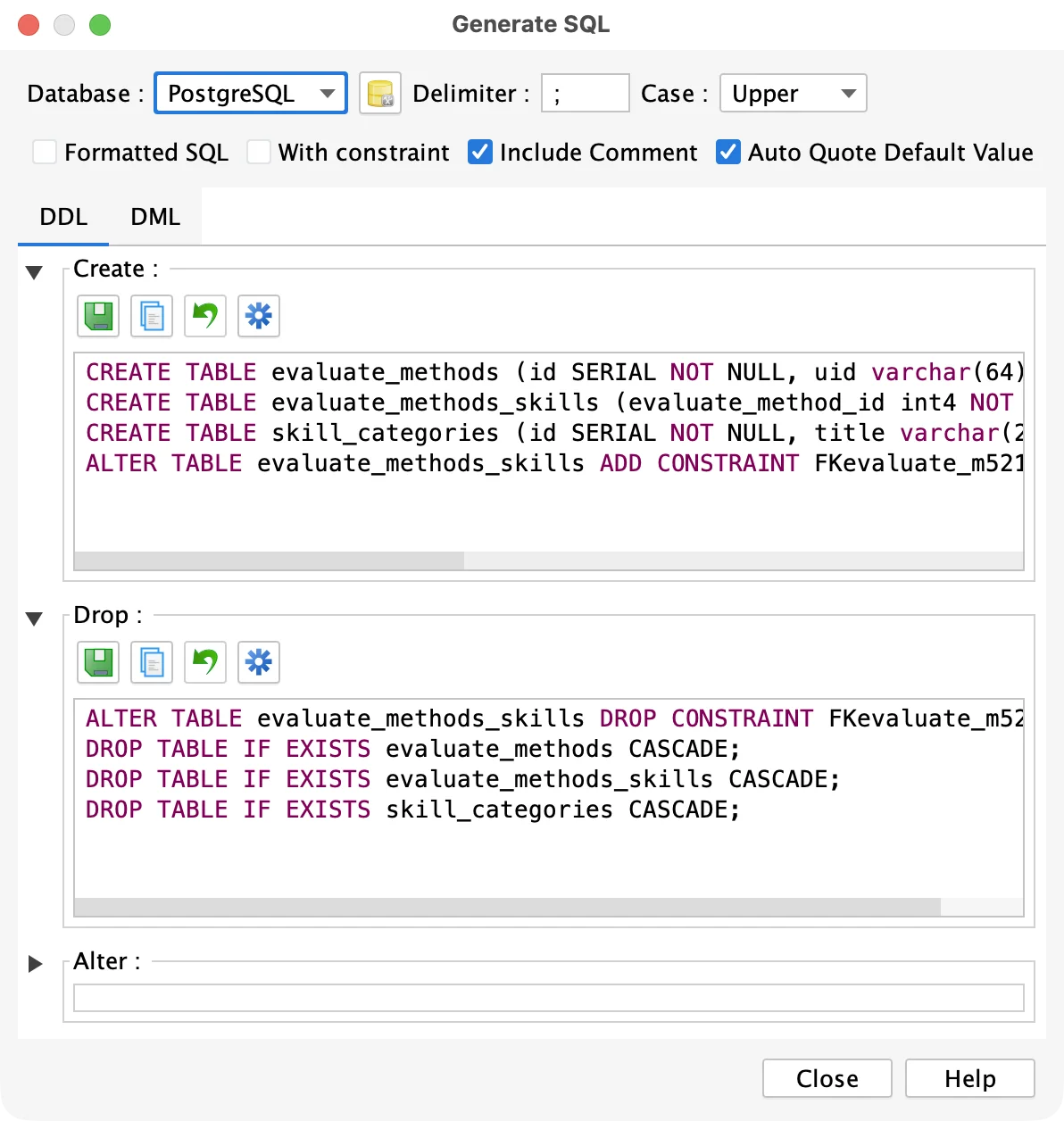
That is a script for a new, empty database. With nothing to compare the model against, it cannot say what to ALTER in a database that already exists, which is what a migration needs; comparing the model with a database is the Standard edition’s Database Engineering. Two more design features also start at Standard: the Database View editor, and synchronization between the conceptual, logical and physical models.
Schemity sells one license with every feature. It connects to a database, directly or, for server databases, over an SSH tunnel, and reverse engineers the schema: tables, columns, types, defaults, CHECK constraints, unique constraints, indexes, views, and every foreign key as a relationship with its ON DELETE and ON UPDATE actions. It reads PostgreSQL (Supabase and CockroachDB included), MySQL and MariaDB, SQL Server, SQLite and Snowflake, and with no database at all, a design-only diagram still writes CREATE TABLE SQL for any of the five dialects.
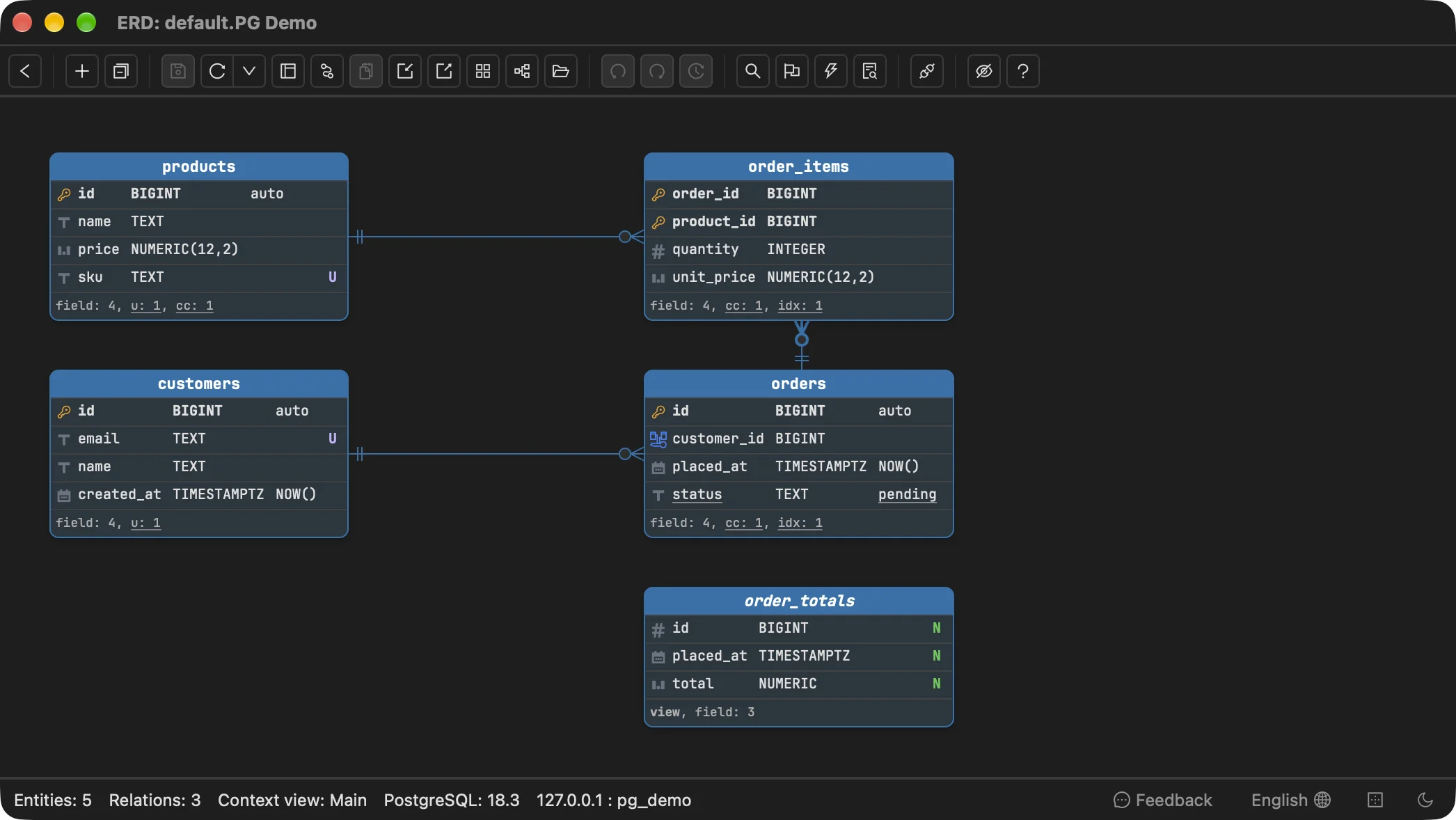
Nothing in that diagram was typed: every table, type, default, key and the view came from the database.
What Does Visual Paradigm Cost for ERD Work in 2026?
Working against a real database costs US$349 perpetual for Standard, plus US$100 a year if you want updates after the first year, or US$19 a month as a subscription.
Verified on Visual Paradigm’s shop and subscription page on 3 November 2026, for one user:
| Edition | Perpetual, single seat | Maintenance per extra year | Subscription | Reads a database |
|---|---|---|---|---|
| Community | Free, “for non-commercial use only” | - | - | No |
| Modeler | US$99 | US$30 | US$6/mo | No |
| Standard | US$349 | US$100 | US$19/mo | Yes |
| Professional | US$799 | US$200 | US$39/mo, US$35 billed quarterly | Yes |
| Enterprise | US$1,999 | US$600 | US$99/mo, US$89 billed half-yearly | Yes |
A perpetual license includes one year of maintenance. After that, the shop says, “you can continue using the last version of Visual Paradigm you downloaded, indefinitely”, and maintenance buys the updates: Visual Paradigm ships “two to three versions per year”, and reinstating maintenance that has lapsed costs more than extending it (US$150 instead of US$100 for Standard). A floating license, shared by concurrent users, costs more again (US$449 for Standard) and needs a Floating License Server.
Over three years with updates throughout, for one engineer:
| Up front | Years 2 and 3 | Three years | |
|---|---|---|---|
| Visual Paradigm Standard, perpetual | US$349 | 2 x US$100 | US$549 |
| Visual Paradigm Standard, subscription | - | 36 x US$19 | US$684 |
| Schemity | $129 | 2 x $29 | $187 |
Schemity is $129 once, with a year of updates, an optional $29 a year after that, use on up to three of your machines (the same limit as a Visual Paradigm single seat), and a two-week free trial with every feature. Visual Paradigm’s own 30-day trial is longer, and its Community edition is free for non-commercial use, which Schemity has no equivalent of.
Does Visual Paradigm Keep the ERD in Sync With the Database?
It can reverse engineer the database again and patch the database from the diagram, but we found no step in its user guide that merges a changed database into a diagram you have already arranged.
Visual Paradigm’s reverse engineering offers to “Form a new diagram with the reversed entities” or add them to the first ERD in the project, and warns that “having too many entities on one diagram may result in a poor database design that is hard to read and maintain.” Going the other way, its database patching is a real and useful feature: “We compare the differences between your design and a database, and patch the differences to your database accordingly.” You can have it write the DDL to a file to review before anything runs, and an option will “drop tables and/or columns that do not exist in your ER diagram.”
What the patch flow shows you is SQL. Reading that SQL is where the expensive questions live: how many rows a dropped column takes with it, whether a statement will fail on rows already in the table, which views read the column, and whether the change locks or rewrites a large table. None of that is in the statement.
In Schemity, a connected diagram is read again from the database every time you open it, and Refresh re-reads it on demand after a migration ran elsewhere: tables you placed keep their position, dropped ones disappear, and new ones arrive placed clear of the rest. A change you draw becomes a plan against the real database, and impact analysis prices it before it runs: the rows a drop would take, the statements that would fail on existing data, the dependent views that would block or break, and the statements that would rewrite or lock a large table. Lint adds what is wrong in the schema itself, such as a foreign key with no index or a type that does not match the key it references. Nothing is applied until you approve the migration SQL (a Snowflake diagram is never migrated at all), and a migration file written by an ORM or an AI agent can be analysed the same way without being run.
Delete orders.placed_at from the shop diagram above and open Preview changes:
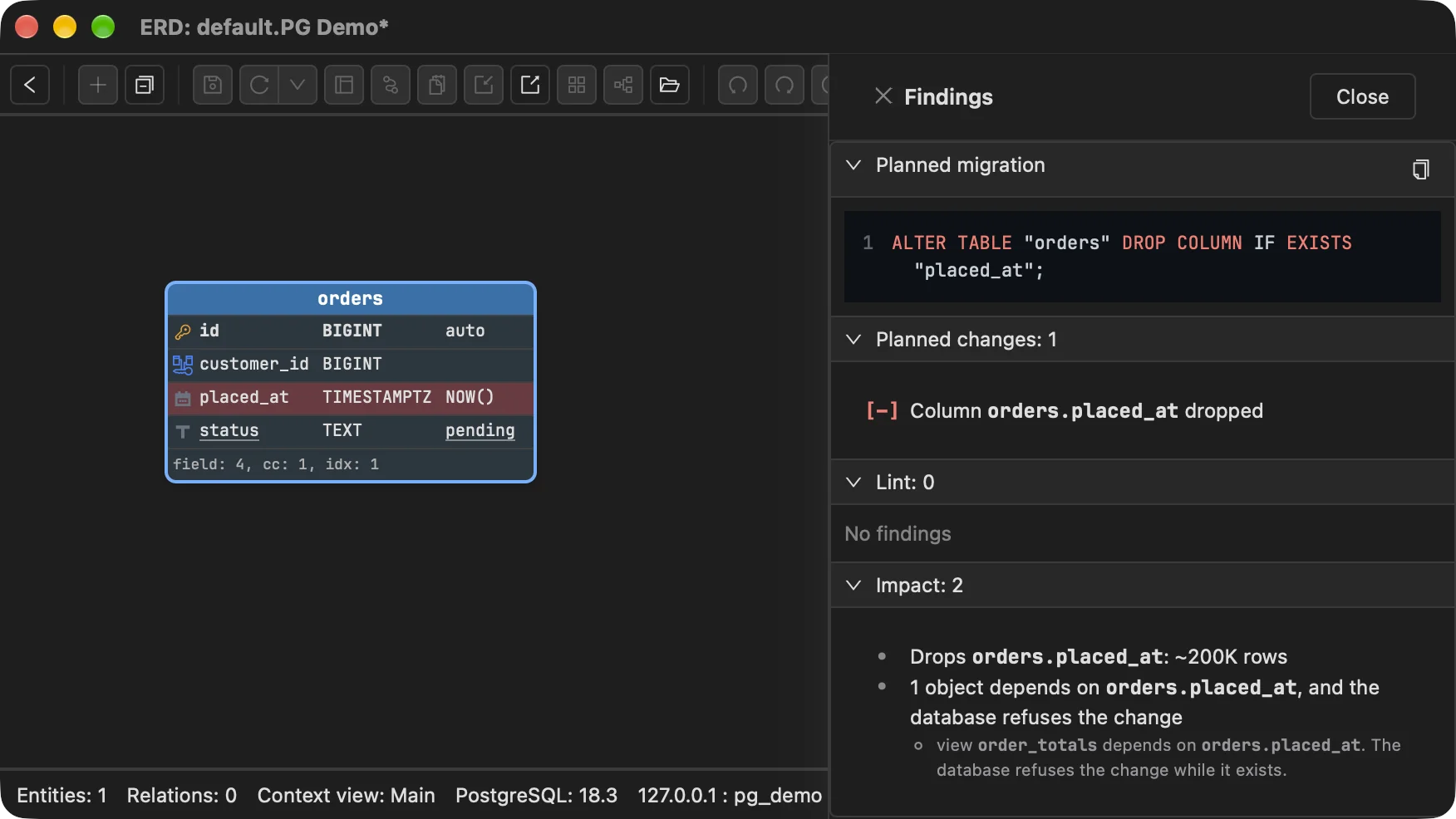
The statement at the top is all a patch script would show. The findings under it are the two facts that decide whether to run it: the column holds about 200,000 values, and PostgreSQL would refuse the statement until the view order_totals stops reading it.
What Did We Run Into Drawing a Real Schema in Visual Paradigm?
Seven smaller things, all in drawing the schema itself: creating a relationship, self-referencing relationships, PostgreSQL arrays, unique constraint names, composite unique markers, allowed values, and copy and paste.
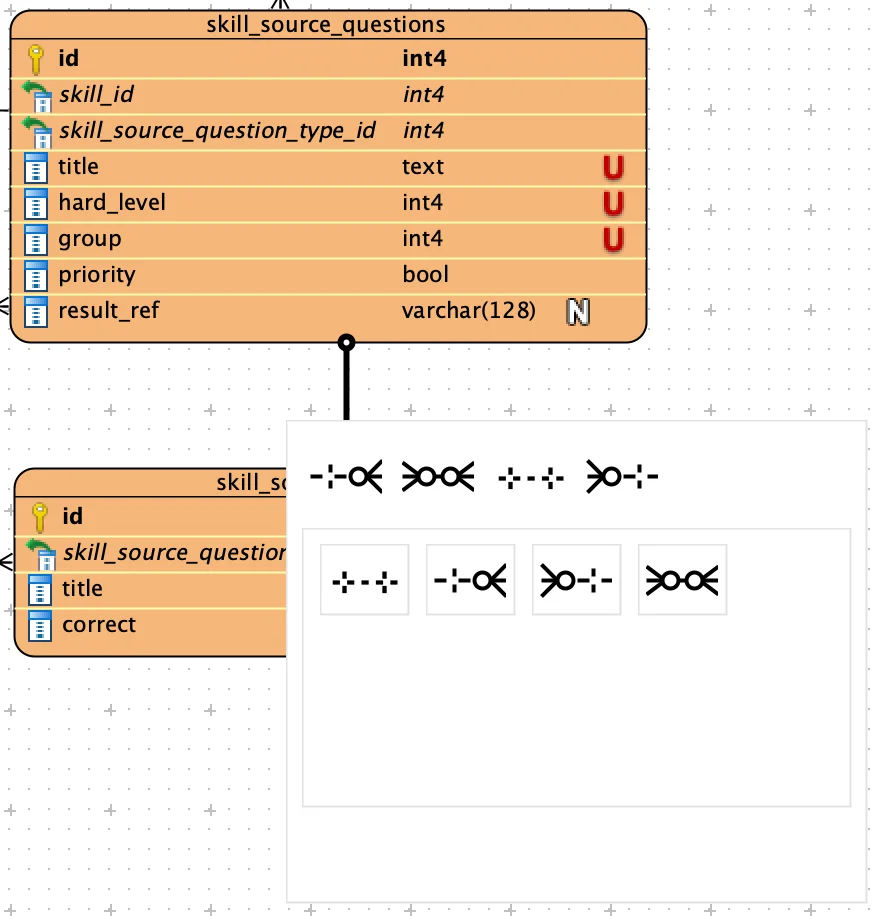
Creating a relationship. Drag a relationship out from one table and Visual Paradigm opens a picker with two rows of the same four relationship symbols, in a different order and with no labels; the top row may be the recently used ones, but nothing on screen says so:
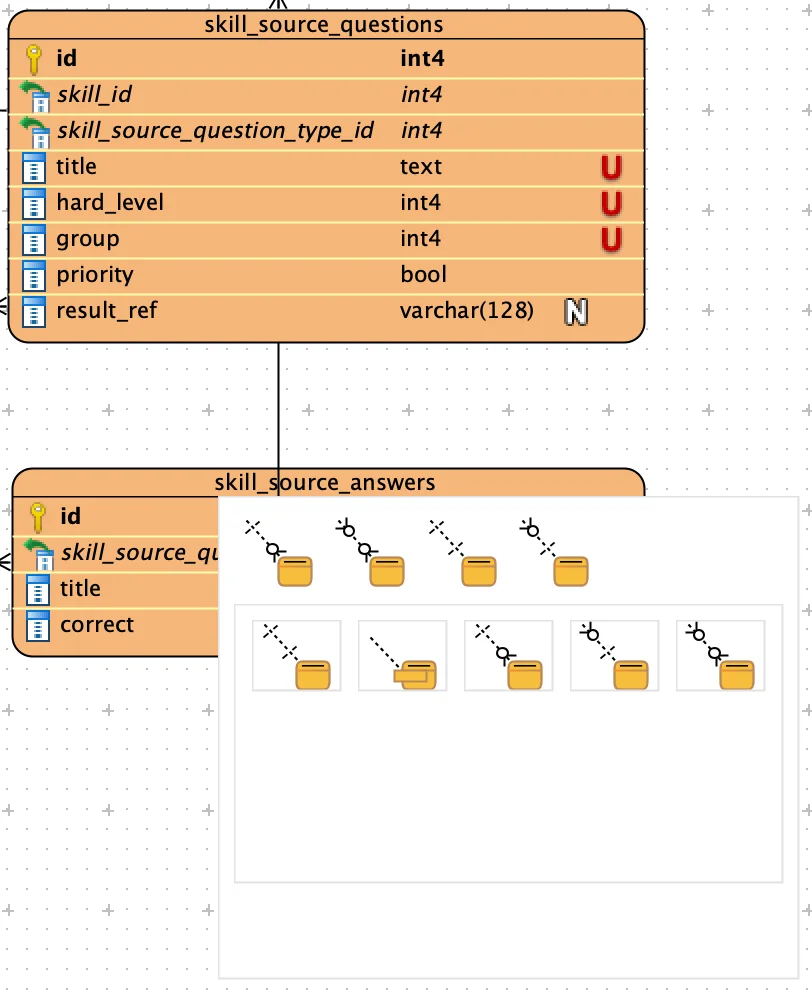
Drop it on the foreign key column of the other table instead, and a second picker appears, this time with four symbols on top and five below, each paired with an entity icon:
In Schemity you drag from the parent table onto the child, and Schemity adds the foreign key column to the child, pointing at the parent’s primary key. The relation dialog then opens with both tables and the new column filled in, and asks its questions in words: a relation or a virtual one, 1:N, 1:1 or N:N (which builds the junction table), and the ON DELETE and ON UPDATE actions. Dropping on empty canvas lets you pick the target table by name instead.
Self-referencing relationships. Visual Paradigm would not let us draw a self-referencing relationship by dragging a relationship from a table back onto itself, which is how positions.parent_id points at its own table. There may be another way to make one; we did not find it, and its guide to drawing entities does not cover the case. In Schemity you drag the new-relation handle off a table and drop it back on the same table, and the self-reference is drawn, as it is on positions above.
PostgreSQL arrays. We found no array type in Visual Paradigm’s PostgreSQL type list, so to make a column such as evaluate_campaigns.attended_titles show as an array on the canvas, we gave it the base type int4 and typed int[] into its User type field:
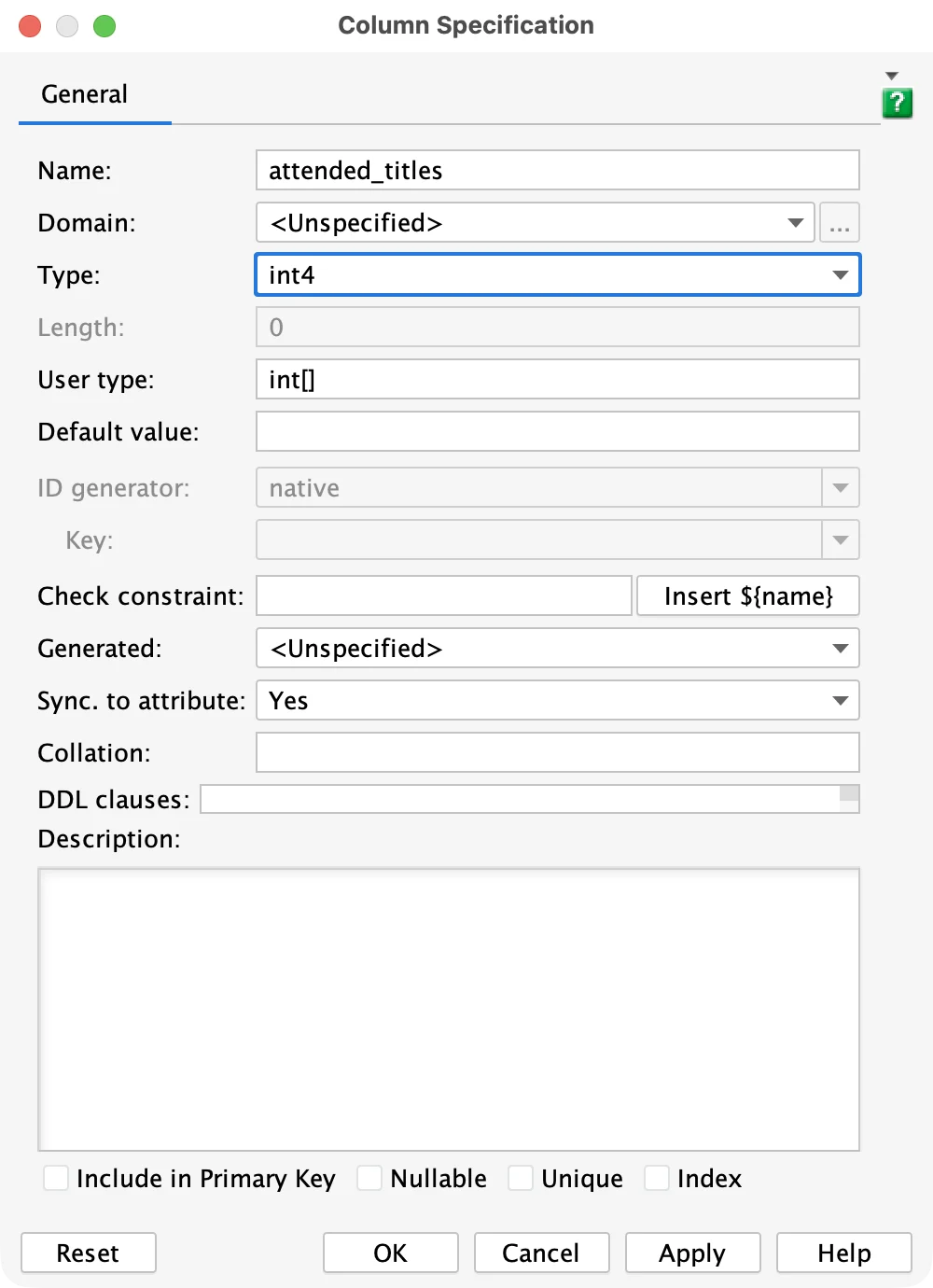
The canvas then reads int[], but the type itself is still int4 with a label beside it. In Schemity, a PostgreSQL column has an array selector next to its type, so attended_titles arrives from the database above as INTEGER[], is written back as one, and is what lint checks when an array holds foreign keys.
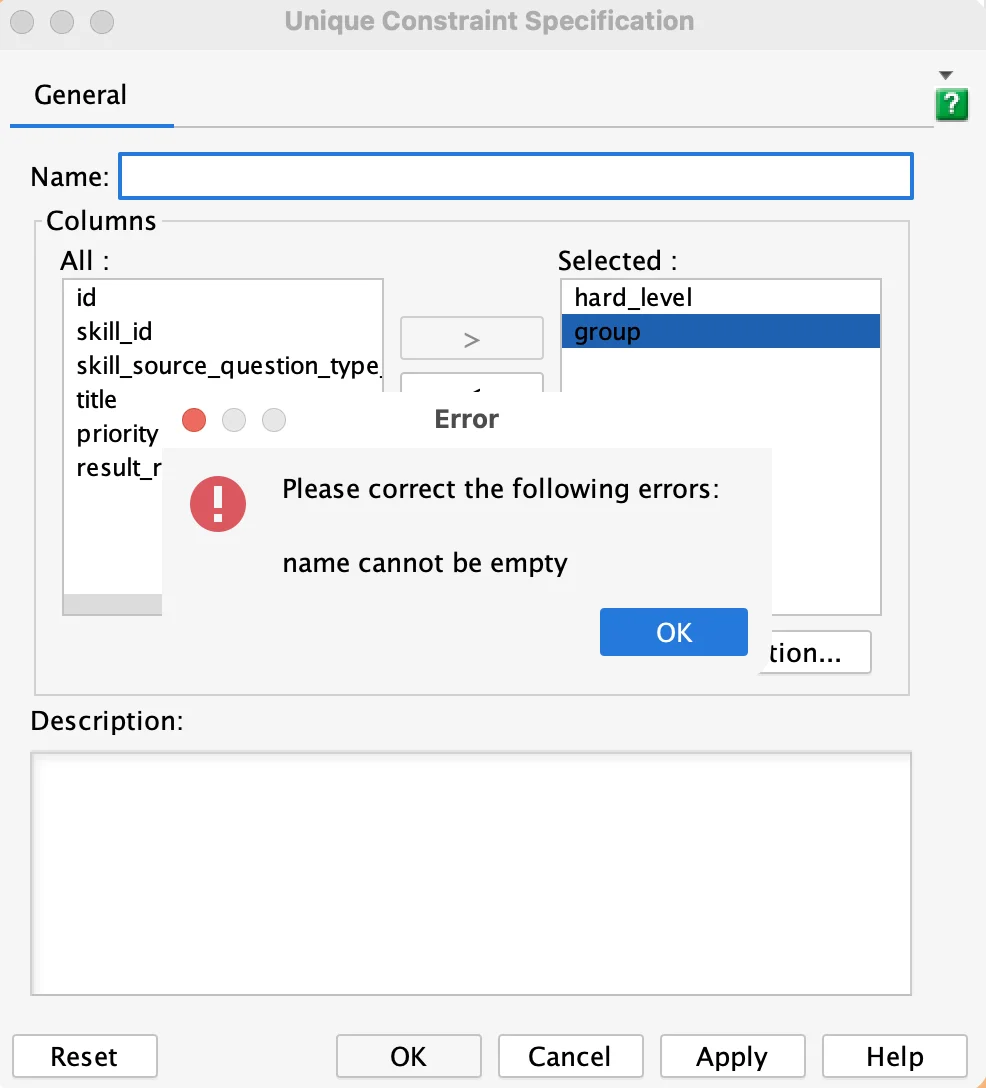
Unique constraint names. Visual Paradigm will not save a unique constraint without a name you type yourself: leave Name empty, as here for (hard_level, group) on skill_source_questions, and it stops with “name cannot be empty”:
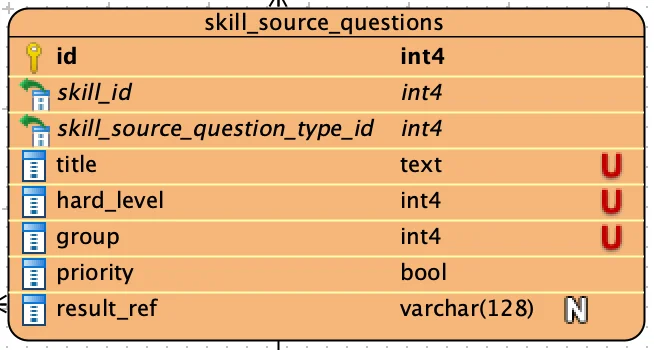
Which columns are unique together. Once the constraint is saved, the canvas does not say which columns are unique together. On skill_source_questions, title is unique on its own and hard_level and group are unique as a pair, yet all three carry the same mark:
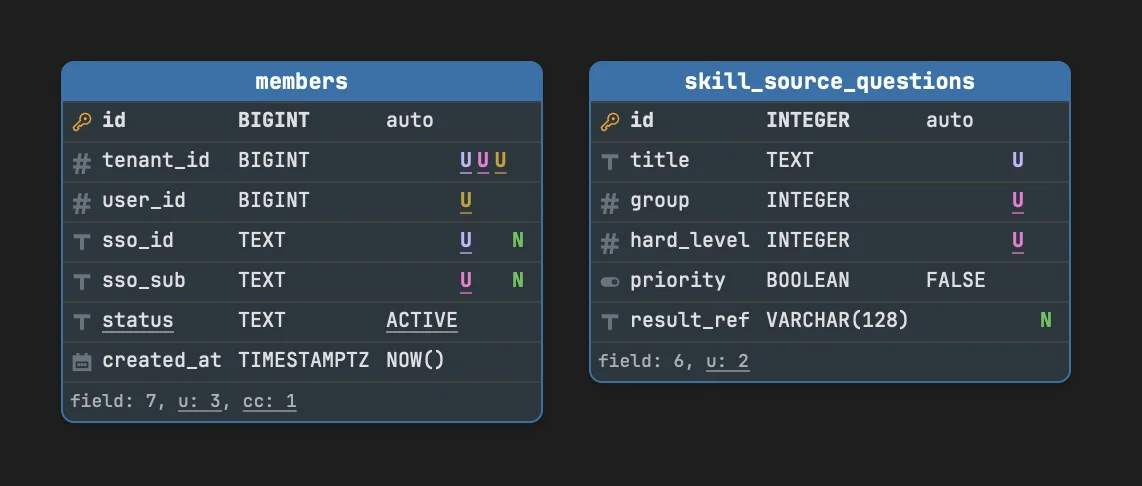
members is harder still. Three unique constraints share tenant_id: (tenant_id, user_id), (tenant_id, sso_sub) and (tenant_id, sso_id). Only the Constraints tab of the Entity Specification says so; the canvas gives tenant_id one U and marks user_id, sso_sub and sso_id as if each were unique on its own:
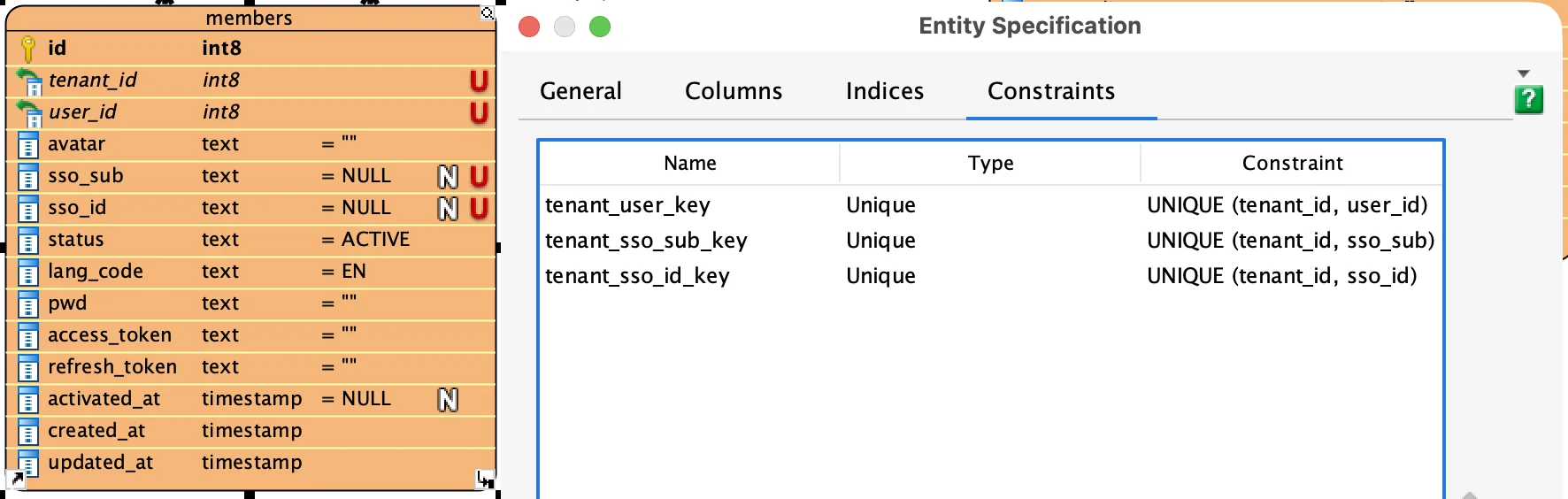
Schemity names a unique constraint for you when you leave the name empty, in PostgreSQL’s own pattern: skill_source_questions_hard_level_group_key. On the canvas, a single-column unique is a plain U and a composite unique is an underlined U; a column in several unique constraints gets one U for each, and each constraint can take its own color. So (hard_level, group) reads as one rule and title as another, and on members, tenant_id carries three underlined U marks, one per constraint; give each constraint its own color and the U on its partner column matches.
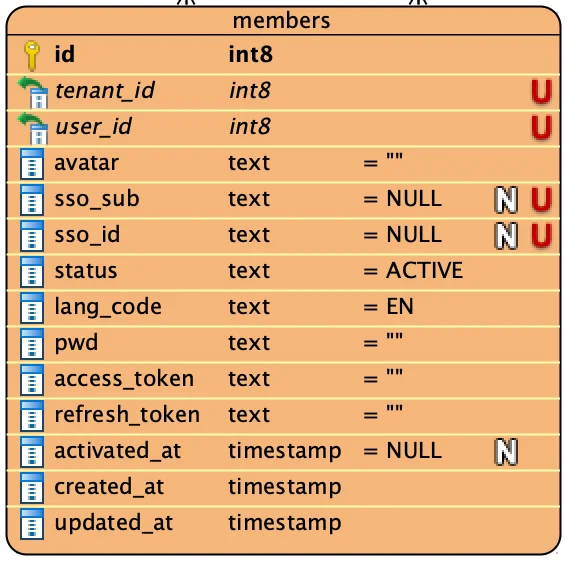
Allowed values. members.status takes one of a fixed set of values, ACTIVE among them, but the entity has no place for that set, so the column reads text = ACTIVE and nothing more. Its Column Specification does have a Check constraint field that takes the rule as text, but the values never show on the diagram, so we kept them in a sticky note or the column’s description, apart from the DDL they belong to:
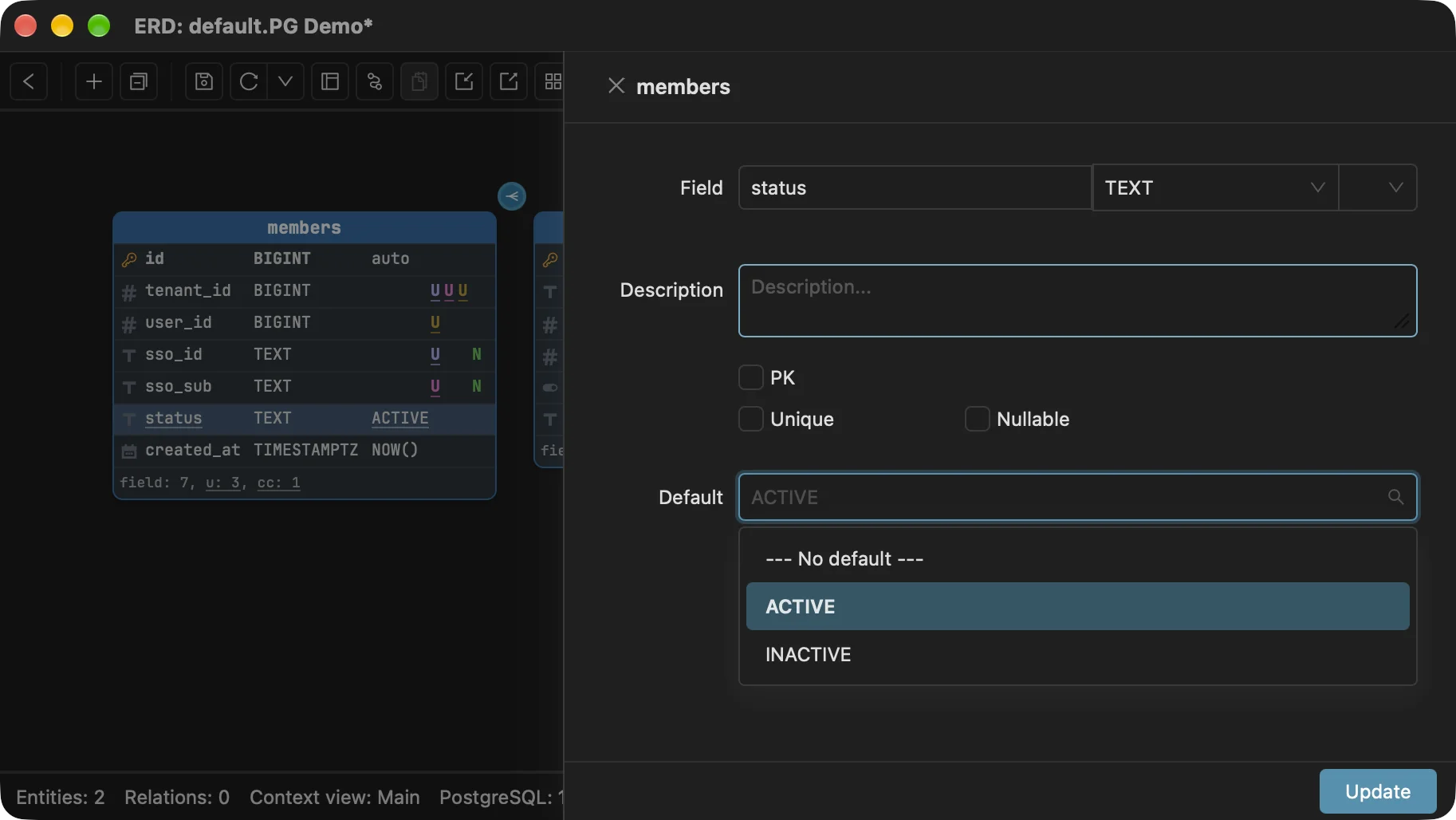
In Schemity the values are part of the column. A CHECK (status IN (...)) list or a PostgreSQL enum type is read from the database with the column; a column that has one is underlined on the canvas, and so is a default that is one of its values, as status and ACTIVE are on the same members table in Schemity above. Open the field and its Default control offers the values the CHECK allows, ACTIVE and INACTIVE, because they are part of the column, not a note beside it:
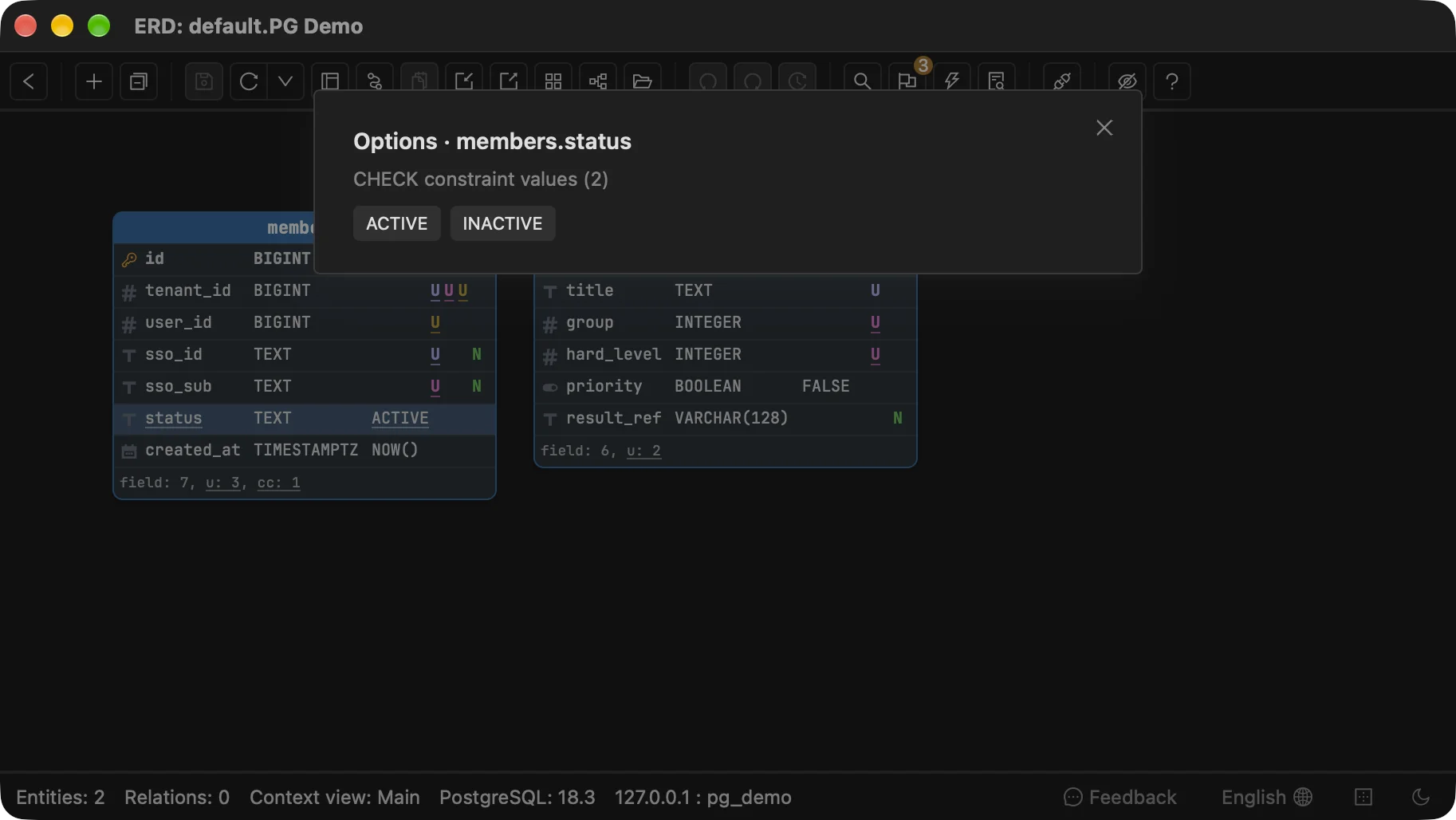
View options (Cmd+O, or Ctrl+O on Windows and Linux) lists the values without opening the field editor at all:
And lint flags a status-like column with nothing restricting its values, so the set that Visual Paradigm left to a sticky note is something Schemity asks you for.
Copy and paste. Copy an entity and paste it with Ctrl-V, and Visual Paradigm does not make a copy: it pastes a second view of the same entity, marked a for auxiliary view, while the original is marked M for master view. The two shapes are one table, so editing either one edits both:
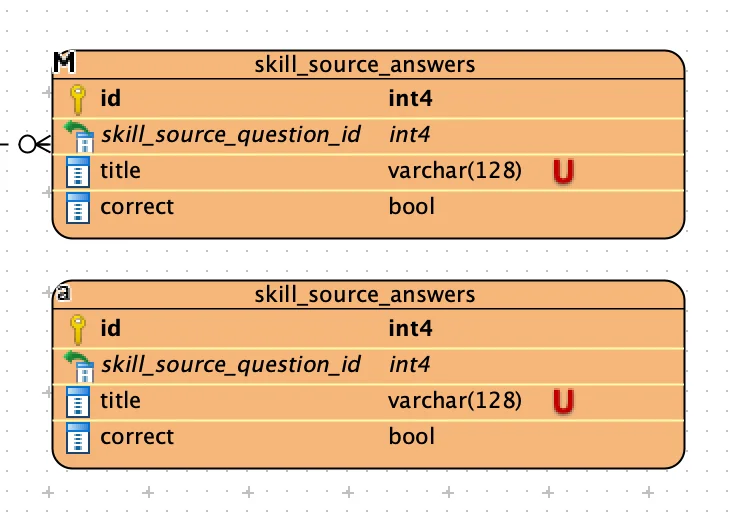
This is deliberate. Visual Paradigm’s copy and paste guide says pasting as view presents “the same model element in another view”, while Paste Model from the right-click menu, or Duplicate, makes a real copy, and its Know-how site explains how to bind Ctrl-V to Paste Model instead. It makes sense for a model shown on many diagrams. In a database diagram, where each shape is one CREATE TABLE, it is the opposite of what Ctrl-V does everywhere else. In Schemity, pasting skill_source_answers creates skill_source_answers_copy, a separate table that the migration creates on its own.
Where Do Visual Paradigm and Schemity Keep the Diagram?
Visual Paradigm keeps a project in one .vpp file and versions it through its own repository; Schemity keeps each diagram as a JSON file you commit to Git like code.
Visual Paradigm “saves all project content to a single file, with file extension .vpp”, and its user guide names “Visual Paradigm VPository and VP Teamwork Server” as “the supported standards of versioning systems”, with commit, update and merge run from Visual Paradigm’s own Teamwork Client. That is a complete system for a team that adopts it, and a separate one from the repository the application code lives in.
A Schemity diagram is a plain JSON file in a workspace folder you choose. Put the folder in the application repository and the schema design is versioned with the code it describes: the same branch, the same pull request, the same history. A reviewer does not need to read JSON to review a schema change either; they open the pull request’s migration against their own connected diagram and see it drawn and priced in the change preview.
How Does AI Work in Visual Paradigm and in Schemity?
Visual Paradigm’s AI ERD generation runs through its cloud service on the Professional and Enterprise editions with active maintenance; Schemity gives the AI agent you already use a local MCP server.
Visual Paradigm’s AI Diagram Generator can turn a description of business objects into an ERD. Its shop marks AI diagram generation for Enterprise and Professional only, groups the AI apps as “via VP Online”, and states that “active maintenance is required to continue using any AI-powered features.” A custom AI endpoint lets a workspace manager bring an API key for providers such as OpenAI, Anthropic or Google; for “an internally hosted model”, the page points to its enterprise team. We did not find an MCP server in Visual Paradigm’s documentation as of November 2026.
Schemity does not run a model of its own. It is a local database MCP server with 18 tools for Claude Code, Claude Desktop, Cursor, Codex, OpenCode or any MCP host: the agent can read the schema and its context views, analyse a migration file it wrote, run lint, and propose changes, which land on your open diagram as unsaved edits for you to review and save. Schemity itself sends your schema nowhere; what reaches a model is whatever your agent’s host sends, under the agreement you already have with it.
Visual Paradigm vs Schemity
Visual Paradigm is a modeling suite whose database engineering starts at the US$349 Standard edition, and Schemity is database design software that reads the database and previews each schema change against it, for $129 once.
| Visual Paradigm | Schemity | |
|---|---|---|
| What it is | Modeling suite: UML, SysML, BPMN, ERD and more in one project | Database design software, desktop app (macOS, Windows, Linux) |
| Reads a live database | Standard edition and up (US$349) | Every license |
| Databases | MySQL, SQL Server, Oracle, PostgreSQL, SQLite, DB2, Sybase, MariaDB, Informix, Firebird and more | PostgreSQL (Supabase, CockroachDB), MySQL, MariaDB, SQL Server, SQLite, Snowflake |
| Keeping it current | Reverse again, into a new ERD, the first ERD, or an entity list you drag onto diagrams by hand | Read again on every open and on Refresh, layout kept |
| Changing the database | Patch: compares the ERD with the database and writes the ALTER and CREATE statements, to the database or to a file to review first | Migration SQL plus lint and impact analysis against the live database, applied only on approval |
| Model levels | Conceptual, logical and physical, synced from Standard up | Physical, the schema the database runs |
| Notation | Crow’s foot and Chen | Crow’s foot |
| Where diagrams live | One .vpp file per project; versioning through VPository or Teamwork Server | JSON files in a folder you choose, ready for Git |
| Large schemas | Several ERDs per project, plus sub-diagrams per model element | Context views per domain and a Context Map of the dependencies between them |
| AI | AI ERD generation via VP Online, Professional and up, with active maintenance | Local MCP server with 18 tools for the agent you already use |
| Footprint | About 790 MB download; 4 GB RAM minimum, 8 GB recommended | 183 MB of memory open on its home screen, measured on an M1 Pro |
| Free use | Community edition and VP Online Free, non-commercial only; 30-day trial | Two-week trial with everything; after it, design-only diagrams with PNG, JPEG and JSON export |
| Price for database work | US$349 plus US$100/yr for updates, or US$19/mo | $129 once, optional $29/yr for updates |
Where Visual Paradigm Wins
Visual Paradigm is the better choice when the ERD is one model among many, when you need conceptual and logical models, Chen notation, stored procedures or Oracle and DB2, or when your team already works in its repository.
For years Visual Paradigm was still the best tool we could find for this work, frustrations included; the others we tried were worse.
One suite for every model. UML, SysML, BPMN and the ERD live in one project, and from Standard up Visual Paradigm can synchronize an ERD with a UML class diagram and generate Hibernate code from it. Schemity draws databases and nothing else.
Conceptual and logical models. Visual Paradigm models a schema at three levels and, from Standard up, keeps them in sync. Schemity models the physical schema, the one the database actually runs, and does not do a conceptual model with generalization.
More of the database. Stored procedures and triggers are shapes on a Visual Paradigm ERD, and its database list reaches Oracle, DB2, Informix, Sybase and Firebird. Schemity draws tables, views, keys, constraints and indexes, not procedures or triggers, though its impact analysis does name the triggers, functions and procedures a change would affect, and it connects to the databases listed above.
Migrating from other modeling tools. Visual Paradigm imports ERwin projects in every edition and PowerDesigner models from Modeler up. Schemity imports SQL, so a model from those tools arrives as the DDL they generate.
Documentation and team process. Doc. Composer builds formatted design documents from Standard up, and VPository gives a team commit, merge and revision history inside Visual Paradigm. Schemity exports a data dictionary and leaves versioning to Git.
A free edition. Community is free for non-commercial ERD work, with no time limit. Schemity’s free use after the trial is design-only.
If the ERD is the only diagram you need and the database already exists, compare the other alternatives too: the DbSchema alternative, for a desktop database IDE that covers far more database engines, the MySQL Workbench alternative, and the ChartDB alternative for a browser-first view.
Frequently asked questions
Which Visual Paradigm edition can reverse engineer a database?
Standard, Professional and Enterprise. Visual Paradigm's edition comparison lists reverse engineering an ERD from a database or from DDL, generating DDL, and patching a database for those three editions only. Modeler (US$99) and the free Community edition can draw ERDs, including conceptual, logical and physical models, but not read or patch a database. In our test, Modeler did write CREATE TABLE and DROP TABLE SQL for the entities we selected.
Is Visual Paradigm free for ER diagrams?
For non-commercial use, yes: the desktop Community edition and the VP Online Free plan both draw ERDs for non-commercial use only. Commercial ERD drawing starts at US$4 a user a month on VP Online Starter, billed annually, or US$99 for the desktop Modeler edition, and working against a real database starts at Standard, US$349 perpetual or US$19 a month. The desktop app also has a 30-day free trial.
What is a good Visual Paradigm alternative for ERDs?
It depends on whether you use the rest of the suite. If you model UML, SysML or BPMN alongside your database, Visual Paradigm keeps them in one project and Schemity does not replace that. If the ERD is the job, Schemity reads the database, keeps the diagram current, previews each migration's impact against the live database, and stores the diagram as JSON in Git, for $129 once.