A database MCP server that never runs your agent's SQL
Schemity is database design software that is also a local database MCP server. Claude Code, Cursor, Codex or any MCP host gets 18 tools to read your schema, context views, dependencies and lint findings, and to measure what a pending migration would cost: data loss, failing statements, table rewrites, dependent views. None of the tools runs SQL the agent writes, none returns a row, and the agent never holds database credentials. Its edits land as unsaved changes on your diagram, and a migration runs only when you click Migrate.
claude mcp add --scope user schemity -- "/Applications/Schemity.app/Contents/MacOS/schemity" --mcp 2 weeks, no credit card. macOS, Windows, Linux.
What can an AI agent do through the Schemity MCP server?
Read the design, measure a change, find and show a diagram, and stage edits. Every tool works on the diagram Schemity already holds; the three that touch the database ask it about structure and counts, never rows.
Understand 5
get_schema- Tables, columns, keys, checks and indexes, plus your naming convention and the template every new table starts with. No row data.
get_dependencies- Relations into and out of one table, with the columns on both sides.
get_context_views- Context views, the dependencies between them, cycles, and which dependencies are not declared as foreign keys.
get_data_dictionary- A Markdown data dictionary of the diagram or one context view.
lint- Schema findings: conventions, missing indexes, type mismatches. Facts, not verdicts.
Measure 4
get_pending_changes- Unsaved edits as the undo history that produced them.
analyze_impact- What the pending migration would cost: data loss, failing statements, rewrites, dependents. SQL only on request, never run.
analyze_migration_file- The same analysis for a hand-written migration file. Parsed, never executed.
count_rows- An exact SELECT COUNT for one finding, with a 60-second timeout. Only when you ask.
Find and show 5
open_schemity- Start the app or bring it to the front.
list_diagrams- The diagrams open right now.
find_diagrams- Every saved diagram, matched by name, database or workspace.
open_diagram- Open the diagram you named in a new tab.
show_preview- Draw pending edits, a migration file or a set of tables on your canvas, with the findings.
Organize and propose 4
propose_changes- Create, change and delete tables, columns, relations, constraints, indexes, legends and context views, as unsaved edits you review.
group_entities- Group tables into legends by domain, from your source code or your description.
route_relations- Re-route relation lines around tables, deterministically.
check_relation_lines- Count overlapping lines, crossings and bends in the layout.
What do I ask the agent?
Ask in plain words. Your agent host hands the model every tool with its description, and the model calls Schemity's when the request fits one. Saying "in Schemity", "the diagram" or a diagram's name makes that clear; in a code repository, "add a status column" alone may just as well send the agent to your model files.
Find a diagram
-
Which diagrams do I have open in Schemity?
list_diagrams -
Open my Coffee Shop diagram.
find_diagrams, open_diagram
Understand it
-
Explain the schema in the current diagram. What are the main domains?
get_schema, get_context_views -
What depends on the orders table?
get_dependencies -
Lint the diagram and tell me what to fix first.
lint
Arrange it
-
Arrange the current diagram: group the tables by domain, using this codebase to decide the groups.
group_entities, route_relations -
Untangle the relation lines in the Billing diagram.
route_relations, check_relation_lines
Change it
-
Show me the changes in the Coffee Shop diagram.
get_pending_changes, show_preview -
What would my unsaved changes cost if I migrate?
analyze_impact -
Check migrations/0042_add_status.sql against the shop database before I run it.
analyze_migration_file, show_preview -
Add a loyalty_points table to the diagram, linked to customers.
propose_changes
In Claude Code, /mcp shows whether schemity is connected. If the agent answers from your files instead of the diagram, add "in Schemity" to the request.
What can the agent not do through it?
The limits are the design. They hold whichever host or model you connect.
Run SQL it wrote
There is no execute tool. A migration the agent writes is analysed by parsing it against the live catalogue, and nothing in it is run.
Read your rows
No tool returns data. The one query an agent can ask for is a COUNT for a finding, and a free-text filter is refused over MCP.
Hold credentials
Schemity holds the connection. The agent talks to a server on 127.0.0.1 and never sees a password or connection string.
Write to the database
Edits land on the diagram, unsaved. The database changes only when you click Migrate.
Delete what you made
Deleting a table, column, relation or view you made asks you first. Without asking, the agent can remove only what it added since your last save.
Hide what it did
Every undo step an agent makes names the agent, in History (F6).
How does a schema change get from the agent to production?
Two paths, and both stop at you before anything reaches the database.
- The agent proposesIt edits the diagram with propose_changes, or writes a schema migration in your codebase the way your ORM expects.
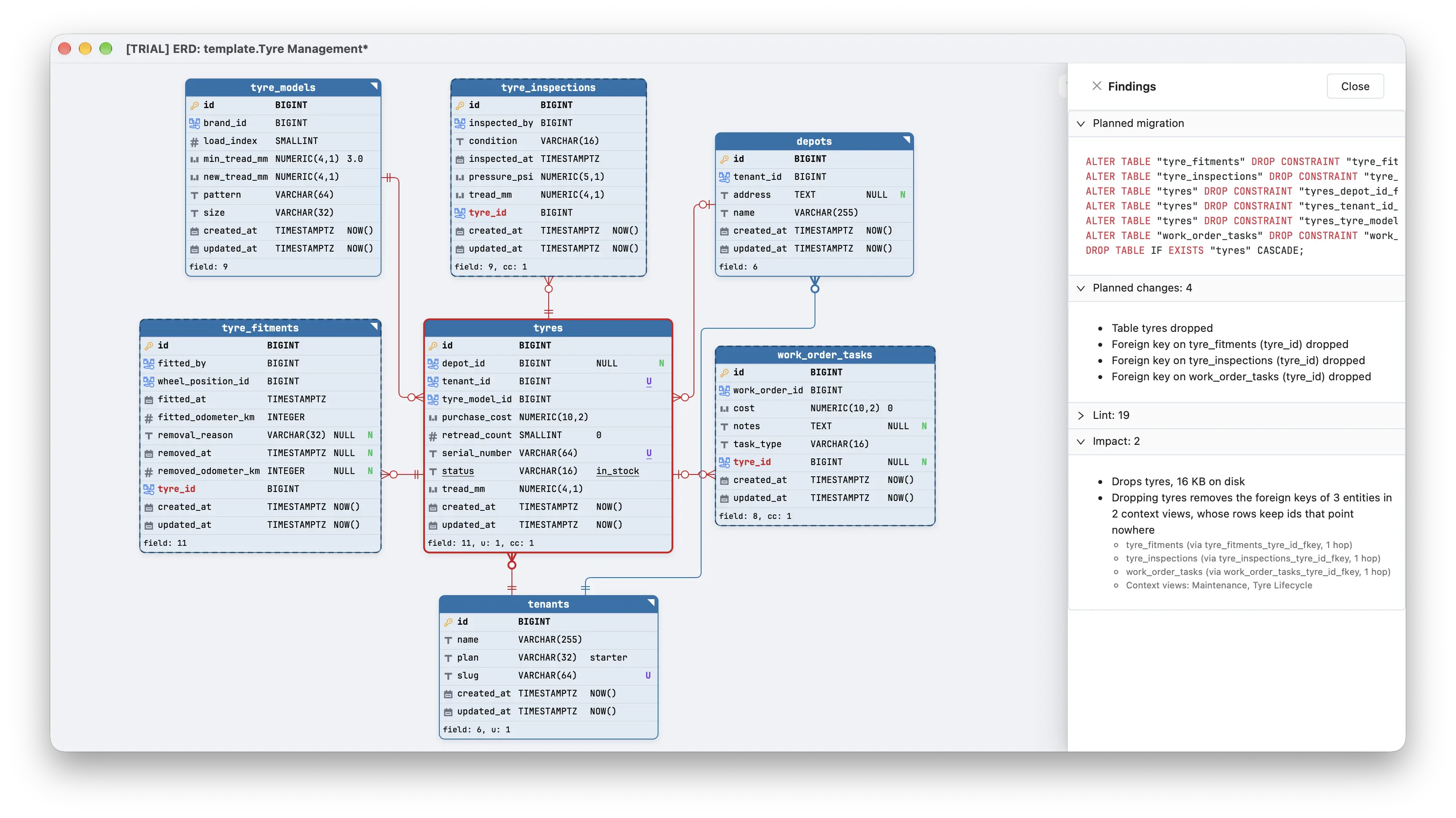
- You see it drawnDiagram edits sit behind an Agent changes button. A migration file opens in the change preview, a throwaway canvas drawn from your diagram with added, dropped and altered tables marked.
- You read the costImpact analysis lists data loss, statements the database will refuse, table rewrites and the views or triggers in the way, before anything runs.
- You decideSave or undo the edits. Run the migration from Migrate, or from your deploy pipeline. Schemity never runs it on its own.
How is this different from other database MCP servers?
Most database MCP servers give the agent a SQL tool and guard it with a read-only flag, a parser or a confirmation prompt. Supabase's own docs say connecting an LLM to your projects carries security risks, and the archived reference Postgres server's read-only transaction could be ended with a COMMIT. Schemity takes the SQL tool away instead.
| Runs SQL the agent writes | Returns rows | Schema changes | Impact before it runs | |
|---|---|---|---|---|
| Schemity | No | No (counts only, on request) | Staged on a diagram, you run them | Yes, nothing executed |
| Reference Postgres server (archived) | Yes, one query tool | Yes | Meant to be read-only | No |
| Supabase MCP | Yes (execute_sql) | Yes | apply_migration, on by default | No |
| Neon MCP | Yes (run_sql) | Yes | Tested on a temporary branch, then applied | By running it on a branch |
| DBHub | Yes (execute_sql) | Yes | Through execute_sql | No |
| Microsoft SQL MCP Server | No (CRUD tools) | Yes | No DDL | No |
Supabase, Neon and DBHub offer read-only modes. Sources: Supabase, Neon, DBHub, Microsoft, reference server, checked October 2026.
When is another database MCP server the better fit?
When the agent has to answer questions about data: debugging a row, an analytics query, a support lookup. Schemity cannot do that, by design. Use a SQL server for it, connected through a role that can read only what it needs, and keep Schemity for designing and changing the schema. Which setup to choose walks through the trade-off, and a Postgres role that reads the schema, not the data shows the role.
Which AI agents and databases does it work with?
Hosts
Claude Code, Claude Desktop, Codex and OpenCode start Schemity on demand over stdio (schemity --mcp). Cursor, MCP Inspector and other hosts connect over Streamable HTTP. The MCP drawer has the snippet for each and a connection test.
Databases
PostgreSQL, MySQL, MariaDB, SQL Server, SQLite and Snowflake, including Supabase. Reading the design works on any diagram, even one with no connection; impact analysis needs a connected one.
Local only
HTTP listens on 127.0.0.1:7332 (the port is yours to change), checks a bearer token on every request and refuses requests from web pages on other origins. The token lives in your OS keychain.
Your model
Schemity runs no model and no AI server. The schema goes only to the model your agent host already uses for your code, and the MCP server sends nothing to us.
Step-by-step for each host: AI agents via MCP. What an agent can see, for a security review: Security review.
Questions
What is a database MCP server?
A server that speaks the Model Context Protocol and gives an AI agent tools for a database. Most offer a tool that runs SQL. Schemity offers tools that read the schema and measure a change instead, and none of them runs SQL the agent writes.
Does Schemity's MCP server run queries against my database?
Only to read the catalogue (tables, keys, dependent views, size estimates) for impact analysis, and a COUNT when a finding needs an exact number and you ask for it. A count is a SELECT COUNT with a 60-second timeout, inside a read-only transaction on PostgreSQL and MySQL. No tool returns a row.
Can an AI agent change my database schema through Schemity?
It can propose the change. Its edits land on the diagram as unsaved changes behind an Agent changes button, deleting anything you made asks you first, and the database changes only when you click Migrate or run the migration yourself.
Which AI agents does it work with?
Claude Code, Claude Desktop, Cursor, Codex, OpenCode, MCP Inspector, and any other MCP host that speaks stdio or Streamable HTTP. A local model works too, through a host such as LM Studio.
Does my schema leave my machine?
The server listens only on your machine, and Schemity sends nothing to us through it. What the agent reads goes to whichever model its host uses, the same place your code already goes; with a local model, nothing leaves at all.
How much does the MCP server cost?
It is part of the desktop app: $129 once, no subscription and no AI fee, since your host brings the model. It runs during the 2-week trial, and is not available in the free browser version or on an expired trial.