A good MySQL Workbench alternative is one that keeps the diagram correct on the schemas where Workbench’s own diagram breaks down: the ones with hundreds of tables, and the ones whose foreign keys MySQL never stored. Those are the two problems people search for after a reverse engineer, and both follow from how Workbench builds its diagram.
This post covers both, what Schemity does differently, and the long list of things MySQL Workbench still does that Schemity does not try to do.
The Honest Summary
MySQL Workbench is Oracle’s own tool for MySQL, free under the GPL as the Community edition, on Windows, macOS and Linux. Its manual covers administrative tasks, performance tools, database development, database design and modeling, and a database migration wizard. The modeling part reverse engineers a live database into an EER model saved as an .mwb file, forward engineers a model into a CREATE script, and synchronizes a model with a database in either direction. One caveat from the same manual: Workbench “is developed and tested with MySQL Server 8.0”, and on 8.4 and later “some MySQL Workbench features may not function”.
Schemity does one of those jobs: the diagram. Schemity is database design software that reads your live database, shows the impact of every schema change before it runs, and keeps the diagram as a file in Git. It connects to MySQL and MariaDB, re-reads the schema each time you open the diagram with its connection available, and turns your edits into a reviewed migration. It has no SQL editor, no server administration and no performance dashboards.
So the comparison is not one tool against another. It is Workbench’s modeling chapter against software that does nothing but modeling.
Does MySQL Workbench 26 Have ER Diagrams?
Not as of October 2026. Oracle rebuilt Workbench as version 26, and its product page lists four areas: develop (a script editor and SQL notebooks), administer, analyze performance (performance reports and Visual Explain), and backup and migrate. Data modeling is not one of them, and the same page says earlier Workbench releases have reached end of life and are no longer maintained.
So everything this post says about Workbench’s diagram, from the EER model and Reverse Engineer to Synchronize Model, describes Workbench 8.0. Its release notes end at 8.0.47, released in April 2026, and the screenshot below comes from that line. If your ER diagrams live in Workbench, they live in a version that gets no more fixes.
Why Does MySQL Workbench Reverse Engineer Show No Relationships?
Workbench draws a relationship for each foreign key. Its manual files relationships under “Adding Foreign Key Relationships Using an EER Diagram”, with six foreign key tools, and double-clicking a line opens the foreign key’s properties. A relationship in a Workbench model is a foreign key.
That is a sound design until the database has no foreign keys to read, and plenty of InnoDB databases have none. Older Rails apps, Laravel migrations that add an unsignedBigInteger column without constrained(), and Django models with db_constraint=False all leave the key undeclared; some teams drop foreign keys to speed up bulk loads and online schema changes; and a schema that grew one hand-written migration at a time often declared keys on some tables and not others. Tables like these are ordinary:
CREATE TABLE customers (
  id BIGINT UNSIGNED AUTO_INCREMENT PRIMARY KEY,
  email VARCHAR(255) NOT NULL
) ENGINE=InnoDB;

CREATE TABLE orders (
  id BIGINT UNSIGNED AUTO_INCREMENT PRIMARY KEY,
  customer_id BIGINT UNSIGNED NOT NULL,
  KEY idx_orders_customer_id (customer_id)
) ENGINE=InnoDB;
The column is named for customers and indexed for joins, but MySQL has no foreign key on record, so information_schema.REFERENTIAL_CONSTRAINTS has nothing for orders. The dependency is real in the data; the database just never heard about it.
Workbench opens such a model with no lines between the tables, which is exactly what the database declares. You can draw each one with its Place a Relationship Using Existing Columns tool, but in a Workbench model every relationship is a foreign key, so Synchronize Model would then offer to create it in the database as a real constraint.
Here is a 26-table MySQL 8.4 shop reverse engineered into Workbench. Its migrations declared 14 foreign keys and left 16 *_id columns undeclared, the way a schema grows when some migrations used constrained() and later ones did not:
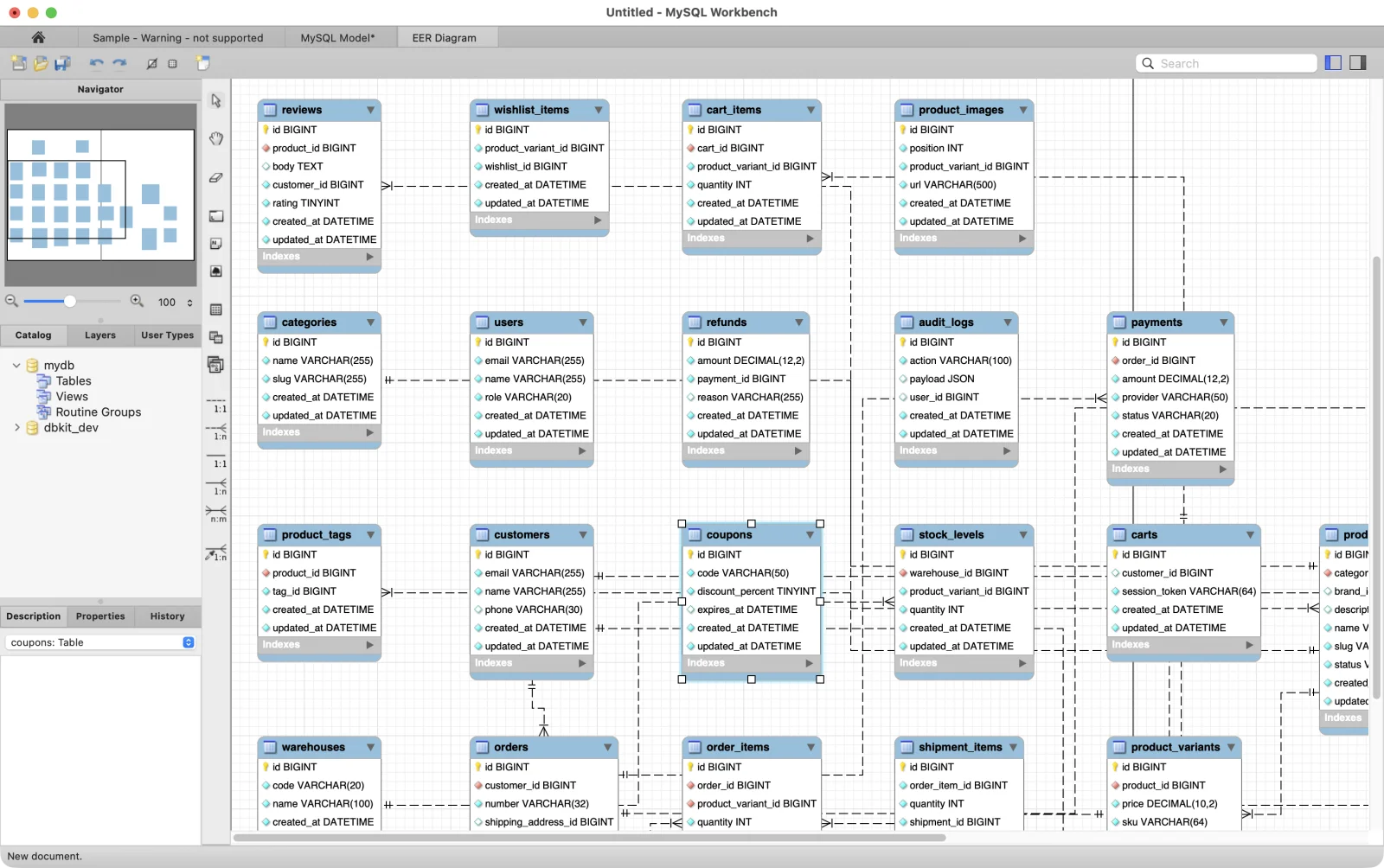
Workbench draws the 14 declared keys, dashed because it draws every non-identifying relationship that way, and nothing for the other 16: wishlist_items.product_variant_id, refunds.payment_id and audit_logs.user_id have no line of their own. The connection tab also shows the 8.4 caveat from the manual in practice: it reads “Warning - not supported”.
How Schemity Draws the Relationships MySQL Never Stored
Schemity reads the declared foreign keys first, the same as Workbench. Then it looks at what is left. A column like customer_id is split into tokens, the trailing id is dropped, and the rest is matched against table names and their singular forms, so customer_id finds customers. The referenced column is the table’s primary key, or failing that its only single-column unique key, or a column named id. Candidates are skipped when the column types disagree, when two tables could answer to the same name, when either side is a view, or when a real foreign key already covers the column.
Each match becomes a virtual relation: a relation Schemity documents but the database does not declare. A virtual relation is drawn dashed, saved in the diagram file, and never written to the database by a migration, a SQL export or a DBML export. One notification says how many were inferred, with a Remove all action, and a relation you delete is remembered so the next refresh does not bring it back. If you would rather see only what MySQL declares, inference can be turned off per connection.
On the schema above, orders.customer_id opens with a dashed line to customers, because both columns are BIGINT UNSIGNED; a signed customers.id would get no line.
The same 26-table shop in Schemity, connected to the same database:
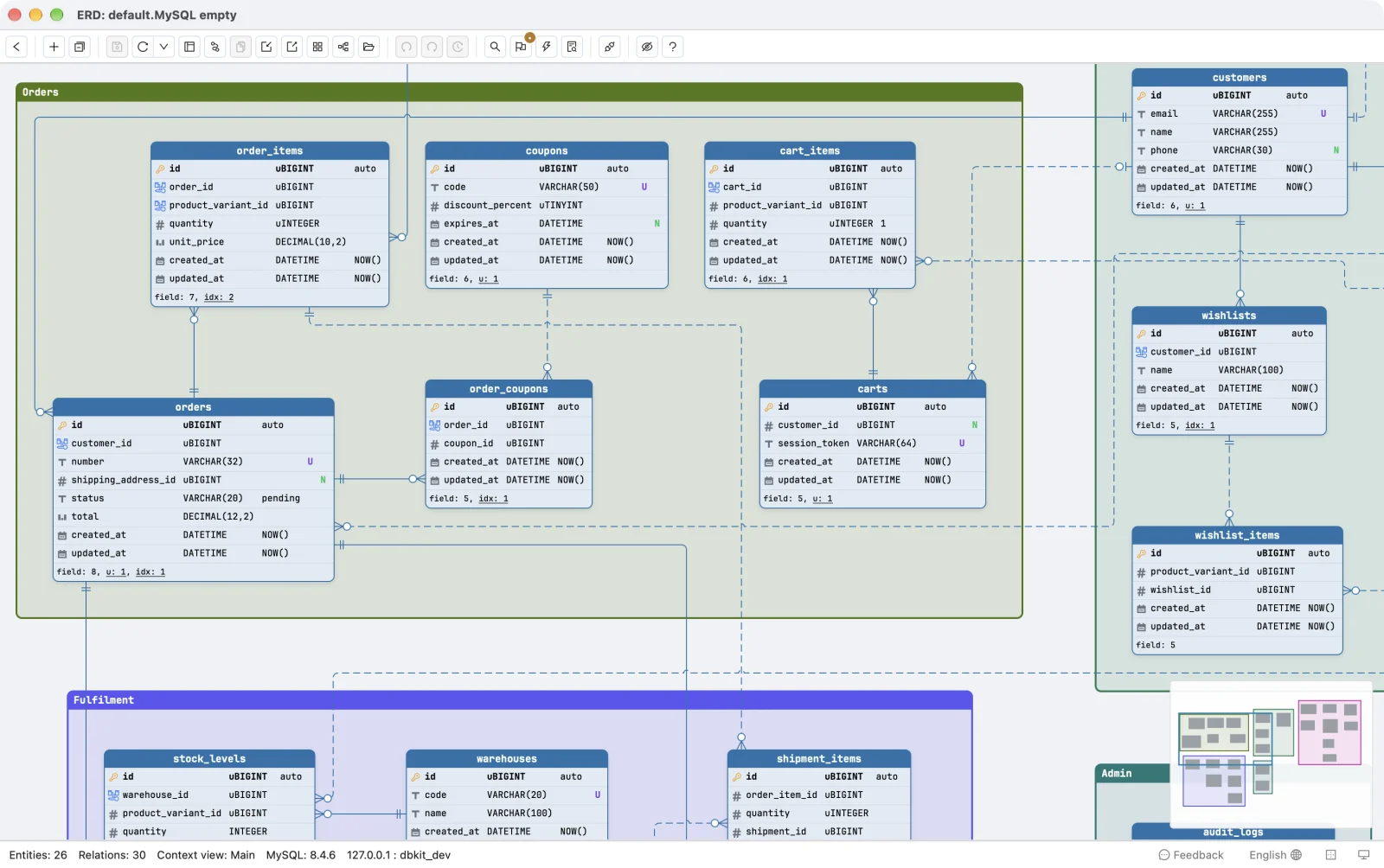
The status bar counts 30 relations: the 14 the database declares, solid, and the 16 inferred from column names, dashed. In Schemity a dashed line means the database does not enforce the link, so order_coupons.coupon_id and carts.customer_id read at a glance as references nothing protects. The line tells you the dependency exists. The dash tells you MySQL will not enforce it, so an order can still point at a customer that was deleted.
What Happens When You Reverse Engineer More Than 250 Tables?
The reverse engineering page of the Workbench manual states the limit itself: “Importing 250 or more objects could fail to create an EER diagram and instead emit a resource warning with the text ‘Too many objects are selected for auto placement. Select fewer elements to create the EER diagram.’”
The documented workaround is to run the wizard again with Place imported objects on a diagram unticked, create the EER diagram by hand, import the objects from the catalog, and then lay them out with Arrange, Autolayout or by hand. The wizard’s object list also includes views and routines, not only tables.
Schemity places every table it reads. It was tested on a generated PostgreSQL schema of 1,035 tables and 1,822 relations, which opens in about 10 seconds on a 16 GB M1 Pro because only the tables on screen are drawn up front. A minimap and a fuzzy search over table, column and legend names do the navigating, and context views split a large schema into focused diagrams by domain while the main view keeps every table. A context view is a sub-diagram of the same schema: the tables are shared, only the selection and layout differ.
Does the Diagram Stay in Sync With the Database?
Credit to Workbench here, because it has a real answer. Synchronize Model compares an .mwb model with a live database and lets you set each difference to Update Model, Update Source or Ignore, then save or run the SQL.
The difference is when it happens. A Workbench model is a file that changes when you run the wizard. Schemity re-reads the database each time you open the diagram with its connection available, and folds the changes into your layout: positions, colours, legends and relation routes stay where you put them, and tables the database gained since your last save arrive with a dashed border so you can find them. After an ORM migration runs outside Schemity, Refresh & merge does the same on demand, as one unsaved change you can review before saving.
Going the other way, an edit on the diagram becomes a migration SQL diff against the live database, and impact analysis reads it before anything runs: which statements fail on existing rows, which drop data, and which may rewrite the table, with the row count taken from table_rows so nothing is scanned. On MySQL it treats every column type change as a rewrite, the cautious reading, since MySQL copies the table for most of them. Nothing touches the database until you apply it.
Does It Keep MySQL’s Own Column Details?
A diagram that rounds MySQL off to generic SQL is a drawing, not a model. Schemity reads and writes the details MySQL schemas actually carry:
UNSIGNEDintegers, shown asuBIGINTon the canvas, with foreign key columns following their key’s sign, so a relation to a Laravel or WordPressBIGINT UNSIGNEDkey migrates instead of being refusedON UPDATE CURRENT_TIMESTAMP,AUTO_INCREMENTand columnCOMMENT- table and column character sets and collations
- prefix indexes such as
client_hash(20)and functional indexes ENUMandSETdefaults, and(CURDATE())and(CURTIME())defaults
These were tested by rebuilding two real MySQL schemas, Invoice Ninja and Sylius, from Schemity’s own SQL, which is where several of them were found missing and fixed. Connections take a pasted MySQL URI or a JDBC string, go direct or over SSH, and log in with IAM tokens on AWS RDS, Azure and Cloud SQL.
MySQL Workbench vs Schemity
| MySQL Workbench | Schemity | |
|---|---|---|
| What it is | SQL editor, administration, performance tools, modeling and migration in one app | Database design software: the diagram, migrations and their impact |
| ER diagrams today | Only in Workbench 8.0, end of life; none in Workbench 26 | The core of the product, in every release |
| Price | Free Community edition under the GPL | $129 one-time, 1 year of updates, 2-week free trial |
| Databases | MySQL, plus a migration wizard from other databases | MySQL, MariaDB, PostgreSQL, Supabase, SQL Server, SQLite |
| Server versions | Tested with MySQL 8.0; some features may not work on 8.4 and later | Tested against MySQL 8.4 |
| Diagram size | 250 or more objects may fail auto placement | Every table placed; tested at 1,035 tables (PostgreSQL) |
| Relationships | Drawn from stored foreign keys | Stored foreign keys, plus dashed relations inferred from column names |
| Staying current | Synchronize Model, run by hand | Re-read on open when connected, layout kept |
| Schema changes | Synchronize or forward engineer, then run the SQL | Migration SQL diff with impact analysis, applied only when you approve |
| Storage | .mwb model file | One JSON file per diagram, in a folder you choose |
| AI agents | None | Local database MCP server for Claude Code, Cursor and other MCP clients |
Where MySQL Workbench Wins
It is free, and it is Oracle’s. For a MySQL shop that wants its tools from the database vendor, that is a real reason.
It is more than a diagram. Running queries, managing users, reading performance reports and migrating from another database all live in Workbench. Schemity does none of them, so you will still want Workbench, or another SQL client, for the rest.
Model-first work is built into 8.0. Workbench 8.0 generates CREATE scripts and synchronization SQL from an EER model, and draws identifying and non-identifying relationships as solid and dashed lines.
It reads .mwb files. Schemity does not. Moving an existing model means pointing Schemity at the same database, or exporting the model through File, Export, Forward Engineer SQL CREATE Script and importing that SQL.
What Is a Good MySQL Workbench Alternative for ER Diagrams?
For the diagram specifically, the questions that decide it are the two above. Does the tool still place every table when the schema passes a few hundred? And does it show the dependencies MySQL never stored, without pretending the database enforces them?
For a large or undocumented MySQL schema, Schemity is built to answer both, which is what lets you understand your schema before you change it: every table on one canvas, the declared keys solid, the inferred ones dashed, and a diagram that is current each time you open it.
Who Should Use MySQL Workbench
- You want one free tool for queries and administration, and can keep an unmaintained Workbench 8.0 for modeling.
- Your schemas are under a couple of hundred objects and declare their foreign keys.
- Your team already keeps
.mwbmodels and forward engineers from them.
Who Should Use Schemity
- Your MySQL or MariaDB schema has hundreds of tables, or arrived without foreign keys.
- You want the diagram to match the database every time you open it, without running a wizard.
- You want each schema change reviewed with its cost before it runs, and the diagram kept in Git.
The Bottom Line
MySQL Workbench is a capable free toolbox, but its modeling now lives only in the unmaintained 8.0 line, and works best on a schema that is small and declares its keys. When the reverse engineer shows no relationships or stops at the placement warning, keep Workbench for queries and administration, and connect Schemity to the same database for the diagram.
For how the scale test behaved, read what breaks when a database diagram reaches 1,000 tables; for the MySQL details, round-tripping Invoice Ninja and Sylius through a database diagram; and if your diagram ever had to draw a 1:1 relationship, why ERD tools draw 1:1 relationships as 1:N.
Frequently asked questions
Does MySQL Workbench 26 have an ER diagram?
Not as of October 2026. Oracle's product page for the rebuilt Workbench lists developing, administering, analyzing performance and backup and migration, with no data modeling, and says earlier Workbench releases are end of life. EER diagrams, Reverse Engineer and Synchronize Model are Workbench 8.0 features, and 8.0.47 from April 2026 is the last 8.0 release.
What does the MySQL Workbench error Too many objects are selected for auto placement mean?
Oracle's manual says importing 250 or more objects could fail to create an EER diagram with that warning. The documented workaround is to reverse engineer with Place imported objects on a diagram unticked, create the diagram by hand and drag the objects in from the catalog. Schemity places every table automatically and has been tested on a generated 1,035-table schema.
Is there a free MySQL Workbench alternative?
Schemity Lite is free and runs in the browser, and it imports CREATE TABLE statements, but it does not connect to a live database. The desktop app connects to MySQL and MariaDB directly and costs $129 once, with a 2-week free trial and no credit card.