DrawSQL is a well-made browser ERD editor, and the alternative worth switching to depends on which of its limits you hit. If it is the size of your model, the privacy of a free diagram, or the fact that the diagram is a copy you paste in by hand, you want database design software that reads the database itself. Schemity is database design software that reads your live database, shows the impact of every schema change before it runs, and keeps the diagram as a file in Git.
This page sets the two side by side as of 29 October 2026: what DrawSQL costs, what it can and cannot do with a real database, where its canvas lets you draw something no database would accept, and where DrawSQL is simply the better choice.
What Does DrawSQL Cost in 2026?
DrawSQL is free for public diagrams of up to 15 tables, and paid plans run from $19 to $179 a month, with the plan deciding how many tables a diagram may hold.
Verified on DrawSQL’s pricing page on 29 October 2026, at the default monthly billing:
| Plan | Price | Private diagrams | Tables per diagram | Users |
|---|---|---|---|---|
| Free | $0 | None, every diagram is public | 15 | 1 |
| Starter | $19/mo or $171/yr | 10 | 50 | 1 |
| Growth | $59/mo or $531/yr | Unlimited | 100 | Up to 5 |
| Large | $179/mo or $1,790/yr | Unlimited | Unlimited | Up to 25 |
| Enterprise | Custom | Unlimited | Unlimited | Unlimited |
The free plan has three limits that matter for professional work, and they compound:
- 15 tables. A real application schema passes that before it reaches its second domain. The example in the screenshots below has 19 tables and is a small shop.
- Public by default. A free diagram is a public diagram. If the schema belongs to a client or sits under an NDA, the free plan is not an option.
- No SQL out. DrawSQL’s plan table marks export (SQL, JSON and PNG) and version history as paid, so a free diagram cannot be exported as SQL, the one format another database tool can read.
DrawSQL also runs a separate no-account canvas at drawsql.app/draw: up to 20 tables, kept in your browser’s local storage until you sign up, with shared links that its own guide says expire after 30 days of inactivity. It is a good sketch pad, not a home for a schema.
The table cap only disappears at $179 per month. Schemity is $129 once, with no limit on tables, diagrams or workspaces, no seats, and no subscription. That is less than one year of Starter at its annual rate.
Does DrawSQL Connect to Your Database?
No: DrawSQL has no database connection, and every way into it is text.
Its import documentation covers SQL DDL, DBML, a Rails schema.rb and DrawSQL’s own JSON, and its MCP server takes “SQL DDL or a DrawSQL schema patch” from you or your agent. No page offers a connection, a credential, or a step that reads a database.
So the diagram is a copy. It is accurate on the day you paste it, and the first migration after that makes it wrong. Keeping it right means dumping the schema again, pasting it again, and redoing the arrangement, which is the loop that makes keeping an ERD current a second job.
Schemity can read the database itself, which DrawSQL cannot, and it also imports SQL and designs with no database at all (both covered below). To read one, you create a connection, directly or over an SSH tunnel, and Schemity reverse engineers the schema: tables, columns, types, defaults, CHECK constraints, unique constraints, views, and every foreign key as a relationship with its ON DELETE and ON UPDATE actions. Passwords go to the operating system keychain. Here is a 19-table PostgreSQL 18.3 database as Schemity read it, grouped into four domains:
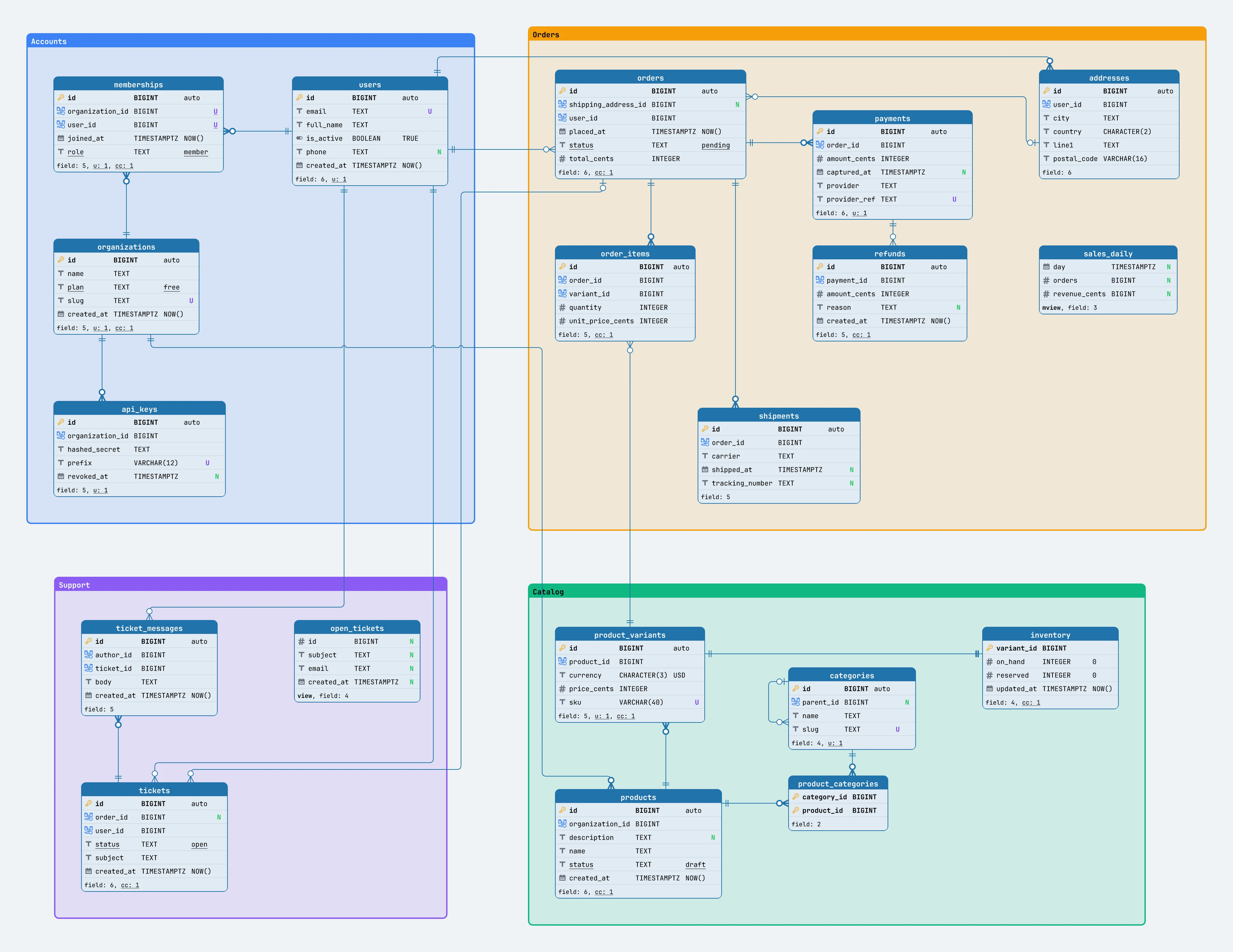
Nothing in that diagram was typed. The auto keys are identity columns, pending, free and draft are underlined because each is one of its column’s CHECK values, the inventory relationship is drawn 1:1 because its foreign key is also its primary key, and sales_daily and open_tickets are marked mview and view in their footers because the database says they are views. Reopen the diagram after a migration and Schemity reads the schema again: tables you placed keep their position, dropped ones disappear, and new ones arrive ready to place.
A database is not required, though. A design-only diagram needs no host or credentials: you pick PostgreSQL, MySQL, SQL Server, SQLite or Snowflake, and that dialect decides the types you can choose and the SQL Schemity writes. Schema that arrives as text works too, since importing a SQL dump or a set of CREATE TABLE statements builds the same diagram.
Can You Draw a Schema DrawSQL Cannot Export?
Yes: in our test its canvas accepted a foreign key between two plain columns and two tables with the same name, neither of which a database would build.
We spent an afternoon in the DrawSQL editor on 4 August 2026 building an ordinary tasks-and-comments schema, and the canvas accepted two things no relational database would.
A foreign key between two arbitrary columns. Drag from users.name to tenants.name, two plain varchar columns, neither of them a key, and DrawSQL draws the relationship.
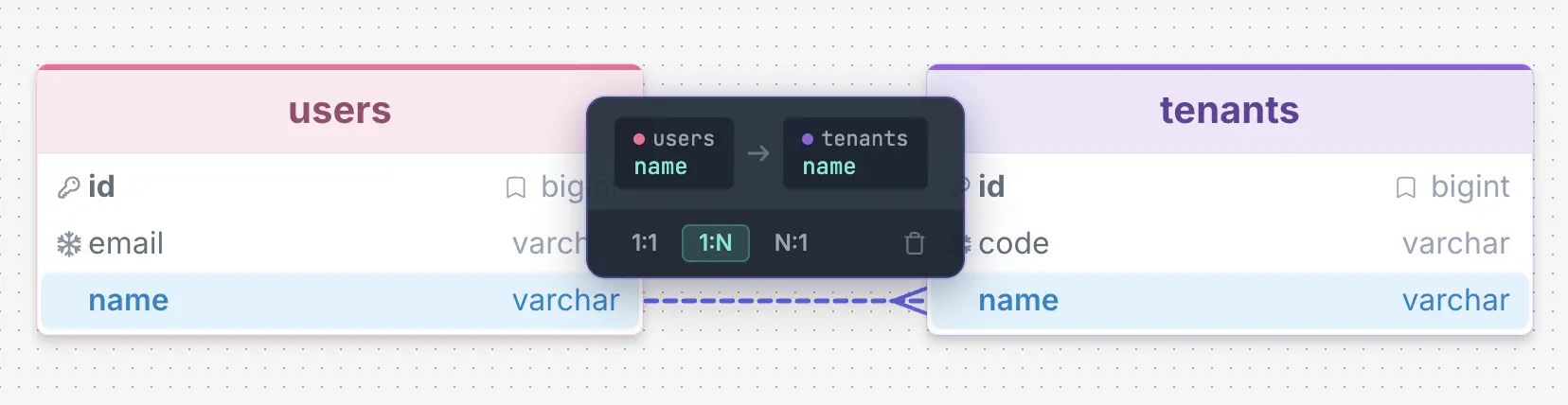
PostgreSQL and SQL Server require a foreign key to reference a primary key or a unique constraint, and MySQL at least an indexed column; tenants.name is none of those. The line looks like a foreign key and is labelled 1:N like one, but it describes a constraint every engine would reject. In the editor we tested, the popover was all a relationship offered: two endpoints, three cardinality buttons and a delete icon. There is no ON DELETE or ON UPDATE action and no constraint name, and DrawSQL’s documentation index has articles for tables, columns, indexes, groups and sticky notes, but none for relationships. The one cardinality missing from those buttons is N:N, the only one a relational database cannot store without a junction table.
Two tables with the same name. In our test, copying a table and pasting it produced a second table named users, with no rename and no warning.
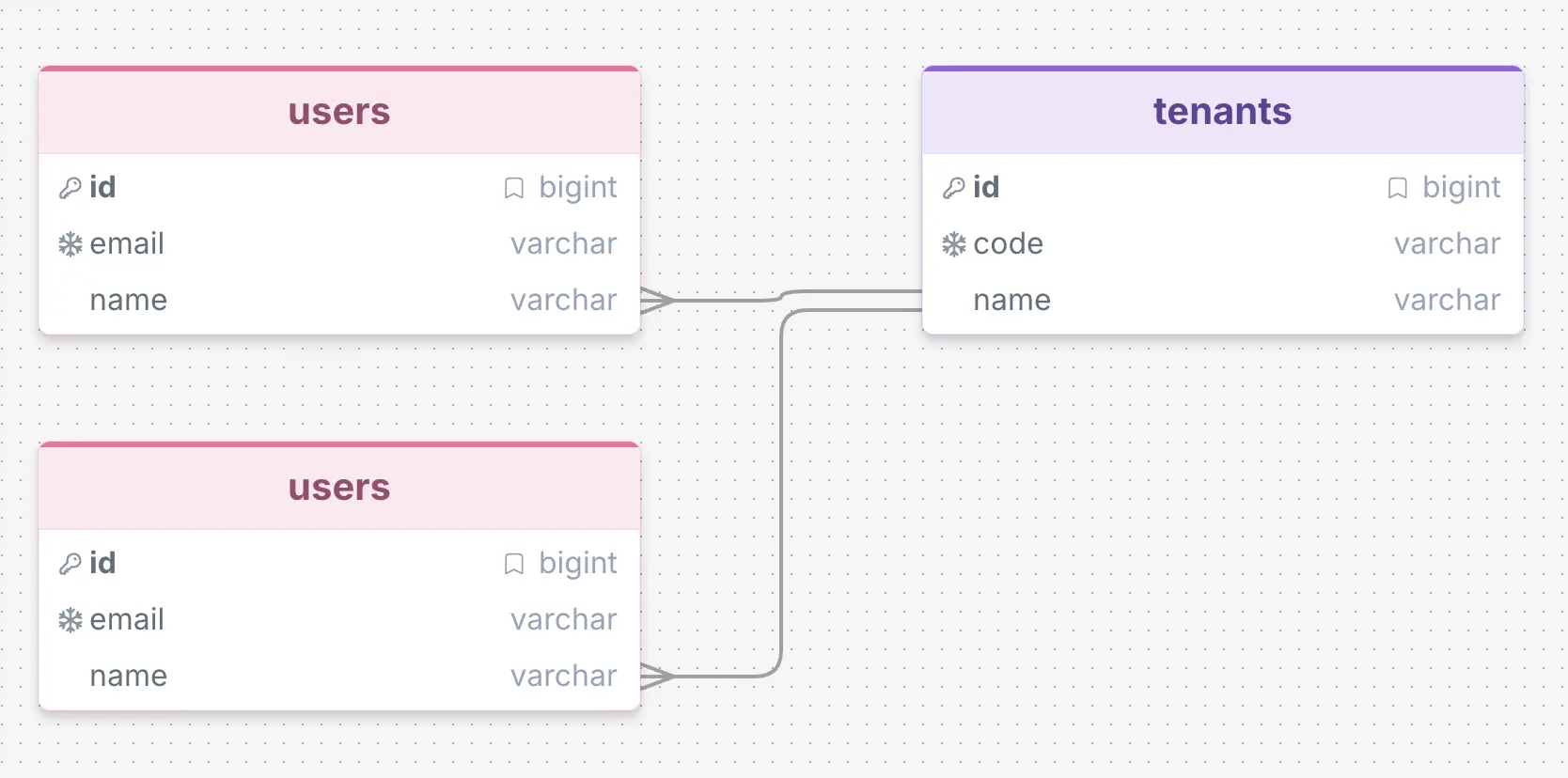
CREATE TABLE users twice in one schema is invalid in every engine DrawSQL supports, so the diagram now describes something that cannot be built. To be fair, DrawSQL is partly a sketching tool, and a sketch pad that lets you draw a half-formed idea is a defensible choice. But SQL export is a listed feature, which sets the expectation that what you draw is a schema.
Schemity treats a relationship as a foreign key with rules. You drag from the parent table to the child, and Schemity creates the foreign key column on the child pointing at the parent’s primary key, so name to name cannot be drawn in the first place, and a duplicate table name is rejected. Every relationship then opens as the constraint it is:
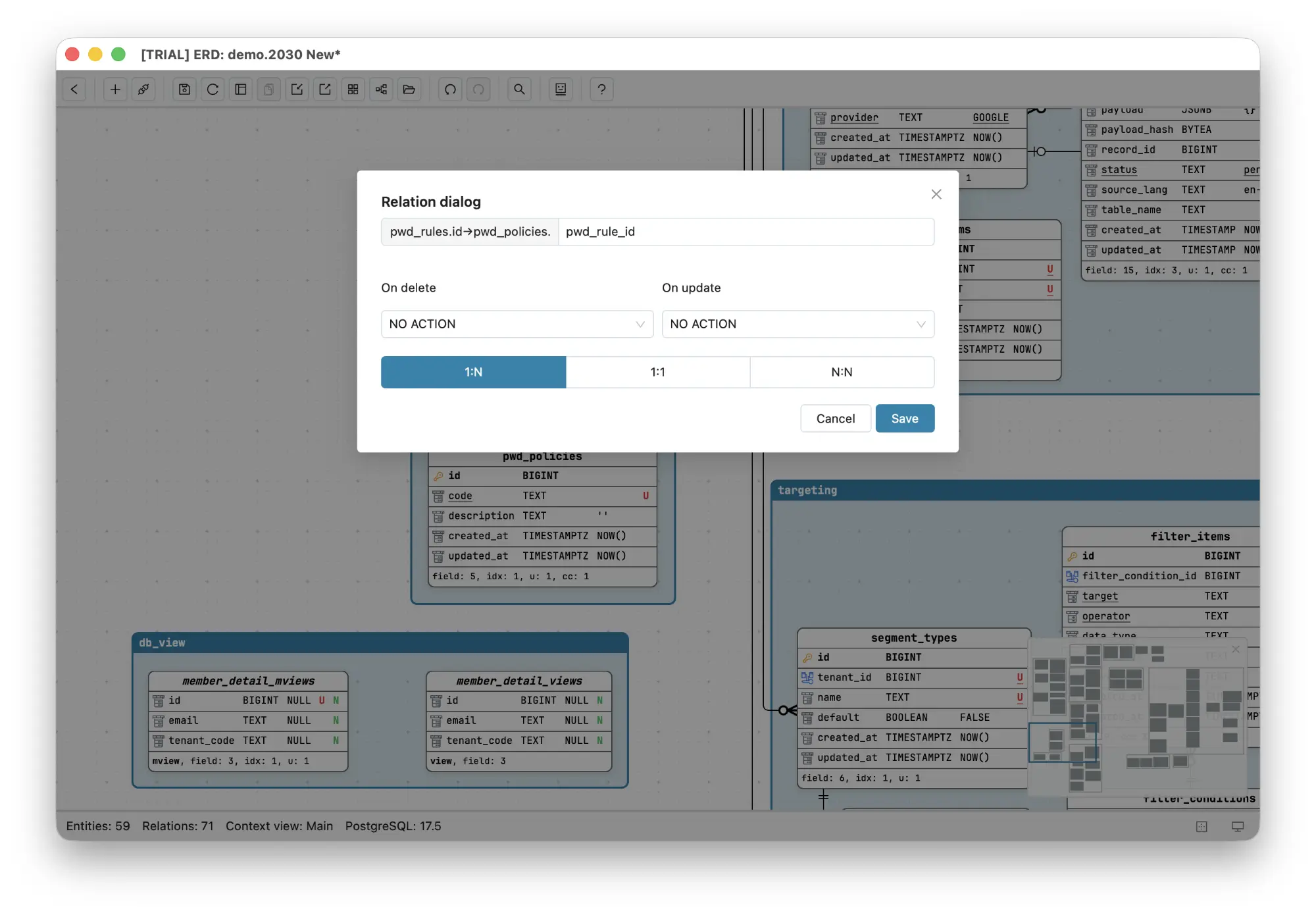
The endpoints and the constraint name, orders_user_id_fkey, are read from the database and cannot be redrawn. Whether the relationship is 1:1 or 1:N is not a button either: it follows from whether the foreign key is unique, which is why a 1:1 does not silently import as a 1:N. What you choose is what the database cannot tell you, whether a user has zero or more orders or at least one, plus the parts DrawSQL has no field for: On delete and On update, which decide how far a DELETE travels, and on PostgreSQL, whether the key is checked on each statement or at commit. An N:N relationship is one gesture that builds the junction table with both foreign keys and a composite primary key.
What Happens When You Change the Schema?
In DrawSQL only the drawing changes, and the ALTER TABLE and its effect on existing rows are yours to work out; in Schemity, a connected diagram shows the migration and what it will do to the database before it runs.
DrawSQL’s SQL export writes “a CREATE TABLE per table” for the whole diagram, not a migration from what the database holds now. DrawSQL AI can review a schema and show its own edits as a diff, but it works on the diagram: nothing in DrawSQL knows how many rows a table holds or what else in the database reads a column.
In Schemity, when the diagram is connected to a database, a change becomes a plan against the real one. Delete orders.placed_at from the shop diagram and open Preview changes:
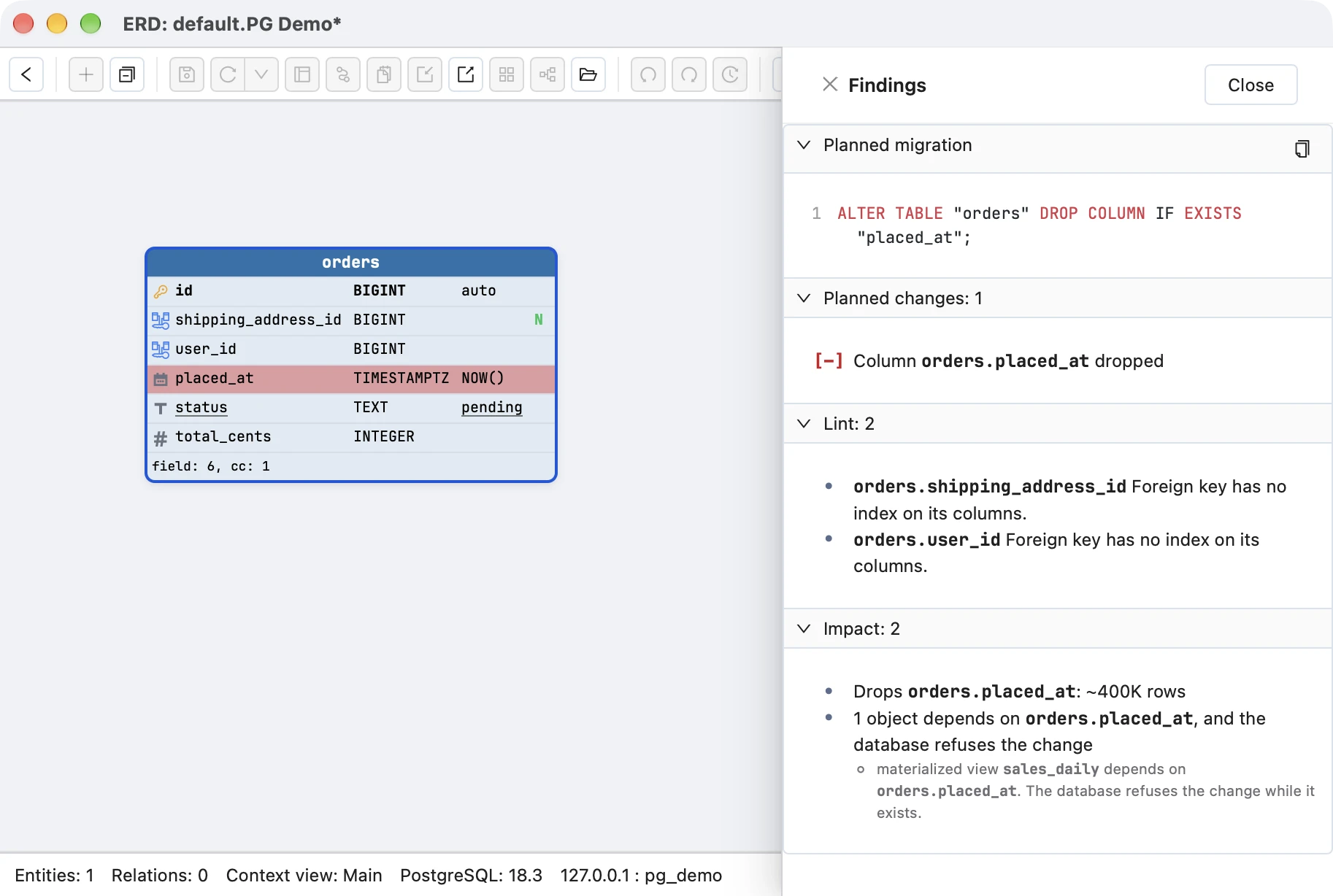
That screen is the review DrawSQL leaves to you. It shows the exact SQL that would run, says the drop would take a column of about 400,000 rows with it, and names the materialized view sales_daily, which reads the column, so PostgreSQL would refuse this statement until the view is dealt with. Impact analysis reads the database to find these, and lint adds what the change leaves unsolved, here two foreign keys with no index. Nothing runs until you approve the migration SQL diff, and on a connection marked Production, Schemity asks for the database name first. The same review works on a pull request: the reviewer opens its migration file, whether a person, an ORM or an AI agent wrote it, against their own connected diagram, and sees it drawn and priced the same way, with no branch to check out.
DrawSQL vs Schemity
DrawSQL is a shared browser canvas metered by tables, and Schemity is desktop database design software that can read the database and preview each schema change against it, and costs $129 once.
| DrawSQL | Schemity | |
|---|---|---|
| What it is | Browser ERD editor for teams | Database design software, as a desktop app (macOS, Windows, Linux) |
| Getting the schema in | Paste SQL DDL, DBML, Rails schema.rb or JSON | Read the live database directly or over SSH; SQL import too |
| Databases | MySQL, PostgreSQL, SQL Server | PostgreSQL, Supabase, MySQL, MariaDB, SQL Server, SQLite; Snowflake for design |
| Keeping it current | Re-import by hand | Read again on every open, layout kept |
| Relationships | Endpoints, three cardinality buttons, delete | Real foreign keys: name, ON DELETE/ON UPDATE, cardinality from uniqueness |
| What the canvas allows | Foreign keys between any columns; duplicate table names | Foreign keys to the primary key; duplicate names rejected |
| Applying a change | Export a full CREATE script and work out the ALTER yourself | Connected: migration SQL, lint and impact against the live database, applied only on approval. Design-only: CREATE TABLE scripts |
| Image export | WebP or JPG; SVG on paid plans | PNG, JPEG and editable vector SVG |
| Other exports | SQL, JSON, Laravel migrations | SQL for any of five databases, DBML, Mermaid, PlantUML, D2, OpenAPI, data dictionary |
| Table limit | 15 free, 50 Starter, 100 Growth, unlimited at $179/mo | None |
| Free use | 15 tables, public, no SQL export | Two-week trial with everything; after it, design-only diagrams on your disk with PNG, JPEG and JSON export |
| Where diagrams live | DrawSQL’s cloud | JSON files in a folder you choose, ready for Git |
| AI | DrawSQL AI, 500 credits per team member per month on paid plans | A local database MCP server for Claude Code, Cursor or any MCP host |
| Collaboration | Live cursors from Growth ($59/mo); discussions, guest links | One designer at a time; a reviewer opens the pull request’s migration in the change preview |
| Price | $19 to $179/month | $129 once |
How Do You Move From DrawSQL to Schemity?
If the database exists, connect Schemity to it and skip DrawSQL’s export; if the schema lives only in DrawSQL, export it as SQL on a paid plan and import the file.
- The database exists. Skip the export entirely. Connect Schemity to the database and the diagram is built from the real schema, which is more accurate than anything DrawSQL holds.
- The schema lives only in DrawSQL, on a paid plan. Export it as SQL (DDL) and open the file with Schemity’s Import SQL. Tables, columns and foreign keys arrive as a diagram in the same dialect.
- The schema lives only in DrawSQL, on the free plan. The plan table marks SQL export as paid. Either upgrade for a month to export the SQL, or rebuild the schema in Schemity.
- The schema started as DBML. If you pasted DBML into DrawSQL, keep the source: open the same
.dbmlfile with Schemity’s Import DBML on a new diagram’s empty canvas, on any DrawSQL plan. Tables, references and enums arrive with your database’s own column types, laid out fresh.
The same empty canvas also opens the model files of other database design software directly, Visual Paradigm, MySQL Workbench, Navicat and DbSchema, with their table positions, if part of the schema lives in one of those.
Once it is in Schemity, the diagram is a plain JSON file in a workspace folder on your disk. Put the folder in your repository and the design is versioned with the code, with history and revert, and no vendor holding it.
A schema too large for one canvas becomes several focused ones. Legends group the tables by domain, and Sync from legends turns every legend into a context view in one click: a context view is a focused subset of the main diagram that you arrange freely while the main diagram stays the single source of truth. The Context Map then draws each context view as one box, with an arrow and a count for the foreign keys between them:
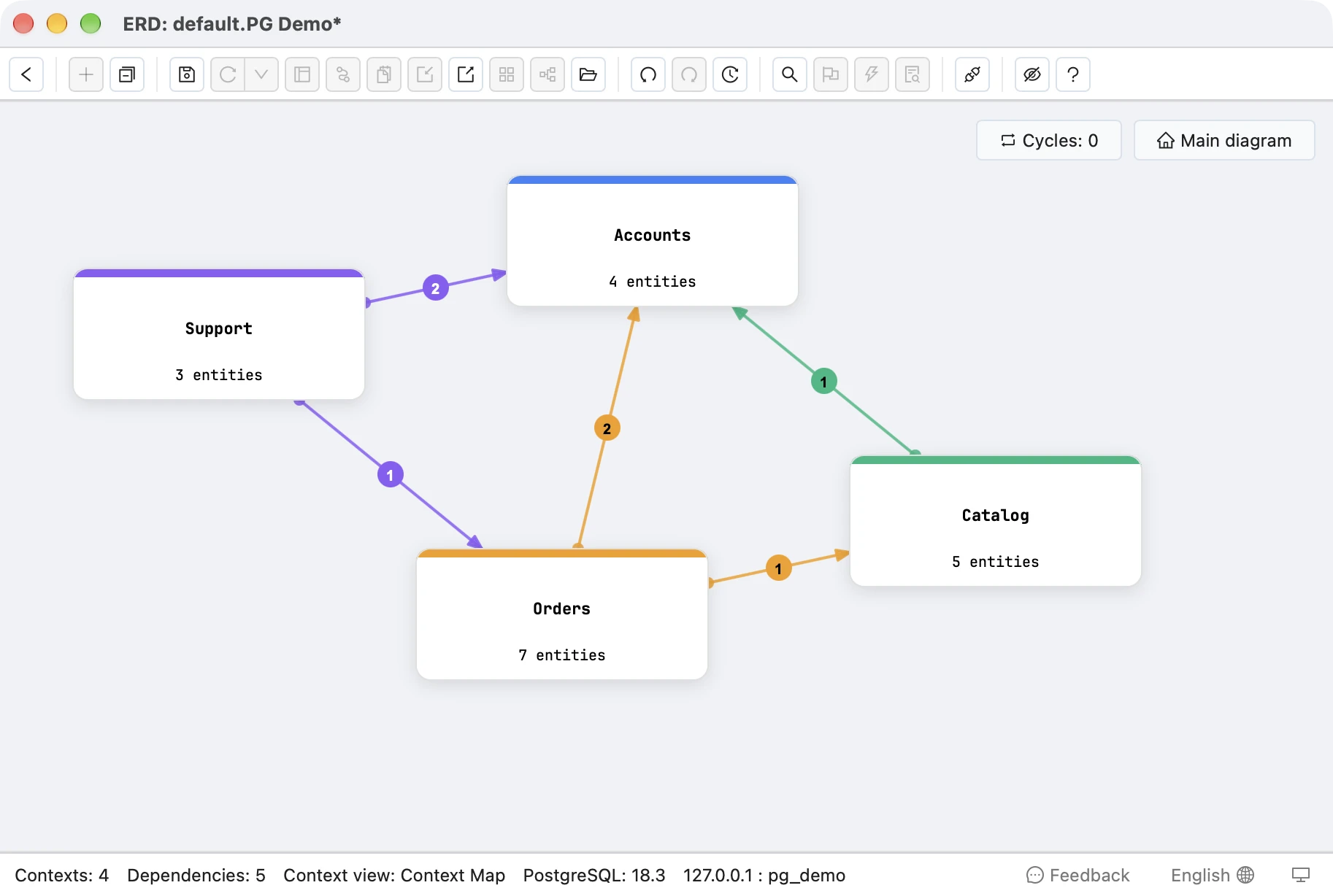
DrawSQL’s table groups color a region of one canvas. A context view is a diagram of its own, and the map shows which domains depend on which. It is the reason you do not need a diagram of all 800 tables.
Where DrawSQL Wins
DrawSQL is the better choice for live multiplayer editing, sticky notes on the canvas, opening a public diagram from a link, Laravel migration export, and a free start for public schemas.
This is DrawSQL at its best, from its own site:
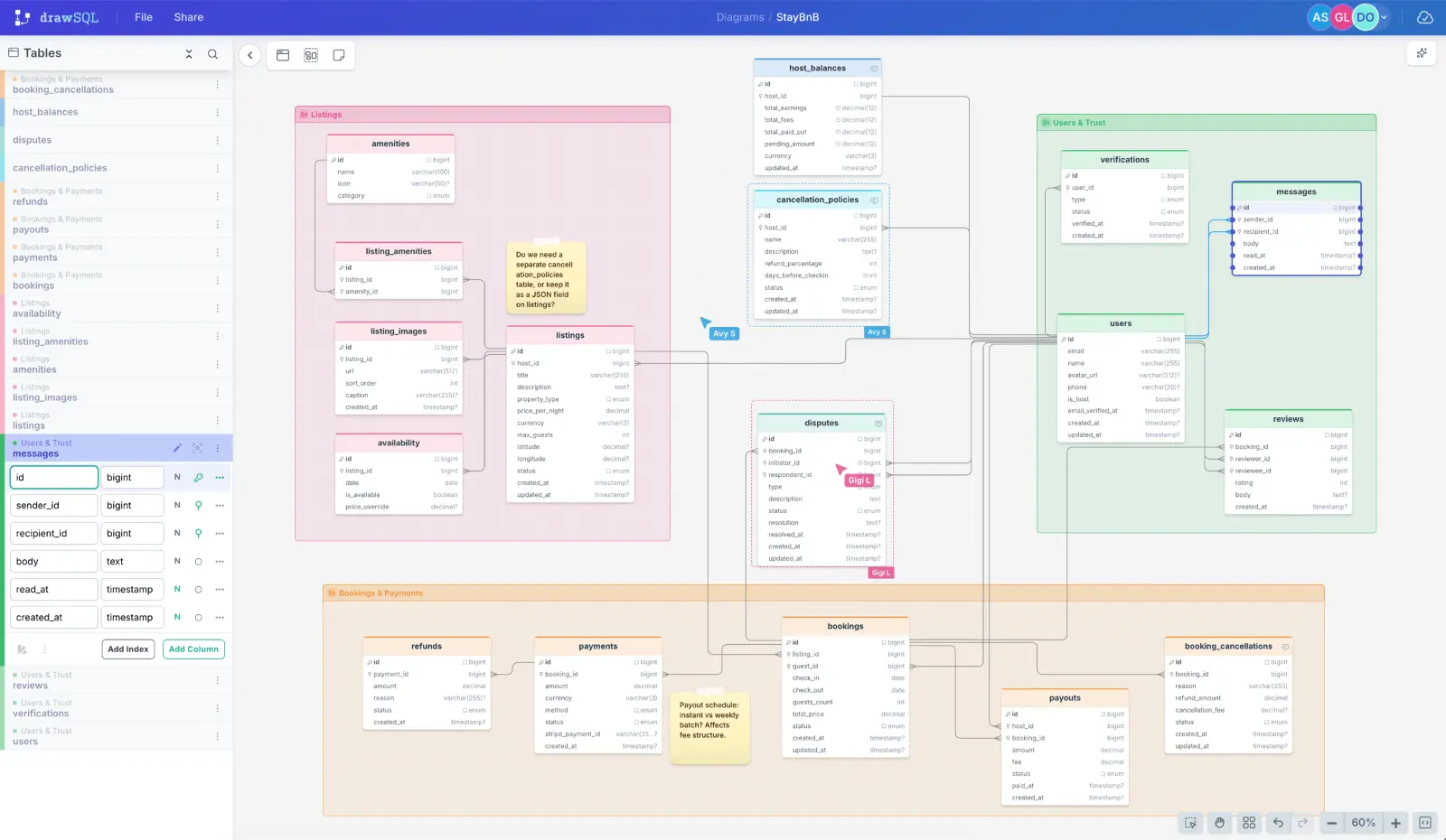
Real-time multiplayer editing. Live cursors, simultaneous edits and discussion threads on the canvas, from the $59/month Growth plan up. Schemity does not do this and does not plan to: one designer holds the pen, and others review the change itself, the migration opened in the change preview. If your modeling sessions are three people on one canvas, DrawSQL is built for that.
Sticky notes. DrawSQL lets a team park an open question anywhere on the canvas. Schemity attaches notes to a table, a legend or a context view as markdown descriptions, which move and disappear with their subject, but cannot be pinned to empty space for a table that does not exist yet.
A link, not an install. Anyone with the link to a public DrawSQL diagram can open it in a browser. Schemity is an app the reader has to install.
Laravel migrations. DrawSQL exports Laravel migration files directly. Schemity writes SQL: a migration diff for a connected database, or CREATE TABLE scripts in any of five dialects.
A free start for public schemas. Fifteen tables on a public URL is a real starting point when the schema is not confidential, and for open-source projects, publishing is the point. Schemity’s desktop app is a two-week trial with every feature. After it, design-only diagrams stay free with PNG, JPEG and JSON export, while connecting to a database, SQL export, lint and impact analysis need the $129 license.
If what you value in DrawSQL is the shared canvas, keep it for that. If what you value is an accurate diagram of a database you have to keep changing safely for years, compare the others too: the ChartDB alternative, the dbdiagram.io alternative, the DbSchema alternative and the Visual Paradigm alternative.
Frequently asked questions
Is DrawSQL free?
Partly. The free plan allows diagrams of up to 15 tables, and every free diagram is public. DrawSQL's own plan table marks private diagrams, export (SQL, JSON and PNG) and version history as paid features, so a free diagram cannot be exported as SQL or rolled back. Private diagrams start at $19/month on Starter, which allows 50 tables per diagram.
Does DrawSQL connect to a database?
No. Schema gets into DrawSQL as text: pasted CREATE TABLE statements, DBML, a Rails schema.rb or DrawSQL's own JSON. Its MCP server also takes DDL text that you or your agent supply. Nothing in the product opens a connection to your database, so the diagram has to be re-imported by hand whenever the schema changes.
What is a good DrawSQL alternative?
It depends on what you used DrawSQL for. If it was the shared canvas, with live cursors and discussions, keep DrawSQL for that. If it was the diagram of a real database, Schemity reads the database directly, keeps the diagram current on every open, shows the migration SQL and its impact before a change runs, and stores the diagram as a file in Git, for $129 once with no table limit.