The diagram of a Cloudflare D1 schema should be read from the remote database, not from the local file wrangler keeps or from a SQL export. A D1 project holds the same schema in three places, and nothing keeps them equal: wrangler d1 migrations apply writes to the local file unless you add --remote, and a statement run in the dashboard console or with wrangler d1 execute --remote never reaches a migration file at all. The local file tells you what your branch will ship. The remote database tells you what production is, and that is the question a diagram is usually asked.
Everything below ran on 18 November 2026 with wrangler 4.151.3: a two-migration project, its local database, and a scratch D1 database created for this post in Cloudflare’s APAC region.
Where does a Cloudflare D1 schema live?
A D1 schema lives in three places: the SQL files in your migrations folder, a local SQLite file that wrangler creates for development, and the deployed database on Cloudflare.
The test project has two migrations. The first creates customers and orders, the second adds order_items:
-- migrations/0001_init.sql
CREATE TABLE customers (
    id INTEGER PRIMARY KEY AUTOINCREMENT,
    email TEXT NOT NULL UNIQUE COLLATE NOCASE,
    created_at TEXT NOT NULL DEFAULT CURRENT_TIMESTAMP
);

CREATE TABLE orders (
    id INTEGER PRIMARY KEY AUTOINCREMENT,
    customer_id INTEGER NOT NULL REFERENCES customers (id) ON DELETE CASCADE,
    status TEXT NOT NULL DEFAULT 'pending' CHECK (status IN ('pending', 'paid', 'shipped')),
    total_cents INTEGER NOT NULL CHECK (total_cents >= 0),
    created_at TEXT NOT NULL DEFAULT CURRENT_TIMESTAMP
);

CREATE INDEX orders_customer_id_idx ON orders (customer_id);

-- migrations/0002_order_items.sql
CREATE TABLE order_items (
    id INTEGER PRIMARY KEY AUTOINCREMENT,
    order_id INTEGER NOT NULL REFERENCES orders (id) ON DELETE CASCADE,
    sku TEXT NOT NULL,
    quantity INTEGER NOT NULL CHECK (quantity > 0)
);

CREATE INDEX order_items_order_id_idx ON order_items (order_id);
The local database is an ordinary SQLite file at .wrangler/state/v3/d1/miniflare-D1DatabaseObject/<64 hex characters>.sqlite. Cloudflare’s local development guide says it plainly: “wrangler dev separates local and production (remote) data.” Once a migration has run, each database also carries a d1_migrations table (the default name), where wrangler records which files it has applied, as the migrations reference describes.
How do the local and remote D1 databases drift apart?
They drift because wrangler d1 migrations apply, execute and export each act on one database, the local one unless you add --remote, and because production accepts changes that no migration file records.
The first migration had been deployed with npx wrangler d1 migrations apply shop --remote before the second file existed. Later, running npx wrangler d1 migrations apply shop with no flag applied both files and printed where they went:
🌀 Executing on local database shop from .wrangler/state/v3/d1:
🌀 To execute on your remote database, add a --remote flag to your wrangler command.
That default is easy to get wrong, because the Pages section of Cloudflare’s local development guide still says the opposite: “Without the --local flag, the commands are executed against the remote version of your D1 database”. On wrangler 4.151.3 the message above is what happens. The deployed database still had only the first migration. Asking each side which files are pending gives two different answers:
$ npx wrangler d1 migrations list shop
✅ No migrations to apply!

$ npx wrangler d1 migrations list shop --remote
Migrations to be applied:
│ 0002_order_items.sql │
The drift also runs the other way. One statement fixed a slow query in production and was never written into a migration file:
npx wrangler d1 execute shop --remote --command "CREATE INDEX orders_status_idx ON orders (status)"After one remote apply, one local apply and one statement run by hand, the two databases disagree in both directions:
| Local file | Remote database | |
|---|---|---|
customers, orders | Yes | Yes |
order_items and its index | Yes | No |
orders_status_idx | No | Yes |
d1_migrations rows | 2 | 1 |
| Cloudflare’s own table | _cf_METADATA | _cf_KV |
A diagram drawn from the local file shows a table production does not have and misses an index production relies on. Nothing in the project folder reveals the index: it exists only in the remote database.
Is a wrangler d1 export a good source for a D1 schema diagram?
An export is an accurate schema script on the day you take it, and it goes stale with the next migration or the next statement run by hand.
npx wrangler d1 export shop --remote --no-data --output schema.sql returned this for the remote database, with the hand-made index and without order_items:
PRAGMA defer_foreign_keys=TRUE;
CREATE TABLE IF NOT EXISTS "d1_migrations"(
		id         INTEGER PRIMARY KEY AUTOINCREMENT,
		name       TEXT UNIQUE,
		applied_at TIMESTAMP DEFAULT CURRENT_TIMESTAMP NOT NULL
);
CREATE TABLE customers ( ... );
CREATE TABLE orders ( ... );
DELETE FROM sqlite_sequence;
CREATE INDEX orders_customer_id_idx ON orders (customer_id);
CREATE INDEX orders_status_idx ON orders (status);
Three things are worth knowing before you build on it. The script includes wrangler’s d1_migrations bookkeeping table, so anything that draws the script draws that table too. It leaves out _cf_KV. And Cloudflare’s import and export guide lists two limits: export is not supported for a database with virtual tables, such as an FTS5 full-text index, and “a running export will block other database requests”.
Why can a SQLite client not open a remote D1 database?
A remote D1 database has no file and no port to connect to: it answers SQL only over Cloudflare’s HTTP API, and that API refuses some statements SQLite tools depend on.
The API is one endpoint, POST /accounts/{account_id}/d1/database/{database_id}/query, which the API reference opens to a token with D1 Read or D1 Write. On the scratch database it answered these catalog questions as follows:
| Statement | Remote D1 | Local wrangler file |
|---|---|---|
SELECT name, sql FROM sqlite_master | Works | Works |
SELECT * FROM pragma_table_xinfo('orders') | Works | Works |
SELECT sqlite_version() | Refused: not authorized to use function: sqlite_version (code 7500) | Refused through wrangler, works in sqlite3 |
A pragma function joined to sqlite_master, as FROM sqlite_master m, pragma_table_xinfo(m.name) | Refused: not authorized: SQLITE_AUTH (code 7500) | Works |
SELECT * FROM sqlite_stat1 | no such table: sqlite_stat1 | No such table until ANALYZE runs |
PRAGMA foreign_keys = OFF | Accepted, and PRAGMA foreign_keys still returns 1 | Same through wrangler |
The last row matters for anyone changing a table: Cloudflare’s foreign keys page says D1 enforces foreign keys by default and that “user queries cannot change this during a query or migration”. The join in the fourth row is how many schema readers fetch every table’s columns in one query, so a tool written for SQLite files cannot be pointed at D1 by swapping the transport. Reading the catalog is also billed like any other query: the statement that lists tables and views reported rows_read: 41 on this two-table database.
Cloudflare D1 local vs remote schema: which should the diagram come from?
The remote database, unless the question is what your branch will change, in which case the local file is the right source.
| Source | What it shows | What it misses | Use it for |
|---|---|---|---|
migrations folder | The intended history, statement by statement | Whether each file ran, and everything done outside the files | Code review of one change |
Local .sqlite file | What your branch builds, including unmerged migrations | Changes made directly on production | Checking a migration before it ships |
wrangler d1 export --remote | Production, on the day of the export | Every change after that day; databases with virtual tables cannot be exported | A one-off snapshot, or a script to design from |
| Remote database, read live | Production now | Migrations that have not been applied yet | The diagram the team reads |
Documentation, onboarding and incident work all ask what production looks like, so the shared diagram should follow the remote database and be refreshed after each deploy. The local file answers a narrower and equally real question, what this branch adds, and it is worth opening next to the remote one before a release: the difference between the two is exactly what the deploy will change, plus whatever someone changed by hand.
How does Schemity read a remote Cloudflare D1 database?
Schemity has Cloudflare D1 as its own database type: it reads the schema over Cloudflare’s API, lets you design on the diagram, and never writes to the database.
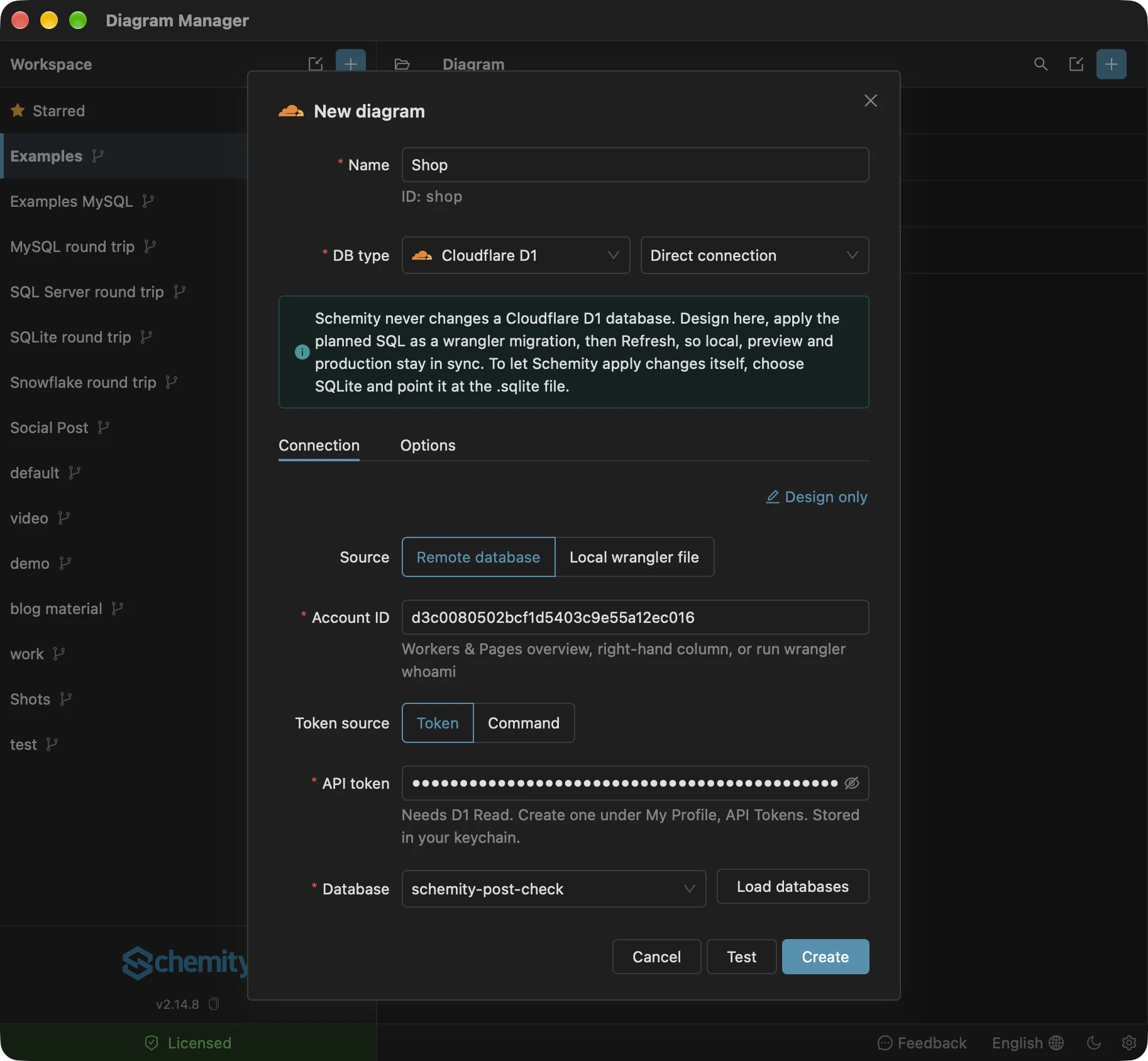
Schemity is database design software that reads your live database, shows the impact of every schema change before it runs, and keeps the diagram as a file in Git. Cloudflare D1 is its own entry in the DB type list, beside SQLite, whose SQL it speaks. Its form offers two sources, Remote database and Local wrangler file, and the remote one asks for three things:
- Account ID: on the Workers & Pages overview, or from
wrangler whoami. - API token: one with D1 Read, kept in your operating system’s keychain, never in the diagram file.
- Database: Load databases lists the account’s D1 databases by name, or paste the database ID.
The reader asks for the schema in a fixed number of rounds, not one call per table: the list of tables and views, then every table’s columns, keys and indexes, then every index’s columns. Each round is sent as batch requests of up to 500 statements, using only the statements D1 accepts from the table above: pragma functions with a bound table name instead of the refused join, no sqlite_version(), no sqlite_stat1. In the test run on 5 November 2026 before the reader was built, a 103-table database was read in three requests in about 1.7 seconds. Cloudflare’s own tables, anything starting with _cf_ and d1_migrations, are left off the diagram, so the scratch database above appears as two tables, customers and orders, with the foreign key between them and both indexes on orders, including the one added by hand. Opening or refreshing a D1 diagram reads no row counts: D1 keeps no sqlite_stat1 to take estimates from, and counting rows would be billed as rows read.
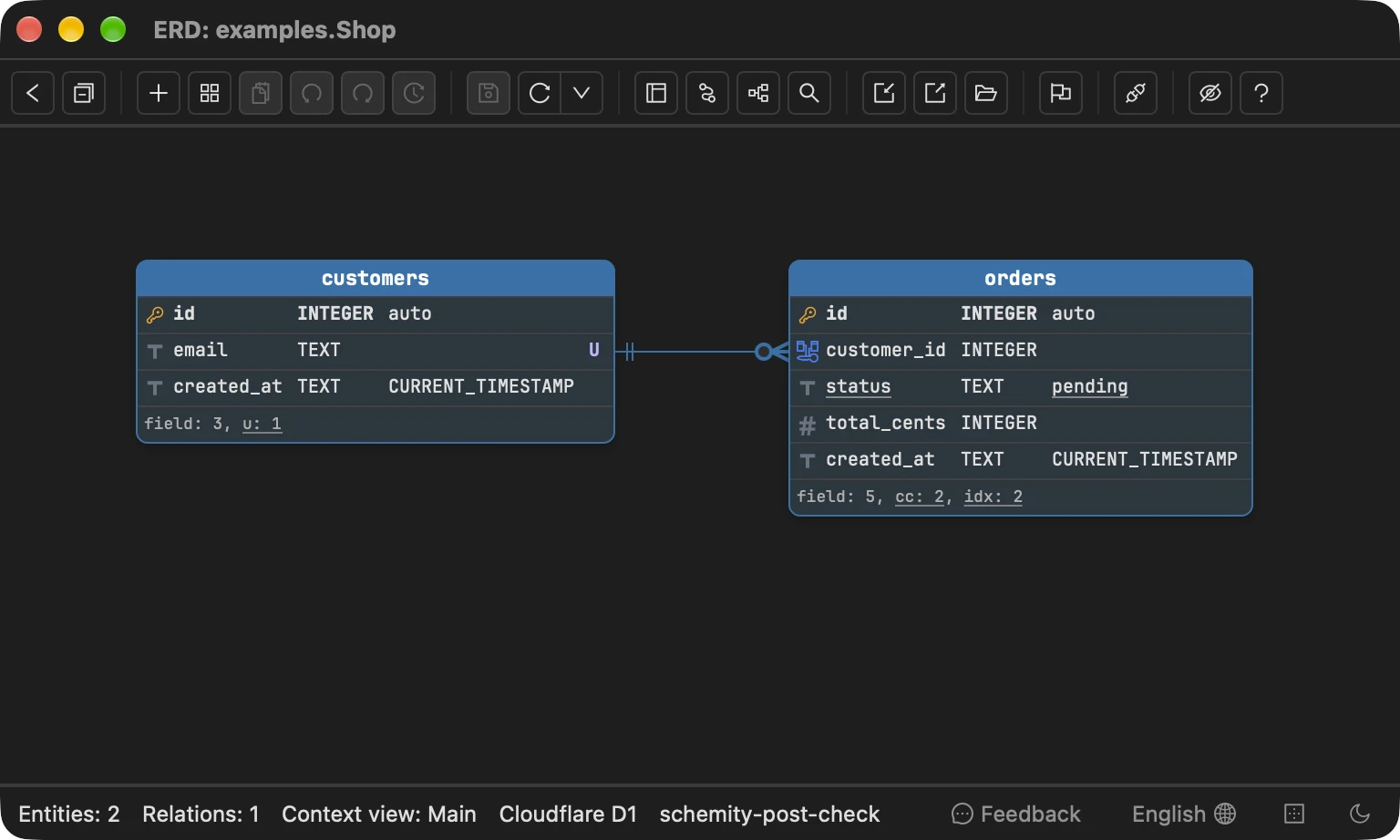
Layout, colours, descriptions, legends and context views are saved in the diagram file. A context view is a named subset of the diagram’s tables with its own layout, drawn from the same schema as the main diagram. Refresh reads the database again and keeps all of that, as re-syncing a diagram with its database describes, so the picture you use to understand your schema follows production without being redrawn.
The Local wrangler file source reads the .sqlite file under .wrangler/state/v3/d1 the same way: never written to, with _cf_METADATA and d1_migrations left off, so the local and the remote diagram differ only where the two databases do. The connection form says above both sources how a change reaches D1: “Schemity never changes a Cloudflare D1 database. Design here, apply the planned SQL as a wrangler migration, then Refresh, so local, preview and production stay in sync.” To have Schemity apply changes to that file itself, open it through the SQLite connection, which shows every table in it and can migrate them.
Why does Schemity not migrate a D1 database?
Because the safe way to rebuild a SQLite table depends on switching foreign keys off, and D1 does not allow that.
SQLite cannot change a column’s type or drop most constraints in place, so the change is a rebuild: create the new table, copy the rows, drop the old table, rename the new one. On a file, the rebuild runs with PRAGMA foreign_keys = OFF. D1 ignores that statement, as the table above showed, and the alternative Cloudflare’s foreign keys page offers is PRAGMA defer_foreign_keys = on.
Deferral postpones the check for violations. It does not stop a foreign key action. On the scratch database, with one customer and two orders, this ran as one request:
PRAGMA defer_foreign_keys = on;
CREATE TABLE customers_new (
    id INTEGER PRIMARY KEY AUTOINCREMENT,
    email TEXT NOT NULL UNIQUE COLLATE NOCASE,
    created_at TEXT NOT NULL DEFAULT CURRENT_TIMESTAMP
);
INSERT INTO customers_new (id, email, created_at) SELECT id, email, created_at FROM customers;
DROP TABLE customers;
ALTER TABLE customers_new RENAME TO customers;
SELECT COUNT(*) AS orders_after FROM orders;
It returned orders_after: 0. Dropping customers deleted its rows first, and ON DELETE CASCADE on orders.customer_id deleted both orders with them. The customer came back under the new table; the orders did not. A rebuild on D1 has to be written for D1, table by table, with the cascade in mind, and that is a decision for the person who owns the data and the migration file, not for a diagram’s Save button. When a planned change drops or rebuilds a table, Schemity says so on the D1 diagram before anyone writes the migration.
So the path for a change is a loop on the one diagram. Draw the new tables and relations on the connected D1 diagram, where they appear dashed as drafts. Save keeps the layout and the drafts and shows the planned SQL instead of applying it: copy it, or the SQL of a selection, into a new file in migrations, or hand it to your AI model to write the migration. Test it on the local database, let wrangler d1 migrations apply --remote ship it, and Refresh: the drafts the database now has turn solid exactly where you placed them. Repeat until the design is done. A script from elsewhere can start the diagram too: Import SQL reads a wrangler d1 export and leaves d1_migrations out.
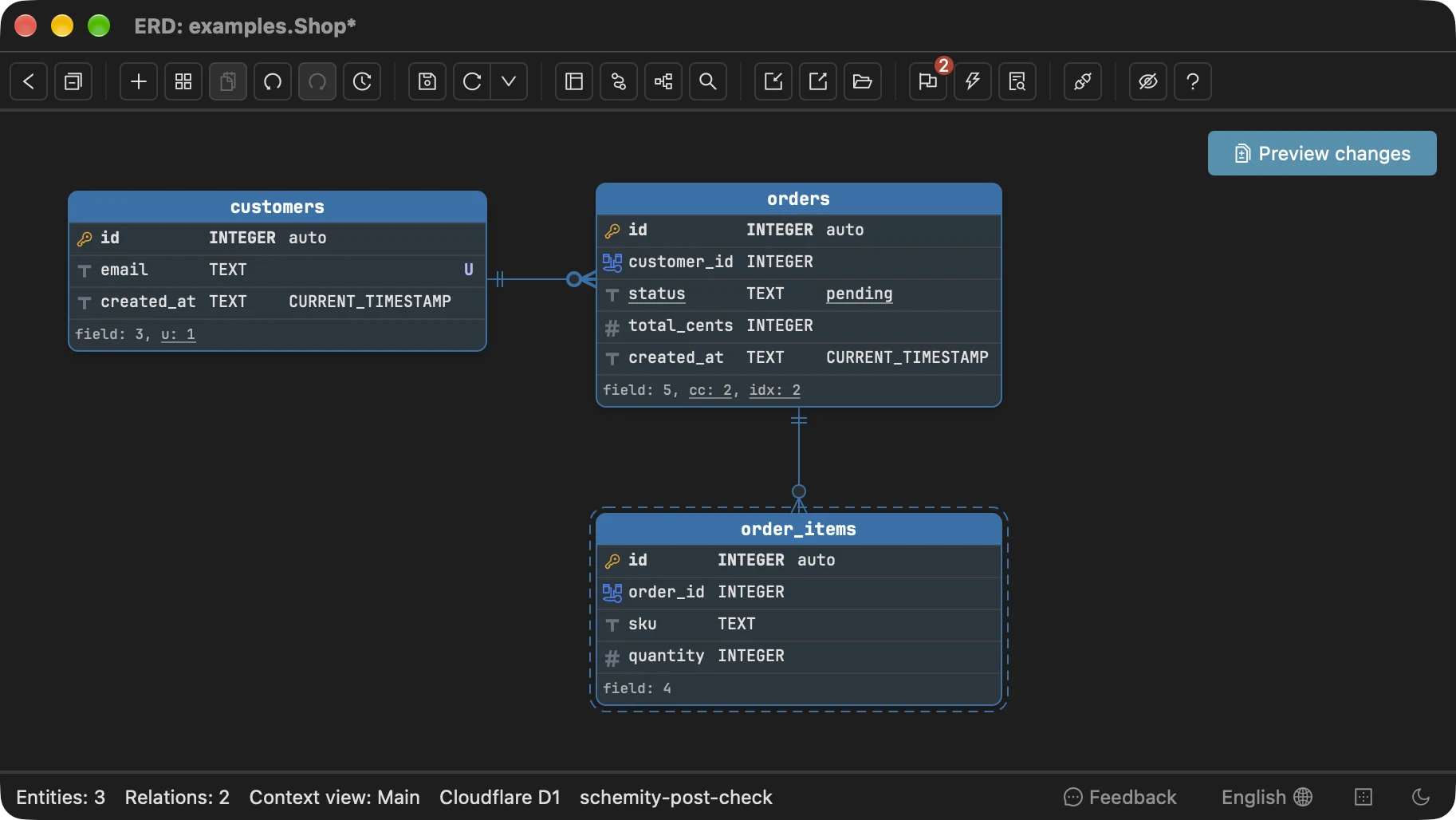
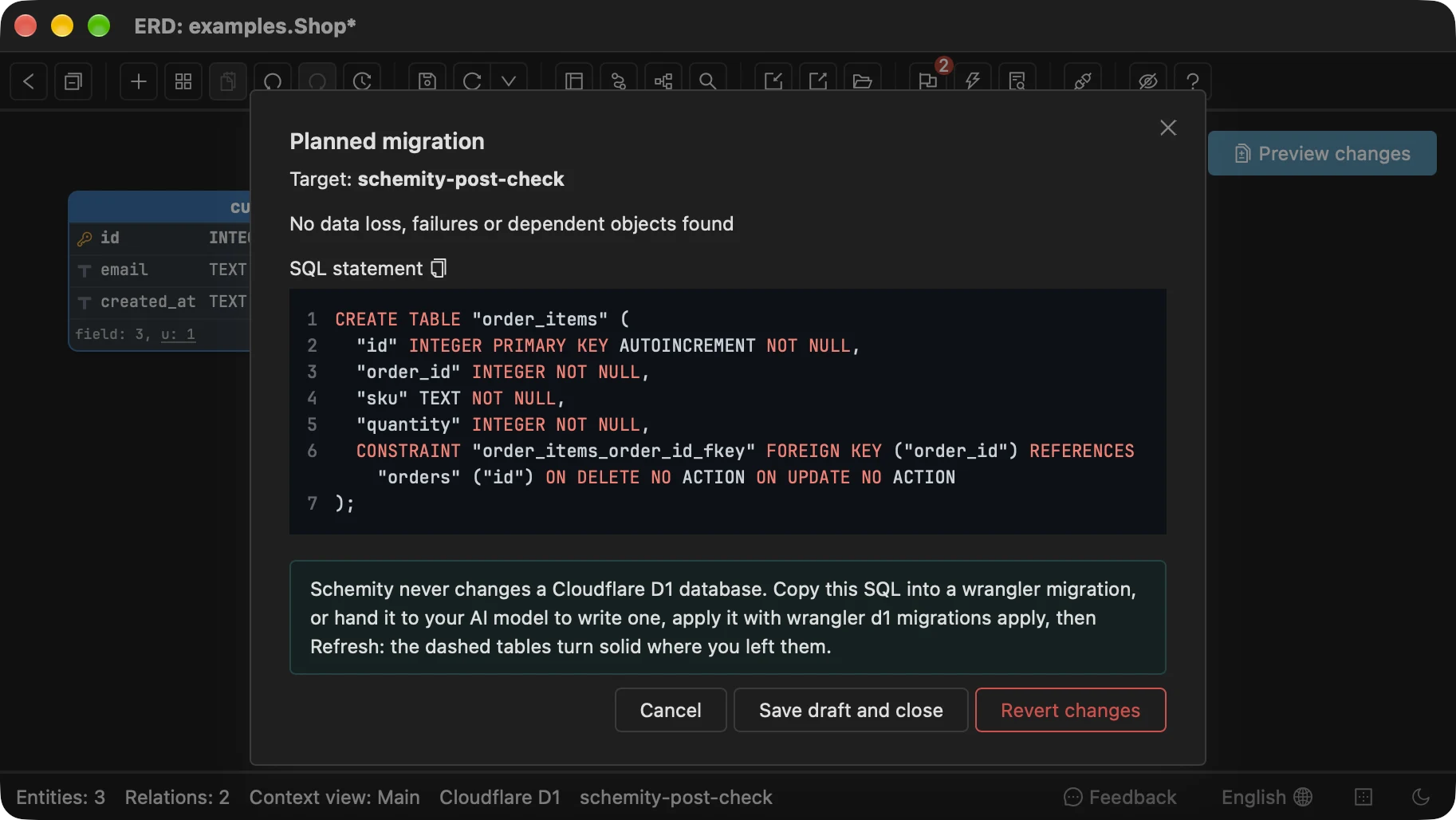
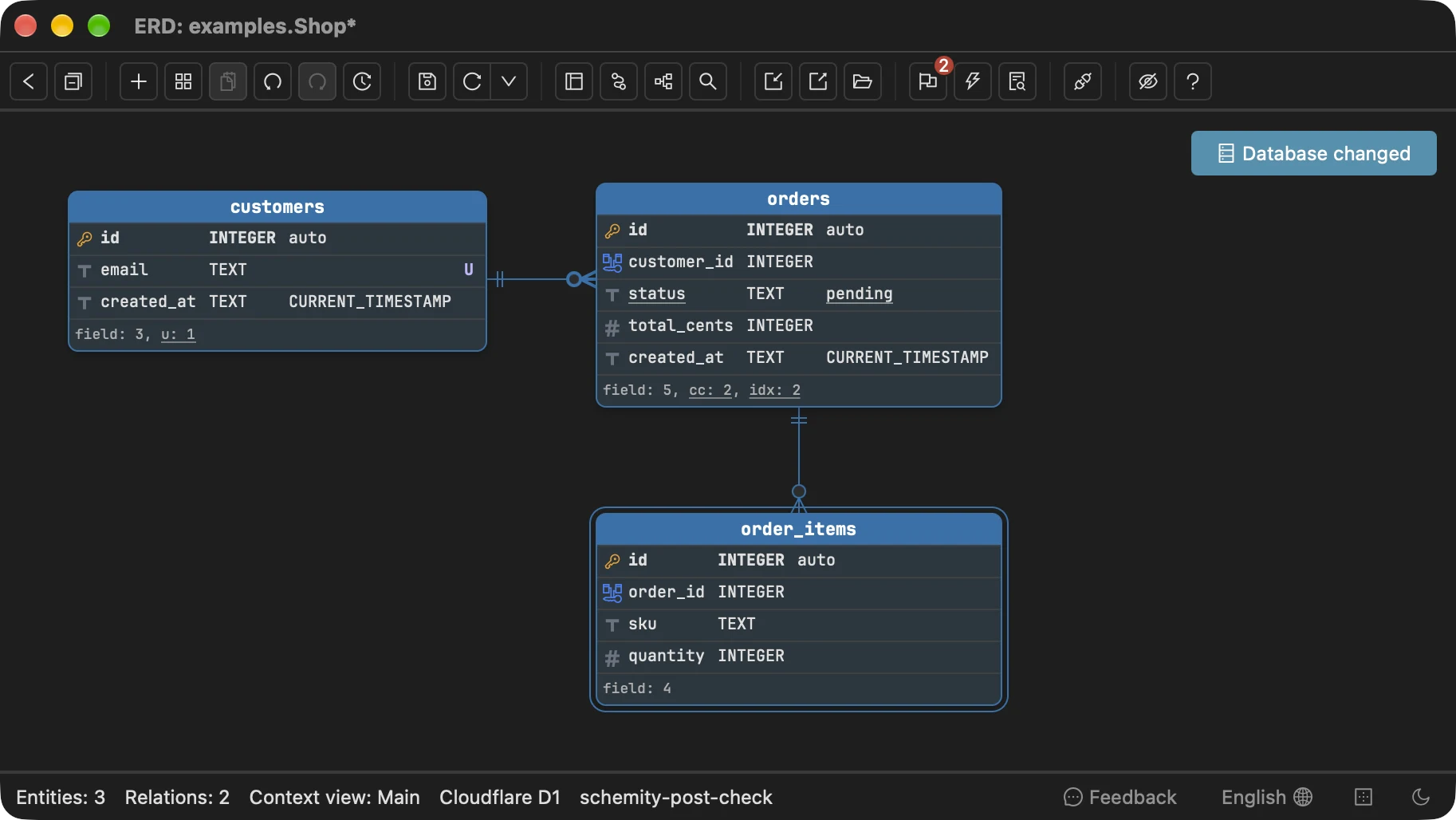
After wrangler ran that statement against the remote database, Refresh drew order_items solid in the place it was drafted. The ring around it and the Database changed button mark it as new in the database since the diagram file was last saved, and the next Save writes the file without planning anything.
The same question for a framework with its own migration runner, and what a fresh install really runs, is in Laravel ERD: draw it from the migration files or from the database. Why a SQLite type change is a rebuild, and the order that keeps child rows on a file, is in changing a column type in SQLite. The same choice of source for another hosted database is in Supabase schema diagram.
Frequently asked questions
How do I view the schema of a remote Cloudflare D1 database?
Run npx wrangler d1 execute <database> --remote --command 'SELECT name, sql FROM sqlite_master' for the raw statements, or npx wrangler d1 export <database> --remote --no-data --output schema.sql for a script. For a diagram that follows the database, connect Schemity to it with the account ID and an API token that has D1 Read.
Why is my local D1 database different from the remote one?
They are two separate databases. Without a flag, wrangler d1 migrations apply and wrangler d1 execute write to a SQLite file under .wrangler/state/v3/d1, and only --remote reaches the deployed database. Run npx wrangler d1 migrations list <database> --remote to see which migration files production has not received.
Can Schemity apply a migration to Cloudflare D1?
No, by design. You design the change on the D1 diagram and Schemity plans the SQL, but it never writes to D1: the change travels as a file in your migrations folder that wrangler applies. After that, Refresh turns the drafted tables solid where you placed them.