There is a thread on the community forum of a popular browser-based diagram tool that every database designer should read once. A user opens the app, looks at the My Diagrams menu, and one of their diagrams is not there anymore. No error, no warning, no trash folder. Their post is one sentence of quiet panic: my diagram is “just gone from My Diagrams menu. Could I recover it?”
The replies make it worse in an instructive way. A moderator offers to recover the diagram manually - so the remedy for losing your work is that a stranger with database access goes looking for it on your behalf. Further down, another user reports losing their diagrams repeatedly and calls it “very annoying” - and notes they are on a paid account, so this is not a free-tier problem. And threaded through the same conversation is a question that deserves its own paragraph: “Is there any way to get my history without PRO subscription?”
Read that last one again. The user’s own past versions of their own diagram exist somewhere - on a server, in a backup - but looking at them is a paid feature.
Your diagram is a row in someone else’s database
None of this requires a villain. It is simply what the storage model implies. When your ERD lives in a cloud tool, it is a row in a vendor’s database, and everything you would call “durability” is actually a stack of decisions someone else made: their backup schedule, their retention policy, their sync code, their pricing tier for history, their support queue for recovery. Any of those can change in a quarterly planning meeting you were not invited to.
Most days the trade is invisible. It becomes visible at exactly the wrong moments - the evening before a design review, when a diagram is missing from the list; or right after a migration went sideways, when you need last month’s version of the model and the history viewer wants an upgrade first.
And the stakes are lopsided. A schema diagram looks small - a few dozen boxes and lines - but it encodes weeks of decisions: which entity owns which fact, why that constraint exists, where the boundaries between domains sit. A schema visualizer is only as trustworthy as the place it keeps that thinking. “Somebody else’s database, behind somebody else’s login” is a strange place for it.
A diagram that is a file cannot silently vanish
Schemity is a desktop ERD tool, and its answer to durability is almost embarrassingly boring: your diagram is a file. A workspace is a folder of plain JSON files on your own disk - created under ~/schemity by default, or any folder you import as a workspace from anywhere on your machine. You can see the files in Finder. You can open them in a text editor. ls finds them.
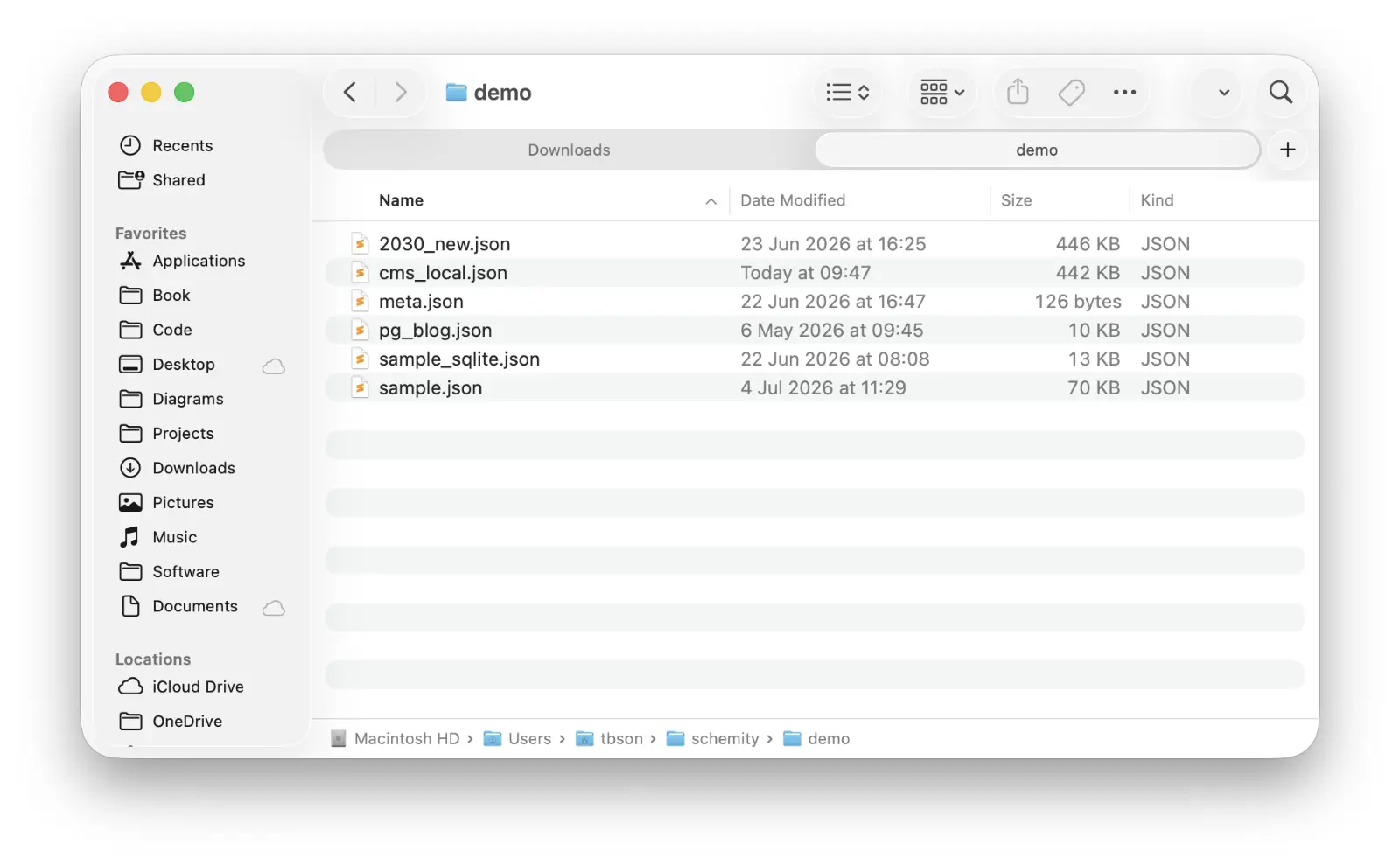
That one boring fact deletes the entire category of failure from the forum thread:
- Backups need no vendor. Whatever already protects your machine - Time Machine, a synced folder, your company’s backup agent - protects your diagrams too, because they are just files in a folder.
- Nothing can expire or be suspended. There is no account whose state decides whether your diagrams exist. Schemity is a local ERD tool with no cloud between you and your work - the file is on your disk whether or not you ever open the app again.
- Nothing syncs, so nothing can fail to sync. The user in that thread had connected their Google account and saved their work, and the diagram vanished anyway. An offline ERD tool has no equivalent failure mode: there is no server copy to disagree with the local one.
This is also where browser-based tools that you self-host quietly fall short - some keep your diagrams in the browser’s local storage, where clearing site data deletes your work. A file on disk has no such trapdoor.
Version history should not be a paid tier
The question “can I get my history without the PRO subscription?” has a structural answer, not a pricing one. Because a Schemity workspace is plain files, version history is not a feature the tool had to build and meter - it is whatever your team already uses. Put the folder in a Git repository and every version of your ERD is yours, forever, at zero cost: version control your database diagram in git, diff last quarter’s model against today’s, and read the reasoning in commit messages.
This is the practical meaning of a Git-native ERD tool: history is not a viewer inside someone’s web app, it is git log. Teams that take this further commit the ERD next to the code it describes and review schema changes in pull requests - but even a lazy git init in ~/schemity already gives you more history than any diagram vendor’s top tier.
Recovery is a command, not a support ticket
Put the layers together and “my diagram is gone, can anyone help?” stops being a question you ask strangers on a forum.
Within a session, Schemity has full undo and redo, so an over-eager cleanup is one keystroke from undone. Between sessions, a bad change is git restore away. After a dead laptop, recovery is restoring a folder from backup and importing it as a workspace - the same move consultants use to hand a client back their entire workspace at the end of an engagement. And in the vendor-shaped worst case: if Schemity the company disappeared tomorrow, the app on your machine keeps working and the JSON keeps being readable, because a one-time purchase ERD tool with local files has no server to shut down. An ERD tool without subscription is also, quietly, an ERD tool without a kill switch.
If a vanished diagram is what has you weighing a dbdiagram.io alternative, it is worth being precise about the lesson. The problem was never that one vendor’s backups were sloppy. It is that your ERD - the single source of truth for how your system’s data fits together - lived somewhere you could not see it, under rules you did not set. Move it into files you own, and it gains the one property every diagram deserves: it cannot just disappear.