Mermaid is the right format for an ER diagram that lives next to the code on GitHub or GitLab, because both render it in Markdown with no setup, and PlantUML or D2 is the right format when a build step renders the diagram to an image. The deciding limits are where the file is displayed and how big the schema is: Mermaid’s default limit is 50,000 characters of diagram text, and our 148-table schema exceeded it.
We exported six schemas from Schemity to all three formats and rendered every file with each tool’s own renderer: mermaid-cli 12.2.0 (Mermaid 12.3.0), PlantUML 1.2026.10 on Java 19, and D2 0.9.0. Three come from real applications: Saleor’s 148 tables and 266 foreign keys on PostgreSQL, Jellyfin’s 33 SQLite tables, and the 24 TPC-DS benchmark tables on Snowflake with 105 keys. The other three are test models built to hit edge cases: 20 PostgreSQL tables, 20 SQL Server tables and an 8-table MariaDB demo.
What the same table looks like in Mermaid, PlantUML and D2
All three describe a table as a block of typed columns and a relationship as a line between two tables, but they differ in how much of the schema they can say.
Here is one table from the PostgreSQL model, a coupon with a numeric(5,2) column, and the nullable order.coupon_code key that points at it. In Mermaid:
erDiagram
  coupon {
    text code PK
    integer max_uses
    numeric(5-2) percent
    timestamptz valid_from
    timestamptz valid_to
  }
  coupon |o--o{ order : "order_coupon_fk"
In PlantUML:
entity "coupon" as coupon {
    * code : text <<PK>>
    --
    max_uses : integer
    * {field} percent : numeric(5,2)
    * valid_from : timestamptz
    * valid_to : timestamptz
}
coupon |o--o{ order
In D2, inside the Sales container that the table’s domain became:
Sales: {
  coupon: {
    shape: sql_table
    code: "text" {constraint: primary_key}
    max_uses: "integer"
    percent: "numeric(5,2)"
    valid_from: "timestamptz"
    valid_to: "timestamptz"
  }
}
Sales.order.coupon_code <-> Sales.coupon.code: {source-arrowhead.shape: cf-many; target-arrowhead.shape: cf-one}
Three differences show up even at this size. Mermaid’s ER syntax says a type “may contain digits, hyphens, underscores, parentheses and square brackets”, which leaves out the comma, so an export that stays inside the documented grammar writes numeric(5-2); Mermaid 12.3 accepted numeric(5,2) when we tried it, and 11.16 added backtick escaping for special characters, but a platform still running an older Mermaid knows neither. PlantUML marks NOT NULL columns with *; Mermaid gained a ? suffix for optional types only in 11.16, so the export leaves it out for the same reason. And D2 records the key from the coupon_code column to the code column, and draws the line between those two rows when rendered with its ELK layout (d2 --layout=elk), where the other two connect table to table.
Mermaid vs PlantUML vs D2: which should you use?
Use Mermaid for a diagram shown in a GitHub or GitLab page and under 50,000 characters, and PlantUML or D2 rendered to SVG in CI for anything bigger or grouped by domain.
| As exported from Schemity | Mermaid | PlantUML | D2 |
|---|---|---|---|
| Rendered in GitHub Markdown | Yes | No | No |
| Rendered in GitLab Markdown | Yes, Mermaid 12 | On GitLab.com; on self-managed once an admin connects a PlantUML server | Not on GitLab.com; through a Kroki server an admin connects on self-managed or Dedicated |
| 148-table Saleor schema | Refused at 71,439 characters | Drew it, an SVG of 14,764 by 5,493 pixels | Drew it |
| Groups tables by domain | No | Yes, as packages | Yes, as containers |
Marks NOT NULL columns | No | Yes, * | No |
| Lines connect | Tables | Tables | Columns, with the ELK layout |
| Renderer to install | None on GitHub; mermaid-cli brings a Chromium | Java, and Graphviz for its default layout | One binary |
GitHub’s diagram documentation names the four syntaxes it renders, Mermaid, GeoJSON, TopoJSON and ASCII STL, so a PlantUML or D2 file in a repository is just text until something turns it into an image. GitLab’s Markdown documentation says it supports Mermaid version 12 and that PlantUML is enabled on GitLab.com but has to be switched on by an administrator of a self-managed instance; D2 goes through the Kroki integration, which GitLab documents for self-managed and Dedicated instances only. That makes Mermaid the default for a README or a pull request description, and PlantUML or D2 the choice for a docs site, a wiki or a design document that a CI job builds.
How big can a Mermaid ER diagram be?
Mermaid’s default limit is 50,000 characters of diagram text, which at Saleor’s rate of about 480 characters per table is roughly 100 tables, and sooner for wide tables.
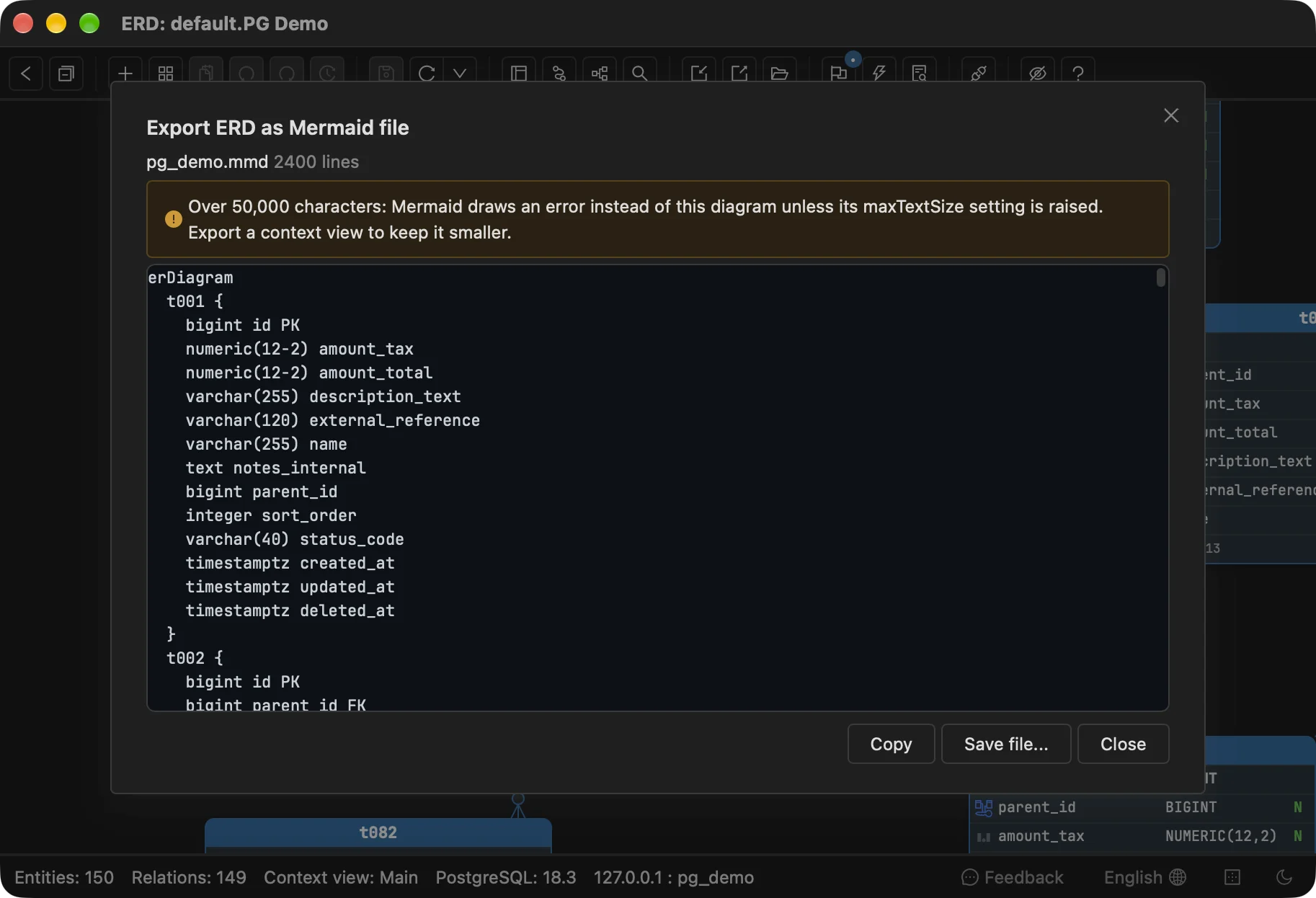
Saleor’s 148 tables came to 71,439 characters, and mermaid-cli drew a box reading “Maximum text size in diagram exceeded” instead of the schema. The Mermaid configuration reference gives maxTextSize a default of 50,000. The dangerous part is that mermaid-cli exited with status 0, so a CI job that checks only the exit code publishes the error box. Table width matters as much as table count: TPC-DS’s 24 tables, averaging 18 columns against Saleor’s 9, came to 21,428 characters, about 890 per table, which would reach the limit near 56 tables. We measured the limit with mermaid-cli; GitHub and GitLab run Mermaid inside their own renderers, so check a large file there before relying on it.
PlantUML’s limit is in pixels instead. Its FAQ says it “limits image width and height to 4096” unless PLANTUML_LIMIT_SIZE is raised, and Saleor’s SVG came out at 14,764 by 5,493 pixels, so a PNG of the same diagram would be cut off unless that variable is set; render large PlantUML diagrams to SVG. With no Graphviz installed, PlantUML still drew all six schemas, logging messages from its bundled Smetana layout engine, a port of Graphviz’s layout code that runs inside PlantUML.
What silently changes the picture: parentheses and cardinality
Two things changed what a diagram said without any error: PlantUML reading parentheses as a method, and an export that ignored a relationship’s cardinality.
PlantUML treats a member whose text contains parentheses as a method. In a table with a primary key the export writes an explicit -- separator and the columns stay in order, but in a table without one, PlantUML moved every column typed like character(1) or varchar(10) below the others, under a divider of its own. The 20-table PostgreSQL model has such a table, and its action character(1) column came out last. Prefixing the member with {field}, as PlantUML’s class syntax allows, keeps it in place, so the export now writes {field} on every line with a parenthesis, including * {field} percent : numeric(5,2) in the example above, where it was not strictly needed.
Cardinality is the quieter one. A one-to-one key such as user_preference.user_id says each preference belongs to exactly one user, but nothing in the database forces a user to have a preference, so the preference end is zero or one. All three formats can say that: user ||--o| user_preference in Mermaid and PlantUML, cf-one on the preference end in D2. ||--|| says every user has exactly one preference, which is a stronger rule than the schema enforces.
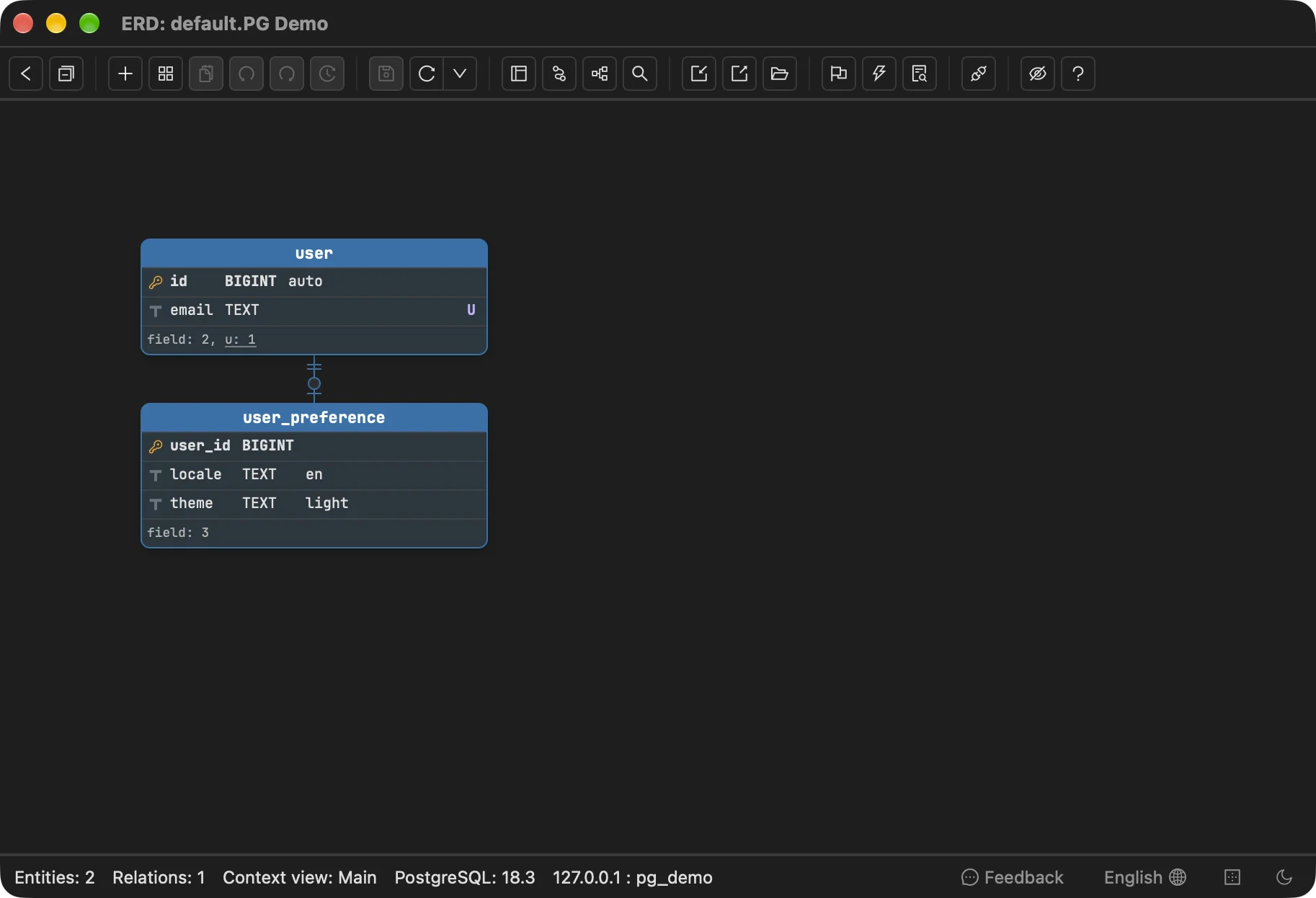
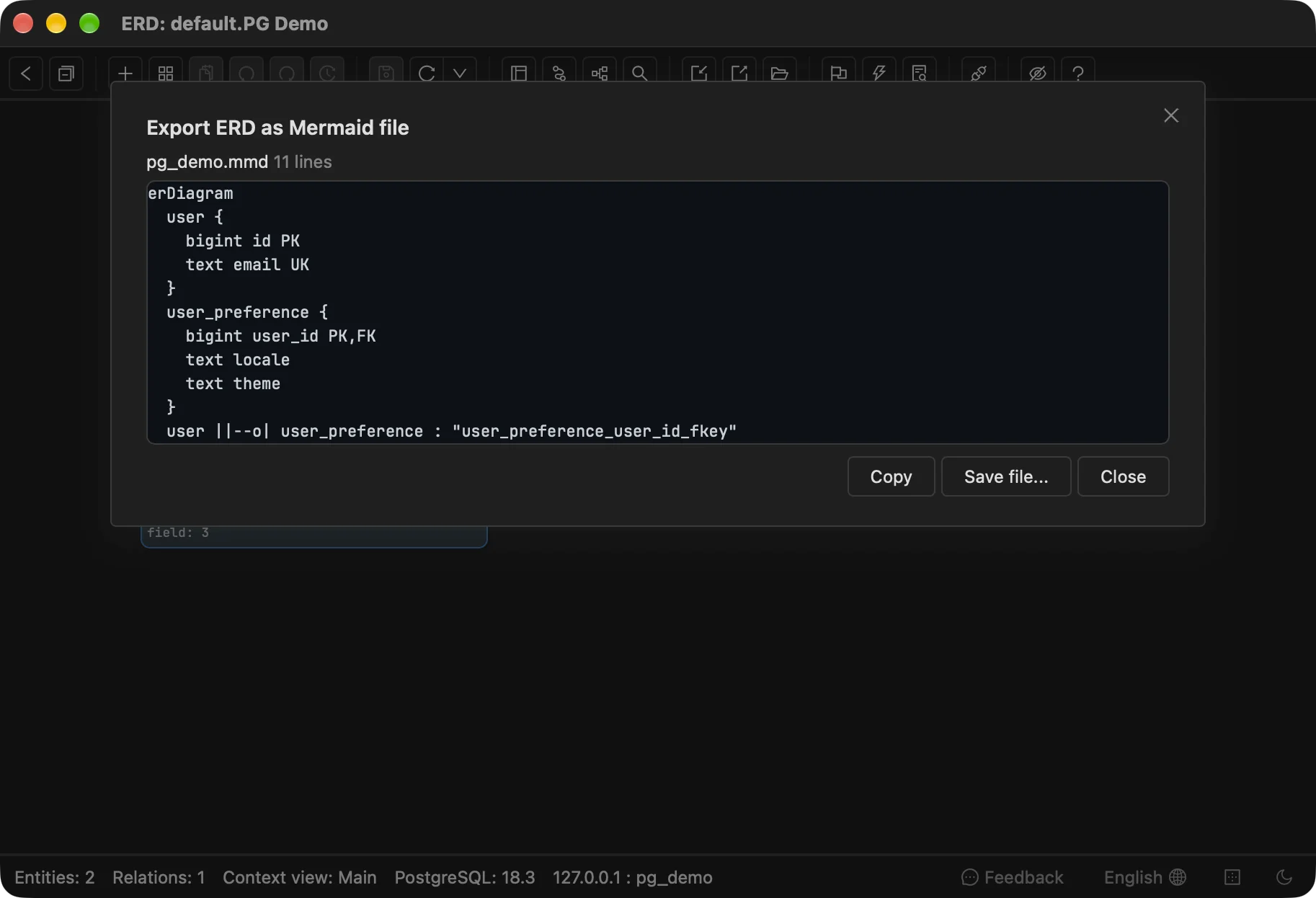
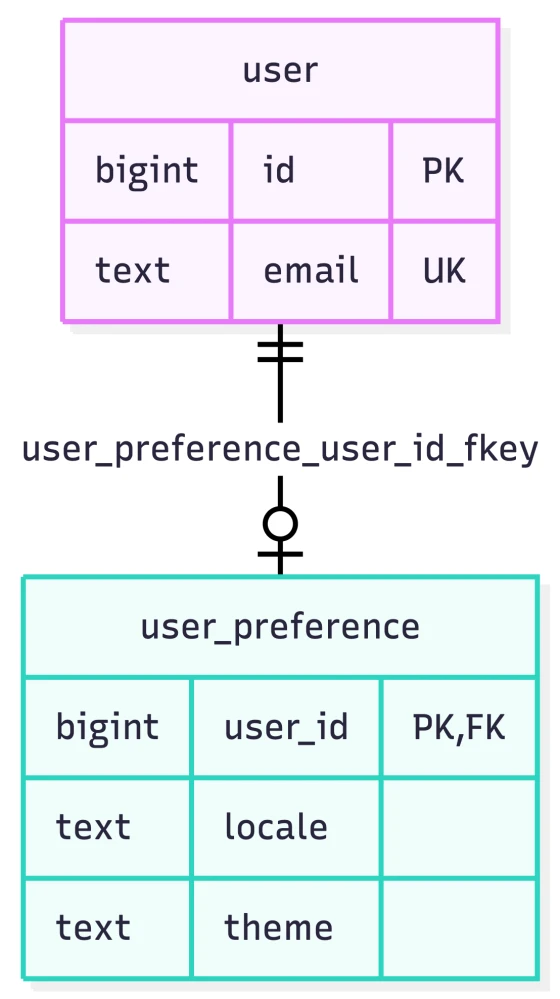
How Schemity exports the same diagram to all three
Schemity writes Mermaid, PlantUML and D2 from one diagram, so a schema you read once can be published in whichever format the reader’s tool displays.
Schemity is database design software that reads your live database, shows the impact of every schema change before it runs, and keeps the diagram as a file in Git. Once it has read the database into a diagram, Schemity Pro exports it as text: a Mermaid erDiagram, a PlantUML entity diagram, or a D2 file of sql_table shapes. A legend, the labelled box you draw around a group of tables on the canvas, becomes a PlantUML package or a D2 container. Every export opens in a preview with Copy and Save, and it holds only the view on screen. A context view is a sub-diagram that shows only the tables of one feature or domain from the same model, so exporting from a context view gives one domain’s tables, which is the way past Mermaid’s limit for a schema the size of Saleor’s.
Running this comparison found three things Schemity’s exports got wrong, all fixed for the next release. The Mermaid, PlantUML and D2 exports ignored the cardinality set on a relationship: a one-to-one set to “Zero or One” in the relationship’s menu was written as exactly one on the child’s end, and a one-to-many set to “One or Many” as zero or more, while the canvas and the SVG export drew what was set; they now write what the canvas draws. The same release makes “Zero or One” the default for every one-to-one Schemity reads from a database or you draw, as “Zero or Many” already was for one-to-many, because no foreign key can make a parent have a child. The PlantUML export now marks columns with parenthesized types as {field}, and the Mermaid preview warns when a file is over 50,000 characters, before you commit something that renders as an error.
That is what it means to understand your schema and hand that understanding to someone else: the diagram they open should say the same thing the database does.
The format follows the page the diagram lives on
A README gets Mermaid, a built docs site gets PlantUML or D2 as SVG, and a schema too big for one Mermaid file gets split by domain.
The text exports sit next to the Markdown data dictionary, which describes each column in words where these formats only draw it, and the image exports covered in why an ERD export turns blurry.
Frequently asked questions
Does GitHub render PlantUML or D2 diagrams in Markdown?
No. GitHub's documentation lists four diagram syntaxes it renders in Markdown: Mermaid, GeoJSON, TopoJSON and ASCII STL. A PlantUML or D2 file has to be rendered to SVG or PNG first, usually by a CI job, and committed or published as an image.
Why does my Mermaid ER diagram show Maximum text size in diagram exceeded?
Because the diagram text is longer than Mermaid's maxTextSize, which defaults to 50,000 characters. A 148-table schema exported as Mermaid was 71,439 characters and mermaid-cli drew only that error, while still exiting with status 0. Split the diagram by domain, or raise maxTextSize wherever you control the Mermaid configuration.
Can Mermaid show a column type like numeric(5,2)?
Mermaid's ER syntax documentation lists letters, digits, hyphens, underscores, parentheses and square brackets for attribute types, and no comma. Mermaid 12.3 accepted numeric(5,2) in our test, but a platform running an older Mermaid may not, so a cautious export writes numeric(5-2). PlantUML and D2 keep the comma.