Moving a schema from MariaDB to MySQL works only for the parts both databases share, and since MariaDB 10.x the parts they do not share are the ones teams pick MariaDB for. A plain mariadb-dump of a three-table MariaDB 11.4 schema with one sequence, loaded into MySQL 8.4, failed on every CREATE in it: the sequence, a table with UUID and INET6 columns, a table whose default draws on the sequence, and a table whose only visible problem was its collation. Each failure has a MySQL replacement, but the replacement changes the column, so it is a design decision you make per column, not a find-and-replace.
The schema below is what was tested, on mariadb:11.4 (11.4.13) and mysql:8.4 (8.4.11) in throwaway containers. It is the kind of thing a MariaDB shop accumulates without trying: a native UUID for public ids, an INET6 for the last login address, a JSON preferences column, a generated total, a sequence for invoice numbers, and system versioning on orders so support can see what an order looked like last week.
CREATE TABLE customers (
  id BIGINT UNSIGNED AUTO_INCREMENT PRIMARY KEY,
  public_id UUID NOT NULL DEFAULT UUID(),
  email VARCHAR(255) NOT NULL UNIQUE,
  last_ip INET6 NULL,
  signup_ip INET4 NULL,
  prefs JSON NOT NULL DEFAULT '{}'
);

CREATE TABLE orders (
  id BIGINT UNSIGNED AUTO_INCREMENT PRIMARY KEY,
  customer_id BIGINT UNSIGNED NOT NULL,
  qty INT NOT NULL,
  unit_price DECIMAL(10,2) NOT NULL,
  total DECIMAL(12,2) AS (qty * unit_price) PERSISTENT,
  status VARCHAR(20) NOT NULL DEFAULT 'new',
  FOREIGN KEY (customer_id) REFERENCES customers (id)
) WITH SYSTEM VERSIONING;

CREATE SEQUENCE invoice_no START WITH 1000;

CREATE TABLE invoices (
  id BIGINT UNSIGNED AUTO_INCREMENT PRIMARY KEY,
  order_id BIGINT UNSIGNED NOT NULL,
  number BIGINT NOT NULL DEFAULT (NEXT VALUE FOR invoice_no),
  FOREIGN KEY (order_id) REFERENCES orders (id)
);
Can you migrate MariaDB to MySQL with a dump?
You can when the schema uses only what both databases share, and the dump of this one failed on every MariaDB-only feature it touched.
mariadb-dump --no-data shop, piped into mysql --force on 8.4, produced these errors, in order:
| Statement in the dump | MySQL 8.4 said |
|---|---|
DROP SEQUENCE IF EXISTS invoice_no | ERROR 1064 (42000): syntax error near SEQUENCE IF EXISTS |
CREATE SEQUENCE invoice_no ... | ERROR 1064 (42000): syntax error near SEQUENCE |
DO SETVAL(invoice_no, 1000, 0) | ERROR 1305 (42000): FUNCTION shop.SETVAL does not exist |
CREATE TABLE customers with uuid and inet6 | ERROR 1064 (42000): syntax error near uuid NOT NULL DEFAULT uuid() |
CREATE TABLE invoices with DEFAULT nextval(shop.invoice_no) | ERROR 1064 (42000): syntax error near nextval( |
CREATE TABLE orders ... COLLATE=utf8mb4_uca1400_ai_ci | ERROR 1273 (HY000): Unknown collation: 'utf8mb4_uca1400_ai_ci' |
Fixing those exposed three more. A CHAR(36) column with the dump’s DEFAULT uuid() is still a syntax error on MySQL, which wants an expression default in parentheses, DEFAULT (UUID()). With that rewritten, customers failed on ERROR 1101 (42000): BLOB, TEXT, GEOMETRY or JSON column 'prefs' can't have a default value, and orders failed on a syntax error near SYSTEM VERSIONING. MySQL’s parser stops at the first problem in each statement, so the first error list is never the whole list. That is why it pays to find everything before the first attempt, with the queries further down.
The collation row is the one that surprises people, because nothing in the schema asked for it. utf8mb4_uca1400_ai_ci is the server default on MariaDB 11.4 (SELECT @@collation_server returned it on 11.4.13), so every table created without an explicit collation carries it, and MySQL has never had it.
Which MariaDB schema features does MySQL 8.4 not accept?
Six MariaDB features have no MySQL equivalent under the same name (UUID, INET6, INET4, sequences, system versioning and the uca1400 collations), JSON changes meaning on the way, PERSISTENT needs renaming, and expression defaults need parentheses.
| MariaDB feature | What MySQL 8.4 does with it | What to use in MySQL |
|---|---|---|
UUID type (MariaDB 10.7+) | Syntax error | BINARY(16) with DEFAULT (UUID_TO_BIN(UUID(), 1)), or CHAR(36) with DEFAULT (UUID()) |
INET6, INET4 types (INET4 from 10.10) | Syntax error | VARBINARY(16) with INET6_ATON(), or VARCHAR(45) |
JSON (an alias of LONGTEXT plus a check) | Arrives as longtext with CHECK (json_valid(...)); a literal default fails | JSON, with DEFAULT ('{}') in parentheses |
CREATE SEQUENCE, NEXT VALUE FOR | Syntax error | AUTO_INCREMENT, or a one-row counter table |
Expression defaults such as uuid() | Syntax error without parentheses | The same expression in parentheses |
WITH SYSTEM VERSIONING | Syntax error | A plain table plus a history table, or no history |
utf8mb4_uca1400_ai_ci (11.4 default) | ERROR 1273: unknown collation | utf8mb4_0900_ai_ci |
PERSISTENT generated column | Syntax error in hand-written DDL | STORED (the dump already writes STORED) |
VECTOR(n) (MariaDB 11.7+) | Syntax error: MySQL 8.4 has no VECTOR (it arrived in MySQL 9.0) | VARBINARY/BLOB holding the packed floats, or MySQL 9 |
The JSON row needs the most thought, because nothing fails if the default is left out. MariaDB’s JSON page says “JSON is an alias for LONGTEXT COLLATE utf8mb4_bin introduced for compatibility reasons with MySQL’s JSON data type”, and SHOW CREATE TABLE on MariaDB prints prefs longtext CHARACTER SET utf8mb4 COLLATE utf8mb4_bin NOT NULL DEFAULT '{}' CHECK (json_valid(prefs)). MySQL 8.4 accepts that column once the default is written as DEFAULT ('{}'), keeps the check, and rejects '{bad' with ERROR 3819. But it is a text column, not MySQL’s binary JSON. Change it to JSON on purpose; a dump will not.
The UUID and INET rows are real choices. BINARY(16) with UUID_TO_BIN(UUID(), 1) keeps the 16-byte storage and, for values generated by UUID() (version 1), the time-ordered index layout MariaDB’s UUID type gave you, but every query that prints the value needs BIN_TO_UUID(public_id, 1), and every query that searches by it, and the data load itself, needs UUID_TO_BIN. CHAR(36) keeps the queries unchanged and costs 36 bytes per value plus a random-order index. The same trade applies to VARBINARY(16) against VARCHAR(45) for addresses, where INET6_ATON('2001:db8::1') and INET6_NTOA(last_ip) are the conversions. The trade between key types is the subject of UUID vs bigint primary keys; the short version is that the binary form is the one that keeps the index small.
System versioning is the row with data at stake. The history rows live in the same table, hidden from a plain SELECT, and MySQL has nowhere to put them. On MariaDB the table also refuses to change: an ALTER TABLE orders ADD COLUMN ... failed with ERROR 4119 (HY000), which refuses the change on a system-versioned table until @@system_versioning_alter_history is changed. A default mariadb-dump writes only the current rows; --dump-history adds the old versions with their row_start and row_end values, which a MySQL table has no columns for. Decide whether the history matters before the move. If it does, copy it out with SELECT ... FROM orders FOR SYSTEM_TIME ALL into an ordinary orders_history table and fill that table from the application or a trigger on MySQL.
How do you find the MariaDB-only features in your schema?
Six queries against information_schema on the MariaDB server list the columns, tables and defaults that will not move as written, before anything is dumped.
Run them in the database you plan to move, on MariaDB itself, where these values are reported. On the test schema they returned exactly the problem list from the dump, plus signup_ip, which the dump never reached:
-- 1. Column types MySQL does not have
SELECT table_name, column_name, data_type
FROM information_schema.columns
WHERE table_schema = DATABASE()
  AND data_type IN ('uuid', 'inet6', 'inet4');

-- 2. JSON columns (stored as LONGTEXT with a json_valid check)
SELECT table_name, constraint_name, check_clause
FROM information_schema.check_constraints
WHERE constraint_schema = DATABASE()
  AND check_clause LIKE 'json_valid(%';

-- 3. System-versioned tables and sequences
SELECT table_name, table_type
FROM information_schema.tables
WHERE table_schema = DATABASE()
  AND table_type IN ('SYSTEM VERSIONED', 'SEQUENCE');

-- 4. Expression defaults, sequence defaults included
SELECT table_name, column_name, column_default
FROM information_schema.columns
WHERE table_schema = DATABASE()
  AND column_default LIKE '%(%'
  AND column_default NOT LIKE 'current_timestamp(%';

-- 5. Columns with a collation MySQL does not have
SELECT table_name, column_name, collation_name
FROM information_schema.columns
WHERE table_schema = DATABASE()
  AND collation_name LIKE '%uca1400%';

-- 6. Tables with that collation as their default
SELECT table_name, table_collation
FROM information_schema.tables
WHERE table_schema = DATABASE()
  AND table_collation LIKE '%uca1400%';
Query 4 matters twice. MariaDB reports an expression default without the parentheses MySQL requires (uuid(), concat('a','b')), and it reports NEXT VALUE FOR invoice_no as a nextval() call on the sequence, so a search of the migration files for NEXT VALUE finds the column a developer wrote, not the one an ORM generated. On the test schema it returned public_id and invoices.number. Query 2 is the way to tell a JSON column from a plain LONGTEXT, because data_type is longtext for both.
The six results are a list. To see what the list means for the rest of the schema, you also need the foreign keys, the tables that reference orders, and the columns that copy customers.public_id into other tables, and that is where a picture of the schema is faster than more queries.
Does the reverse direction, MySQL to MariaDB, work better?
Mostly yes: a MySQL 8.4 table with a JSON column and the utf8mb4_0900_ai_ci collation loaded into MariaDB 11.4.13 unchanged, and a functional index was the part that failed.
MariaDB reads MySQL’s JSON as its alias, so the column arrived as longtext ... CHECK (json_valid(attrs)). MySQL’s default collation is accepted because the MariaDB 11.4.5 release notes list “Added support for utf8mb4_0900_* collations”, so check the server’s version before relying on it. What failed was the index KEY sku_color ((CAST(attrs->>'$.color' AS CHAR(20)))), a MySQL functional key part (the dump writes it out as a json_extract expression), which MariaDB 11.4 rejected as a syntax error. On MariaDB that index is written as a virtual generated column holding the expression, with an ordinary index on the column.
One column-level difference runs the same way. MySQL 8.4 accepts n INT NOT NULL INVISIBLE with no default, and MariaDB 11.4 refuses the same column with ERROR 4108 (HY000): Invisible column 'n' must have a default value, because an INSERT that lists no columns would have nothing to put in it. Give every invisible NOT NULL column a default before moving it to MariaDB.
So the two directions are not symmetric. MariaDB has spent several releases accepting MySQL’s syntax, and MySQL has not done the same for MariaDB’s. A move from MariaDB to MySQL is the one that needs the audit. The other direction mostly needs the JSON caveat: MariaDB’s JSON page also says row-based replication “will not work for JSON types from MySQL to MariaDB”, because one side stores text and the other binary.
| Direction | Tested result | Main blocker |
|---|---|---|
| MariaDB 11.4 to MySQL 8.4 | Failed on every MariaDB-only feature | Types, sequences, versioning, uca1400 collation |
| MySQL 8.4 to MariaDB 11.4 | Loaded, apart from one index | Functional key parts, invisible NOT NULL columns with no default |
How to see a MariaDB schema before you move it
Connect Schemity to the MariaDB server and the diagram shows every table with the types MariaDB reports, so the columns from the audit can be read in place, next to the tables that depend on them.
Schemity is database design software that reads your live database, shows the impact of every schema change before it runs, and keeps the diagram as a file in Git. From the next release MariaDB is its own database type, supported from 11.4 onwards: pick MariaDB in the connection dialog or paste a mariadb:// URL, and the diagram footer shows the server it read. The reader was tested on MariaDB 11.4.13, 11.8.9, 12.3.3 and 13.0.2 and read this schema the same on all four; the screenshot below is from 13.0.2. Reverse engineering then reads the whole schema, and the test schema came out as MariaDB stores it:
customers.public_idasUUID,last_ipasINET6andsignup_ipasINET4, so the first audit query’s results are visible as column types on the canvas.customers.prefsasLONGTEXTwith itsjson_valid(prefs)check, which is what MariaDB means byJSON.orders, a system-versioned table, read like any other table, with its row count and dependents.invoices.numberwith itsnextval()default on the sequence. The sequence itself is not a table and is not drawn.
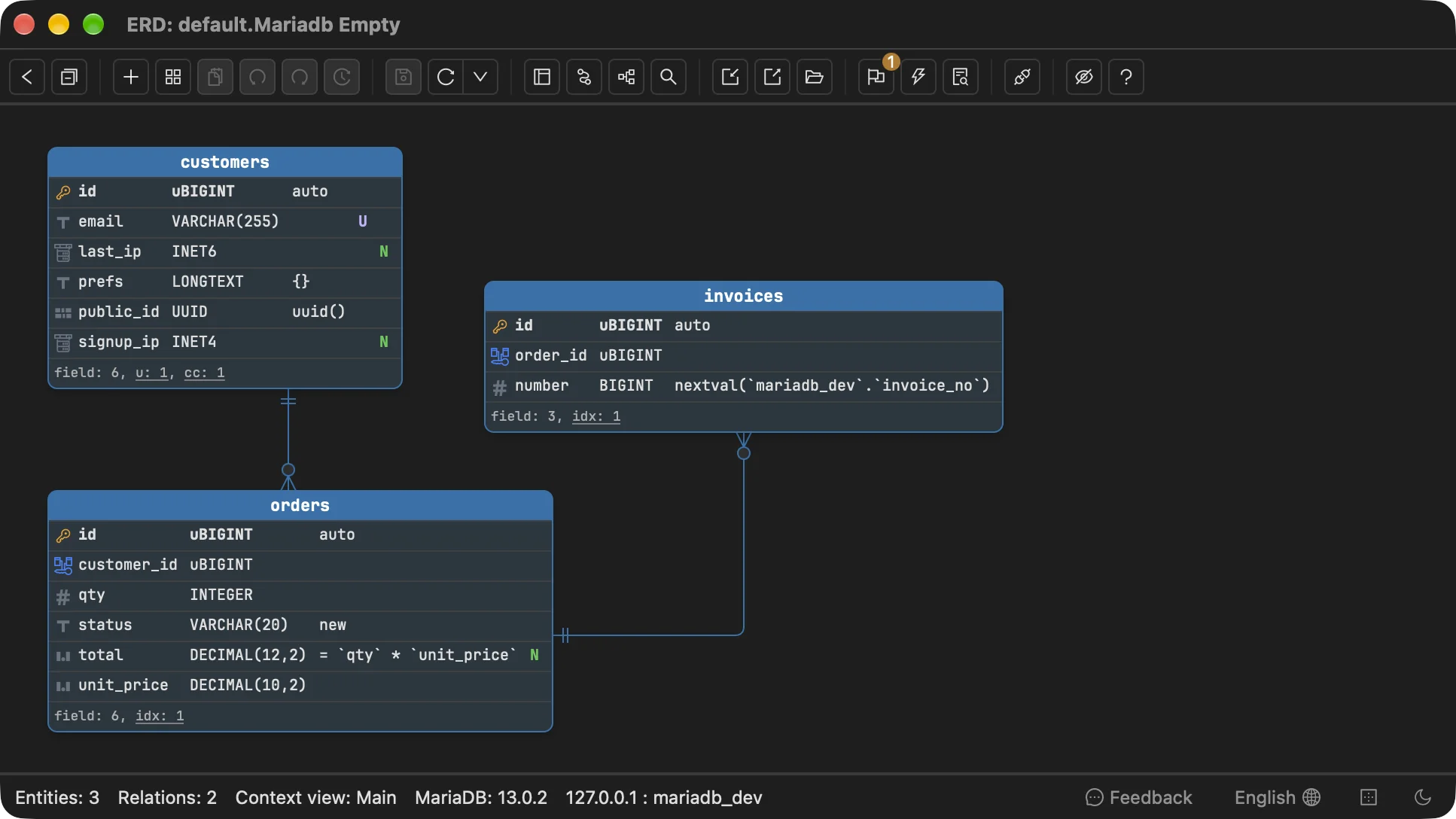
That is what it takes to understand your schema before a move like this: the column types, which tables hold the columns that change, and every foreign key into them, on one canvas. public_id and last_ip are in customers, which orders references, which invoices references, so the UUID decision touches every query that joins those three.
Can Schemity write the MySQL version of a MariaDB schema?
Yes, from the next release: the SQL dialog writes a MariaDB diagram as MySQL DDL, and the script it wrote for the test schema ran on MySQL 8.4.11 with no errors, all three tables and both foreign keys created.
Open the SQL dialog with Export > SQL file and pick MySQL in its Database dropdown (converting SQL to another database). The script makes the conservative choice from the table above for each MariaDB-only feature and lists every one in a comment block at the top, so the review is the list, not a diff:
| In the MariaDB diagram | In the MySQL script | Said in the notes |
|---|---|---|
public_id UUID DEFAULT uuid() | CHAR(36) DEFAULT (UUID()) | MySQL has no UUID type: stored as its 36-character text |
last_ip INET6, signup_ip INET4 | VARCHAR(45) | MySQL has no network address type: stored as text |
prefs LONGTEXT ... DEFAULT '{}' with json_valid | LONGTEXT DEFAULT ('{}'), check kept | - |
number DEFAULT nextval(invoice_no) | No default | The default draws from a MariaDB sequence, which MySQL has none of: left out |
utf8mb4_uca1400_ai_ci on every table | No collation, so MySQL 8.4 used utf8mb4_0900_ai_ci | 4 collation settings left out |
total ... PERSISTENT | GENERATED ALWAYS AS (...) STORED | - |
BIGINT UNSIGNED keys | BIGINT UNSIGNED | - |
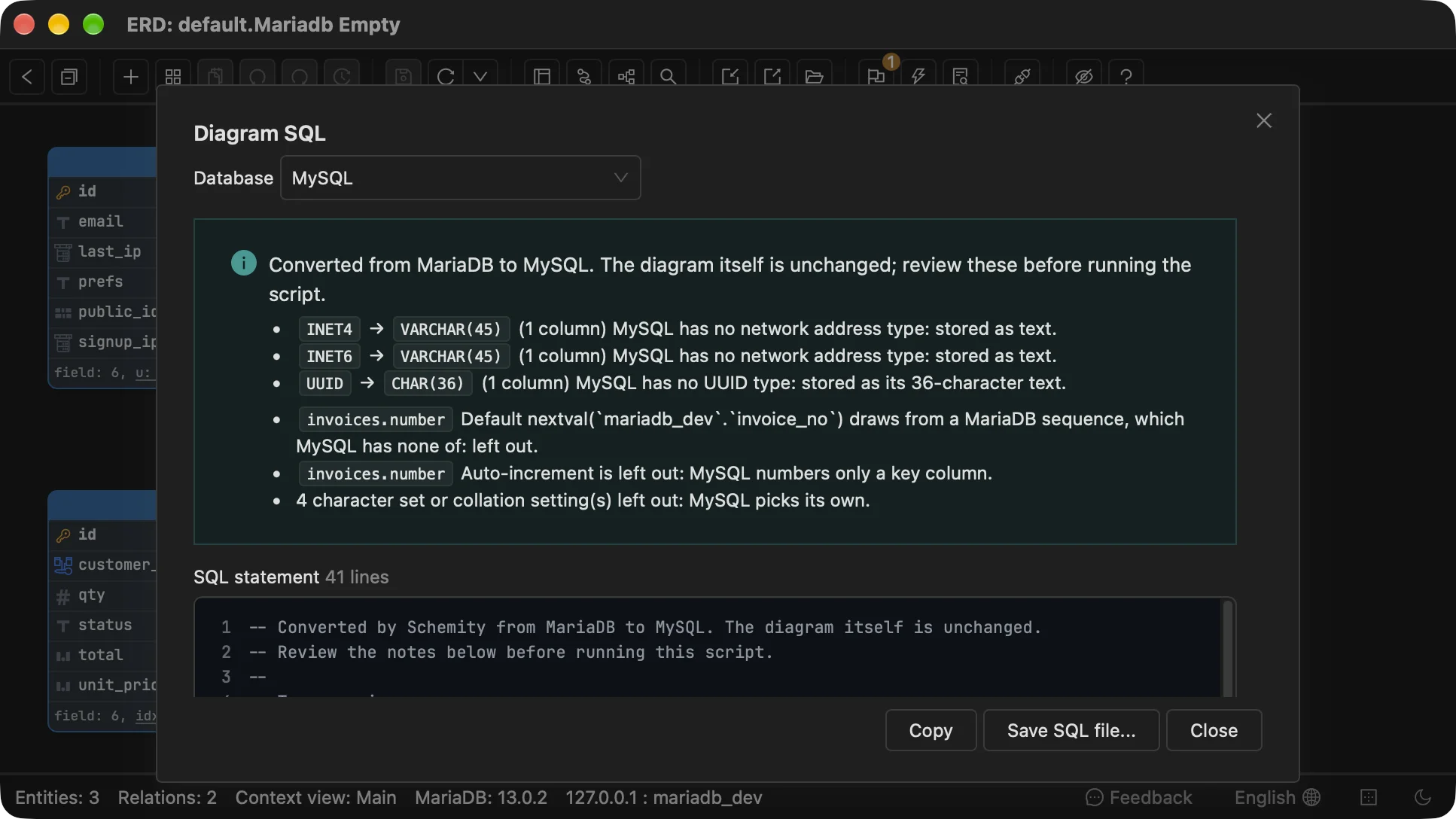
What it does not decide is the part of the move that is a design choice. CHAR(36) is the choice that leaves queries unchanged; if you want BINARY(16), edit those columns in the script. The prefs column stays text with its check, the same as the dump, so changing it to MySQL JSON is still a deliberate edit. invoices.number now needs its value from the application or a counter table. And orders is created as a plain table: its history is not part of the schema, so it has to be copied out before the move as described above. The diagram itself is left as MariaDB, so the MariaDB design and the MySQL script never drift into two models.
If the MariaDB model lives in Navicat Data Modeler rather than a running server, Import Navicat reads a MariaDB .nmodel into a MariaDB diagram with its UUID, INET6 and INET4 columns kept native, and the same SQL dialog writes it for MySQL. Converting to another database is a licensed feature.
What to decide before moving a schema from MariaDB to MySQL
Every MariaDB-only feature in the audit needs a MySQL replacement chosen before the dump, and the UUID, INET, sequence and versioning choices change application queries, not only DDL.
- Run the six audit queries on the MariaDB server and keep the output as the migration checklist.
- Set every table to
utf8mb4_0900_ai_ci, or another collation MySQL has, in the dump or before it. - For each
UUIDcolumn, chooseBINARY(16)(smaller index, conversion functions in every query) orCHAR(36)(unchanged queries, larger index). Do the same forINET6andINET4. - Change
JSONcolumns to MySQLJSONon purpose, and write their defaults in parentheses. - Replace each sequence with
AUTO_INCREMENTor a counter table, and put every expression default from query 4 in parentheses. - Decide whether system-versioned history is kept. If it is, copy it out with
FOR SYSTEM_TIME ALLbefore the move.
Moving between engines with more distance between them, such as MySQL to PostgreSQL, follows the same pattern of type decisions at a larger scale. For a MySQL schema that is staying put, which MySQL ALTER TABLE changes lock the table is the next question, and the Navicat Data Modeler alternative post shows a MariaDB shop model read from a live MariaDB 11.4 server.
Frequently asked questions
Can I import a mariadb-dump file into MySQL?
Only if the schema uses nothing MariaDB added on its own. A MariaDB 11.4 dump of a schema with a sequence, a UUID column and the default utf8mb4_uca1400_ai_ci collation failed on MySQL 8.4 with syntax errors and ERROR 1273 (HY000): Unknown collation. Run the audit queries first, change those columns and tables on the MariaDB side or in the dump, then import.
Is a MariaDB JSON column the same as a MySQL JSON column?
No. In MariaDB JSON is an alias for LONGTEXT COLLATE utf8mb4_bin with a json_valid() check, so the dump writes longtext and MySQL creates a text column, not a binary JSON one. If the column also has a literal default such as DEFAULT '{}', MySQL refuses it with ERROR 1101, because a text column can only take an expression default such as DEFAULT ('{}').
Does MySQL have system-versioned tables like MariaDB?
No. MySQL 8.4 has no WITH SYSTEM VERSIONING and rejects it as a syntax error, so a versioned table has to be created without it and its history either dropped or copied into an ordinary history table. Decide that before the move, because the history rows are not in a plain SELECT and a default dump of the table does not carry them.