Somewhere on your disk there is a schema. It might be a pg_dump output, a folder of migration files, or a schema.sql a departed colleague left behind. It is complete, precise, and utterly unreadable at a glance - forty CREATE TABLE statements do not show you how billing relates to users.
So you open a diagram tool. And the diagram tool opens a blank canvas.
Now you are a human transpiler. You read a CREATE TABLE statement, click “add table”, retype the name, retype twelve columns, pick the types from a dropdown, squint at the REFERENCES clauses, draw the lines. Forty tables later you have a diagram, a sore wrist, and - statistically - at least one typo that will mislead someone in a design review next quarter.
That is the first half of the tax. The second half comes later, and it is worse.
The translation tax runs in both directions
Every trip between SQL and diagram costs you, and most ERD tools make you pay both ways.
Going in, you transcribe SQL into boxes. Going out, you do the reverse: the team agrees on a change during a design session, you update the diagram, and then you sit down to hand-write the ALTER TABLE statements that make the real database match the picture. Add a column here, a foreign key there, a unique constraint you almost forgot because it was just a small badge on the canvas.
Hand-written migrations drift from the diagram the same way wiki PNGs drift from the database - because a human is the sync mechanism, and humans skip steps. The diagram says one thing, the migration did another, and now your “single source of truth” has a fork in it.
A tool that only draws pictures is a whiteboard. A schema visualizer earns a place in an engineer’s workflow when it speaks SQL natively - in both directions.
From SQL dump to diagram in one paste
Schemity treats SQL as an input format, not just an export button. Paste CREATE TABLE statements or import a full dump, and it generates the entities and relationships automatically - names, types, nullability, defaults, foreign keys, the lot. What used to be an afternoon of transcription is a paste and a layout pass.
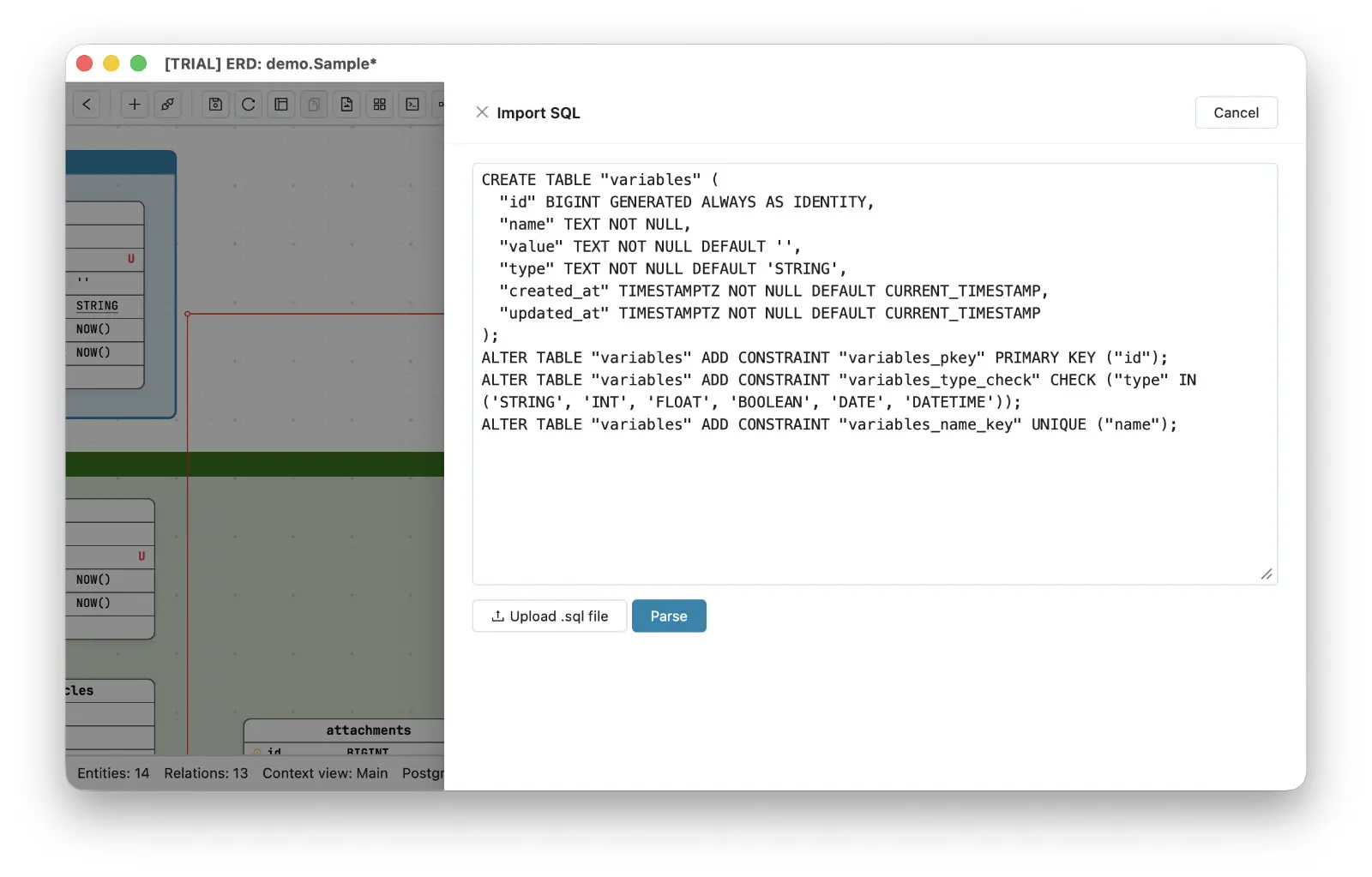
This matters most exactly when you need it most: documenting a production database schema you did not design. Generate an ERD from a SQL dump your DBA handed you, and you are reading the structure visually within minutes - no credentials required, nothing leaving your machine, because this is a local ERD tool working on a local file.
And when you do have access, you can skip the dump entirely: connect and reverse engineer PostgreSQL to ERD directly - MySQL, MariaDB, SQL Server, SQLite, and Supabase too. Either road ends at the same place: a real diagram, produced from the real schema, with zero retyping.
From diagram edit to reviewed migration
The return direction is where Schemity departs from the whiteboard model. When you change the ERD - add a field, tighten a constraint, create a relationship - Schemity generates the SQL migration diff for you to review. Not a full dump to eyeball, a diff: precisely the ALTER statements your edits imply.
You read it. You decide. Only then does it run against the connected database.
That review step is deliberate. An ERD migration SQL diff you can read before applying is the difference between “the tool changed my database” and “I changed my database, and the tool did the typing”. The diagram proposes; you approve. Your edits stay honest because the SQL they generate is sitting right in front of you, and the database stays honest because it received exactly what the diagram said - no hand-translation in between to drop a constraint on the floor.
Export at every scale
Sometimes you do not want a migration - you want the SQL itself, scoped to what you are discussing. Schemity exports at whatever granularity the conversation needs: right-click a single entity for its CREATE statement, right-click a legend to export the SQL of every entity grouped inside it - handy when a legend marks a bounded context - or export the full SQL of the entire view.
Pasting the exact three tables under discussion into a PR comment beats linking a wiki page every time.
SQL in, SQL out, nothing in between
This whole loop - dump in, diagram out, edits in, migration out - runs on your desktop. Schemity is an offline ERD tool for software engineers: your schema is parsed locally, stored as plain local JSON, and never routed through anyone’s cloud. For client work and NDA projects, that is not a nicety; it is the reason you are allowed to use the tool at all.
The measure of a SQL diagram tool is how little translating you do by hand. If your current one has you retyping columns on the way in and hand-writing ALTER statements on the way out, you are not using a tool - you are being one.