To change an INT primary key to BIGINT in SQL Server, you have to drop everything that uses the column first: every foreign key that references it, the primary key itself, and the indexes on the referencing columns. A plain ALTER COLUMN fails with Msg 5074 while any of them exists, and once they are gone the change rewrites every row of every table involved under a lock that blocks all reads and writes.
The question usually arrives as an outage. An IDENTITY(1,1) key reaches 2,147,483,647 and the next insert fails with Msg 8115, Level 16: “Arithmetic overflow error converting IDENTITY to data type int.” Below are the four ways out, run on SQL Server 2022 (CU26, Developer edition) in a throwaway container. That container ran under x86 emulation on a laptop, so read the timings as ratios between methods, not as what your server will do.
How close are your INT keys to the limit?
Before choosing a method, find out how much time you have. sys.identity_columns keeps the last value each identity handed out:
SELECT OBJECT_SCHEMA_NAME(ic.object_id) AS schema_name,
       OBJECT_NAME(ic.object_id) AS table_name,
       ic.name AS column_name,
       CAST(ic.last_value AS bigint) AS last_value,
       CAST(100.0 * CAST(ic.last_value AS bigint) / 2147483647 AS decimal(5,2)) AS pct_used
FROM sys.identity_columns ic
WHERE TYPE_NAME(ic.system_type_id) = 'int'
  AND OBJECTPROPERTY(ic.object_id, 'IsUserTable') = 1
ORDER BY pct_used DESC;
A table at 80% with a steady insert rate gives you a date. A negative last_value and percentage mean someone already reseeded it, which is the last method below. The query covers the keys; the foreign key columns that point at them are just as INT, and every one of them has to change in the same migration, because SQL Server will not keep a foreign key across two types. Creating an INT foreign key against a BIGINT key failed with Msg 1778, “is not the same data type as referencing column”, and even a VARCHAR(20) column against a VARCHAR(40) key failed with Msg 1753, “must be defined with the same length and scale”.
Why does ALTER COLUMN fail on an INT primary key?
Because SQL Server checks every object that uses the column before it changes the type. With orders.user_id referencing users.id and an index on orders.user_id, the obvious statement:
ALTER TABLE users ALTER COLUMN id BIGINT NOT NULL;returns:
Msg 5074, Level 16, State 1
The object 'PK_users' is dependent on column 'id'.
Msg 5074, Level 16, State 1
The object 'FK_orders_users' is dependent on column 'id'.
Msg 4922, Level 16, State 9
ALTER TABLE ALTER COLUMN id failed because one or more objects access this column.
Changing the referencing column first fails the same way, naming IX_orders_user_id and FK_orders_users. The ALTER TABLE documentation lists the objects that block a type change: a PRIMARY KEY or FOREIGN KEY constraint, a CHECK or UNIQUE constraint, a default, an index, statistics made with CREATE STATISTICS, and a computed column. In the same container, a CHECK (n > 0) on the column, an index that only INCLUDEs it, and a view created WITH SCHEMABINDING that selects it all blocked INT to BIGINT as well. On a real database, look for schema-bound views and functions before you plan the window: each one has to be dropped and created again around the change.
Two things do not get you past it. WITH (ONLINE = ON), available since SQL Server 2016 and on Enterprise edition only, returned the same Msg 5074 on a key column. And the one exception the documentation makes is narrower than it looks: an index, a CHECK or a UNIQUE constraint lets a VARCHAR, NVARCHAR or VARBINARY column grow to a longer length of the same type. In the container the same growth also passed under a primary key, but a foreign key still blocked it. INT to BIGINT gets no exception.
How do you change an INT primary key to BIGINT in SQL Server?
In place, it is eight statements for one key and one referencing table, inside one transaction so that a failure halfway does not leave users without its primary key. Foreign keys go first, because the primary key cannot be dropped while one references it:
SET XACT_ABORT ON;
BEGIN TRANSACTION;
ALTER TABLE orders DROP CONSTRAINT FK_orders_users;
ALTER TABLE users DROP CONSTRAINT PK_users;
DROP INDEX IX_orders_user_id ON orders;
ALTER TABLE users ALTER COLUMN id BIGINT NOT NULL;
ALTER TABLE orders ALTER COLUMN user_id BIGINT NOT NULL;
CREATE INDEX IX_orders_user_id ON orders (user_id);
ALTER TABLE users ADD CONSTRAINT PK_users PRIMARY KEY (id);
ALTER TABLE orders ADD CONSTRAINT FK_orders_users
    FOREIGN KEY (user_id) REFERENCES users (id);
COMMIT;
The IDENTITY property survives the type change. After the script, sys.columns still showed is_identity = 1 on users.id, and after DBCC CHECKIDENT ('users', RESEED, 2147483647) the next insert got 2,147,483,648.
The cost is the rewrite. With 1,000,000 rows in users and 1,000,000 in orders, in a database whose full backup was 82 MB, the whole script took 20.5 seconds and grew the used transaction log from 6 MB to 1,015 MB. A single ALTER COLUMN from INT to BIGINT on a 1,000,000-row table with no key on the column took 1.6 seconds and 365 MB of log on its own. The documentation says ALTER TABLE holds a schema modification (Sch-M) lock “to ensure that no other connections reference even the metadata for the table during the change”, so nothing reads or writes either table until it commits. Multiply by every table that references users, and by the real row counts, and size the log file before you start. PK_users is clustered, the default for a primary key, so dropping it leaves users as a heap and adding it back sorts the whole table into a clustered index again. If the original key was NONCLUSTERED, say so in the ADD CONSTRAINT, or it comes back clustered.
Restate NOT NULL and COLLATE on every ALTER COLUMN
The same documentation hides a second trap: “if not specified, the column is nullable”, and “if you don’t specify a collation, the column is assigned the default collation of the database”. On a NOT NULL column created as NVARCHAR(255) COLLATE Latin1_General_CS_AS, this statement succeeded:
ALTER TABLE users ALTER COLUMN email NVARCHAR(320);and left email nullable and on the database default collation, in that container the case-insensitive SQL_Latin1_General_CP1_CI_AS. No error, no warning. For a key widening the rule is simple: every ALTER COLUMN says NOT NULL, and every string column says its COLLATE again.
Which way should you widen it?
The in-place script is not the only option. Each of the four trades something different:
| Method | What changes | Measured here | Use it when |
|---|---|---|---|
In place: drop keys, ALTER COLUMN, recreate | The key and every referencing column, for good | 20.5 s and ~1 GB of log for 2 x 1,000,000 rows, both tables locked throughout | The tables fit in a maintenance window |
| Row compression first, then in place | The same, but the ALTER COLUMN stops rewriting rows | ALTER COLUMN took 0 ms and 0 MB of log; re-adding the clustered primary key still rebuilt the table in 1.0 s | The table is already row- or page-compressed, or a compression rebuild fits now |
New BIGINT tables, copy across, rename | New tables swapped in with sp_rename, the key’s and each large referencing table’s | Not measured: the copies run in batches while the old tables keep serving | The tables are too big to lock for the length of a rewrite |
| Reseed to -2,147,483,648 | Nothing in the schema | Instant | You need weeks, not hours, and every consumer accepts negative ids |
Row compression stores integers in “only the bytes that are needed”, according to Microsoft’s row compression documentation, so INT and BIGINT share one on-disk format and the type change becomes a catalog edit. On a row-compressed 1,000,000-row table, the same ALTER COLUMN that took 1.6 seconds uncompressed took 0 ms and wrote no log. It does not lift Msg 5074: on a compressed table with the key on the column, the ALTER COLUMN was still refused until the primary key was dropped, and adding it back took 1.0 second. Compressing an existing table is itself a rebuild (0.36 seconds for 1,000,000 narrow rows here). Data compression is in every edition of SQL Server 2022, Express included; doing that rebuild ONLINE is what needs Enterprise.
A new table is the method for a table you cannot lock: create users_new with id BIGINT IDENTITY, copy rows across in batches with SET IDENTITY_INSERT users_new ON, keep the two in step with a trigger or a final catch-up pass, then swap the names with sp_rename in a short transaction. The foreign keys cannot simply be recreated against the new table: every referencing column is still INT, and Msg 1778 refuses a key across two types, so each large child table needs the same copy, or row compression, of its own before the keys come back. It is the most work and the only one where the long part runs while the application keeps writing.
Reseeding changes no column. Once the identity has overflowed, DBCC CHECKIDENT with RESEED, -2147483648 makes the next insert -2,147,483,647, because, as Microsoft’s documentation for the command puts it, on a table with rows the next one “uses new_reseed_value + the current increment value”. That buys another 2.1 billion inserts in the negative half. It is a stopgap: every API, client and report that assumed positive ids sees negative ones, and the ids stop sorting by age.
How Schemity plans the change and shows what it costs
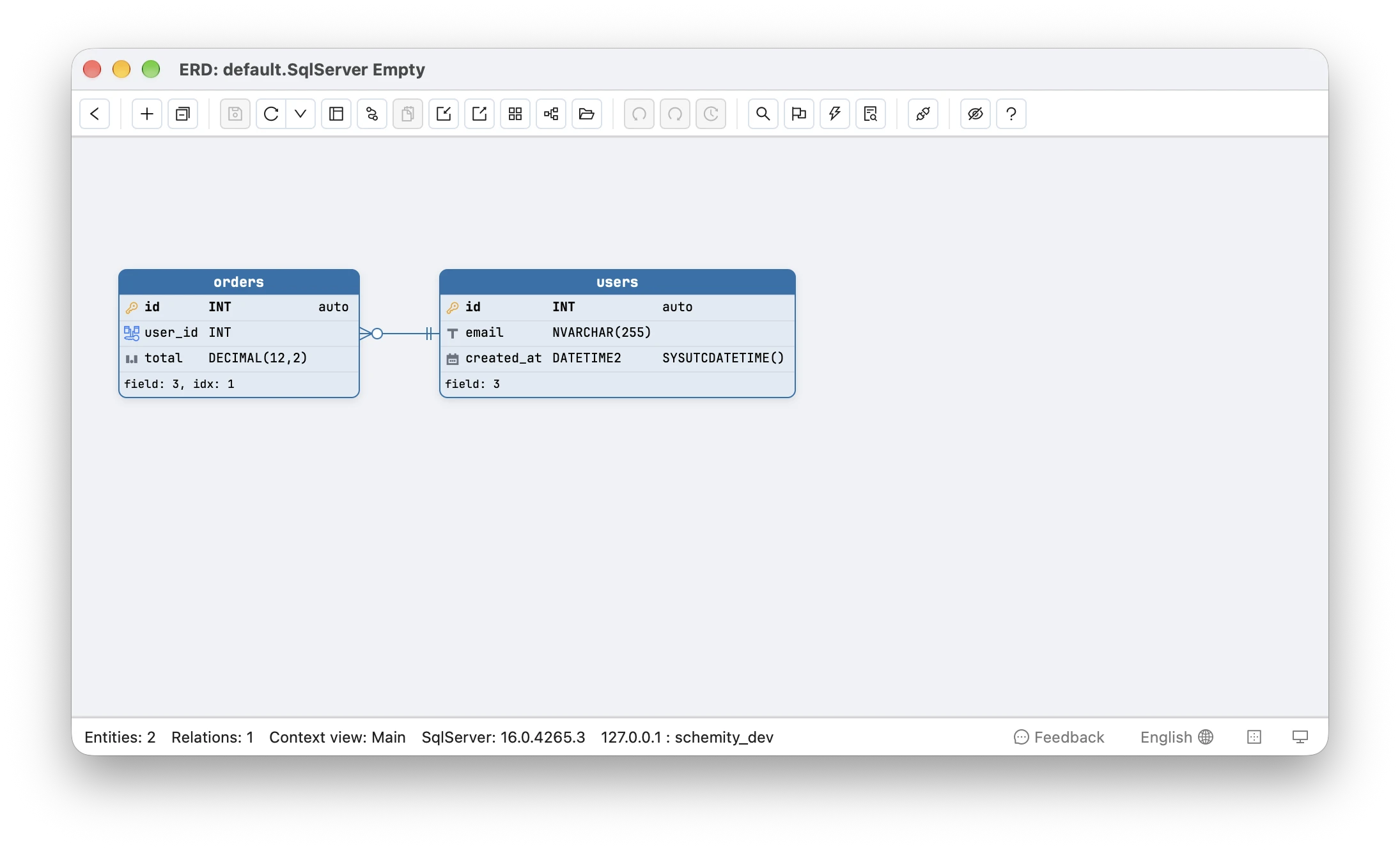
Schemity is database design software that reads your live database, shows the impact of every schema change before it runs, and keeps the diagram as a file in Git. After you connect to SQL Server, every key is drawn with its real type, so an INT key and the INT foreign key columns that point at it are visible together on the canvas, with the relationships between them.
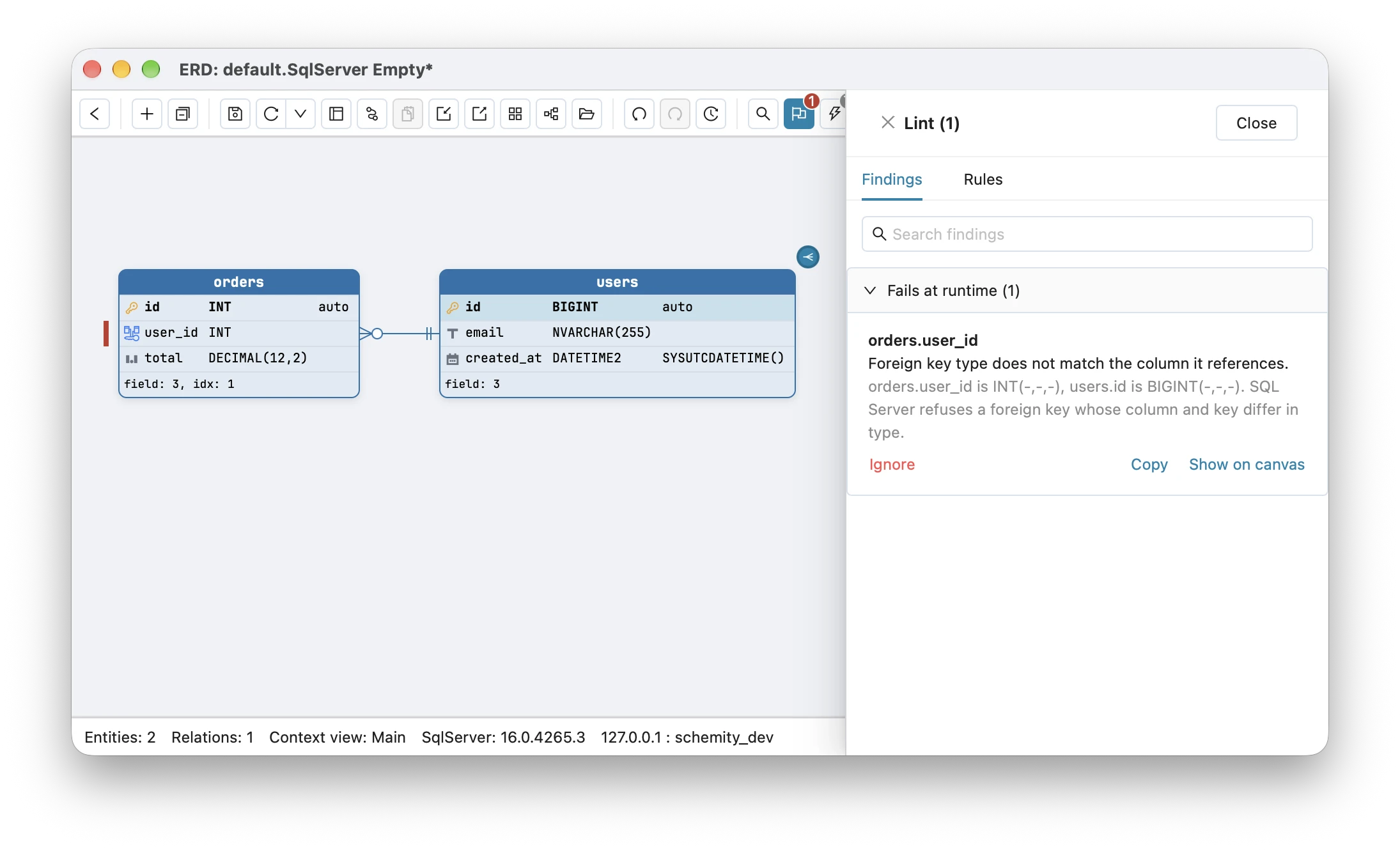
Change users.id to BIGINT in the field editor and lint reports each foreign key column still on INT as “Foreign key type does not match the column it references”, filed under the findings that fail at runtime with the detail that SQL Server refuses a foreign key whose column and key differ in type. The referencing columns are found by the diagram rather than by Msg 1778 at deploy time.
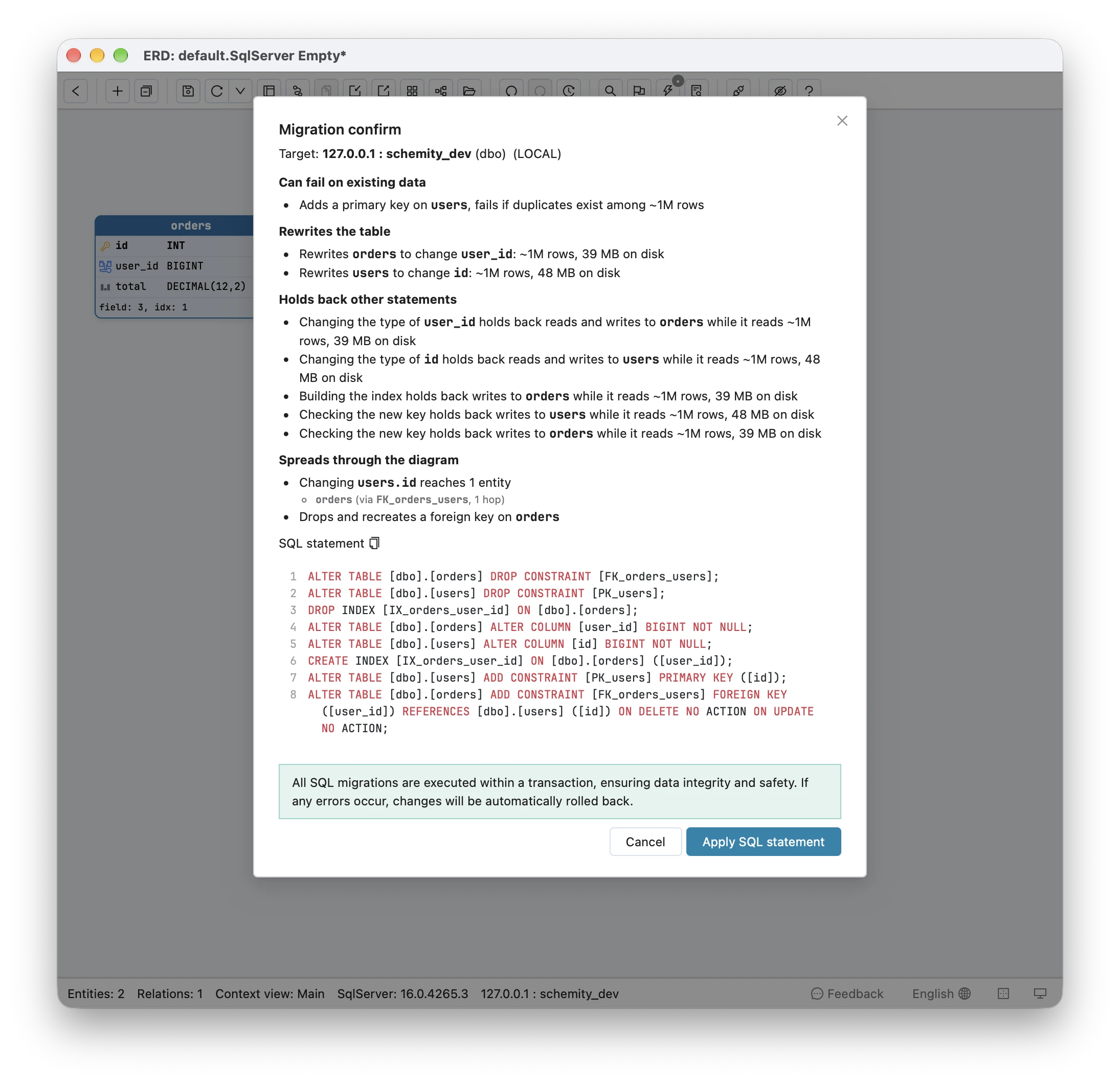
Change them too, and the planned schema migration is the in-place script above: it drops the foreign keys, the primary key and the indexes that use the columns, restates NOT NULL on every column that has it, keeps a non-default COLLATE on string columns, and creates everything again in dependency order. A VARCHAR, NVARCHAR or VARBINARY that only grows keeps its index, because SQL Server allows that change in place. A column renamed and retyped in the same save becomes one ALTER COLUMN plus sp_rename, and an identity added, removed or given a new step is refused with an explanation, because SQL Server can only change that by copying the table.
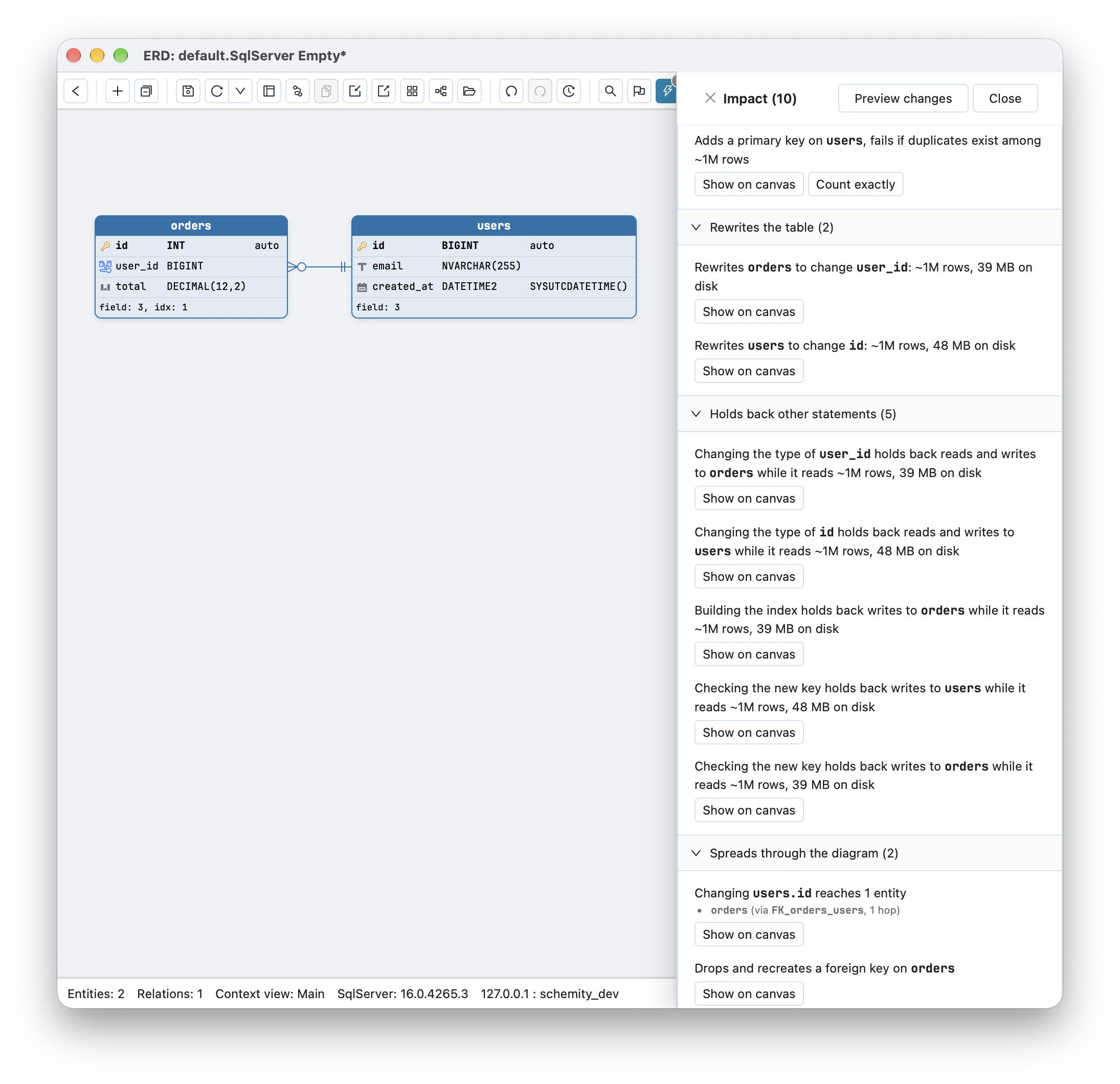
Before anything runs, impact analysis lets you see the impact of every change in the plan: “Rewrites users to change id” and “Rewrites orders to change user_id”, each with the table’s row estimate and size on disk, the lock each type change takes (“holds back reads and writes to users while it reads ~1M rows”), the index rebuild and the key checks that hold back writes, “Drops and recreates a foreign key on orders”, and the primary key it adds back, with the duplicate check any new key gets. Those row estimates are the numbers to set against the 20.5 seconds and 1 GB above before you book the window.
INT to BIGINT on SQL Server, in one list
- Find the tables at risk with
sys.identity_columnsbefore an insert fails with Msg 8115. ALTER COLUMNon a key column fails with Msg 5074 and 4922 until every primary key, foreign key, unique, check, index and schema-bound view on it is dropped.ONLINE = ONdoes not change that.- In place means drop, alter, recreate, with every table locked and its rows rewritten. Budget the transaction log: 1 GB for two 1,000,000-row tables here.
- Always restate
NOT NULLand the column’sCOLLATEinALTER COLUMN. - Row compression stops the
ALTER COLUMNfrom rewriting rows; new tables avoid the long lock; a negative reseed only buys time.
The PostgreSQL version of this migration has its own catch, a serial sequence that stays integer after the column is widened, covered in serial vs identity in Postgres. MySQL’s version fails on the foreign keys too, with error 3780, as shown in MySQL UNSIGNED primary keys, and how Schemity reads two real SQL Server schemas end to end is in the SQL Server round trip.
Frequently asked questions
How do I change an INT primary key to BIGINT in SQL Server?
Drop every foreign key that references the key, then the primary key and any index on the foreign key columns, run ALTER COLUMN ... BIGINT NOT NULL on the key and on every referencing column, and create the indexes, the primary key and the foreign keys again. SQL Server refuses the ALTER COLUMN with Msg 5074 while any of them still uses the column, and WITH (ONLINE = ON), which needs Enterprise edition, does not get past that check. Each ALTER COLUMN rewrites every row under a schema modification lock.
Can I reseed an INT identity to negative numbers instead of changing the type?
Yes, as a stopgap. DBCC CHECKIDENT ('users', RESEED, -2147483648) makes the next insert -2147483647, and the column then counts up through the negative half for another 2.1 billion rows. It needs no schema change, but every consumer of the id has to accept negative values, and the ids no longer sort by insertion time.
Does ALTER COLUMN keep NOT NULL and the column's collation in SQL Server?
Only if the statement restates them. Microsoft's ALTER TABLE documentation says a column altered without NULL or NOT NULL becomes nullable, and one altered without COLLATE gets the database default collation. In a test, ALTER COLUMN email NVARCHAR(320) turned a NOT NULL column with Latin1_General_CS_AS into a nullable one with the database default, there SQL_Latin1_General_CP1_CI_AS.