A MySQL primary key can be signed or UNSIGNED, and both cost the same storage: 4 bytes for INT, 8 for BIGINT. What decides the choice is not the range but the foreign keys. MySQL refuses any foreign key whose sign differs from the column it references, so the sign of the first key decides the sign of every key column that will ever point at it.
That is why the question usually arrives as an error rather than a design discussion. A migration adds an orders table to a Laravel database, declares user_id as a plain BIGINT, and MySQL answers with error 3780. Below is what each choice gets you, measured on MySQL 8.4.11 in a throwaway container, how to pick, and what changing your mind later costs.
What UNSIGNED changes in a MySQL integer column
Only the range. The MySQL manual’s integer table gives each type one storage size, signed or not:
| Type | Bytes | Signed maximum | UNSIGNED maximum |
|---|---|---|---|
INT | 4 | 2,147,483,647 | 4,294,967,295 |
BIGINT | 8 | 9,223,372,036,854,775,807 | 18,446,744,073,709,551,615 |
On 8.4, inserting 2,147,483,648 into a signed INT and -1 into an INT UNSIGNED both failed with ERROR 1264: Out of range value. The doubled range is real for INT, where 2.1 billion is a number a busy events table can reach. For BIGINT it is academic: inserting a million rows a second, a signed key lasts about 292,000 years.
Two things UNSIGNED is not. It is not deprecated on integers: MySQL 8.0.17 deprecated it for DECIMAL, FLOAT and DOUBLE, and 8.4 still warns UNSIGNED for decimal and floating point data types is deprecated on those, but not on INT or BIGINT. And the (20) in BIGINT(20) UNSIGNED is a display width, deprecated in the same release. 8.4 warns Integer display width is deprecated and SHOW CREATE TABLE drops it.
Which frameworks create signed and unsigned keys
Most schemas did not choose. The framework that created the first table did:
| Framework | Primary key it creates on MySQL | Source |
|---|---|---|
| Laravel | BIGINT UNSIGNED from $table->id(), and foreignId() matches it | Laravel 13 migrations docs: id is “an alias of the bigIncrements method”, which “creates an auto-incrementing UNSIGNED BIGINT” |
| WordPress | bigint(20) unsigned on every core table: ID, post_author, comment_ID | wp-admin/includes/schema.php |
| Rails | signed bigint | primary_key: "bigint auto_increment PRIMARY KEY" in the MySQL adapter |
| Django | signed bigint for BigAutoField, integer for AutoField | "BigAutoField": "bigint AUTO_INCREMENT" in the MySQL backend |
Laravel’s current helpers stay consistent with each other, but its default changed once. Apps created before Laravel 5.8 made users.id with $table->increments('id'), which is INT UNSIGNED, so a new foreignId('user_id') pointing at it fails, and the column needs $table->unsignedInteger('user_id') instead. WordPress core declares no foreign keys at all, so there the error comes from a plugin or a hand-written table. Otherwise the problem appears where two conventions meet: a hand-written $table->bigInteger('user_id') (Laravel’s bigInteger is signed) next to $table->id(), a Laravel app added on top of a database a Rails or raw-SQL app created first, or a reporting table written by hand in a WordPress database.
To see which convention a database already uses, count its integer primary keys by type:
SELECT c.COLUMN_TYPE, COUNT(*) AS primary_keys
FROM information_schema.COLUMNS c
JOIN information_schema.KEY_COLUMN_USAGE k
  ON k.TABLE_SCHEMA = c.TABLE_SCHEMA AND k.TABLE_NAME = c.TABLE_NAME
 AND k.COLUMN_NAME = c.COLUMN_NAME AND k.CONSTRAINT_NAME = 'PRIMARY'
WHERE c.TABLE_SCHEMA = DATABASE()
  AND c.DATA_TYPE IN ('tinyint', 'smallint', 'mediumint', 'int', 'bigint')
GROUP BY c.COLUMN_TYPE;
One row back means one convention. Two rows means the next foreign key has to check which table it points at.
Should a MySQL primary key be UNSIGNED?
Only when the schema around it already is. The sign is not a per-table preference, it is a convention the whole schema has to share, and the cheapest choice is almost always the one already in the database:
| Situation | Choose | Why |
|---|---|---|
| Laravel or WordPress schema | BIGINT UNSIGNED, on keys and every foreign key column | Every existing key is unsigned, and a signed column cannot reference one |
| Rails or Django schema | Signed BIGINT | Same rule, the other way round |
| New schema, no framework deciding | Signed BIGINT | The extra range is unreachable, and signed avoids the problems below |
A 4-byte INT key that may pass 2.1 billion | BIGINT, unless key size really matters | INT UNSIGNED doubles the headroom once, BIGINT multiplies it by four billion |
The case for signed in a new schema is everything outside the table. Subtraction is one: on 8.4, SELECT a.id - b.id between two BIGINT UNSIGNED ids, 1 minus 2, failed with ERROR 1690: BIGINT UNSIGNED value is out of range, and CAST(a.id - b.id AS SIGNED) failed the same way, because the subtraction runs first. Only CAST(a.id AS SIGNED) - CAST(b.id AS SIGNED), or the NO_UNSIGNED_SUBTRACTION SQL mode, returned -1. Porting is another: PostgreSQL, SQL Server and SQLite have no unsigned 64-bit integer, so a BIGINT UNSIGNED key either moves to BIGINT with a theoretical upper half it can no longer hold, or to NUMERIC. Java’s long, Go’s int64 and PHP’s int are signed 64-bit as well, so a BIGINT UNSIGNED value above 2^63-1 has no native type in them.
Whichever you pick, the rule that is not optional is the same: a foreign key column gets exactly the type of the key it references, UNSIGNED included.
Why does MySQL return error 3780 for a foreign key?
Because the MySQL manual requires it: “The size and sign of fixed precision types such as INTEGER and DECIMAL must be the same.” This is the Laravel case, reproduced on 8.4.11:
CREATE TABLE users (
    id BIGINT UNSIGNED AUTO_INCREMENT PRIMARY KEY,
    email VARCHAR(255) NOT NULL
);

CREATE TABLE posts (
    id BIGINT UNSIGNED AUTO_INCREMENT PRIMARY KEY,
    user_id BIGINT NOT NULL,
    CONSTRAINT posts_user_id_foreign FOREIGN KEY (user_id) REFERENCES users (id)
);
ERROR 3780 (HY000): Referencing column 'user_id' and referenced column 'id' in foreign key constraint 'posts_user_id_foreign' are incompatible.Three details from the same test session:
SET foreign_key_checks = 0does not get it through. The sameCREATE TABLEfailed with the same error. The manual lists “creating a foreign key constraint where a column references a nonmatching column type” among the things disabled checks still refuse.- Same sign, different size fails too. An
INT UNSIGNEDcolumn referencingBIGINT UNSIGNEDreturned 3780 as well. - The direction does not matter. A
BIGINT UNSIGNEDcolumn referencing a signedBIGINTkey failed the same way as the reverse. So did a LaravelforeignId('account_id'), which differs in both size and sign, pointing at a legacy signedINTkey. The fix there is$table->integer('account_id')followed by$table->foreign('account_id')->references('id')->on('accounts'), matching the key rather than the framework’s default.
The other cause of error 3780: string keys with different collations
Integer keys are not the only ones. The same manual passage goes on: “For nonbinary (character) string columns, the character set and collation must be the same.” A CHAR(36) UUID key or a country_code hits this whenever the key’s table and the new table were created under different defaults, and the error text is identical, so it reads like a type problem.
It usually comes from a table made years ago. A database created on MySQL 8.0 or later defaults to utf8mb4_0900_ai_ci, the 8.0 server default. Older tables often carry utf8mb3_general_ci, and Laravel’s default config writes utf8mb4_unicode_ci onto every table its migrations create. Any table made without a COLLATE clause, by raw SQL, a GUI or another framework, gets the database default instead. On 8.4.11:
CREATE TABLE tenants (
    id CHAR(36) NOT NULL PRIMARY KEY,
    name VARCHAR(100) NOT NULL
) DEFAULT CHARSET = utf8mb4 COLLATE = utf8mb4_unicode_ci;

CREATE TABLE projects (
    id BIGINT UNSIGNED AUTO_INCREMENT PRIMARY KEY,
    tenant_id CHAR(36) NOT NULL,
    CONSTRAINT projects_tenant_id_foreign FOREIGN KEY (tenant_id) REFERENCES tenants (id)
);
ERROR 3780 (HY000): Referencing column 'tenant_id' and referenced column 'id' in foreign key constraint 'projects_tenant_id_foreign' are incompatible.Both columns are utf8mb4 and both are CHAR(36). Only the collation differs, and foreign_key_checks = 0 did not get it through either. Declaring the column as tenant_id CHAR(36) COLLATE utf8mb4_unicode_ci NOT NULL did. To see which keys a new table will fail against before you write one, list the primary key columns whose collation differs from the database default:
SELECT c.TABLE_NAME, c.COLUMN_NAME, c.COLLATION_NAME,
       s.DEFAULT_COLLATION_NAME AS new_tables_get
FROM information_schema.COLUMNS c
JOIN information_schema.KEY_COLUMN_USAGE k
  ON k.TABLE_SCHEMA = c.TABLE_SCHEMA AND k.TABLE_NAME = c.TABLE_NAME
 AND k.COLUMN_NAME = c.COLUMN_NAME AND k.CONSTRAINT_NAME = 'PRIMARY'
JOIN information_schema.SCHEMATA s ON s.SCHEMA_NAME = c.TABLE_SCHEMA
WHERE c.TABLE_SCHEMA = DATABASE()
  AND c.COLLATION_NAME <> s.DEFAULT_COLLATION_NAME;
Every row is a key whose foreign key columns need an explicit COLLATE. Integer keys never appear, because their COLLATION_NAME is NULL.
What does it cost to change a key from UNSIGNED to signed?
More than one ALTER. With orders.user_id referencing users.id, both BIGINT UNSIGNED, the obvious migration fails on its first statement, with or without foreign key checks:
ALTER TABLE users MODIFY COLUMN id BIGINT AUTO_INCREMENT;ERROR 3780 (HY000): Referencing column 'user_id' and referenced column 'id' in foreign key constraint 'orders_user_id_foreign' are incompatible.Changing the child column first fails the same way. The foreign key has to go, both columns change, and the key comes back:
ALTER TABLE orders DROP FOREIGN KEY orders_user_id_foreign;
ALTER TABLE users MODIFY COLUMN id BIGINT AUTO_INCREMENT;
ALTER TABLE orders MODIFY COLUMN user_id BIGINT NOT NULL;
ALTER TABLE orders ADD CONSTRAINT orders_user_id_foreign
    FOREIGN KEY (user_id) REFERENCES users (id);
On two tables of 1,000,000 rows each, that took 7.3 seconds, and every statement after the drop reported 1,000,000 rows affected:
| Statement | Time | What MySQL did |
|---|---|---|
DROP FOREIGN KEY | 0.01 s | Metadata only |
MODIFY COLUMN on users.id | 1.53 s | Copied the table: a type change is ALGORITHM=COPY only |
MODIFY COLUMN on orders.user_id | 2.49 s | Copied the table |
ADD CONSTRAINT ... FOREIGN KEY | 3.27 s | Copied orders again: with checks on, ALGORITHM=INPLACE is refused with Adding foreign keys needs foreign_key_checks=OFF |
The last step is the one you can make cheaper. With foreign_key_checks = 0, the same ADD CONSTRAINT on a 1,000,000-row table affected 0 rows and took 0.87 s, because MySQL skips checking the existing rows. That is safe here, where only the type changed and no value did, and unsafe anywhere rows might not match.
The online DDL table lists a column type change as “Permits Concurrent DML: No”, so writes to each table wait while it is copied. Multiply by every table that references users and the cost of switching is clear: decide the sign once, at the first table, because changing it later is a schema migration across the whole graph of foreign keys.
How Schemity handles UNSIGNED keys
Schemity is database design software that reads your live database, shows the impact of every schema change before it runs, and keeps the diagram as a file in Git. When you connect to MySQL, it reads each column’s sign with its type, and the canvas shows an unsigned column as uBIGINT, so a schema’s convention, and any table that breaks it, is visible at a glance across the diagram.
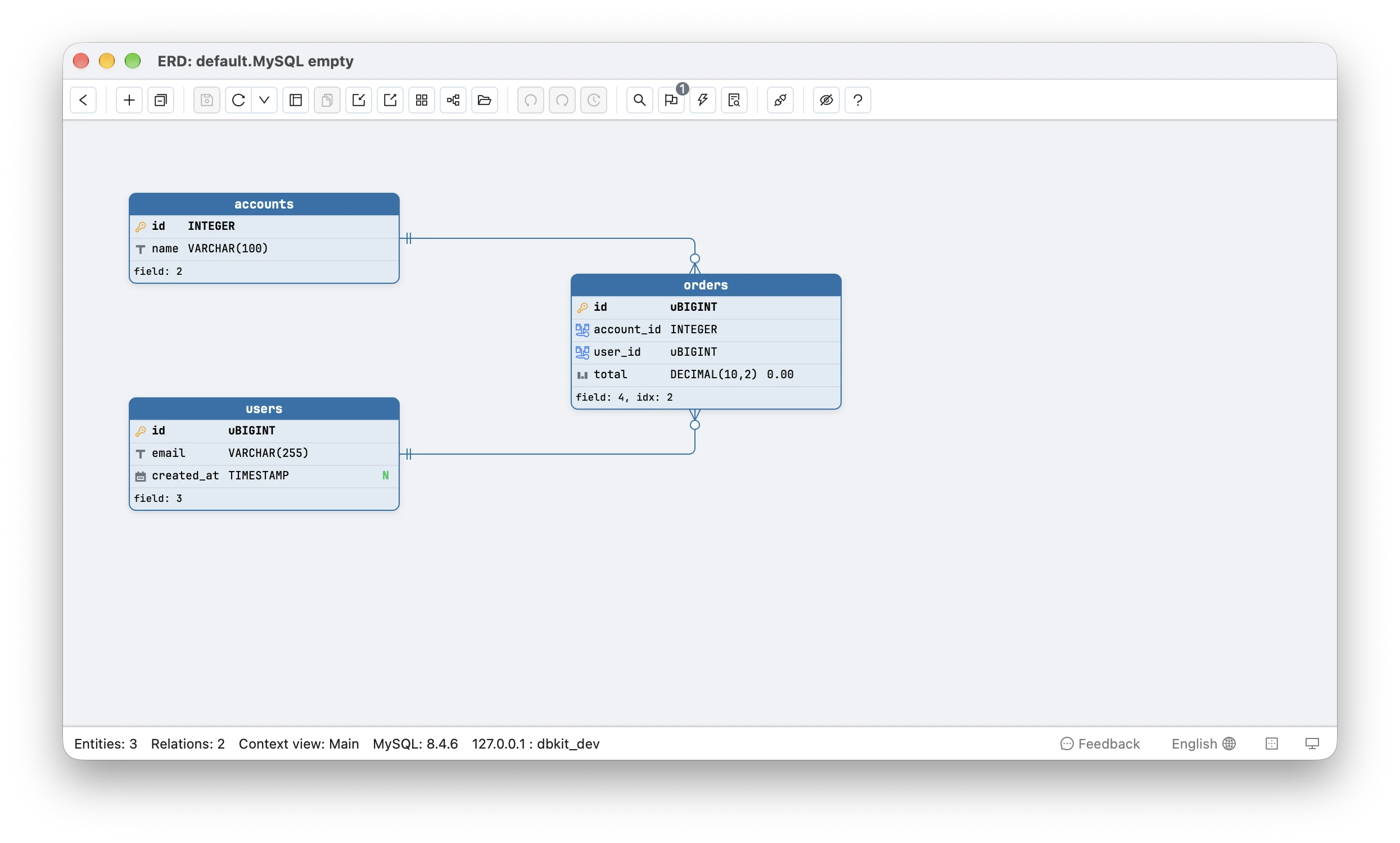
To design the next one, the field editor offers an Unsigned checkbox on MySQL integer types. Drawing a relationship copies the key’s full type into the new foreign key column, sign included, so a new table pointing at a Laravel users.id gets user_id BIGINT UNSIGNED and its migration applies instead of failing with 3780. A string key’s character set and collation are copied the same way, so a column pointing at tenants.id is created with COLLATE utf8mb4_unicode_ci whatever the database default is. Ticking or clearing Unsigned on a key changes every foreign key column that references it in the same edit, one undo step.
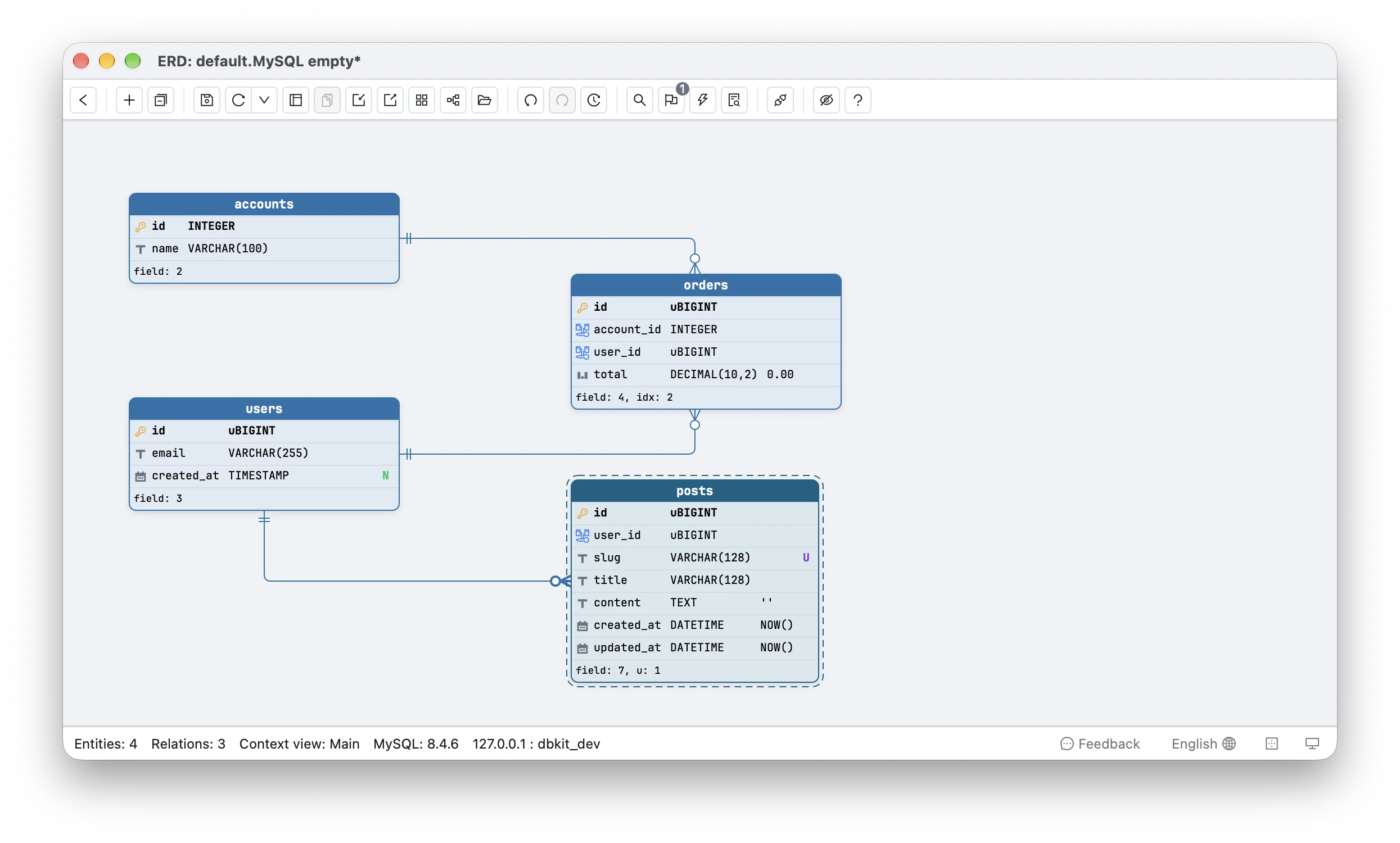
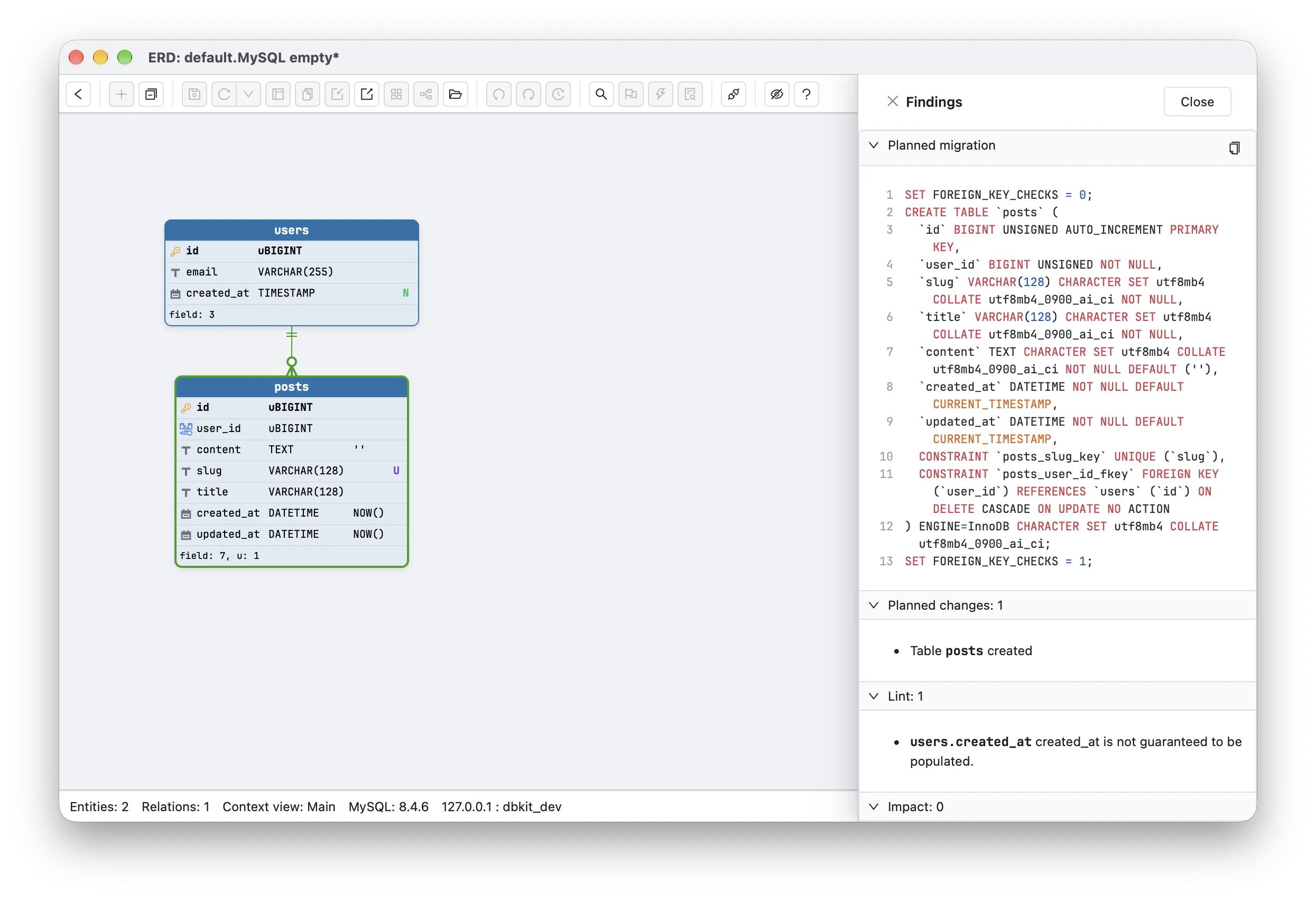
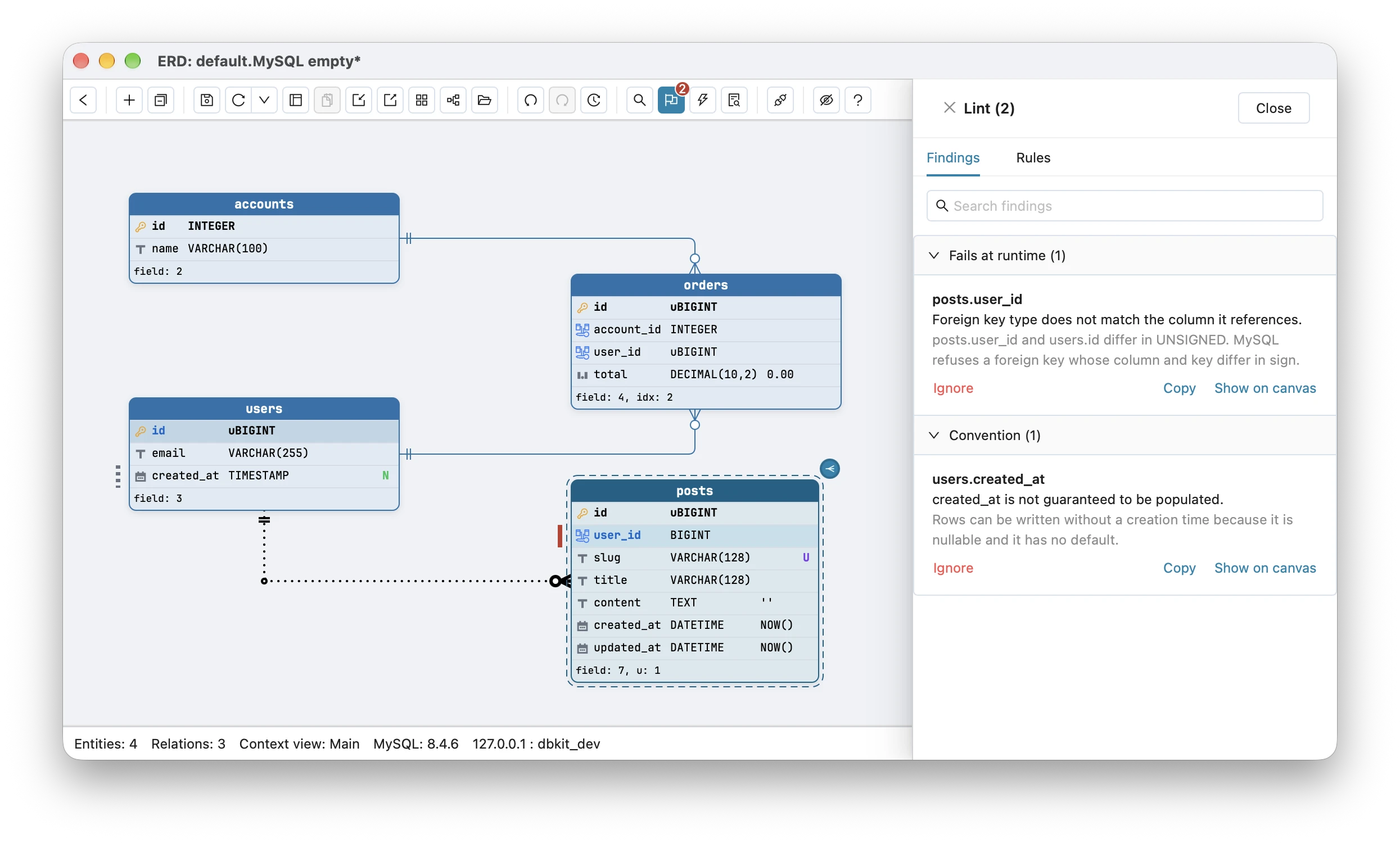
A mismatch that already exists, or one you type yourself, is caught by lint. Its fk-type-mismatch rule reports “Foreign key type does not match the column it references” on the foreign key’s field row, with the detail that the two columns differ in UNSIGNED and that MySQL refuses a foreign key whose column and key differ in sign. On MySQL it also names both collations when a string key and its foreign key column differ in character set or collation.
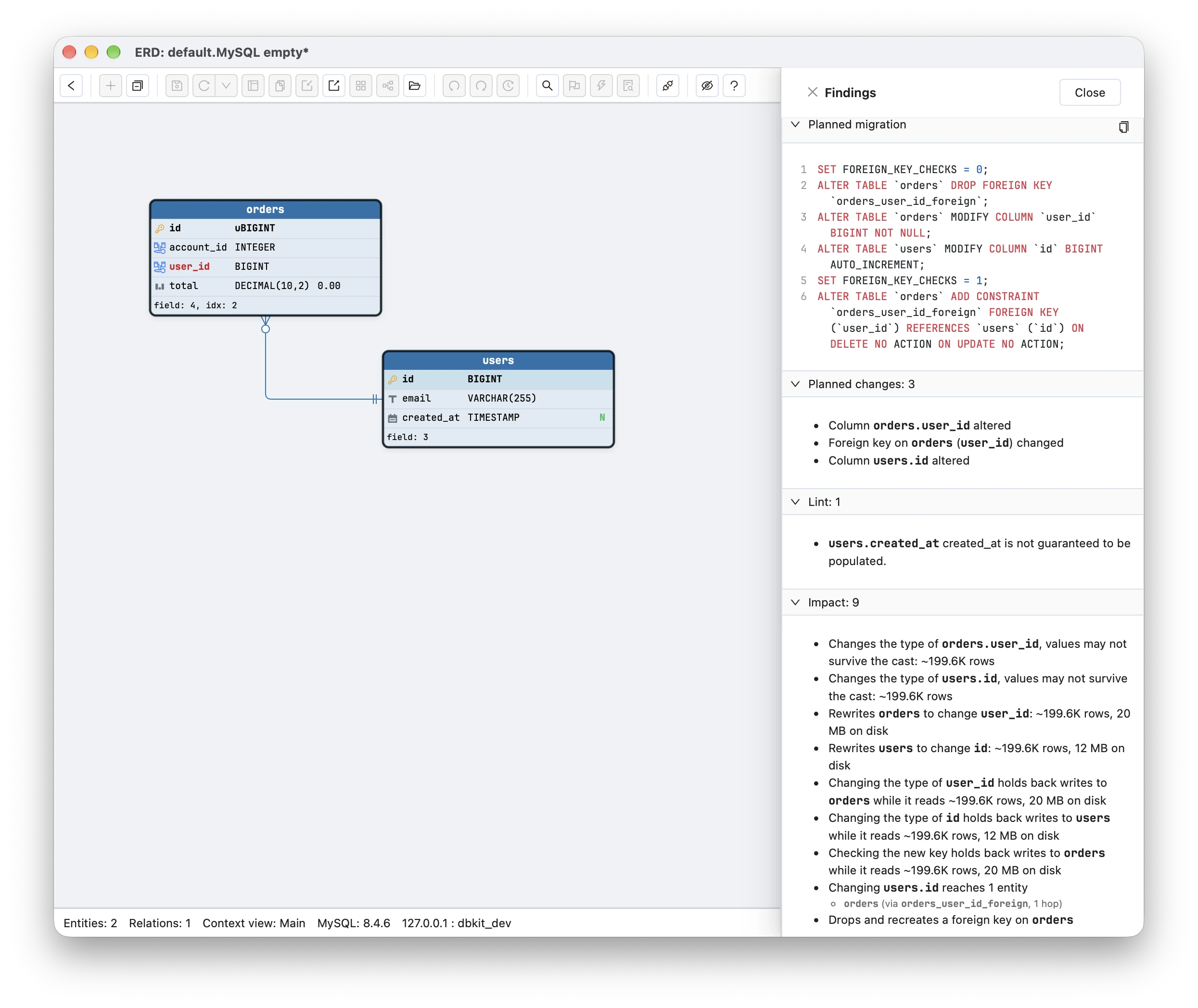
Changing the sign of a key that is already referenced plans the drop, modify, re-add sequence from the section above, and impact analysis reports each MODIFY before it runs as “Rewrites users to change id” with the row count, and a sign change that can lose values, such as BIGINT UNSIGNED to BIGINT, as “values may not survive the cast”. The foreign key it adds back is listed too, as “Checking the new key holds back writes to orders”, since that was the slowest step in the test above. If you later convert the diagram’s SQL to PostgreSQL, SQL Server or SQLite, unsigned integers are widened one size so every value still fits, and a BIGINT UNSIGNED stays a signed 64-bit integer (BIGINT, or INTEGER on SQLite) with a note that values above 2^63-1 would not.
Signed or unsigned MySQL keys, in one list
- Existing schema: use whatever sign its primary keys already have. The
information_schemaquery above tells you. - Laravel or WordPress:
BIGINT UNSIGNEDeverywhere, including hand-written foreign key columns. - Rails, Django, or a new schema with no framework: signed
BIGINT. - Foreign key column: exactly the key’s type, sign and size included. Error 3780 means it is not.
- Changing the sign later: drop the foreign keys, modify both sides, add the keys back, and expect each table to be copied.
The same choice on PostgreSQL, where there is no unsigned option but the key can be a UUID, is in UUID vs bigint primary keys in Postgres. On SQL Server, which refuses a foreign key that differs from its key even in length, widening a key is covered in changing an INT primary key to BIGINT on SQL Server. Naming the constraints those foreign keys create, so orders_user_id_foreign still means something in five years, is in the PostgreSQL constraint naming convention.
Frequently asked questions
Should a MySQL primary key be signed or unsigned?
Match what the schema already uses, since every foreign key must have the same sign as its key. In a Laravel or WordPress database that means BIGINT UNSIGNED. In a new schema with no framework choosing, use signed BIGINT: its limit of 9,223,372,036,854,775,807 is out of reach, and a signed key subtracts, converts and maps to application types without surprises.
What does MySQL error 3780 mean?
Error 3780 says the foreign key column and the column it references are incompatible. For integers that means a different size or sign, such as BIGINT against BIGINT UNSIGNED, and for string keys a different character set or collation, such as a new utf8mb4_0900_ai_ci table pointing at an older utf8mb4_unicode_ci key. Setting foreign_key_checks = 0 does not help, so the fix is to give the foreign key column exactly the key's type, including UNSIGNED and COLLATE.
How do I change a MySQL primary key from UNSIGNED to signed?
Drop every foreign key that references it, change the key and each foreign key column with MODIFY COLUMN, then add the foreign keys back. MySQL refuses the MODIFY while a foreign key still links the two columns. Each MODIFY copies its table, and re-adding the foreign key with checks on copies the child table again, so plan it as a maintenance window.