A database diagram that reads a Snowflake schema and writes it back should give you the same schema, and before this round of fixes Schemity did not. We took two schemas, TPC-DS as Snowflake ships it in its sample database (24 tables) and a hand-written schema built from the Snowflake features real projects use (6 tables), imported each from Snowflake’s own GET_DDL, and rebuilt it in a fresh schema from the SQL Schemity wrote. Snowflake stopped the second script partway through, and the first came back with every clustering key gone and 17 keys numbering themselves. After the fixes, the SQL Schemity writes runs on Snowflake as it is, with no edit, TPC-DS comes back with no catalog difference, the feature schema differs only in two comments, and both behave like their originals in 14 behaviour probes.
Schemity is database design software that reads your live database, shows the impact of every schema change before it runs, and keeps the diagram as a file in Git. This is the fifth and last post in a series that tests the round trip on each database it supports, after Mastodon and Saleor on PostgreSQL, Invoice Ninja and Sylius on MySQL, Bitwarden and Smartstore on SQL Server and Campfire and Jellyfin on SQLite. Reading a schema you did not write is how you understand your schema before changing it, and Snowflake tested the part of a table the other four never needed: how the warehouse stores it, not only what its columns are.
Which two schemas, and which path?
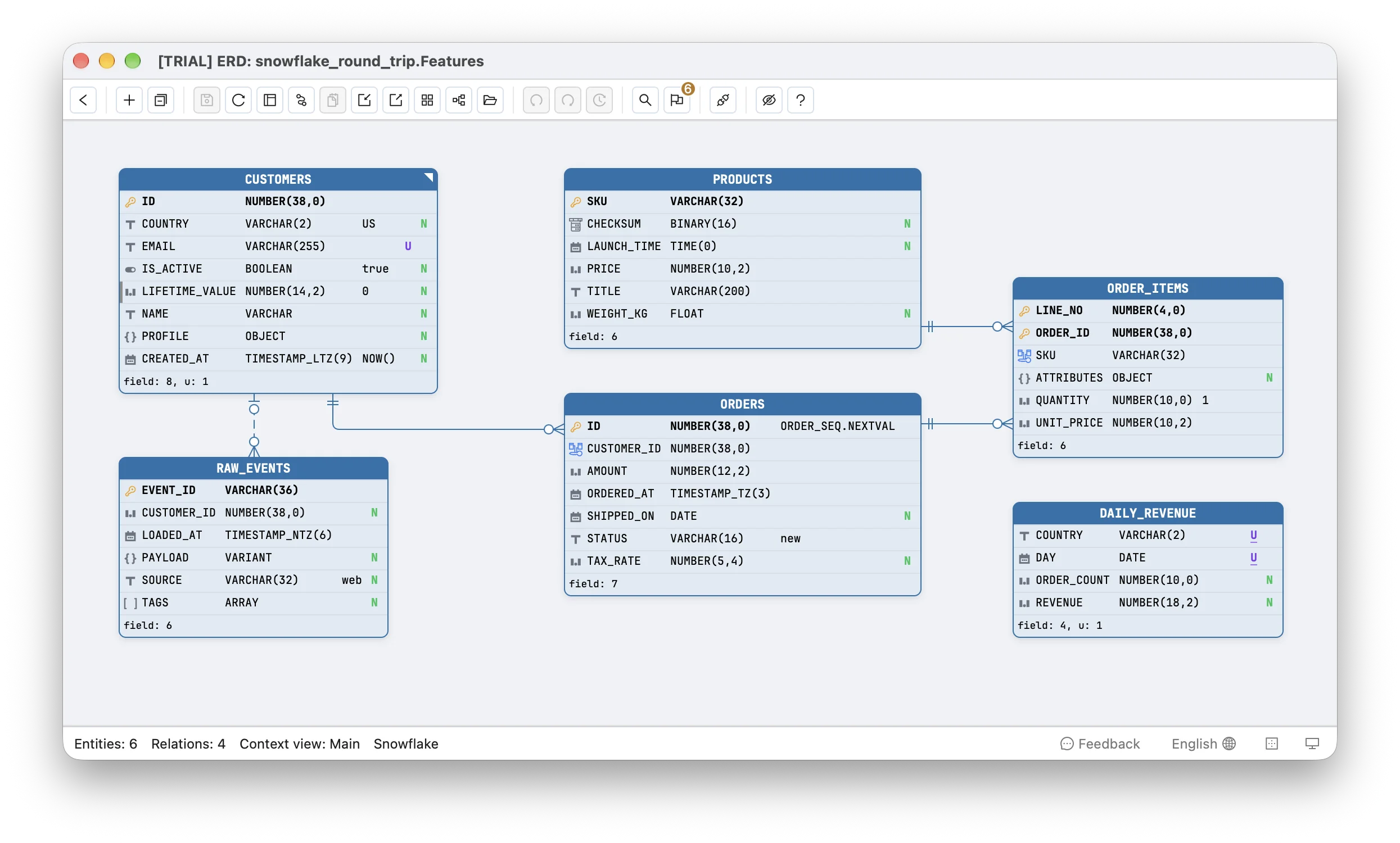
There is no open-source application whose schema is built for Snowflake the way Mastodon’s is built for PostgreSQL, so this post uses two kinds instead. TPC-DS is the TPC’s decision-support benchmark, the schema analytics engines are measured on, and Snowflake ships it with its keys declared. The second is ours: a billing and events model written to use what Snowflake projects do and the other four databases never needed.
| TPC-DS | Feature schema | |
|---|---|---|
| What it is | The TPC’s decision-support schema, from SNOWFLAKE_SAMPLE_DATA.TPCDS_SF10TCL | Customers, products, orders, order items, raw events and a daily rollup |
| Tables / columns | 24 / 425 | 6 / 37 |
| Keys | 24 primary keys, 105 foreign keys | 5 primary keys and 2 unique keys, 2 of them composite, and 3 foreign keys |
| Clustering keys | 24, on a column | 2, one on an expression: CLUSTER BY (TO_DATE(ORDERED_AT)) |
| Also has | nothing else | an identity with START 100 INCREMENT 5, a sequence default, COLLATE 'en-ci', a TRANSIENT table, OBJECT / VARIANT / ARRAY, TIMESTAMP_LTZ(9) / TIMESTAMP_TZ(3) / TIMESTAMP_NTZ(6), TIME(0), BINARY(16), two comments |
Snowflake refuses GET_DDL on a shared database such as its sample data, so TPC-DS was copied into an empty schema with CREATE TABLE ... LIKE, which keeps the columns and the clustering keys, and the sample’s keys were added from its own SHOW PRIMARY KEYS and SHOW IMPORTED KEYS. Everything ran on a Snowflake trial account, version 10.37, on an X-Small warehouse.
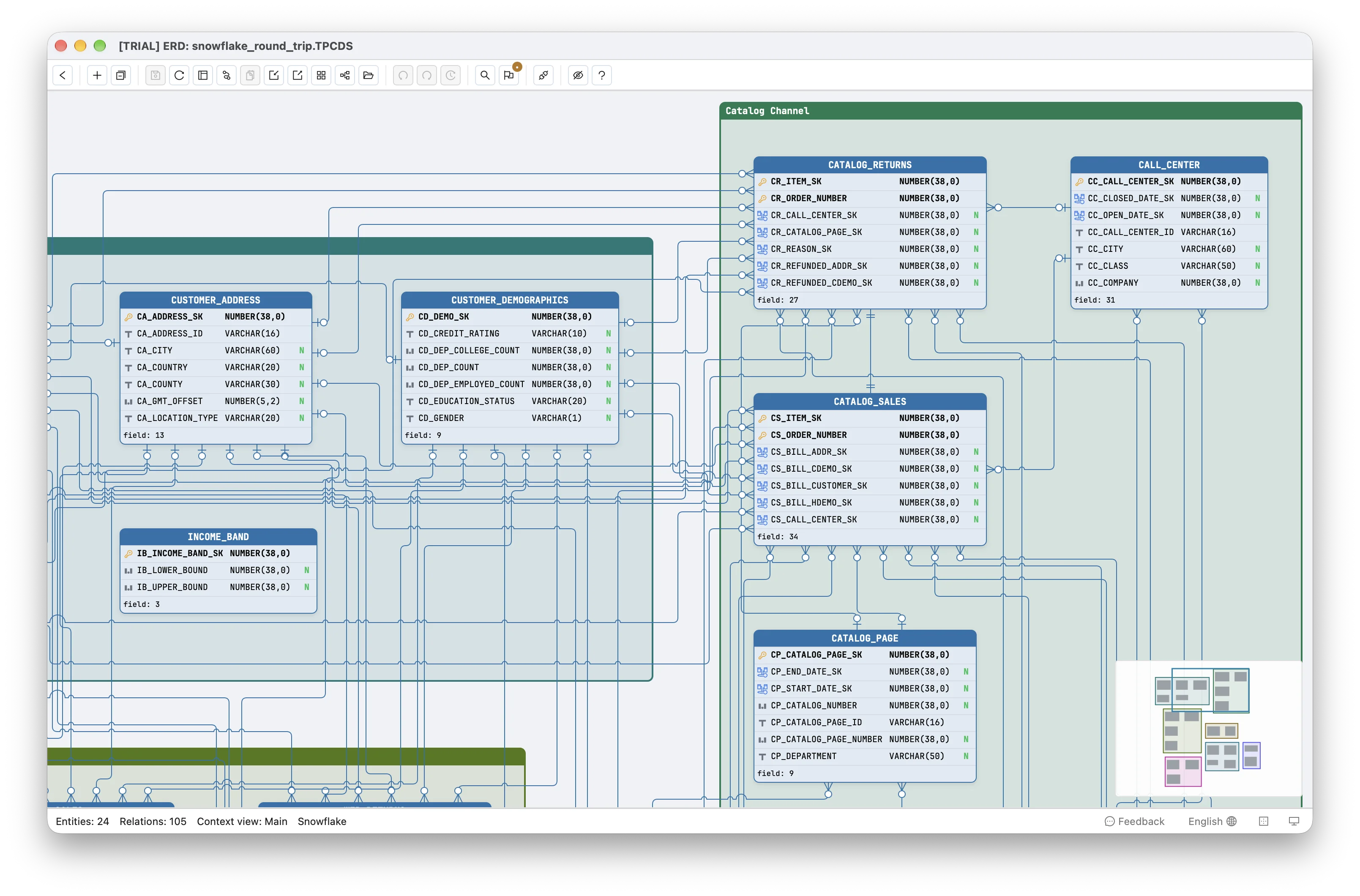
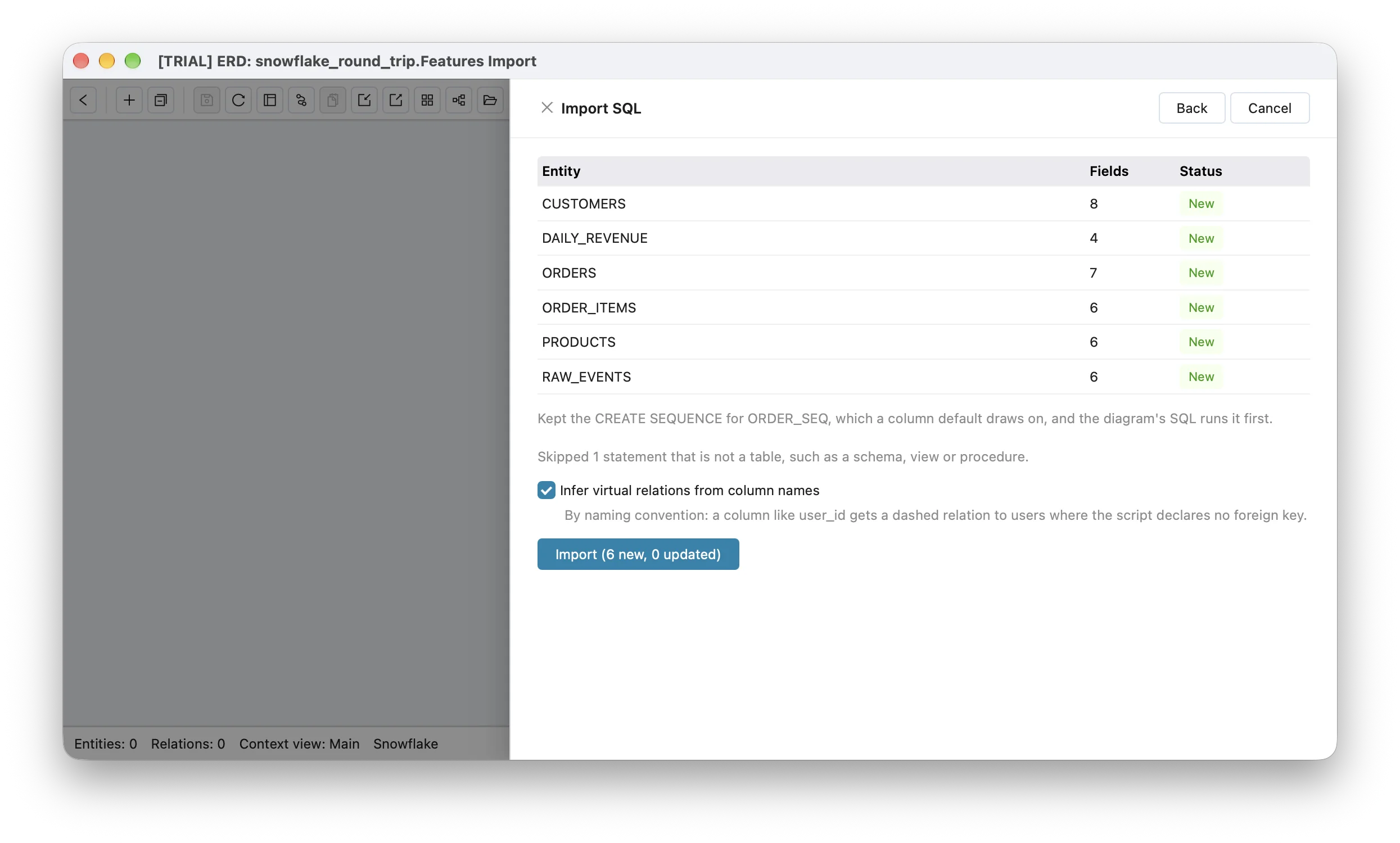
Unlike the other four databases, Schemity has no live connection to Snowflake: a Snowflake diagram is designed from a script and its SQL is run by you. So unlike the other four posts there is one path:
- Import SQL:
GET_DDLof each original schema, read by Schemity’s SQL parser and mapped into a diagram the way the app maps it, with no connection.
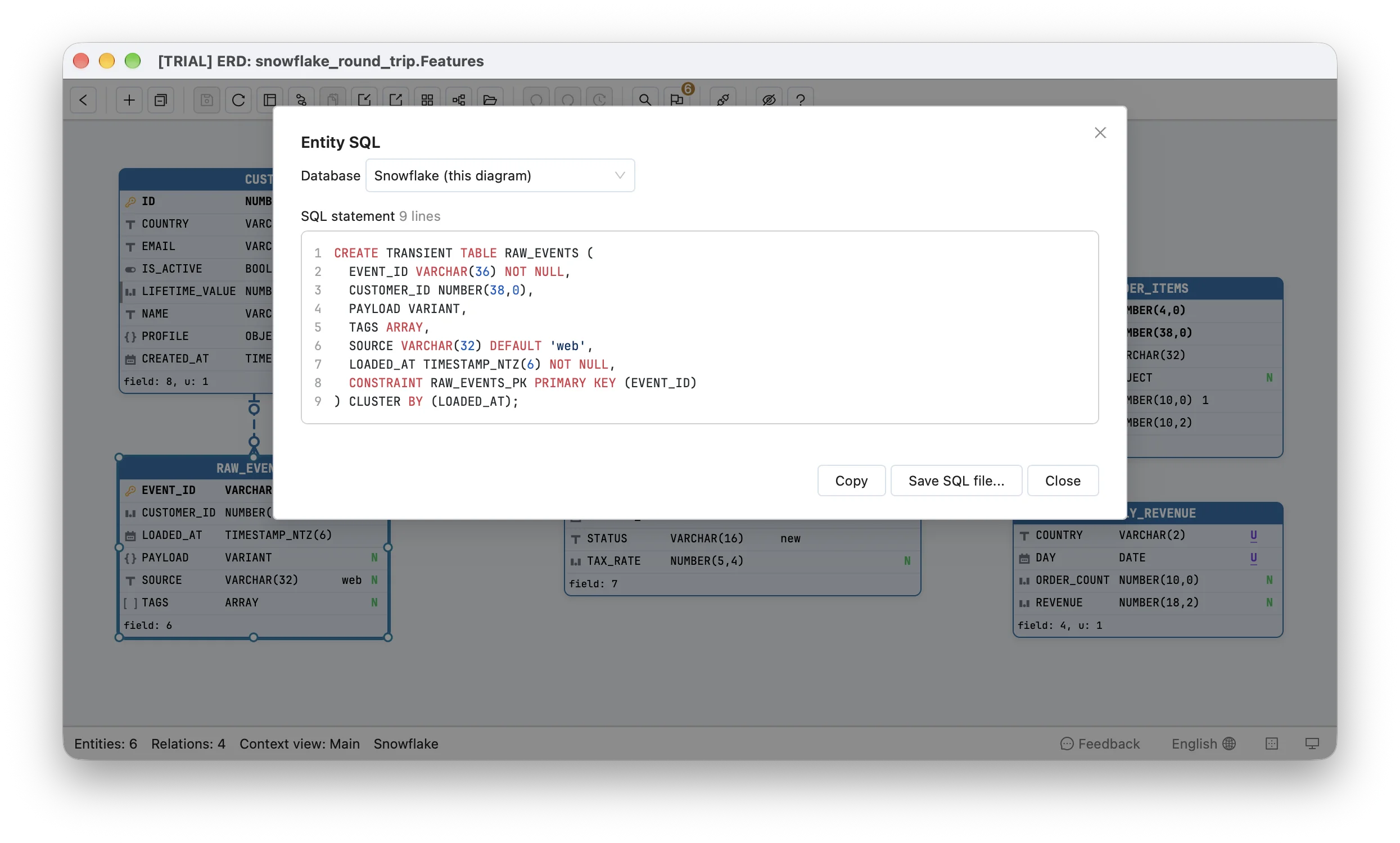
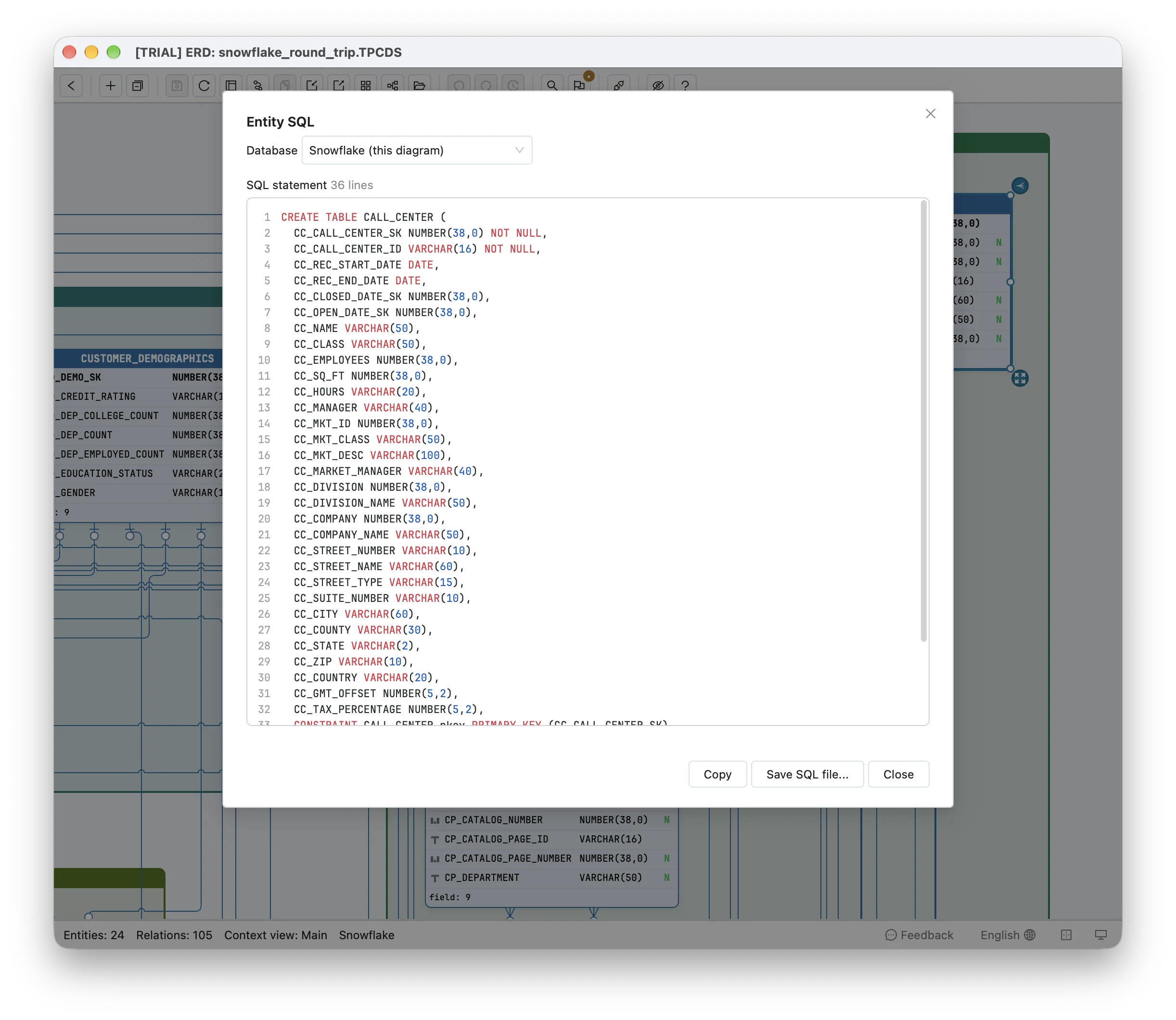
The diagram’s SQL, as View SQL writes it, then ran in a fresh schema on the same account. The runs used Schemity’s own code from a development build, called from scripts rather than through the app’s window, and include the step the app takes when it turns a parsed table into a diagram. The earlier posts’ scripts skipped it, and that step reordered every table’s columns until the fix described in the SQLite post. The fixes described below are in that build and ship in the next release; until then, the released app has the losses in the “before” column.
How do you prove a rebuilt Snowflake schema is the same?
The same two checks as the earlier posts, with one change Snowflake forces on the second.
The catalog diff. A script lists one line per fact for the original schema and for the copy, from INFORMATION_SCHEMA and Snowflake’s SHOW commands: every table with whether it is transient, its clustering key and its comment; every column with its position, type, length or precision, nullability, default, identity start, step and order, collation and comment; every primary, unique and foreign key by its columns; every sequence with its start and step. The two lists are diffed line by line.
The behaviour probes. A probe is a few statements in one transaction that is rolled back, ending in a SELECT of what was stored or in Snowflake’s error. On standard tables Snowflake records primary, unique and foreign keys but does not enforce them; it enforces NOT NULL and CHECK. So a probe here cannot ask which duplicate a copy refuses, as the earlier posts did. It asks what a value becomes: the ids an identity hands out, whether a case-insensitive collation finds a match, what a NUMBER(12,2) stores for 10.005, what a TIMESTAMP_TZ(3) keeps of 10:00:00.123456 +02:00, and whether a row that leaves out a key is refused.
| Check | What it compares | What it catches |
|---|---|---|
| Catalog diff | Tables, columns, keys and sequences as Snowflake reports them | Anything missing, added or changed in the schema |
| Probes | What each schema stores, numbers and refuses | An identity, default, collation or type that behaves differently |
There are 14 probes: 12 for the feature schema and 2 for TPC-DS. An identity or a sequence hands out its numbers even inside a rolled-back transaction, so each copy of the feature schema was rebuilt fresh before its probes ran; TPC-DS has neither.
What failed before the fixes?
Everything below is from Schemity’s code just before these fixes (commit 3360cb61).
Snowflake stopped the feature schema’s script partway. It created the first three tables and stopped at ORDER_ITEMS with:
002003 (42S02): SQL compilation error: Table 'SPIKE_DB.FEATURES_BEFORE.ORDERS' does not exist or not authorized.Import SQL had not read ORDERS at all, so ORDER_ITEMS’s foreign key named a table the script never created. With that one key removed by hand the script ran, and the copy could be compared.
| TPC-DS | Feature schema | |
|---|---|---|
| Script ran | yes | stopped at the fourth table, error 002003; ran once patched |
| Tables lost | 0 | 1, ORDERS |
| Clustering keys lost | 24 of 24 | 2 of 2 |
TRANSIENT dropped | - | 1 of 1 |
| Keys given an identity they do not have | 17 | 0 |
| Identity start and step lost | - | 1 |
| Collation dropped | - | 1 |
| Catalog lines that differ | 82 | 22 |
| Probes that match the original | 0 of 2 | 5 of 12 |
The probes that failed are the ones that matter to the data:
| Probe | Original | Before the fixes | After |
|---|---|---|---|
| Feature schema: the first two customer ids | 100, 105 | 1, 2 | 100, 105 |
Feature schema: '[email protected]' finds '[email protected]' | 1 row | 0 rows | 1 row |
Feature schema: the 5 probes on ORDERS | stored or refused as declared | refused, no table | stored or refused as declared |
TPC-DS: a row in CALL_CENTER or DATE_DIM without its key | refused, error 100072 | accepted, key 1 | refused |
In the tables that were read, NOT NULL, every type, length, precision and scale, defaults, VARIANT, OBJECT and ARRAY, TIMESTAMP_LTZ(9) and TIMESTAMP_NTZ(6) with their precision, TIME(0), BINARY(16), every primary, unique and foreign key and the column order all survived; ORDERS, with its TIMESTAMP_TZ(3), its keys and its sequence default, was lost whole. Each failure had its own cause.
Why did a table with a clustering key disappear?
Because the clause was in a place the parser did not expect it. GET_DDL writes a table’s clustering key between its name and its column list, create or replace TABLE ORDERS cluster by (TO_DATE(ORDERED_AT))(, and Snowflake allows an expression there, not only column names. The SQL parser Schemity uses reads only column names in that clause, so it refused the statement, and Import SQL listed ORDERS as a table it could not read. TPC-DS’s clustering keys are plain columns, so its tables were read, but the clause was then dropped with nothing to hold it. Import SQL now takes CLUSTER BY (...) out of the statement wherever it stands, keeps its text exactly as written, since Snowflake stores the key’s text and spacing, and the writer puts it back after the column list.
Why did a staging table become permanent?
Because TRANSIENT was read and then dropped. A transient table has no Fail-safe period and at most one day of Time Travel, so it costs less to keep and cannot be recovered once its Time Travel period of at most a day has passed; it is what raw and staging data is usually loaded into. The copy’s RAW_EVENTS came back as a permanent table, with Fail-safe storage the original never paid for. The diagram now keeps TRANSIENT with the table’s clustering key and writes CREATE TRANSIENT TABLE.
Why did TPC-DS’s keys start numbering themselves?
Because a Snowflake diagram did not record identity, and the writer guessed. It gave AUTOINCREMENT to every single-column whole-number primary key, which is right for a table drawn in the editor and wrong for 17 of TPC-DS’s 24 tables, whose surrogate keys come with the data being loaded; the other 7, the sales, returns and inventory tables, have composite keys. A row that leaves CC_CALL_CENTER_SK out is refused by the original:
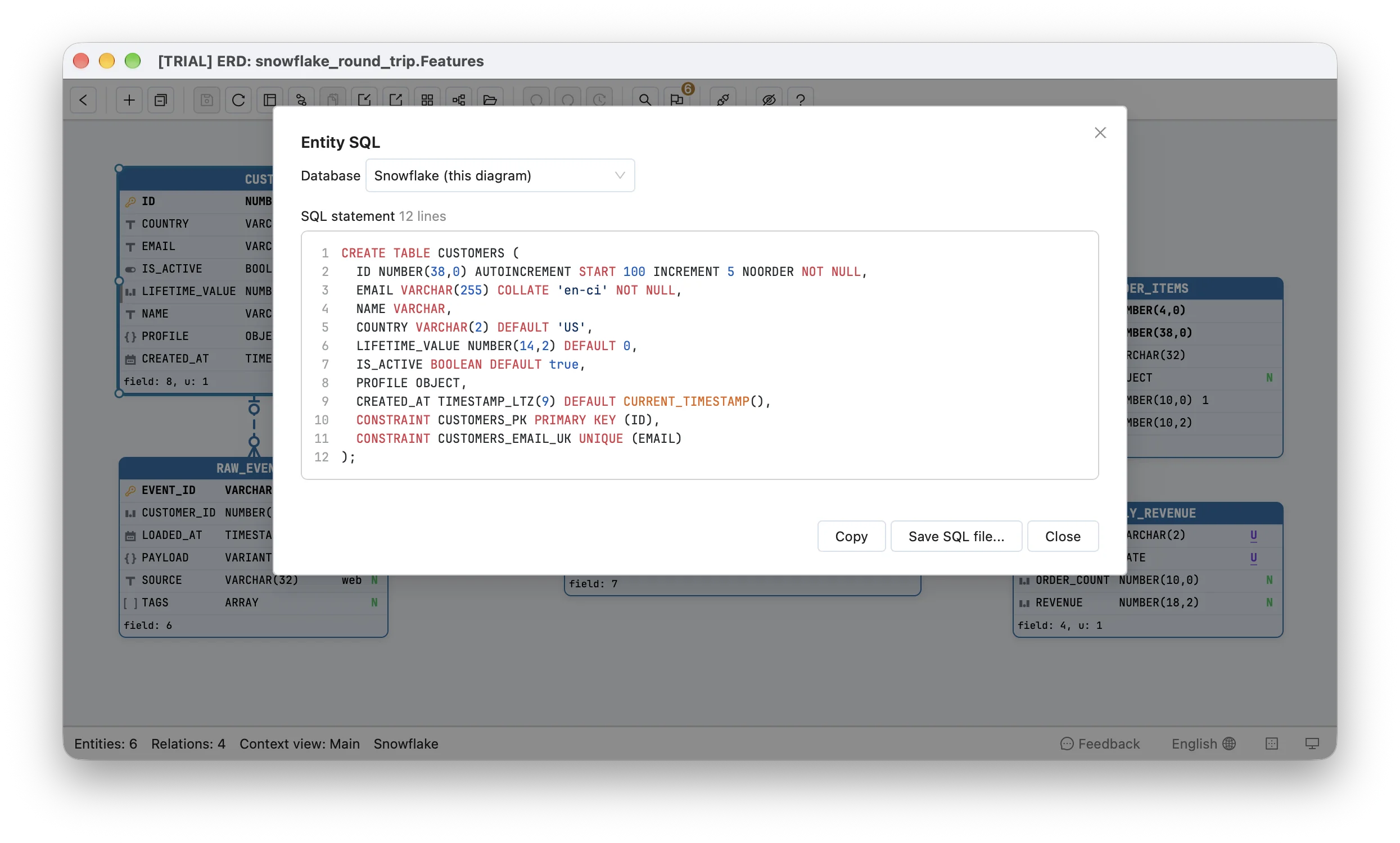
100072 (22000): DML operation to table CALL_CENTER failed on column CC_CALL_CENTER_SK with error: NULL result in a non-nullable columnThe copy accepted it and gave it key 1, which the next load’s real key 1 would then duplicate, and Snowflake would not refuse that either. The same missing record lost the feature schema’s ID NUMBER(38,0) autoincrement start 100 increment 5 noorder: written back as plain AUTOINCREMENT, which starts at 1 and steps by 1, it numbered the first customers 1 and 2 where the original numbered them 100 and 105 (a NOORDER identity does not promise consecutive values, but it starts where it is told). The diagram now records a Snowflake column’s identity as declared, its start, step and ORDER or NOORDER, and records that a whole-number column has none, as it already did for PostgreSQL and SQL Server. Editing such a field in the editor keeps it.
Why did a case-insensitive email stop matching?
Because the column’s collation was read and not written. EMAIL VARCHAR(255) COLLATE 'en-ci' compares without regard to case, so a lookup for '[email protected]' finds '[email protected]'; the copy’s plain VARCHAR(255) compared case and found nothing, which is the difference between a login that works and one that does not. The writer now writes a Snowflake column’s COLLATE as declared.
What happened to the sequence?
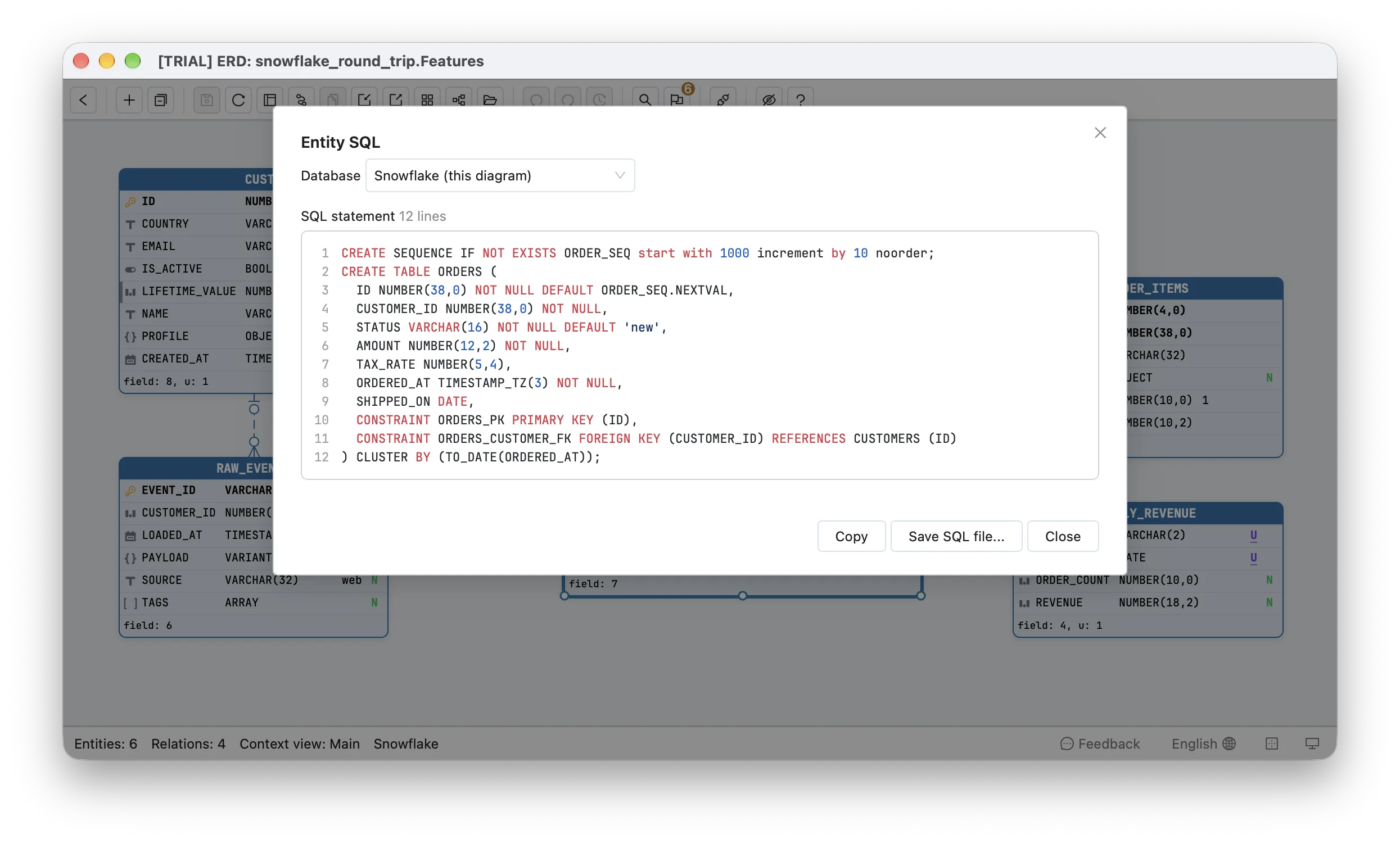
It was skipped, and the default that drew on it had two more problems. ORDERS.ID defaults to ORDER_SEQ.NEXTVAL, a sequence that starts at 1000 and steps by 10, and GET_DDL writes that default with the original’s database and schema, SPIKE_DB.FEATURES_ORIG.ORDER_SEQ.NEXTVAL, so a copy elsewhere would draw on the original’s sequence. And the writer, which ORDERS never reached here, wrote such a default in quotes, as the text 'ORDER_SEQ.NEXTVAL'; the core now has a test for it. Import SQL now keeps each sequence the script creates as setup SQL, which the diagram’s SQL runs first as CREATE SEQUENCE IF NOT EXISTS with the script’s own start and step; a default reads as the sequence alone; and the writer leaves a NEXTVAL call unquoted. The copy’s first order is 1000, as the original’s.
What does the round trip give you now?
The same schema, for both, apart from two comments, from SQL that ran on Snowflake as Schemity wrote it. Neither script needed an edit or raised an error: TPC-DS’s 24 CREATE TABLE statements built all 24 tables, 425 columns, 24 primary keys and 105 foreign keys, and the feature schema’s one CREATE SEQUENCE and six CREATE TABLE statements built its sequence, all 6 tables and every key.
| TPC-DS | Feature schema | |
|---|---|---|
| Catalog differences | none | the table’s comment and a column’s comment |
| Probes that match the original | 2 of 2 | 12 of 12 |
All 24 of TPC-DS’s clustering keys and its 17 surrogate keys without an identity come back as they were, as do the feature schema’s expression clustering key, its transient table, its identity starting at 100 by 5, its case-insensitive collation and its sequence starting at 1000 by 10. The catalog includes each column’s position, and every table comes back in its declared column order.
How do you see relationships in a Snowflake schema with no foreign keys?
By reading them from the column names. Snowflake does not enforce a FOREIGN KEY on a standard table, as the probes above rely on, so nothing stops a row that points nowhere, and plenty of Snowflake schemas declare no foreign keys at all. Raw landing tables and models built by ELT tools are the usual cases. Imported as written, such a schema is a grid of tables with no lines between them.
The feature schema has one: RAW_EVENTS.CUSTOMER_ID holds a customer’s id, but the transient landing table declares no key for it. With Infer virtual relations from column names ticked in Import SQL, Schemity matched CUSTOMER_ID to CUSTOMERS and its primary key ID, and drew a dashed relation, zero-or-one at the customer end because the column allows NULL. A virtual relation lives only in the diagram. The SQL Schemity writes leaves it out, so the round trip above is unchanged, and the diagram still shows where the data joins.
What still differs, and why?
Comments. The feature schema’s table comment and its column comment on LIFETIME_VALUE are read into the diagram as descriptions, and Schemity does not write descriptions to any database: they are the diagram’s own notes, on Snowflake as on the other four. A copy carries the columns and keys, not the documentation, which stays in the diagram file.
What this benchmark does not show
- The numbers through the app’s window. The catalog diffs and probes came from scripts calling Schemity’s import, mapping and writer code on a development build. The screenshots are that build’s app, importing the same
GET_DDLscripts, and the SQL file it exported for each diagram also ran by hand in a Snowflake worksheet with no error, building all 24 TPC-DS tables and all 6 of the feature schema’s. - A live connection. Schemity has none to Snowflake; a schema comes in through Import SQL of
GET_DDL, and the diagram’s SQL is run by you. - Data. The originals are empty apart from the probes’ rolled-back rows. A schema that matches is the precondition for loading data, not proof that a load is safe.
CHECKconstraints, dynamic tables, views and stages. Neither schema has aCHECK; Snowflake enforces them, so they deserve their own test. Dynamic tables and views are not tables a diagram designs.- Other databases. The other four have their own posts, linked above, and this is the last in the series.
How to rerun it
Build each original in an empty schema, take SELECT GET_DDL('schema', '<db>.<schema>') as the script, put it through Schemity’s Import SQL, take the diagram’s SQL from View SQL and run it in another empty schema. Then list both catalogs with this query, a shorter form of the benchmark’s, and diff the output. It leaves out keys, sequences and comments, which the benchmark reads from SHOW PRIMARY KEYS, SHOW IMPORTED KEYS and SHOW SEQUENCES:
SELECT line FROM (
  SELECT 'table | ' || table_name || ' | ' || is_transient || ' | ' || coalesce(clustering_key, 'no clustering key') AS line
    FROM information_schema.tables
   WHERE table_schema = CURRENT_SCHEMA() AND table_type = 'BASE TABLE'
  UNION ALL
  SELECT 'column | ' || table_name || ' | ' || ordinal_position || ' | ' || column_name || ' | ' || data_type
         || ' | ' || coalesce(to_varchar(character_maximum_length), to_varchar(numeric_precision) || ',' || to_varchar(numeric_scale), to_varchar(datetime_precision), '')
         || ' | ' || is_nullable
         -- A default drawing on a sequence names the schema it is in.
         || ' | ' || coalesce(replace(column_default, current_database() || '.' || current_schema() || '.', ''), 'no default')
         || ' | identity ' || coalesce(identity_start || ',' || identity_increment || ',' || identity_ordered, 'none')
         || ' | ' || coalesce(collation_name, 'no collation')
    FROM information_schema.columns
   WHERE table_schema = CURRENT_SCHEMA()
) ORDER BY line;
For behaviour, run each probe between BEGIN and ROLLBACK, end it with a SELECT of what was stored, and rebuild the schema before running the probes again: an identity and a sequence keep the numbers a rolled-back transaction drew.
Frequently asked questions
How do you import Snowflake DDL into an ERD without losing clustering keys?
Read the table options as well as the columns. GET_DDL writes CLUSTER BY before the column list and Snowflake allows an expression there, such as CLUSTER BY (TO_DATE(ORDERED_AT)); a parser that expects column names refuses the whole statement. Schemity's Import SQL now takes the clause out wherever the script puts it, keeps it and TRANSIENT with the table, and writes both back as declared.
Does Snowflake enforce primary keys and foreign keys?
No. On standard tables Snowflake records PRIMARY KEY, UNIQUE and FOREIGN KEY but does not enforce them; it enforces NOT NULL and CHECK. The keys still matter, because tools and optimizers read them, so a diagram should keep and write them. It means a rebuilt copy cannot be checked by which duplicate rows it refuses, only by what it stores.
Why does a Snowflake surrogate key need to stay without AUTOINCREMENT?
Because a NOT NULL column without an identity refuses a row that leaves it out (error 100072), while an AUTOINCREMENT column fills it from 1. TPC-DS's keys come from the data being loaded, so a copy that numbers them accepts rows the original refuses and hands out keys that collide with the loaded ones. Schemity now records that a whole-number column has no identity and writes none.