Renaming a column is safe for the data and unsafe for everything that reads the column by name, and each database draws that line in a different place. PostgreSQL and SQLite rewrite views, CHECK constraints, generated columns and indexes to the new name. MySQL and SQL Server refuse the rename while a CHECK or a generated column reads the column, and accept it while leaving views, triggers and routines pointing at a name that no longer exists.
We ran the same rename on PostgreSQL 18.3 (and 16.8, with the same results), MySQL 8.4.11 (and 9.7.4, with the same results), SQL Server 2022 CU26 and SQLite 3.54.0, each in a throwaway container. The table is orders, and the column being renamed is total, which has collected the usual readers. This is the PostgreSQL version; the other three use the same objects in their own syntax, with the CHECK named orders_total_check as PostgreSQL names it.
CREATE TABLE customers (
  id bigint GENERATED ALWAYS AS IDENTITY PRIMARY KEY,
  email text NOT NULL UNIQUE
);
CREATE TABLE orders (
  id bigint GENERATED ALWAYS AS IDENTITY PRIMARY KEY,
  customer_id bigint NOT NULL REFERENCES customers (id),
  total numeric(12,2) NOT NULL CHECK (total >= 0),
  total_with_tax numeric(12,2) GENERATED ALWAYS AS (total * 1.10) STORED,
  created_at timestamptz NOT NULL DEFAULT now()
);
CREATE INDEX orders_total_idx ON orders (total);
CREATE INDEX orders_big_idx ON orders (customer_id) WHERE total > 1000;
CREATE TABLE order_audit (
  order_id bigint NOT NULL,
  old_total numeric(12,2) NOT NULL,
  changed_at timestamptz NOT NULL DEFAULT now()
);
CREATE VIEW order_totals AS
  SELECT id, customer_id, total FROM orders;
CREATE FUNCTION log_total_change() RETURNS trigger LANGUAGE plpgsql AS $$
BEGIN
  INSERT INTO order_audit (order_id, old_total) VALUES (OLD.id, OLD.total);
  RETURN NEW;
END $$;
CREATE TRIGGER orders_total_audit AFTER UPDATE OF total ON orders
  FOR EACH ROW EXECUTE FUNCTION log_total_change();
CREATE FUNCTION customer_spend(c bigint) RETURNS numeric LANGUAGE sql AS
  $$ SELECT coalesce(sum(total), 0) FROM orders WHERE customer_id = c $$;
INSERT INTO customers (email) VALUES ('[email protected]');
INSERT INTO orders (customer_id, total) VALUES (1, 100), (1, 50);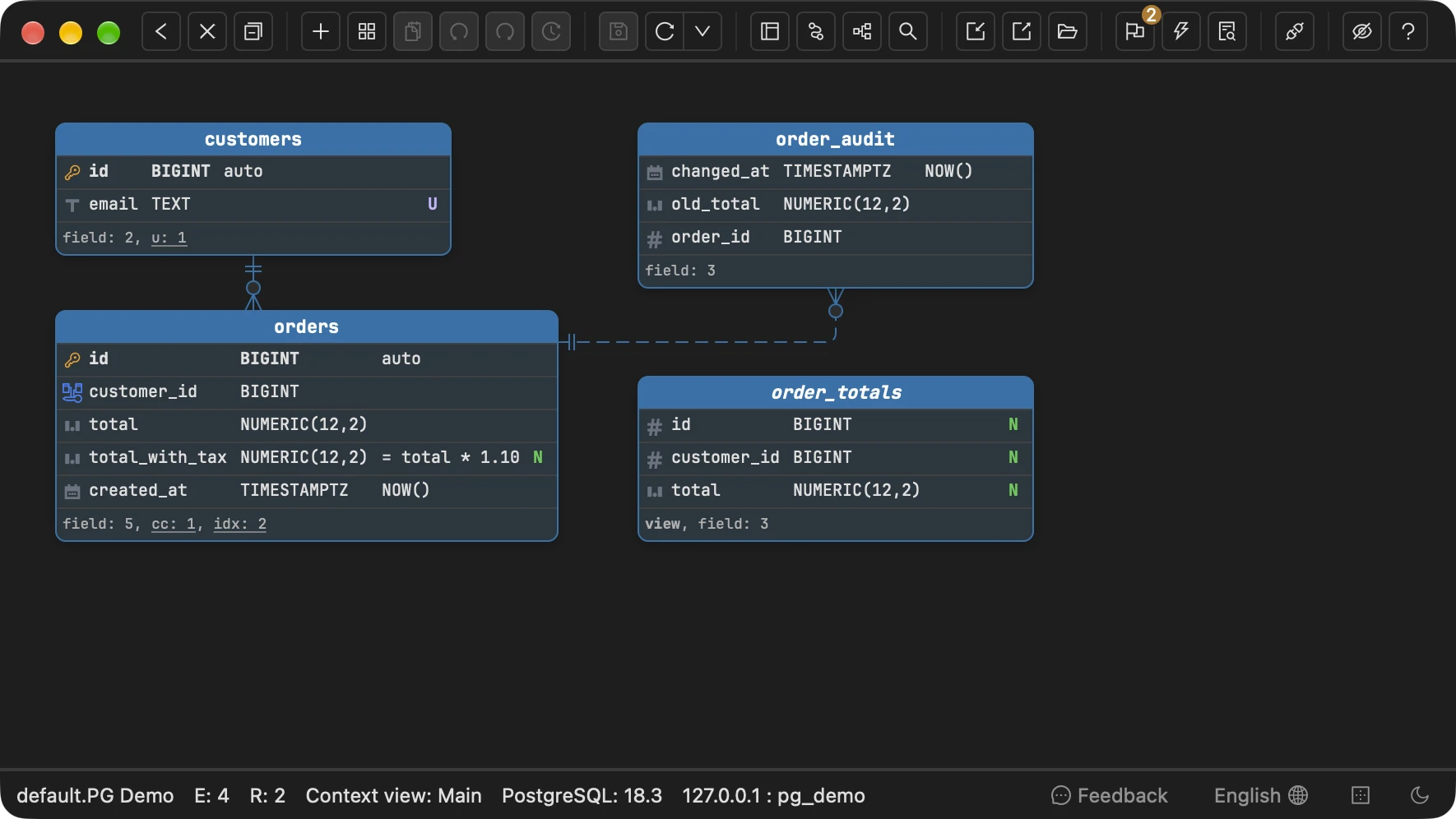
The statement under test is ALTER TABLE orders RENAME COLUMN total TO total_amount;, or EXEC sp_rename 'dbo.orders.total', 'total_amount', 'COLUMN'; on SQL Server.
What happens to each object when a column is renamed?
Each object that reads the column does one of three things: it follows the rename, it blocks the rename, or it lets the rename through and fails later.
| Object that reads the column | PostgreSQL 18.3 | MySQL 8.4 | SQL Server 2022 | SQLite 3.54 |
|---|---|---|---|---|
| Plain index | Follows | Follows | Follows | Follows |
| Foreign key, either side | Follows | Follows | Follows | Follows |
CHECK constraint | Follows | Refuses, error 3959 | Refuses, Msg 15336 | Follows |
| Generated or computed column | Follows | Refuses, error 3108 | Refuses, Msg 15336 | Follows |
Index on an expression or with a WHERE | Follows | Refuses, error 3837 | Refuses, Msg 5074 | Follows |
| View | Follows, keeps its own column name | Breaks, error 1356 | Breaks, Msg 207 | Follows, and renames its own column |
| Trigger body | Breaks on the next UPDATE | Breaks on the next UPDATE | Breaks on the next UPDATE | Follows |
| Function or procedure body | Breaks on the next call | Breaks on the next call | Breaks on the next call | Not applicable |
“Follows” means the database changed the object for you: after the rename, PostgreSQL’s catalog showed CHECK ((total_amount >= (0)::numeric)), a generated expression of (total_amount * 1.10) and a partial index WHERE (total_amount > (1000)::numeric). The names do not follow. The constraint is still called orders_total_check and the index orders_total_idx, and on PostgreSQL 18, which stores each NOT NULL as a named constraint, that one is still orders_total_not_null, so the catalog now describes a column that the names no longer mention.
The lock is the small part. PostgreSQL took an ACCESS EXCLUSIVE lock, which the ALTER TABLE documentation says is acquired “unless explicitly noted”, SQL Server took a schema modification lock (Sch-M), and MySQL accepted ALGORITHM=INSTANT. None of them reads a row, but each waits behind any transaction still using the table and holds up every query that arrives after it, so set a short lock_timeout on PostgreSQL and retry rather than let it queue. MySQL makes one exception: renaming a column that another table’s foreign key points at is refused as INSTANT with error 1846 and runs as INPLACE.
Does renaming a column break views?
Not on PostgreSQL or SQLite, which rewrite the view, but on MySQL, MariaDB and SQL Server the rename succeeds and the view fails the next time something reads it.
PostgreSQL stores a view’s columns by position, so after the rename pg_get_viewdef returned total_amount AS total: the view reads the new column and still calls its own column total, and nothing that queries the view notices. SQLite takes the other route and edits the view’s text. Its ALTER TABLE page says the name is changed “within all indexes, triggers, and views that reference the column”, and the stored view became SELECT id, customer_id, total_amount FROM orders. That renames the view’s own column as well, so SELECT total FROM order_totals now fails with no such column: total. A SQLite rename moves the breakage one layer out, to whatever reads the view.
MySQL keeps a view as text and does not edit it. The rename returned no warning, and the next SELECT * FROM order_totals failed with ERROR 1356 (HY000): View 'shop.order_totals' references invalid table(s) or column(s) or function(s) or definer/invoker of view lack rights to use them. MariaDB 11.4.13 did the same. SQL Server printed its one standing caution, Changing any part of an object name could break scripts and stored procedures, and the view then failed with Msg 207: Invalid column name 'total' and Msg 4413: Could not use view or function 'order_totals' because of binding errors. Running sp_refreshview on it failed with the same Msg 207. Microsoft’s sp_rename page states the rule: “Renaming an object such as a table or column won’t automatically rename references to that object.”
Trigger and routine bodies are the part no engine but SQLite follows. On PostgreSQL the trigger’s column list was rewritten to AFTER UPDATE OF total_amount, so it still fired, and its PL/pgSQL body then failed with record "old" has no field "total". On MySQL the same trigger failed with Unknown column 'total' in 'OLD', and on SQL Server with Msg 207. In all three cases the error is raised by an ordinary UPDATE of an order, not by anything that mentions the trigger, so one rename stops the application’s writes. PostgreSQL has one body that does follow. A SQL function written with BEGIN ATOMIC is stored parsed, and a second copy of customer_spend that we created that way kept working and showed sum(orders.total_amount) afterwards.
Which renames does the database refuse outright?
MySQL and SQL Server refuse a rename while an object they would have to rewrite reads the column, and each object type has its own error.
| Reader | MySQL 8.4.11 | SQL Server 2022 |
|---|---|---|
CHECK constraint | ERROR 3959: Check constraint 'orders_total_check' uses column 'total', hence column cannot be dropped or renamed. | Msg 15336: Object 'dbo.orders.total' cannot be renamed because the object participates in enforced dependencies. |
| Generated or computed column | ERROR 3108: Column 'total' has a generated column dependency. | Msg 15336 |
| Functional or filtered index | ERROR 3837: Column 'total' has a functional index dependency and cannot be dropped or renamed. | Msg 5074: The index 'orders_big_idx' is dependent on column 'total'. |
| Schema-bound view | Not applicable | Msg 15336 |
A refusal is the safe outcome, because nothing has changed yet. The fix is to drop the reader, rename the column, and create the reader again with the new name. MySQL takes all of that in one ALTER TABLE, which either happens completely or not at all:
ALTER TABLE orders
  DROP CHECK orders_total_check,
  RENAME COLUMN total TO total_amount,
  ADD CONSTRAINT orders_total_check CHECK (total_amount >= 0);
The same statement accepted a DROP COLUMN and an ADD COLUMN for the generated column beside the rename. Written as separate statements instead, each one commits on its own, so a migration that fails at the rename has already dropped the check; which databases roll back a failed migration covers that half. SQL Server needs separate statements, since the rename is a procedure call, but runs them inside one transaction.
Either way the rename is no longer a catalog change. MySQL refused ADD CONSTRAINT ... CHECK with ALGORITHM=INPLACE (error 1845, Try ALGORITHM=COPY), so adding the check back copies the whole table, and a stored generated column added back is computed for every row. MariaDB is not MySQL here: 11.4.13 accepted the plain rename and rewrote both the CHECK and the generated column itself.
SQLite refuses for a different reason. If any view in the database is already broken, even one that never touches orders, the rename fails with error in view broken: no such column: nope, because SQLite re-reads the whole schema to rewrite it.
How do you find what reads a column before renaming it?
Ask the catalog for the objects it tracks, then search the bodies it does not track for the column name.
On PostgreSQL, pg_depend knows every object that will follow the rename, and a search of pg_proc finds the bodies that will not:
SELECT DISTINCT pg_describe_object(d.classid, d.objid, d.objsubid) AS dependent
FROM pg_depend d
JOIN pg_attribute a ON a.attrelid = d.refobjid AND a.attnum = d.refobjsubid
WHERE d.refobjid = 'orders'::regclass AND a.attname = 'total'
ORDER BY 1;

SELECT p.proname
FROM pg_proc p
JOIN pg_namespace n ON n.oid = p.pronamespace
WHERE n.nspname = 'public' AND p.prosqlbody IS NULL AND p.prosrc ~* '\mtotal\M';
On 18.3 the first query returned seven rows: the CHECK and the NOT NULL constraint, the generated column, both indexes, the view and the trigger. On 16.8 it returned six, with no NOT NULL row. The second returned log_total_change and customer_spend, the two bodies that broke.
MySQL tracks none of this by column, so the search is by text across information_schema: VIEWS.VIEW_DEFINITION, TRIGGERS.ACTION_STATEMENT, ROUTINES.ROUTINE_DEFINITION, CHECK_CONSTRAINTS.CHECK_CLAUSE and COLUMNS.GENERATION_EXPRESSION, each matched with REGEXP '\\btotal\\b'. On our table that found all five readers. Run it as a user who can read routine bodies: for anyone but the routine’s definer, ROUTINE_DEFINITION is NULL until the user is granted SHOW_ROUTINE, so the search returns nothing for that function and reports no error (measured on 8.4.11 and 9.7.4). On SQL Server, the sp_rename page itself says to “use sys.sql_expression_dependencies to list dependencies on the object before renaming it”:
SELECT o.type_desc, OBJECT_NAME(d.referencing_id) AS name,
       d.is_schema_bound_reference AS bound
FROM sys.sql_expression_dependencies d
JOIN sys.objects o ON o.object_id = d.referencing_id
WHERE d.referenced_id = OBJECT_ID('dbo.orders')
  AND d.referenced_minor_id IN
      (0, COLUMNPROPERTY(OBJECT_ID('dbo.orders'), 'total', 'ColumnId'));
The bound column sorts the result into the two outcomes. The rows with 1 are tied to this column and refuse the rename: the CHECK, and the computed column and the filtered index, which both appear under the table’s own name. The rows with 0 (the view, the function and the procedure) are recorded against the table as a whole, so they are every object that reads orders, and the ones that use total break after the rename. It did not list our trigger, which reads the deleted pseudo-table rather than orders by name, so check a table’s triggers by hand. None of these queries sees application code, an ORM model or a report that names the column.
Should you rename in place or add a new column?
Rename in place when you can change every reader in the same deploy, and add a new column beside the old one when you cannot.
| Rename in place | New column, then switch | |
|---|---|---|
| Statements | One, plus a drop and re-add for each reader the engine refuses under | Add, backfill, switch readers, drop |
| Readers of the old name | All fail at the same moment | Keep working until you move them |
| Views, triggers, routines | Fixed in the same migration, or broken | Moved one at a time |
| Old and new application versions running together | One of them is wrong | Both work |
| Cost on a large table | None, or a table copy on MySQL when a CHECK is added back | A backfill and a second copy of the data for a while |
The in-place rename is right more often than its reputation suggests: a table one service owns, a maintenance window, or a database where the list from the previous section is short. The second route earns its extra steps when several application instances deploy gradually, since old code queries the old name the moment it is gone. Either way the dependent objects go in the same migration as the rename, in an order the database accepts.
How Schemity shows what a column rename reaches
Schemity lists the objects that read a renamed column, says which ones the database updates and which ones fail later, and writes the schema migration in the order that database accepts.
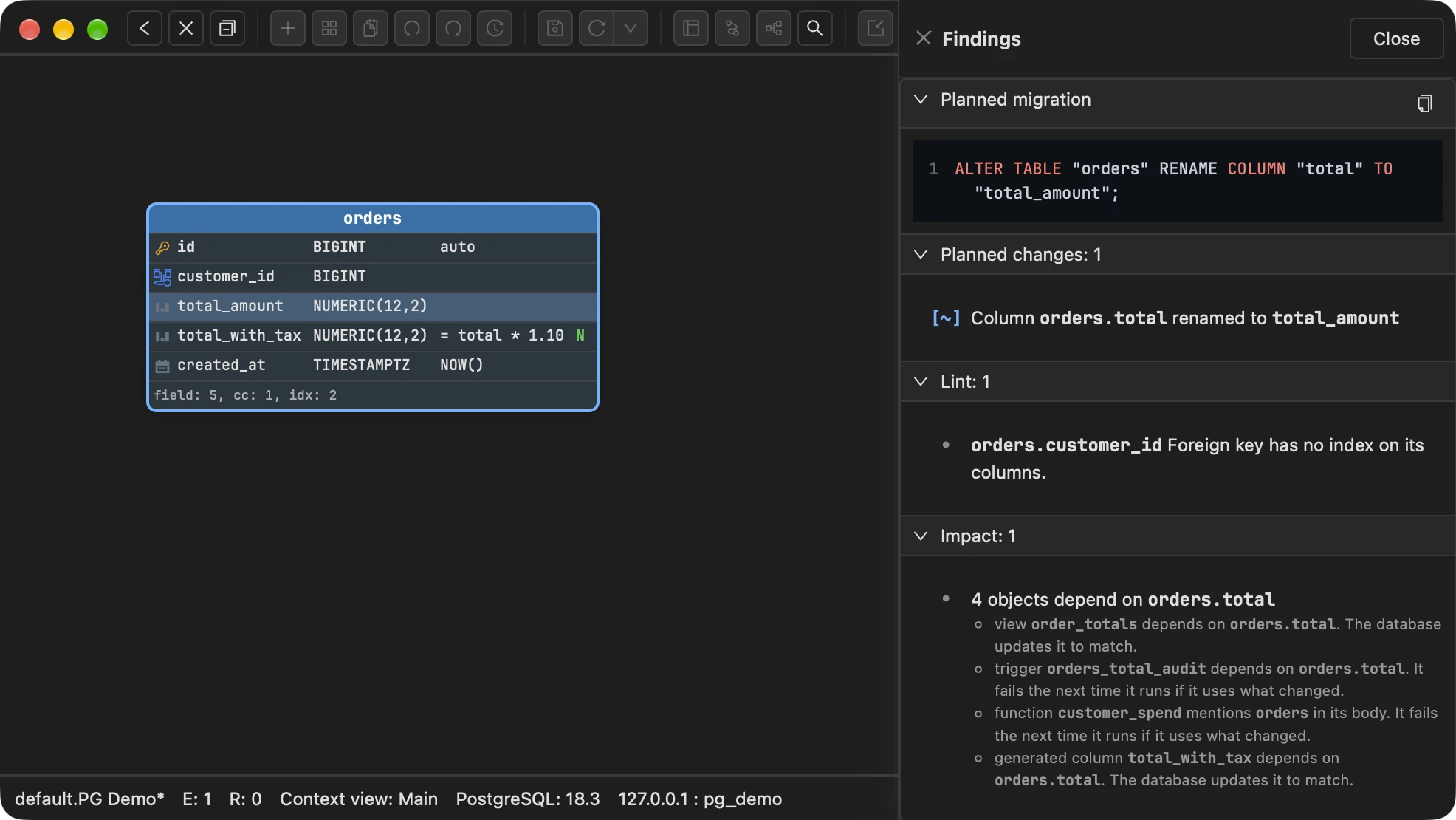
Schemity is database design software that reads your live database, shows the impact of every schema change before it runs, and keeps the diagram as a file in Git. Rename total on a diagram connected to the PostgreSQL database above and impact analysis, part of Schemity Pro, reports “4 objects depend on orders.total”: the view, the generated column, the trigger and customer_spend, leaving out the indexes and constraints that simply follow. It says of the view and the generated column that “the database updates it to match”, and of the trigger and of customer_spend that it “fails the next time it runs if it uses what changed”. The planned migration is the single RENAME COLUMN. On MySQL and SQL Server (a Schemity Pro connection) the same finding lists the view, the trigger and the routines as objects that may fail, though there it names every one that reads the table, because those databases do not record which column a view or routine uses. A MySQL routine whose body the connecting user cannot read is listed as one that may use the table, not left out.
The migration is where the engines’ refusals are handled. For the same rename on MySQL, Schemity plans five statements: DROP CHECK, DROP COLUMN for the generated column, CHANGE COLUMN for the rename, then the generated column and the CHECK added back reading total_amount. It writes them as separate statements rather than the single ALTER TABLE above, so on MySQL a failure partway leaves the earlier ones applied. On SQL Server, which needs Schemity Pro, it plans the same order around sp_rename, and a filtered index that reads the column is dropped before the rename and created after it. On the databases Schemity Free connects to, the migration dialog shows that SQL before applying it, and renaming a foreign key column carries the new name into the key on every database.
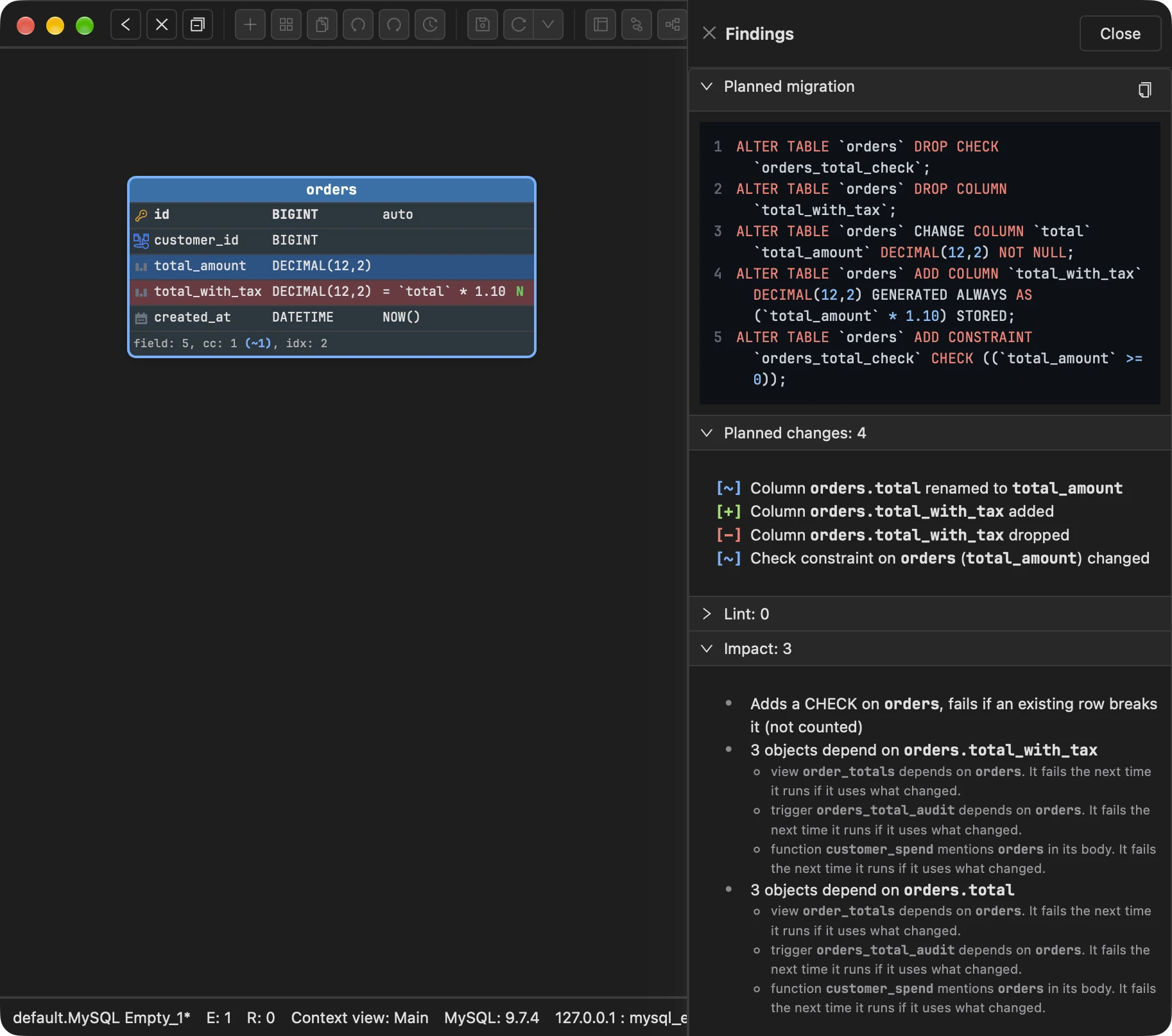
Running this post’s table through the app is how the CHECK and the filtered index got into that plan. Until then the app rebuilt the generated column but left the CHECK in place, so MySQL stopped the migration at error 3959 with the generated column already dropped, and SQL Server stopped it at Msg 15336. Both are fixed for the next release, and we applied the new plan to both databases to confirm it. One case is still yours to handle: Schemity does not read MySQL functional indexes into the diagram, so a column one of them uses needs that index dropped and recreated by hand. That is what it takes to see the impact of every change: the same one-line rename is a different migration on each database.
What to check before renaming a column
Check the readers the database will not rewrite for you, which is a different list on each engine.
- On PostgreSQL the rename will succeed; search trigger and function bodies, which it does not rewrite.
- On MySQL and SQL Server, drop each
CHECK, generated column and expression index that reads the column, rename, and add them back, in oneALTER TABLEon MySQL, counting the table copy that costs. - On MySQL, MariaDB and SQL Server, recreate every view that reads the column in the same migration.
- On SQLite, fix any view that is already broken first, then look for readers of the views, whose own columns are renamed too.
- Rename the constraints and indexes whose names still carry the old column name, or accept that they no longer match.
Dropping a column instead reaches a different set of objects, measured the same way in what PostgreSQL DROP COLUMN refuses and what it drops. When the rename arrives inside a generated migration, often as a drop and an add that loses the data, reviewing what an AI agent’s migration does covers how to catch it, and changing the column’s type rather than its name is in altering a column a view depends on.
Frequently asked questions
Does renaming a column break views?
On PostgreSQL and SQLite no: the view is rewritten to read the new name. On MySQL, MariaDB and SQL Server the rename succeeds and the view fails the next time it is queried, with error 1356 on MySQL and Msg 207 on SQL Server. A SQL Server view created WITH SCHEMABINDING is the exception: it refuses the rename with Msg 15336.
Why does MySQL refuse to rename a column with error 3959?
Because a CHECK constraint reads the column, and MySQL does not rewrite the constraint. Drop the check, rename the column and add the check back with the new name, all in one ALTER TABLE so the change is atomic. A generated column that reads it is refused the same way with error 3108, and a functional index with error 3837.
Does a column rename lock the table?
Briefly. PostgreSQL takes an ACCESS EXCLUSIVE lock and SQL Server a schema modification lock, both for a change that touches only the catalog, and MySQL 8.4 accepts ALGORITHM=INSTANT. The cost of a rename is not the lock but every query, view and routine that still uses the old name.