There are three ways to track schema changes in PostgreSQL, and they answer three different questions. The server log with log_statement = 'ddl' records what someone tried to run. An event trigger records what was committed, and by whom. A schema snapshot compared with the live database shows what is different now, whoever made the change and however they made it.
Each one has a gap the others cover. The log keeps statements that were rolled back and misses DDL run inside a function. The event trigger needs a superuser to install, and a superuser can switch it off for one session. The snapshot cannot tell you who. Every result below was measured on PostgreSQL 18.3 in a throwaway container, against this schema:
CREATE TABLE customers (
    id bigint GENERATED ALWAYS AS IDENTITY PRIMARY KEY,
    email text NOT NULL
);

CREATE TABLE orders (
    id bigint GENERATED ALWAYS AS IDENTITY PRIMARY KEY,
    customer_id bigint NOT NULL REFERENCES customers,
    total numeric(12,2) NOT NULL
);
How to track schema changes in PostgreSQL
The schema change you need to find is rarely the one in your migrations folder. It is the index someone added by hand during an incident, the column a support script created, the ALTER an AI agent ran against a dev database that was later promoted. Migration tools record which of their files ran; they do not notice a change made around them. Hence the three approaches below, compared on what they catch:
| Server log (DDL) | Event trigger | Schema snapshot | |
|---|---|---|---|
| Answers | What was attempted | What was committed, by whom | What is different now |
| Rolled-back DDL | Logged, with no sign it was undone | Not recorded | Not visible (nothing changed) |
DDL inside DO or a function | Missed | Recorded | Visible |
| Who made the change | Only with %u added to log_line_prefix | session_user in the audit row | No |
| Roles, databases, tablespaces | Logged | Never fires | Only with pg_dumpall --globals-only |
| Needs | Superuser to set it | Superuser to create it | SELECT on the tables it dumps |
| Can be switched off by | A superuser | A superuser, per session or for everyone, unrecorded | Nobody, but it sees only the state at each snapshot |
For most teams the answer is a snapshot for what changed, plus an event trigger for who did it. The rest of this post is the evidence for each row.
Does log_statement = ‘ddl’ catch every schema change?
It catches every DDL statement a client sends, which is not the same thing. With log_statement = 'ddl' set, PostgreSQL wrote these lines for this session:
ALTER TABLE orders ADD COLUMN note text;
BEGIN; ALTER TABLE orders ADD COLUMN rolled_back int; ROLLBACK;
DO $$ BEGIN EXECUTE 'ALTER TABLE orders ADD COLUMN via_do int'; END $$;
The first two appeared as LOG: statement: ALTER TABLE orders ADD COLUMN .... The second was rolled back, and the log says nothing about the rollback: anyone reading the log afterwards sees a rolled_back column that orders does not have. The third added a real column, via_do, and was not logged at all, because the statement the client sent was a DO block, not DDL. A function that runs EXECUTE 'ALTER TABLE ...' behaves the same way: the CREATE FUNCTION is logged, the call that changes the table is not.
One more limit comes from the PostgreSQL logging documentation: the default log_line_prefix is '%m [%p] ', a time and a process ID, so the line does not say which user ran it until you add %u.
The log is still worth turning on. It is one setting, it costs nothing, and for “what happened at 02:14 last night” it is often the only record there is.
How do you log DDL changes with an event trigger?
An event trigger runs a function after every DDL command, inside the same transaction. This one writes each change to an audit table, and a second trigger catches drops, which pg_event_trigger_ddl_commands() does not report:
CREATE TABLE ddl_audit (
    id           bigint GENERATED ALWAYS AS IDENTITY PRIMARY KEY,
    happened_at  timestamptz NOT NULL DEFAULT now(),
    db_user      text NOT NULL DEFAULT session_user,
    command_tag  text NOT NULL,
    object_type  text,
    object_name  text,
    statement    text
);

CREATE FUNCTION log_ddl() RETURNS event_trigger
LANGUAGE plpgsql SECURITY DEFINER SET search_path = pg_catalog, public AS $$
DECLARE r record;
BEGIN
    FOR r IN SELECT * FROM pg_event_trigger_ddl_commands() LOOP
        INSERT INTO ddl_audit (command_tag, object_type, object_name, statement)
        VALUES (r.command_tag, r.object_type, r.object_identity, current_query());
    END LOOP;
END $$;

CREATE FUNCTION log_drop() RETURNS event_trigger
LANGUAGE plpgsql SECURITY DEFINER SET search_path = pg_catalog, public AS $$
DECLARE r record;
BEGIN
    FOR r IN SELECT * FROM pg_event_trigger_dropped_objects() LOOP
        INSERT INTO ddl_audit (command_tag, object_type, object_name, statement)
        VALUES (tg_tag, r.object_type, r.object_identity, current_query());
    END LOOP;
END $$;

CREATE EVENT TRIGGER audit_ddl ON ddl_command_end EXECUTE FUNCTION log_ddl();
CREATE EVENT TRIGGER audit_drop ON sql_drop EXECUTE FUNCTION log_drop();
Run against the same three statements, the audit table got one row for the committed ALTER, nothing for the rolled-back one, and a row for the column added inside the DO block, with the whole DO block as the statement. An ALTER TABLE orders DROP COLUMN produced two rows: the dropped column from the sql_drop trigger and the altered table from ddl_command_end. A COMMENT ON COLUMN was recorded too. A DROP TABLE IF EXISTS on a table that did not exist recorded nothing, which is right, since nothing changed.
Four things to know before you rely on it:
SECURITY DEFINERis not optional. Without it, the auditINSERTruns as whoever issued the DDL. In the test, a role withCREATEon the schema but noINSERTonddl_auditranCREATE TABLEand gotpermission denied for table ddl_audit: the audit trigger blocked the change it was meant to record. WithSECURITY DEFINER, the sameCREATE TABLEsucceeded and the row named the user, becausesession_useris still the login role inside the function.- Only a superuser can create it. A non-superuser gets
permission denied to create event triggerwith the hintMust be superuser to create an event trigger, as theCREATE EVENT TRIGGERreference says. - Shared objects are never seen. The event trigger documentation excludes databases, roles, tablespaces, parameter privileges and
ALTER SYSTEM. ACREATE ROLEleft no row. - A superuser can step around it.
SET event_triggers = off, a setting added in PostgreSQL 17, disables every event trigger for the session, and anALTER TABLErun after it left no row.SET session_replication_role = replicadid the same until both triggers were set toENABLE ALWAYS(ALTER EVENT TRIGGER audit_ddl ENABLE ALWAYS, and the same foraudit_drop), after which they fired anyway.ALTER EVENT TRIGGER audit_ddl DISABLEor aDROP EVENT TRIGGERturns it off for everyone, and leaves no row either, since event triggers never fire for commands on event triggers. The server log does record those, which is the best argument for running both.
So an event trigger is an honest record of changes made by people who are not trying to hide them. That is most changes, and it is the only one of the three that answers “who”, with one caveat: session_user is the login role. A superuser who runs SET ROLE dev before a CREATE TABLE is recorded as the superuser, and a team that shares one migration login gets that login as the answer every time.
Why does a pg_dump diff show changes that did not happen?
The snapshot approach is the simplest to set up: dump the schema, commit the file, dump it again later and compare. pg_dump --schema-only needs no superuser, only SELECT on the tables it dumps (it takes an ACCESS SHARE lock on each), and the comparison sees everything that is in the database now, however it got there. Its blind spot is the time between snapshots: a change made and undone in between leaves no trace.
Since the August 2025 minor releases (17.6, 16.10 and their siblings), two dumps of an unchanged table are not identical. Each begins with a \restrict line and ends with an \unrestrict line carrying a random key, a defence against a malicious server injecting psql commands into a dump (CVE-2025-8714, released August 14, 2025). Diffing two dumps of the same orders table taken a second apart on 18.3 gave a four-line difference and no schema change.
The fix is pg_dump --schema-only --restrict-key=schema, which writes a fixed key. The pg_dump documentation names comparing dump files as a reason to use it, and warns against using a known key for a dump you will restore. With the fixed key, a real change was the only difference: total numeric(12,2) became total numeric(14,2). The -- Dumped from database version and -- Dumped by pg_dump version headers still change when the server or the client is upgraded, so expect one noisy diff then.
What the snapshot cannot do is say who changed the column or when. It says the column is different now. That is usually the question you have when you inherit a database, or come back to one after a month, and it is the one the logs answer worst: you would have to replay every line since the last time you looked.
Seeing what changed since you last saved the diagram
Schemity is database design software that reads your live database, shows the impact of every schema change before it runs, and keeps the diagram as a file in Git. The saved diagram is a schema snapshot already, so opening it is the comparison. When a connected diagram that has been saved at least once opens, Schemity reads the live database, compares it with the file as you last saved it, and if anything differs, a Database changed button appears in the canvas’s top-right corner. A change made through psql, an ORM’s migration or an agent’s session shows up there the same way.
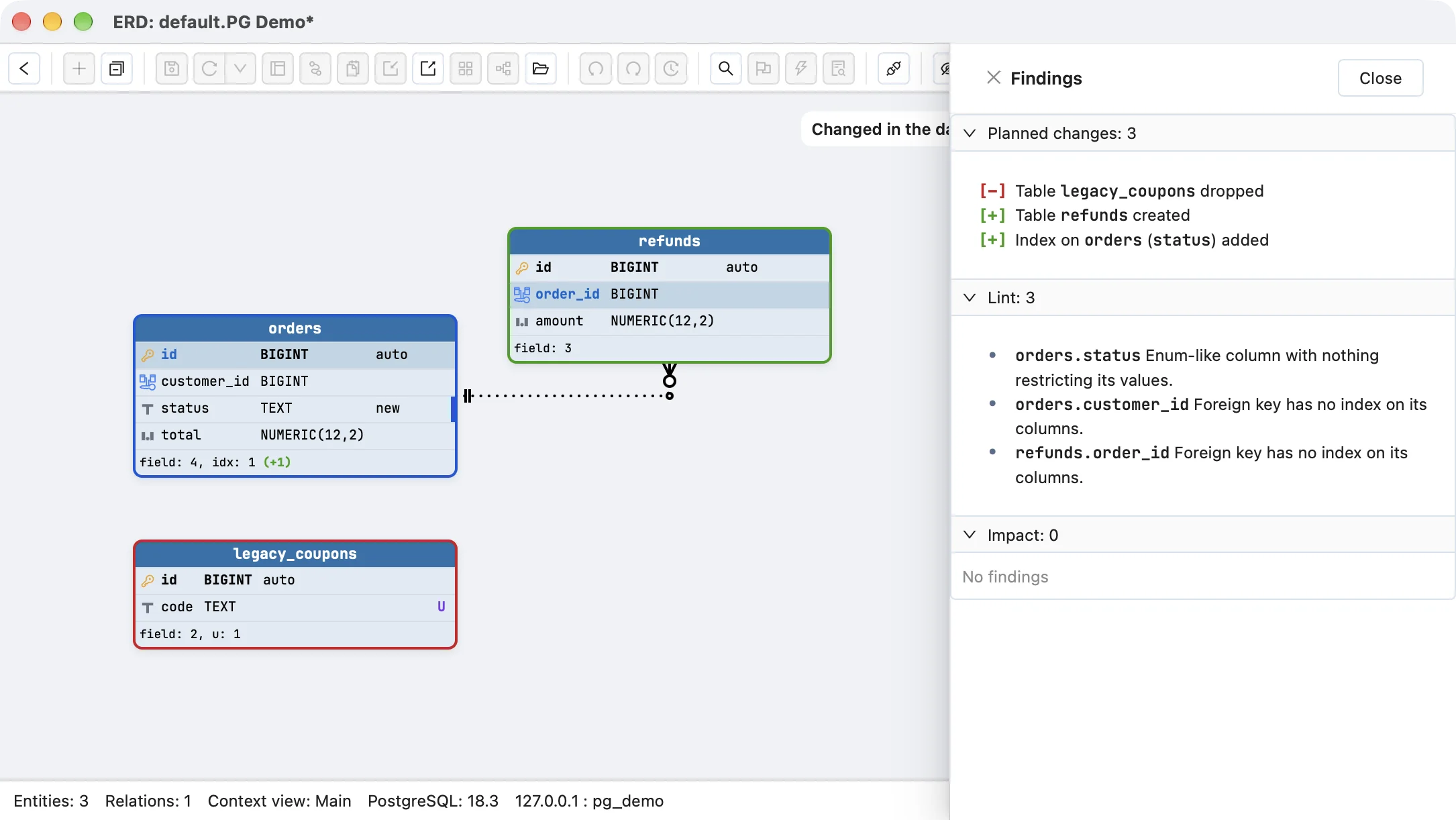
The button opens the change preview, titled “Changed in the database since you last saved”. Every table the database changed gets a border: green for added, red for removed, blue for altered, with removed tables drawn where they used to be, since the diagram itself no longer has them. A table’s footer counts what changed in its keys, constraints and indexes, so a hand-made index reads idx: 1 (+1), with a bar on the column it covers. Each change is also listed in words, such as Index on orders (status) added. There is no SQL in it, because nothing is going to run. On a restricted licence tier the same changes come as a plain list instead of the drawing.
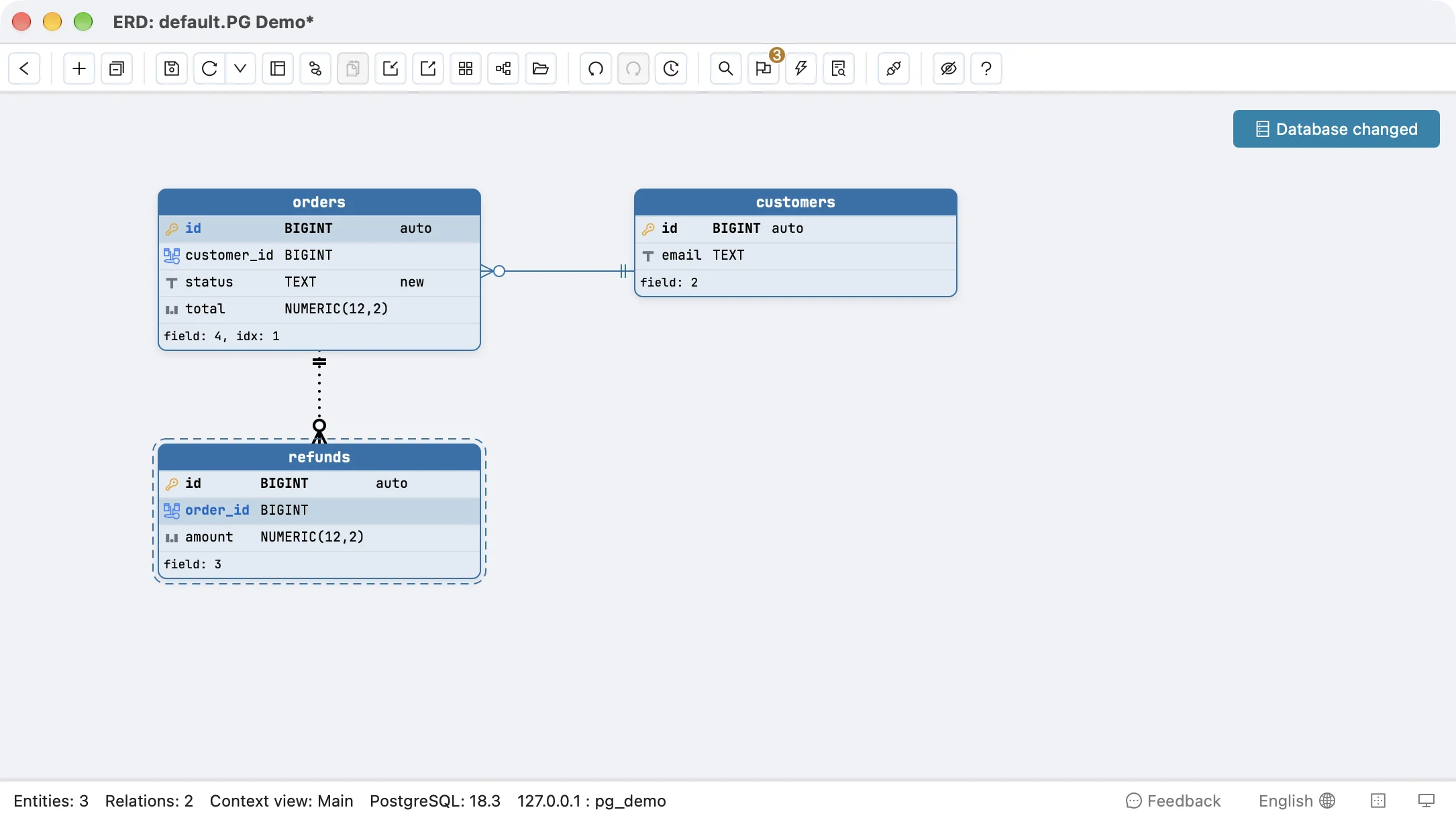
 On the main diagram, tables the database added carry the dashed border of a table added since the last save.
What it compares is what the database owns: tables, columns with their type, nullability and default, primary keys, unique constraints, checks, indexes and declared foreign keys. Positions, colours, descriptions and virtual relations are the diagram’s own and never count as a change. Views, triggers, functions and grants are not part of the comparison, so keep the event trigger for those.
Nothing is accepted until you save. The merge sits on the diagram as one unsaved change: Save accepts the database’s version and the button goes, Undo puts the diagram back to the file. Commit the saved file and the diagram’s JSON in Git becomes the dated record of what the schema was at each save, which is the part a snapshot needs and a log never gives you. The same check runs on MySQL, SQL Server and SQLite connections.
This is what it takes to understand your schema as it is rather than as the migrations say it should be. It does not replace the event trigger: the preview tells you orders gained an index since Tuesday, and the audit table tells you who added it and what they typed.
Related reading
A change you find this way still has a cost to undo, and impact analysis shows it before the reverting migration runs, as in changing a column type a view depends on. For comparing two environments rather than one database over time, see comparing staging and production schemas. For keeping the diagram current after migrations you do run, see keeping your ERD updated. And for what to let an AI agent change in the first place, see should AI agents write database migrations.
Frequently asked questions
Can I find out who changed a table in PostgreSQL after the fact?
Not unless something was recording at the time. PostgreSQL's catalogs hold the current definition of every table and no history: no author, no timestamp, no previous version. Turn on log_statement = 'ddl' with %u in log_line_prefix, or install an event trigger, before the next change rather than after it.
Does a PostgreSQL event trigger log DDL that was rolled back?
No. The trigger's INSERT into the audit table runs inside the same transaction as the DDL, so a ROLLBACK removes both. On PostgreSQL 18.3 an ALTER TABLE followed by ROLLBACK left no audit row, while log_statement = 'ddl' wrote the statement to the server log anyway.
Does log_statement ddl log schema changes made inside a function?
No. It logs the top-level statement the client sent, so a DO block or a function call that runs EXECUTE 'ALTER TABLE ...' is logged as nothing at all. In the test, two columns added that way never appeared in the log; an event trigger caught the same change and recorded the DO block as the statement.