
The fix for blurry schema diagram exports is not a higher DPI setting - it is exporting a vector format, and exporting less diagram. Schemity does both: SVG export that stays sharp at any zoom, and context views that let you export the ten tables your reader cares about instead of the two hundred they do not. And where the destination renders Mermaid - GitHub, GitLab, Notion - it exports the diagram as a Mermaid erDiagram file and skips the image entirely.
But start with the moment the problem shows up, because it never shows up on your screen. It shows up on someone else’s. You finish arranging the diagram, export a PNG, paste it into the design doc, and move on. A day later a teammate opens the doc, zooms in to read a column name, and finds mush - anti-aliased gray smudges where the field types used to be. The diagram was correct. The export threw its readability away.
This failure is old, common, and still open. A DBeaver user asked for better output in 2023 in exactly these words: the image generated by exporting a diagram “is in low resolution”, asking for an option to set image quality or DPI - a request that has sat open since February 2023. Other users report the mirror-image failure: exports of any diagram bigger than one screen coming out cropped at the screen’s edge. And cranking up the resolution is not an escape hatch, because pixels scale quadratically - as Genuitec’s own ERD documentation warns, “a large ERD can easily require 100s of megabytes to represent it in image format”, sometimes failing the export outright because the bitmap is too large to build at all.
Notice the shape of the trap. A raster export forces you to pick a resolution up front, before you know how the image will be read - and every choice loses. Low resolution is unreadable when zoomed, high resolution is a hundred-megabyte file nobody can paste anywhere, and the diagram itself keeps growing, so whatever resolution worked last quarter fails this one. For a schema visualizer, whose entire output is fine text inside small boxes, that is a structural defect, not a settings problem.
How do I export a database diagram without losing quality?
Export SVG instead of pixels. Schemity exports any diagram as PNG, JPEG, or SVG, and the SVG output is vector: shapes and text are stored as geometry, not as a grid of pixels, so the diagram renders sharp at every zoom level - 50% in a wiki page or 800% while someone squints at one foreign key. The text stays selectable, so a reader can copy a table name straight out of the image. And because vector size grows with the number of shapes rather than the number of pixels, a large diagram exports to a file measured in kilobytes, not the hundreds of megabytes a bitmap of the same schema would need.
One caveat the file extension hides: not every .svg is vector. Some tools - Supabase Studio’s Schema Visualizer among them - export SVG by wrapping a snapshot of the dashboard’s HTML in a single foreignObject tag, with the browser’s computed styles inlined on every element. Exporting the same database from both tools makes the difference concrete: the dashboard’s foreignObject export weighed 6.4 MB and contained zero SVG text elements, while Schemity’s true-vector export of the same schema was 99 KB - sixty-four times smaller, with more information on the canvas (key icons, badges, crow’s foot ends). The size is not even the real problem: almost nothing outside a browser implements foreignObject, so that 6.4 MB file opens blank in Illustrator, Inkscape, and most converters. A real SVG stores shapes and text as geometry; a foreignObject SVG is a screenshot wearing the extension.
| PNG / JPEG export | SVG export | Mermaid export | |
|---|---|---|---|
| Zoomed in | Blurs at a fixed resolution | Sharp at any zoom | Sharp - rendered as vector by the doc platform |
| Text | Pixels - cannot be selected | Selectable, copyable | Plain text, diffable in review |
| File size on a large diagram | Grows with pixel count, easily huge | Grows with shape count, stays small | Tiny - it is the schema as text |
| Your arrangement | Preserved, as pixels | Preserved, as geometry | Re-laid out by the renderer |
| Opened in a vector editor | One flat bitmap layer | Editable shapes, grouped per entity, live text | Not an image - the platform draws it |
| Resolution decision | Forced at export time | Never made at all | Never made at all |
Fidelity carries over too. The details that make a Schemity diagram readable on the canvas - relationship lines that hop over each other where they cross, waypoint turns with smooth rounded corners - render identically in the SVG export. The diagram you share is the diagram you drew, not a flattened approximation of it.
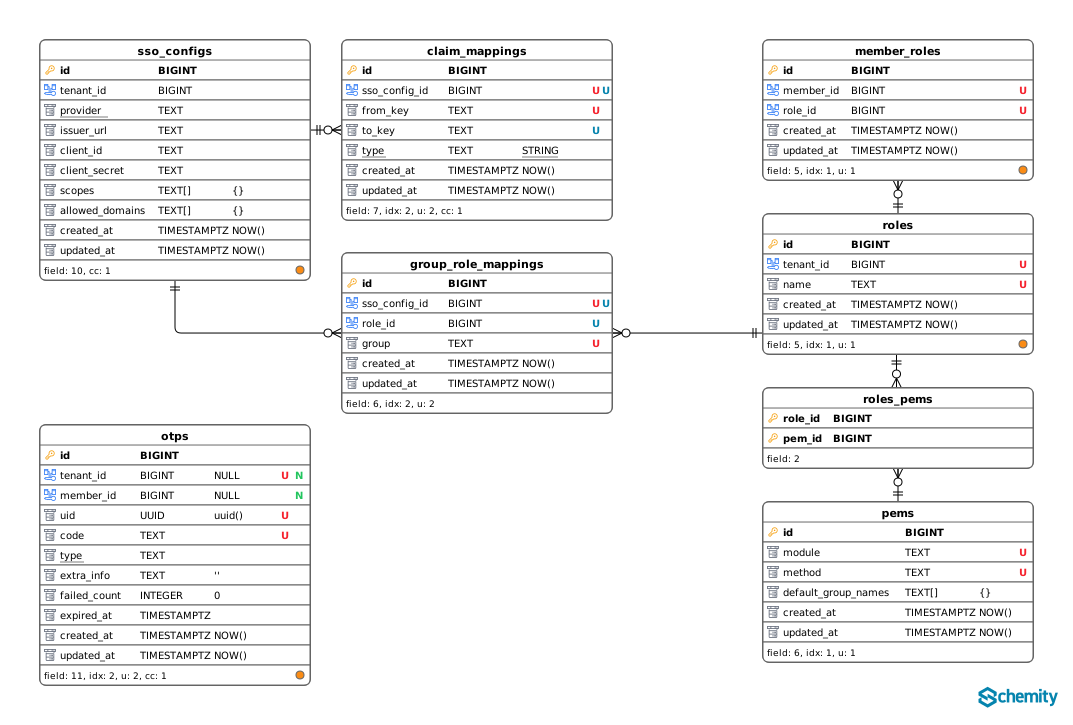
Does the SVG export open in Figma, Affinity Designer or Illustrator?
It opens as editable artwork, not as a picture of one. Drop a Schemity SVG into Figma, Affinity Designer, Illustrator or Inkscape and the diagram arrives as real vector objects: each entity is its own group you can move as a unit, relationship lines are paths you can restyle, and every table and field name is still live text you can select, retype, or set in the house font. Nothing is flattened into a single embedded bitmap, and nothing is outlined into unreadable path data on the way out.
Figma is the one worth calling out, because it is where the schema most often has to meet everything else. Drag the SVG onto a Figma canvas and the diagram lands as an ordinary layer tree - entities as nested groups you can rename or hide, lines as editable vectors, table and field names as text layers that accept the file’s own text styles. That is the difference between a schema you can lay out alongside the rest of a deck or a spec and a schema you can only paste in as a picture. A foreignObject export gives Figma nothing to import: the file that looked right in the browser arrives as black boxes with no text in them at all, the same failure Illustrator and Inkscape show.
That is the practical difference between a real SVG and a foreignObject one, and it is only visible outside the browser. Both render fine in an image viewer or a wiki page, which is why the distinction goes unnoticed until the diagram has a job to do - a consultant assembling a client deliverable, an architect recoloring the schema to match a document’s palette, a figure being prepared for print. At that moment a foreignObject export is worth nothing: it opens blank, and the work restarts in a drawing tool. Schemity’s opens, and the last mile is an afternoon of styling rather than a redraw.
This matters most for exactly the readers who never open the database design software. The people who see your schema in a report or a slide deck are not going to install anything, and the person preparing that artifact should not have to trace your diagram by hand to get it into their layout.
Export a context view instead of the whole diagram
The other half of the fix is scope. Most blurry-poster exports exist because the tool offered only one thing to export: everything. But the reader of a design doc almost never needs the full schema - they need the billing tables, or the auth tables, and nobody can read the 800-table poster anyway.
A context view is a focused subset of the main diagram - a sub-diagram you arrange freely while the schema itself stays untouched in the main view, which remains the single source of truth. Schemity exports any context view the same way it exports the main diagram: as PNG, JPEG, or SVG, with the arrangement you gave it. So the payments doc gets a crisp image of the eight payment tables, laid out for that story, and the onboarding doc gets a different eight - each one small enough to read without zooming in the first place. Exporting less diagram does more for readability than any resolution slider ever could.
Export Mermaid when the doc renders diagrams itself
Sometimes the best exported image is no image at all. GitHub, GitLab, Notion, and Obsidian all render Mermaid diagrams natively from a fenced code block in markdown - and Schemity exports your diagram as a Mermaid erDiagram file. Paste it into a README or a pull request description and the platform draws the schema itself, as vector, sharp at every zoom, with nothing to upload and no attachment to go stale in a media folder. Because the diagram is now text in the document, it also behaves like text: reviewers see schema changes as a readable diff, not as “image replaced”.
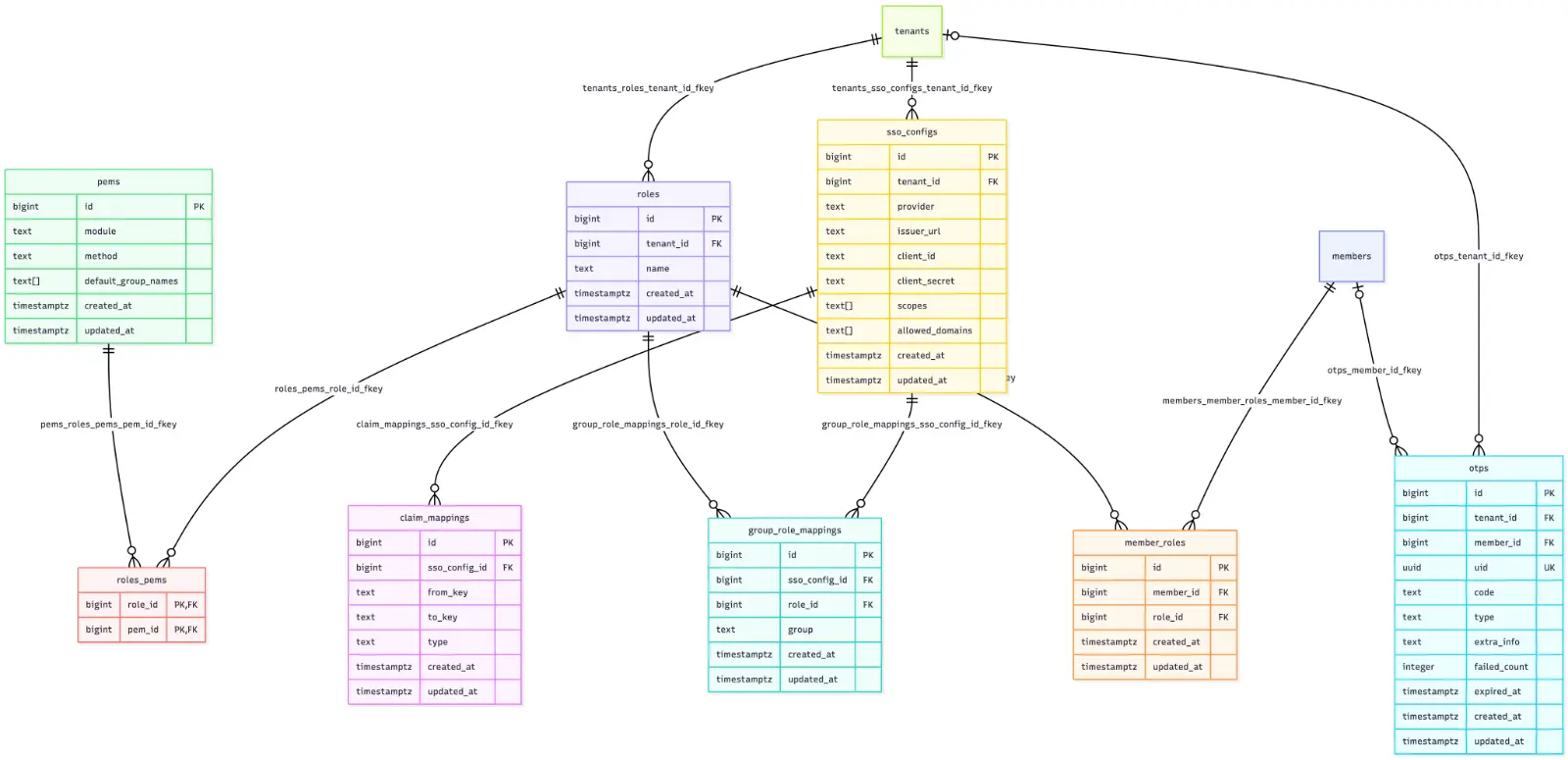
One honest note: Mermaid describes entities and relationships, not your canvas. The renderer arranges the boxes itself, so the layout you crafted - the legends, the routing, the grouping that tells the story - does not travel with it, though your entity colors do, as the render above shows. Mermaid is the right export for docs that live where Mermaid is native; when the arrangement is the point, SVG remains the format that carries it faithfully.
When the reader needs SQL, skip pixels entirely
Some of what gets shared as a screenshot never wanted to be an image. If a teammate asks “what exactly is in the invoicing tables?”, the faithful answer is DDL, not pixels. Schemity exports SQL at the same granularities as images: the whole diagram, any context view, a single entity - or one right-click on a legend to export the CREATE statements of every entity inside it. The legend that groups your invoicing tables on the canvas becomes the exact SQL of that group in the clipboard, ready to paste into a code review or hand to an AI assistant.
All of this runs in a lightweight desktop app, fully offline. Schemity is database design software for software engineers: the diagram lives in a plain local JSON file, exports are rendered on your machine with no upload step, and the SVG never passes through a server that might re-rasterize or watermark it on the way out. The layout work you are exporting is exactly the work that is too valuable to trust to a tool that treats the diagram as disposable - it deserves an export path that preserves it, at every zoom level, for every reader.
An exported diagram has one job: to be read somewhere you are not. A format that caps its readability at a resolution you had to guess in advance fails that job by design. Export vectors, export focused views, export Mermaid where the doc can draw the diagram itself, export SQL when SQL is the real question - and the person who zooms in finally sees what you drew.