Whether updated_at should be set by the database or by the ORM comes down to one question: does anything besides your application write to the table? The database side means MySQL’s ON UPDATE CURRENT_TIMESTAMP column clause or a trigger everywhere else; the application side means Rails timestamps, Django’s auto_now, Eloquent or Prisma’s @updatedAt. A column default alone never moves after the row is created.
The short version: if anything other than your application writes rows (a migration backfill, a support engineer in psql, a second service, a bulk update_all), keep it in the database. If one application owns every write, the ORM is simpler and portable. The rest of this post is what each option does on the edge cases that decide it, and the schema changes that break each one later without an error. Every database behaviour below was run on MySQL 8.4.11, PostgreSQL 18.3, SQL Server 2022 and SQLite 3.54.0 in throwaway containers; the ORM behaviour is quoted from each framework’s documentation or source.
Why DEFAULT CURRENT_TIMESTAMP is not enough
Most schemas start the same way. On MySQL:
CREATE TABLE orders (
    id BIGINT AUTO_INCREMENT PRIMARY KEY,
    status VARCHAR(20) NOT NULL,
    created_at TIMESTAMP(6) NOT NULL DEFAULT CURRENT_TIMESTAMP(6),
    updated_at TIMESTAMP(6) NOT NULL DEFAULT CURRENT_TIMESTAMP(6)
);
Both columns get the insert time. After that, updated_at is an ordinary column, and an UPDATE orders SET status = 'paid' leaves it exactly where it was. A default is a value for a missing column at insert, on every database. Keeping a “last changed” time current is a separate job, and each database gives you a different tool for it.
How to auto update updated_at column: the three options
MySQL ON UPDATE | PostgreSQL trigger | ORM (auto_now, @updatedAt, Rails timestamps) | |
|---|---|---|---|
| Available on | MySQL TIMESTAMP and DATETIME only | Any database with triggers (SQL Server and SQLite below) | Any database |
An UPDATE that changes nothing | Column unchanged | Column moves | Rails sends no UPDATE; Django’s save() moves it |
An UPDATE that sets updated_at itself | Your value is kept | Your value is overwritten | Rails and Prisma keep it, Django’s auto_now overwrites it |
| Raw SQL and scripts | Covered | Covered | Not covered |
| Bulk updates | Covered | Covered | Eloquent sets it; Django QuerySet.update() and Rails update_all do not |
| Renaming the column | The clause follows the column | Next UPDATE fails | Change the model |
| Where it shows up | In the column definition | In a trigger, outside the table | In application code |
The rows that decide it are the bulk and raw writes, and the rename, so each option gets its own section.
MySQL: ON UPDATE CURRENT_TIMESTAMP
MySQL is the only one of the four with a column clause for this:
updated_at TIMESTAMP(6) NOT NULL DEFAULT CURRENT_TIMESTAMP(6) ON UPDATE CURRENT_TIMESTAMP(6)It fires only when a row’s values actually change. UPDATE orders SET status = 'new' on a row whose status is already new reports 0 rows changed and leaves updated_at alone, which matches the MySQL manual: an auto-updated column “remains unchanged if all other columns are set to their current values”. An UPDATE that sets updated_at explicitly keeps the value it was given, which is how a data fix can backdate a row on purpose. The clause works on DATETIME as well as TIMESTAMP, and with fractional seconds the precision has to match on both sides: CURRENT_TIMESTAMP(6) for a TIMESTAMP(6) column.
The trap is in later migrations. ALTER TABLE orders MODIFY updated_at TIMESTAMP(6) NOT NULL DEFAULT CURRENT_TIMESTAMP(6) replaces the whole column definition, and since it does not repeat the clause, the clause is gone. MySQL accepts the statement without a warning. Before it, information_schema.columns.EXTRA read DEFAULT_GENERATED on update CURRENT_TIMESTAMP(6); after it, DEFAULT_GENERATED. The column keeps its old values and stops moving, and nothing notices until someone asks why a row edited yesterday says it was last changed in March. RENAME COLUMN, by contrast, keeps the clause.
PostgreSQL, SQL Server and SQLite: a trigger
PostgreSQL has no column clause, so the column is kept current by a BEFORE UPDATE trigger:
CREATE FUNCTION set_updated_at() RETURNS trigger LANGUAGE plpgsql AS $$
BEGIN
    NEW.updated_at := now();
    RETURN NEW;
END;
$$;

CREATE TRIGGER orders_set_updated_at BEFORE UPDATE ON orders
    FOR EACH ROW EXECUTE FUNCTION set_updated_at();
PostgreSQL also ships the same thing as an extension, moddatetime, in contrib: CREATE EXTENSION moddatetime; then CREATE TRIGGER ... BEFORE UPDATE ON orders FOR EACH ROW EXECUTE FUNCTION moddatetime(updated_at);. It saves writing the function and accepts only timestamp or timestamptz columns.
Three behaviours differ from MySQL, and all three were reproduced on 18.3:
- It fires on every
UPDATE, changed or not.UPDATE orders SET status = statusmovesupdated_at. AddingWHEN (OLD.* IS DISTINCT FROM NEW.*)to theCREATE TRIGGERgives MySQL’s no-op behaviour back; an explicit value is still overwritten. - It overwrites an explicit value.
UPDATE orders SET updated_at = '2020-01-01'stores the current time instead, with the plpgsql function and withmoddatetime. A backfill that needs to set historic times has to disable the trigger first. now()is the start of the transaction, not the moment of the update. Every row a long transaction touches gets the same time. Useclock_timestamp()in the function if you need the wall clock.
SQL Server and SQLite use an AFTER UPDATE trigger that runs a second UPDATE on the same row. That second update does not fire the trigger again because recursive triggers are off by default on both (is_recursive_triggers_on = 0, PRAGMA recursive_triggers returns 0). On SQL Server:
CREATE TRIGGER orders_set_updated_at ON orders AFTER UPDATE AS
BEGIN
    SET NOCOUNT ON;
    IF UPDATE(updated_at) RETURN;
    UPDATE o SET updated_at = SYSUTCDATETIME()
    FROM orders o JOIN inserted i ON i.id = o.id;
END;
And on SQLite:
CREATE TRIGGER orders_set_updated_at AFTER UPDATE ON orders
WHEN NEW.updated_at IS OLD.updated_at
BEGIN
    UPDATE orders SET updated_at = strftime('%Y-%m-%d %H:%M:%f', 'now') WHERE id = NEW.id;
END;
Both keep an explicit value, and both still move the column on a no-op UPDATE. The SQL Server guard has a catch: UPDATE(updated_at) is true whenever the column is in the SET list, even with its old value, so an ORM that writes every column on save makes this trigger return every time and the column never moves. Drop the guard if your ORM does that.
The weakness of a trigger is that it names the column in a place the column does not know about. Rename updated_at to modified_at and PostgreSQL accepts the rename, then fails the next UPDATE on the table with record "new" has no field "updated_at" from the plpgsql function, or "orders" has no attribute "updated_at" from moddatetime. Dropping the column does the same. The migration succeeds; the first write after the deploy is what fails. SQL Server fails the same way after sp_rename, which at least prints a caution. SQLite is the exception: it rewrites the trigger body on RENAME COLUMN, though a dropped column still breaks the next UPDATE with no such column: NEW.updated_at. A generated column is no way out here, since it cannot call now().
The ORM: auto_now, @updatedAt and Rails timestamps
Rails, Django, Laravel’s Eloquent and Prisma all set updated_at themselves, in application code, so the same model works on every database and the behaviour is visible in the codebase. The cost is every write that does not go through that code path, and the frameworks document where that is:
- Django:
auto_nowis “only automatically updated when callingModel.save()”, not byQuerySet.update(). - Rails:
update_all“does not trigger Active Record callbacks or validations”, so it does not touchupdated_ateither. - Prisma:
@updatedAtis “implemented at Prisma ORM level”, so a raw SQLUPDATEleaves it alone. - Eloquent is the exception for bulk writes: its query builder’s
update()addsupdated_atto the values, soOrder::where(...)->update([...])sets it. ADB::table('orders')->update()does not.
Add a manual fix run in a SQL console, a nightly script, or a second service written in another language, and updated_at is right for some writes and stale for others. That is acceptable when the column is for display. It is not when an incremental export, a cache, or a sync job reads WHERE updated_at > :last_run, because a stale row is a row that sync never sends.
Which should you use: MySQL ON UPDATE, a trigger or the ORM?
- One application owns every write, and
updated_atis informational: let the ORM do it. It is portable and it lives next to the model. - Anything reads
updated_atto decide what changed (sync, export, cache invalidation): put it in the database, because the database sees every write. On MySQL that is the column clause; elsewhere a trigger, with theWHENclause if no-op updates should not count. Database-side fixes coverage, not ordering:now()is when a transaction started, so a long transaction that commits after a sync run can stamp rows earlier than that run’s:last_run. Query with an overlap, such asupdated_at > :last_run - interval '5 minutes', and make the sync idempotent. - Both at once is harmless when the column is for display: MySQL and the SQLite trigger keep the value the ORM wrote, and a PostgreSQL trigger replaces it with its own
now(). For sync, pick one clock, the database’s, since the application servers’ clocks and time zones are not the database’s.
Whichever you choose, the column’s behaviour now depends on something the CREATE TABLE may not show, which is what makes it easy to lose in a later migration.
How Schemity keeps updated_at in the schema
To design the next one without losing this, the schema, not the application, has to carry the decision. Schemity is database design software that reads your live database, shows the impact of every schema change before it runs, and keeps the diagram as a file in Git.
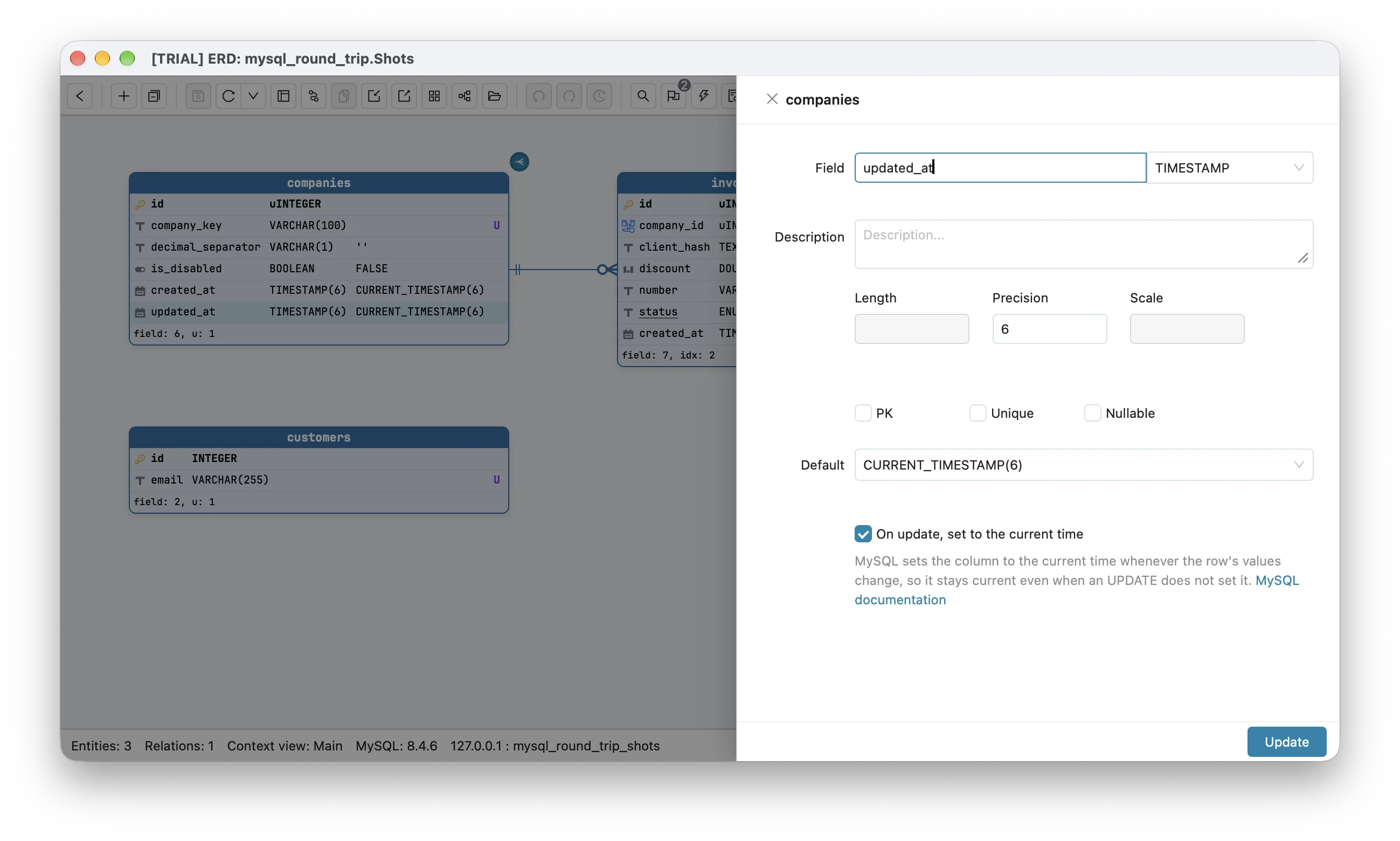
On MySQL, the clause is part of the column in the diagram. Import SQL and the live reader both read ON UPDATE CURRENT_TIMESTAMP, and the field dialog has an “On update, set to the current time” tick on TIMESTAMP and DATETIME columns. Because the diagram holds it, every MODIFY in the migration SQL Schemity writes restates it, so changing the column’s type or default does not quietly drop it the way a hand-written MODIFY does. Converting a MySQL diagram to another database leaves the clause out and says so in the conversion notes (ON UPDATE CURRENT_TIMESTAMP(6) “is left out: PostgreSQL has no column that sets itself on update”), rather than writing a column that looks the same and stops moving.
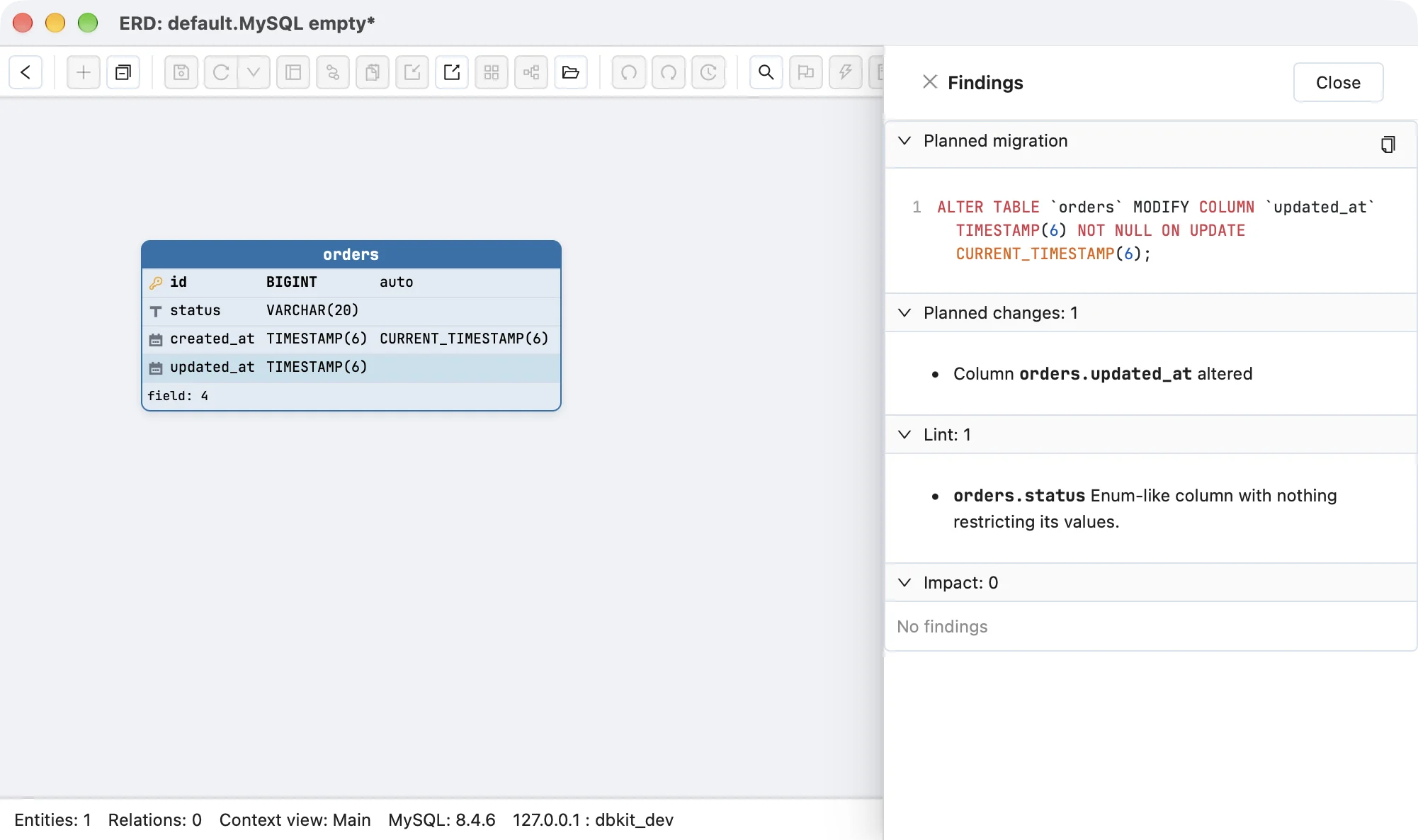
With the default removed and the tick left on, the planned migration still carries the clause:
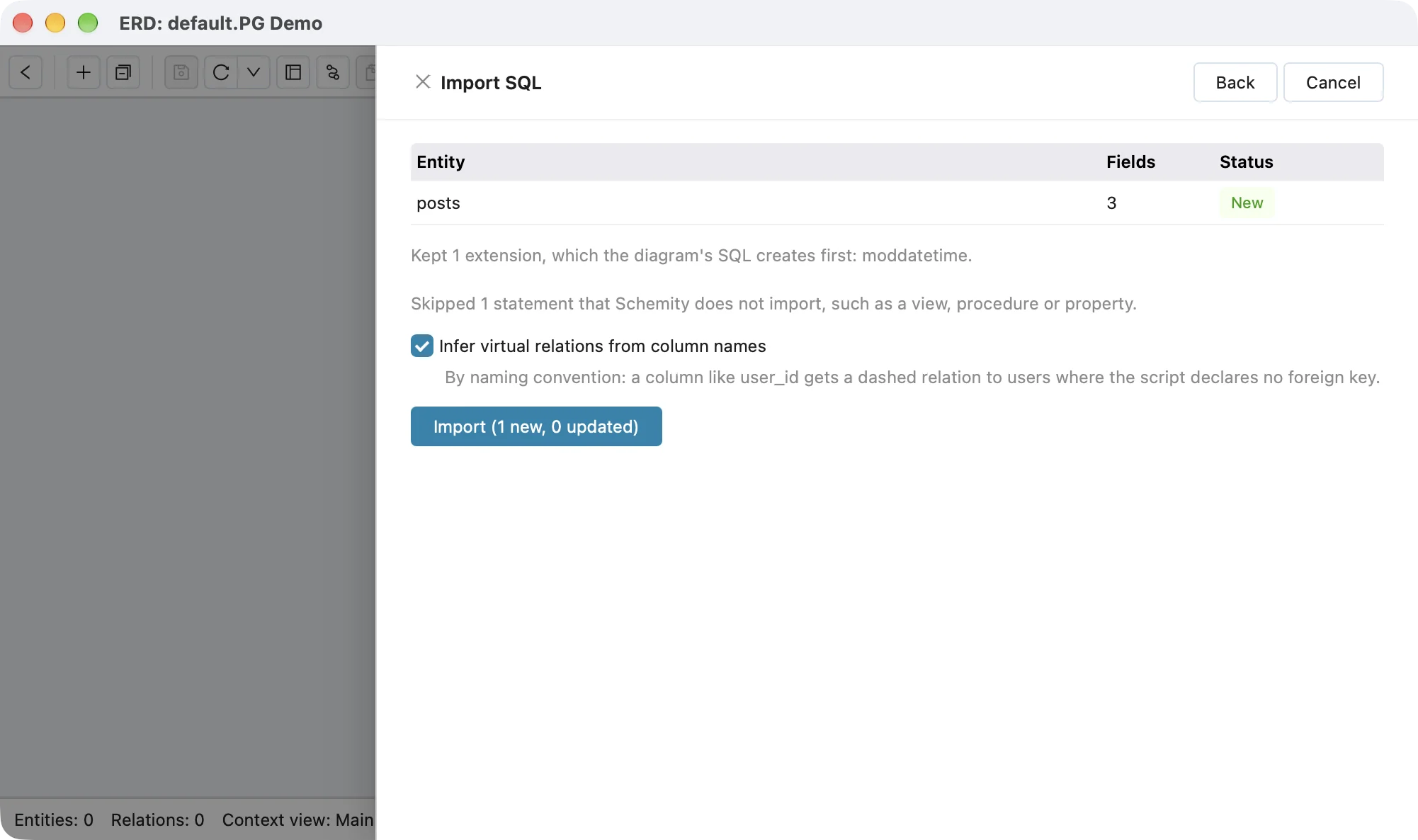
On PostgreSQL, the mechanism lives outside the table, and the diagram is honest about that. Import SQL keeps CREATE EXTENSION moddatetime and writes it back as CREATE EXTENSION IF NOT EXISTS moddatetime; setup SQL that runs before the tables, but the trigger and its function are not part of a table in the diagram: they are counted among the skipped statements, and updated_at reads as a timestamptz column with its now() default.
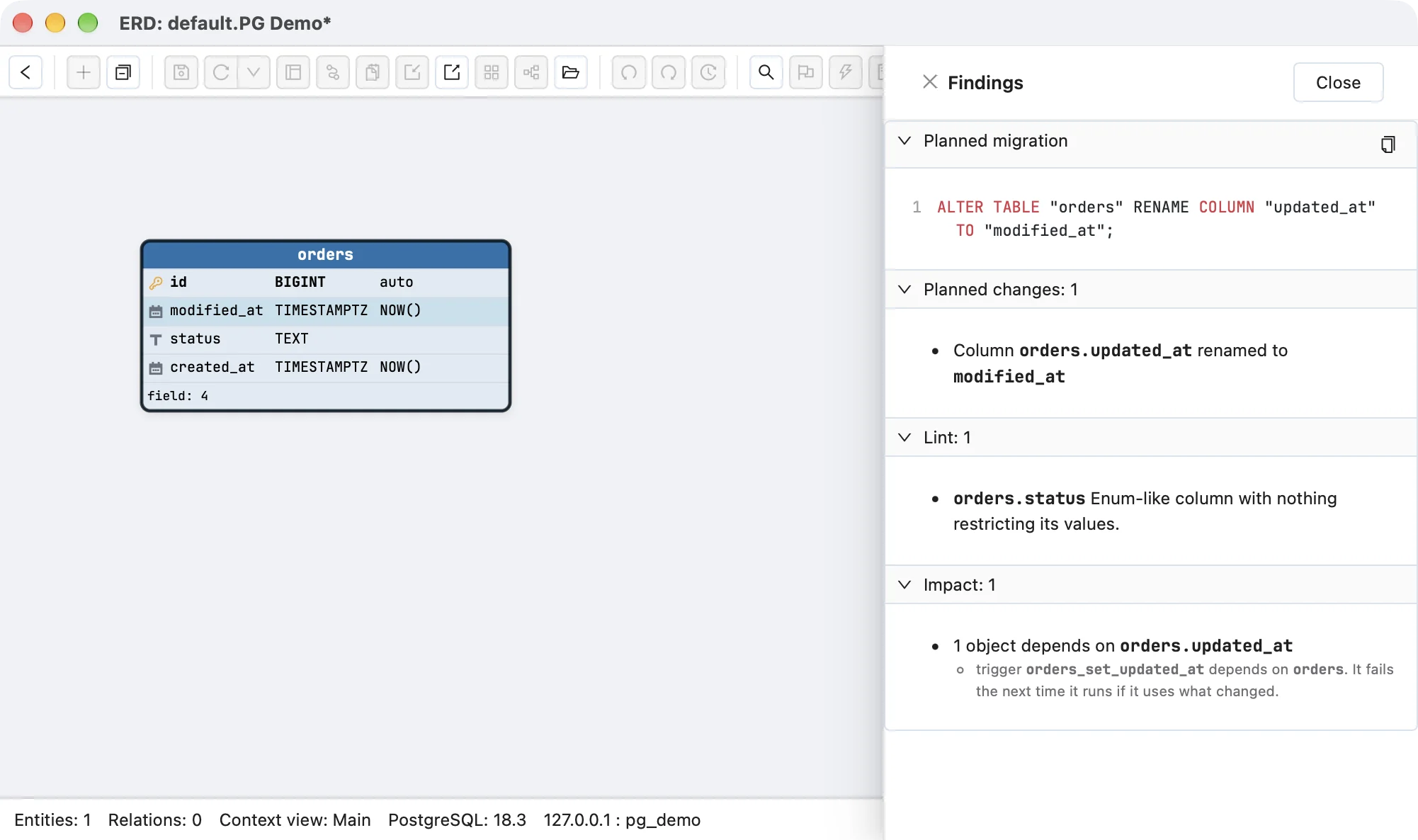
When you rename or drop updated_at in a diagram connected to the database, impact analysis reads the table’s triggers from the catalogue and names each one, with the warning that it fails the next time it runs if it uses what changed. That is the error above, shown before the migration rather than after the deploy.
When you design the next table, the template every new entity starts from is the place to settle the columns once: created_at and updated_at with their types and defaults, so the question of how updated_at stays current is asked for every table rather than remembered for some.
Related reading
Why a trigger and not a generated column is the right tool for now() is in generated column vs trigger. For the type of the column itself, timestamp or timestamptz, see timestamp vs timestamptz. SQLite drops a table’s triggers during a table rebuild, which is how an updated_at trigger disappears in changing a SQLite column type. And the MySQL round-trip benchmark is where Schemity’s own loss of ON UPDATE was found and fixed.
Frequently asked questions
Does DEFAULT CURRENT_TIMESTAMP update the column when the row changes?
No. A default is used only when an INSERT leaves the column out, on every database. Keeping the time of the last change current needs ON UPDATE CURRENT_TIMESTAMP on MySQL, a trigger on PostgreSQL, SQL Server or SQLite, or application code that sets the column on every update.
Does Django auto_now or Rails updated_at change when I run update_all or QuerySet.update?
No. Django documents that auto_now is applied only by Model.save(), not by QuerySet.update(), and Rails documents that update_all skips callbacks and so does not touch updated_at. A database-side clause or trigger is the only option that also covers bulk updates, raw SQL and scripts.
Why did my MySQL updated_at column stop updating after a migration?
Most often an ALTER TABLE ... MODIFY restated the column without ON UPDATE CURRENT_TIMESTAMP. MODIFY replaces the whole column definition, so a clause it leaves out is removed without a warning. Check the EXTRA column of information_schema.columns: it contains on update CURRENT_TIMESTAMP while the clause is there.