In 2023, a Samsung engineer pasted proprietary database source code into ChatGPT to check it for errors. Within a month there were three incidents, and Samsung banned generative AI tools company-wide. Plenty of companies read that memo and wrote their own. If you design databases inside one of them, the policy does not say “be careful with AI.” It says no.
Notice what leaked in that first incident: database code. Not customer records, not credentials - the structure itself. Your schema is worth protecting, and your security team knows it. So the question for a lot of engineers in 2026 is not “which AI tool should I use for schema design?” It is “is there any AI help I am actually allowed to have?”
When bring-your-own-key is still one key too many
We wrote before about AI database design without the cloud: with a BYOK ERD tool, you plug in your own OpenAI, Claude, Gemini, Grok, or DeepSeek key, and prompts travel directly from your desktop to the one provider you chose. No diagram vendor in the middle. For most NDA and IT-policy situations, that is the fix - one relationship, under your own terms.
But some environments do not negotiate relationships. A blanket AI ban does not distinguish between “a vendor’s AI service” and “my own API key” - the schema still crosses the network to someone else’s servers either way. Developers handling client work describe exactly this wall: confidential client data that cannot be uploaded to a third party, full stop, no matter whose account it rides on. And on air-gapped networks or machines with no-egress policies, the argument ends before it starts: outbound calls are not slow or discouraged, they are impossible.
For these environments, a better contract is not the answer. Zero egress is the answer.
A model that lives where your diagrams live
Schemity now supports Ollama as an AI provider. Ollama runs open models - Llama, Qwen, Mistral, DeepSeek and others - as a server on your own machine. Instead of pasting an API key, you point Schemity at your Ollama server’s base URL; the local default works out of the box. Schemity lists the models installed on that server, you pick one, and responses stream into the chat panel live, exactly as they do from the cloud vendors.
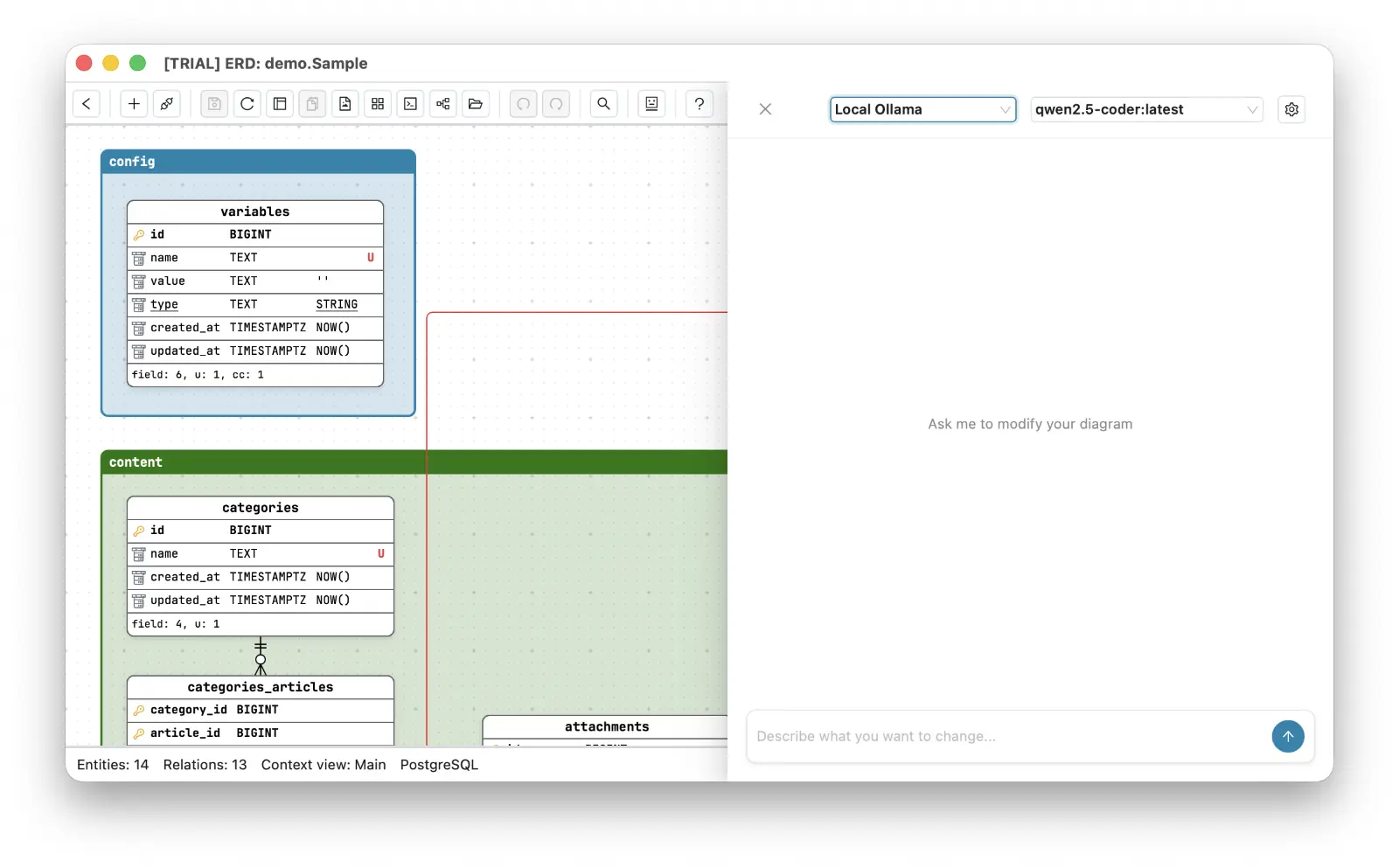
Now walk the whole loop. Your diagrams are already plain JSON files on your disk - Schemity is an offline ERD tool by design, no account, no sync. Your credentials already live in the OS keychain. And with Ollama, the model’s weights sit in the same place your diagrams do: on your hardware. A prompt goes from the desktop ERD tool to a process on localhost and back. Nothing crosses the network boundary, so there is nothing for a proxy log to catch, nothing for a DLP scanner to flag, and nothing for a client’s auditor to ask about.
BYOK made the AI loop private: you and the provider you picked. Ollama makes it local: you, and nobody.
That is what “offline AI ERD tool” means without asterisks - AI ERD without cloud, where even the model is a local file. For an air-gapped ERD tool setup, install Ollama and pull the model on a connected machine, move them across the gap the same way you move any approved software, and the chat works exactly the same. This is private AI database design in the literal sense: it works with the network cable unplugged.
The same hand on the same whiteboard
Local does not mean lesser in what the assistant is allowed to do. The Ollama-backed chat is the same AI chat that fully interacts with your diagram: describe “a warehouse system with lots, batches, and expiry tracking” and it drafts the entities and relationships on the canvas; ask it to split a bloated table and it modifies the diagram in place, junction tables and foreign keys included. Every change goes through the normal history, so undo works on the AI exactly as it works on you.
Honesty matters here, the same as it did for BYOK: an 8B-parameter model on your laptop is not a frontier model in a datacenter. Its first drafts will be rougher, and you will review them harder. But you were always supposed to review the drafts - the model proposes, you dispose - and for the environments this post is about, the comparison is not “local model vs cloud model.” It is “local model vs no AI at all,” because the cloud option was never on the table.
The tool your IT team can actually say yes to
There is a quiet second benefit. When you ask IT to approve an ERD tool with AI, the usual review drags because the answer to “where does the data go?” has three vendor names in it. With Schemity plus Ollama the answer is one sentence: diagrams are local files, keys are in the OS keychain, and the AI is a localhost process. An ERD tool approved by IT is usually the one that gives the reviewer nothing to investigate - the same reason consultants keep client schemas in per-client local workspaces instead of a shared cloud account.
If your provider is allowed, BYOK is still the pragmatic choice - frontier models are better at first drafts, and your key keeps the loop private. But if your workplace read the same memo Samsung wrote, the choice is no longer “AI somewhere else or nothing.” Install Ollama, add the base URL, and the most honest document your business owns gets AI help without ever leaving the building.