
Schemity has no zoom control, and that is a decision rather than an omission. Zoom is one of those features that looks free because every canvas app ships it, but it charges the designer on every single use, and once the jobs it was doing are handled properly there is nothing left for it to pay for.
The question we asked was not “should we add zoom?” It was: what problems does zoom solve, and what problems does it introduce?
What zoom actually costs
It resets your spatial memory. A large ERD is something you navigate by remembering where things are. Orders live down and to the right, identity is up near the top left, the audit tables hang off the bottom. That memory is the thing that makes a big diagram workable at all. Every zoom changes the geography: distances between entities change, what is on screen changes, the shape you had memorized is replaced by a different one. You then spend a few seconds re-establishing where you are. Individually trivial, and paid every single time.
It fights the input it needs. The default binding for zoom on a canvas is the mouse wheel, and the mouse wheel is what you want for scrolling. So a tool either takes the wheel away from scrolling, or it puts zoom behind a modifier - space, control, command plus wheel. Panning around a schema is a constant, high-frequency action. Putting a modifier on either half of that pair taxes something you do hundreds of times an hour.
It creates state you have to manage. Once zoom exists, the diagram has a zoom percentage, and the percentage becomes something you track. Am I at 80% or 60%? Why does this entity look smaller than it did yesterday? How do I get back to 100%? That is a new category of question that had nothing to do with designing a database.
None of this is peculiar to ERDs. It is a known cost of infinite canvases, and even the tools built entirely around zoom run into its edges. A Figma user asked the forum why they could no longer zoom out to see all their content - “is there any reason why i now can not zoom out to see all the content?” - because they wanted to overview the file before zooming into sections. The thread, 105 views and 3 replies, ended with the answer that the file had grown to 100,000px wide and hit Figma’s zoom limit. The overview they wanted was not available at any zoom level. Muse’s 2020 memo on the infinite canvas made the sharper version of the point: arbitrary zooming lets you pull out to see the landscape and pull back in for detail work, “but this adds another layer of confusion because there is no consistent sense of scale.”
What zoom was supposed to solve
The costs only matter if the benefits can be delivered another way, so here are the real jobs, stated fairly. On a large ERD, designers zoom out because they need to:
- Reach an area far outside the viewport. The entity you want is somewhere off screen and panning to it is slow.
- Spot tables a migration added outside the app. You ran an ORM migration, new tables now exist, and after a re-sync they are placed somewhere on a large canvas. You do not know where.
- Find entities you just imported into a context view. They landed somewhere and now need arranging.
- Get a first overview of a reverse-engineered database. A freshly imported schema arrives in a default layout, and before arranging anything you need to see the whole shape to reason about it.
- Keep track of new entities you created in several places. You have been working across the diagram and want to see what you added.
Every one of those is a genuine need. Notice what they have in common: not one of them is a request to make the diagram smaller. They are all requests to locate something. Zoom is a way of answering a location question by shrinking everything until the answer happens to be on screen, which is a very indirect way to answer it.
How do I navigate a large ER diagram without zooming out?
Two features, split by whether you know what you are looking for.
If you know the name, search. Realtime fuzzy search across entity and field names takes whatever fragment you remember - not necessarily the start, not necessarily contiguous - and updates as you type.
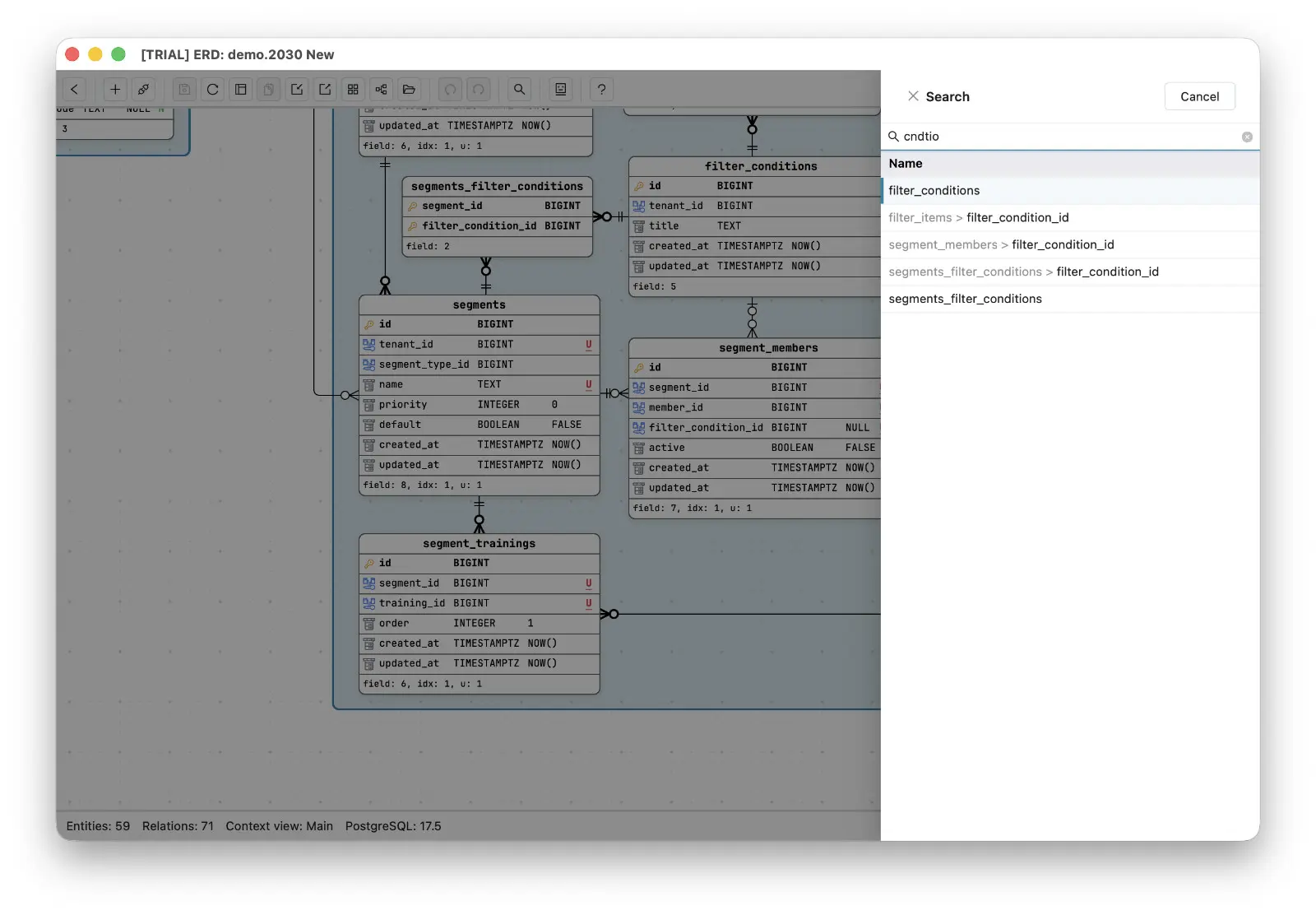
Typing cndtio into a 59-entity schema returns the filter_conditions entity and every filter_condition_id field that references it, across three different tables - even though not one of those names contains the literal string cndtio. Arrow down, hit enter, and the viewport is on it. That is the “reach a distant area” job, done in a keystroke instead of a zoom-pan-zoom cycle.
If you do not know the name, use the minimap. A toggleable minimap sits at the bottom right of the canvas showing every legend and entity in miniature, with a rectangle marking the part the viewport currently covers. Click anywhere on it to jump there, or drag the rectangle to pan continuously. The main view and each context view carry their own minimap, so switching views switches the map with it.
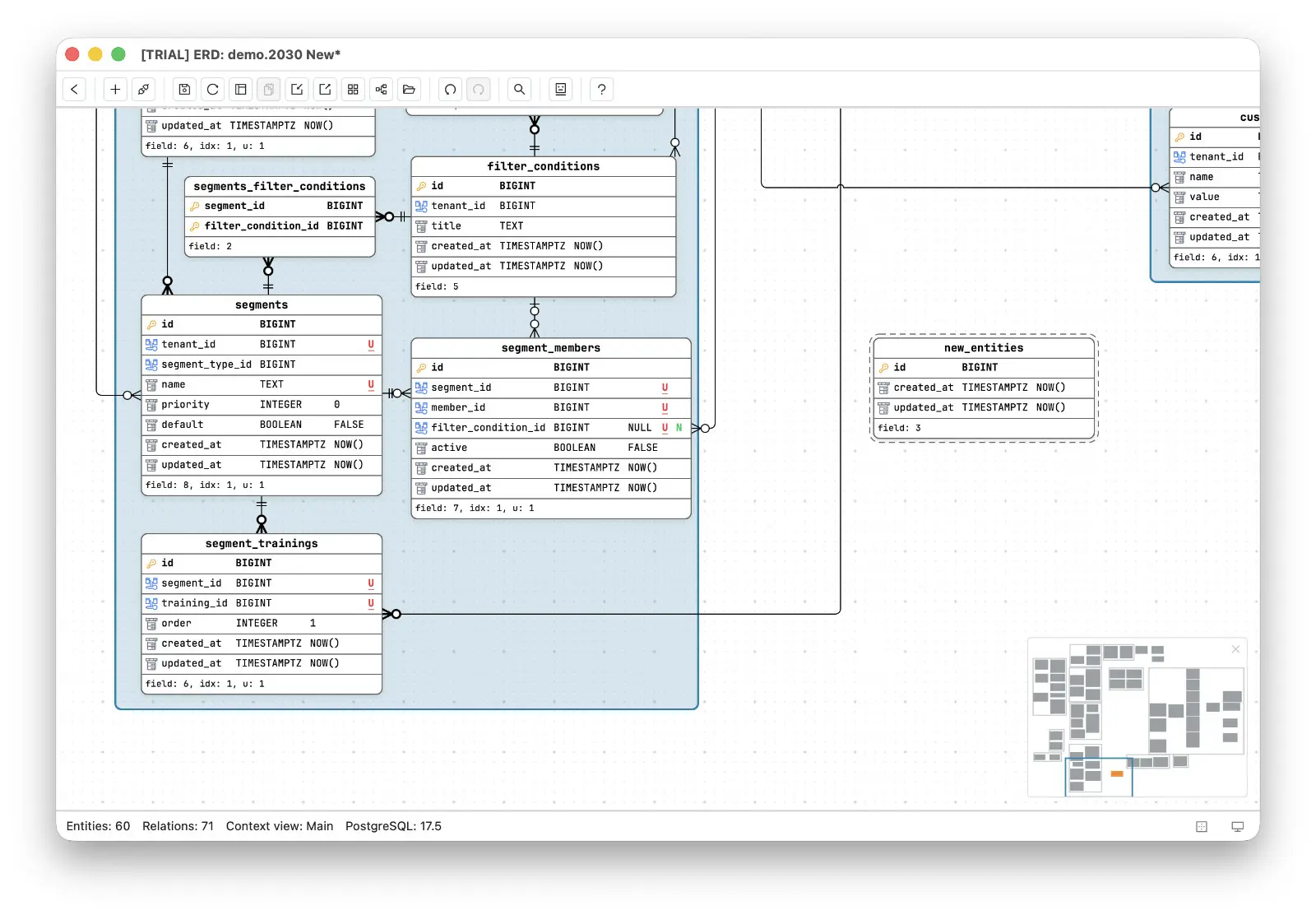
And for the three jobs that are really “where did the new things land?”, the minimap answers directly. An entity the database has not confirmed yet is drawn with a dashed border on the canvas, and on the minimap it is drawn in orange - the one case where the minimap uses color at all. In the schema above, the entity count has gone from 59 to 60 and the single orange block tells you exactly where the new table went. So when a re-sync pulls new tables in from the live database after an out-of-app migration, or when entities are imported into a context view, you can see where they landed without hunting for them.
| The job | What zoom does | What Schemity does |
|---|---|---|
| Reach a distant entity you can name | Zoom out, find it, zoom back in | Fuzzy search, one keystroke to the entity |
| Find tables a migration added | Zoom out and scan for unfamiliar shapes | Dashed entities visible on the minimap |
| Locate entities imported into a context view | Zoom out and scan | Dashed on the minimap, exactly where they landed |
| Get a first overview of a reverse-engineered schema | Zoom out until it fits, if it fits | Minimap shows the whole shape at a fixed size |
| Move to another part of the diagram | Zoom out, pan, zoom in | Click the minimap, or drag its viewport rectangle |
Why the minimap deliberately shows less
The obvious way to build a minimap is to render the diagram smaller. That reproduces the exact problem zoom has, because a shrunken copy of a dense ERD is an unreadable smudge.
So the minimap is not a small diagram. It draws only legends and entities, never relationships, and it ignores the custom colors you assigned to legends and entities on the canvas. It is a map of where things are, not a second copy of the diagram, which is why it stays readable no matter how dense or how colorful the ERD gets. The orange draft marker is the deliberate exception: the map spends its one color on the single question you cannot answer by looking, which is where the new thing went. Dropping the relationship lines is what keeps it legible at minimap size, and the information you lose is information you were not going to be able to read anyway.
That is the whole trade. Zoom offers a continuous range of scales, all of which change the geography and none of which is guaranteed to answer your question. A fixed-size map plus a name search answers the question directly and leaves the diagram exactly where you left it.
The general principle
Every feature that ships has to justify what it costs the people using it, and interaction costs are the easiest kind to overlook because each instance is small. A feature used a hundred times a day at two seconds of re-orientation is not a small feature.
The useful discipline is to write down the jobs a feature is really being asked to do, then ask whether something more direct can do them. For zoom on an ERD, the jobs were all location questions, and location questions have better answers than scale changes. That is also why you do not need a diagram of all 800 tables in the first place: the instinct to see everything at once is usually a navigation problem wearing a layout costume.