
One of the most viewed SQL questions ever asked on Stack Overflow is not about deadlocks, window functions, or query plans. It is “Find all tables containing column with specified name” - 4.5 million views, 36 competing answers, and a comment section full of people saving the snippet for next time. The single most common question developers ask about a database is, apparently, where is my own column?
Think about what that number means. Millions of working engineers, sitting in front of schemas they maintain, had to stop and write a query against information_schema or sys.columns to locate a column by name. Not to analyze it. Not to migrate it. Just to find it. The MySQL variant of the same question has another 770,000 views. This is not a knowledge gap - every one of those developers knows their schema has a customer_id somewhere seventeen times over. It is a tooling gap: the schema has no search box.
A diagram you can only scan is not much better than a query
The classic answer to “I can’t find anything” is a diagram. But a diagram you can only scan just moves the problem from SQL to your eyes. On a schema of real size - hundreds of tables is normal, not exceptional - locating one box among the boxes is its own chore. In a Hacker News thread about ERD tools, one engineer described exactly how this goes: with any remotely complex schema, “I just end up spending all my time trying to see how things are actually connected”. The diagram was supposed to answer questions; instead you spend the session hunting through it.
And “where is it?” is only the first half of the question. What you actually want to know is almost always the second half: is that column nullable? What is its default? Which values is it allowed to hold? Is it part of a unique constraint? In most tools each of those answers costs another click - open the table, open the column, open the constraints tab - and by the third click you have forgotten why you asked.
The cost is not the seconds. It is that every lookup yanks you out of whatever you were designing. Schema knowledge you cannot reach in one motion might as well live in a wiki.
Search the schema like you search your code
Engineers solved this problem for code a long time ago: you do not scroll through files to find a function, you hit a shortcut, type roughly what you remember, and a fuzzy finder does the rest. Schemity treats your schema the same way. It is a desktop ERD tool built for software engineers, and its smart search is a realtime fuzzy search across both entity and field names. You do not need the full name - you do not even need a contiguous piece of it. Type ssconf into the search over a 54-table schema and the results appear as you type: the sso_configs entity, plus the sso_config_id foreign keys inside claim_mappings and group_role_mappings - even though not one of those names contains the literal string ssconf.
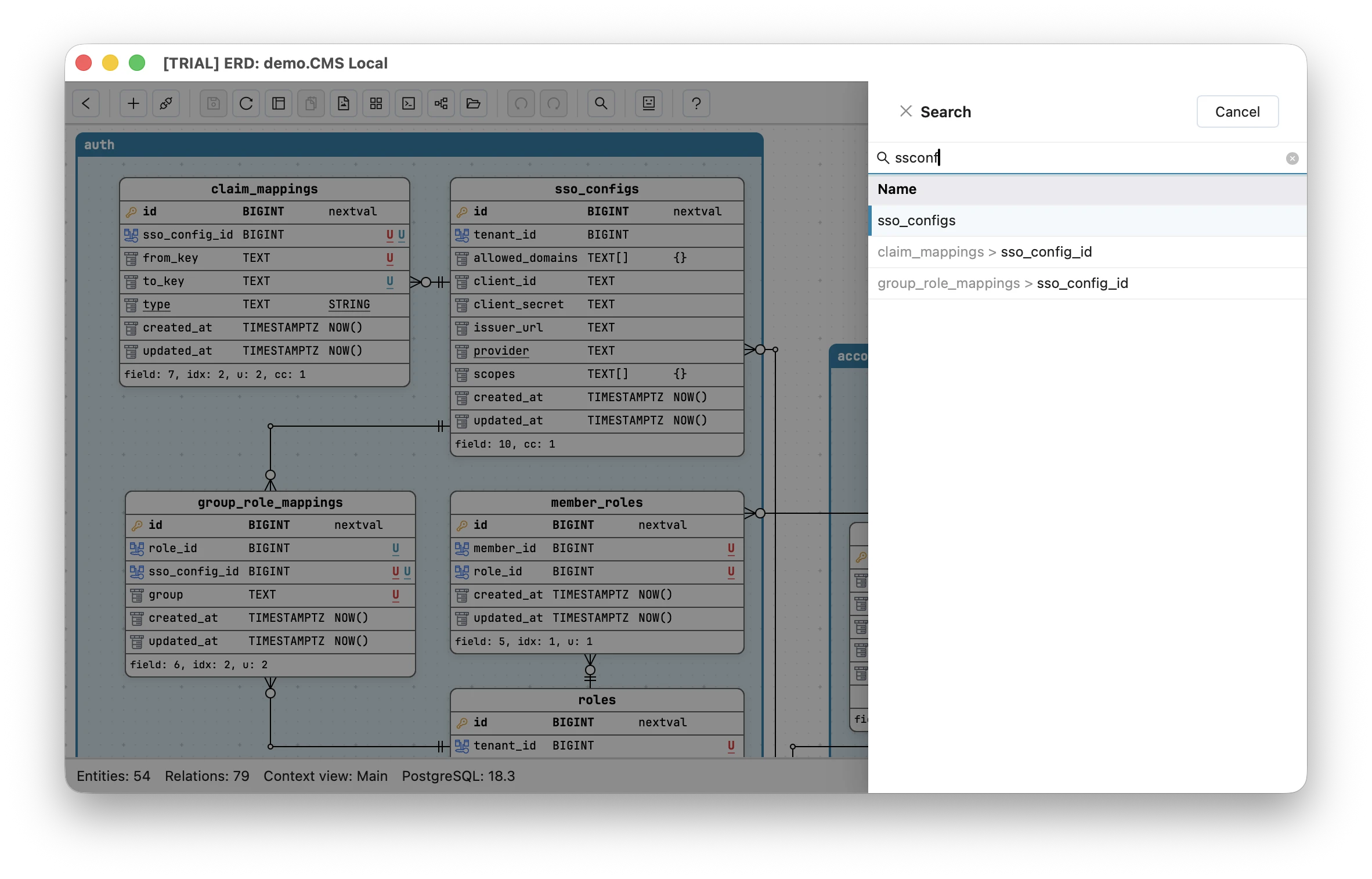
And the lookup never asks for the mouse: arrow down through the results, hit Enter, and the canvas jumps straight to that entity or field. Half-remembered fragment in, exact location out, hands still on the keyboard.
Notice that the Stack Overflow answers already knew this about you: nearly every one wraps the column name in LIKE '%...%' wildcards, because nobody trusts their memory of the exact name. Fuzzy search is that wildcard habit built in - except it forgives more than a wildcard does (a wildcard still needs the fragment to be contiguous and spelled right), and it answers as you type. The whole information_schema ritual is replaced by a keystroke, and the 4.5-million-view question stops being a question, because “which tables contain something like this column” is what the search results are. It works the same whether you drew the schema by hand or reverse engineered it from a live database, and because Schemity is an offline ERD tool that keeps everything local, search is instant against files on your own disk - no round trip, no login, no loading spinner between you and your own schema.
The entity should answer before you ask
Landing on the right entity is only useful if the answers are waiting there. This is where most tools make you keep clicking. Schemity’s position is that the diagram itself should carry the facts you look up most, so every field wears its properties on the canvas:
- Distinct icons for primary keys, foreign keys, and regular fields - the skeleton of the table at a glance.
- A green N badge on every nullable field, so optionality is visible instead of buried in a form.
- Default values printed directly on the entity, not hidden behind an editor.
- An underlined U badge for unique constraints and unique indexes, with colors that keep different unique sets apart.
- Underlined fields wherever an
INcheck constraint applies - the signal for an enum-like field. PressCtrl/Cmd + Oon it and the full list of allowed values appears, straight from the check constraint, without opening anything. - A footer tally on every entity - how many fields, indexes, check constraints, and unique rules it carries - so you can size up a table before reading a single field.
Search gets you to the entity; the entity answers the follow-up questions before you ask them. “Is status nullable, what does it default to, and what can it hold?” goes from three dialogs to zero.
Lookup speed is design speed
It is tempting to file all this under convenience, but the Stack Overflow numbers say otherwise. When finding a column costs a query, people batch their questions, guess instead of checking, and design against a memory of the schema rather than the schema itself. A lightweight ERD tool that answers “where is it, and what are its rules” in one motion changes how often you consult the model - and a model you consult constantly is one you actually trust.
That is the same reason keyboard-first editing matters when you are creating tables: friction does not just slow you down, it changes what you do. And once the answers live on the canvas, the diagram starts doing the job documentation always promised - the way check constraints turn the ERD into a readable domain model, search plus glanceable fields turn it into the fastest reference your schema has. Your database already knows where every column is. Your schema visualizer should too - and it should tell you in one keystroke.